Despite Eastman Kodak making tentative steps back into the consumer photo film market, and its name still being applied to the front of countless licensees' compact cameras, there's still a widely-held sense of 'What if?' surrounding the Kodak name.
Not only did the company dominate the film industry, it also did more than its share of founding photography's digital age.
It was a Kodak engineer, Steve Sasson, who in 1975 produced the world's first digital camera as we recognize them today: a self-contained, comparatively hand-holdable device that captured images with a CCD sensor. Though, perhaps thankfully, the Compact Cassette tape didn't last long as a storage medium.
Likewise it was a Kodak engineer, Bryce Bayer, who invented his eponymous, and now near ubiquitous color filter pattern, patented the same year.
So perhaps it's not a surprise that it was Kodak that, 35 years ago this month, launched the first commercial digital SLR.
The Kodak DCS (Digital Camera System) built on both these existing inventions, combining a 1.3MP CCD sensor with a Bayer color filter array. It was designed as a digital back that could be mounted onto an unmodified Nikon F3 film camera body, with the add-on unit including a motor drive to cock the camera's shutter between shots.
Where it all started (for camera buyers)
Photo: Marc Aubry
The sensor was an in-house Kodak chip, the KAF1300, a 21 x 16.6mm sensor, roughly comparable in size to the 1.6x crop sensors in Canon's later APS-C digital camera. It delivered 1280 x 1024 px images, with both mono and color versions being offered.
A cable then connected the camera to a shoulder-slung 'Digital Storage Unit,' which contained a 20 megabyte hard drive, lead acid camcorder battery and the ability to add options such as a JPEG compression processing board. This allowed the camera to capture up to 156 uncompressed images or around 600 compressed photos.
If you're wondering why we're describing it as the first "commercial" DSLR, it's because the DCS was developed from a series of earlier, often government/military-funded digital camera projects. Kodak's earliest DSLRs were created by its Federal Systems Division (FSD), which developed a camera based on a Canon F-1 body and a 1MP CCD sensor, as early as 1988.
The company's Professional Photography Division developed a prototype somewhat closer to the DCS in 1990, based on a Nikon F3 body and that, intruigingly, led to FSD making the Hawkeye II, one version of which used a 5 megabyte memory card and lithium ion batteries, making it more directly comparable to a modern digital camera in many ways.
However, this more portable camera only had capacity for four full-res images, hence the decision to persevere with the external storage unit's development for the DCS.
Photo: Marc Aubry
Kodak continued to develop the camera, with the later DCS 200 (whose introduction prompted a journalist to coin the 'DCS 100' name, by which the original camera is now widely known), leading to a series of DCS cameras culminating in the Nikon and Sigma-bodied 14MP DCS Pro SLR models in 2004.
The DCS's lead engineer, Jim McGarvey, said the prominence of Nikon in the US photojournalism market led to the decision to built the original DCS around an F3, but both F-mount and EF-mount versions of later DCS models were produced, with varying levels of input and support from Nikon and Canon. It would be another eight years before Nikon introduced the first Japan-designed DSLR, the recognizably modern Nikon D1.
McGarvey's own website is host to a fascinating details and insights into the Kodak DCS and the cameras that came both before and after it.
With thanks to Marc Aubry for the photos from his camera collection. You can see more of his images on his Flickr page
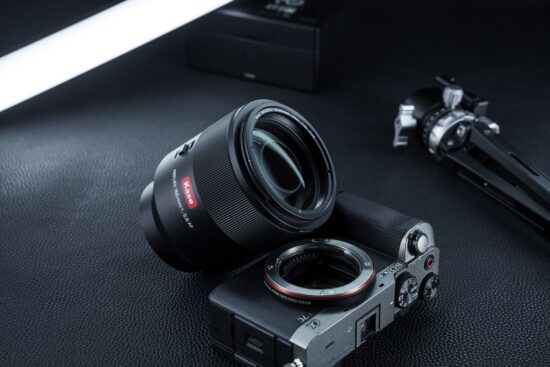
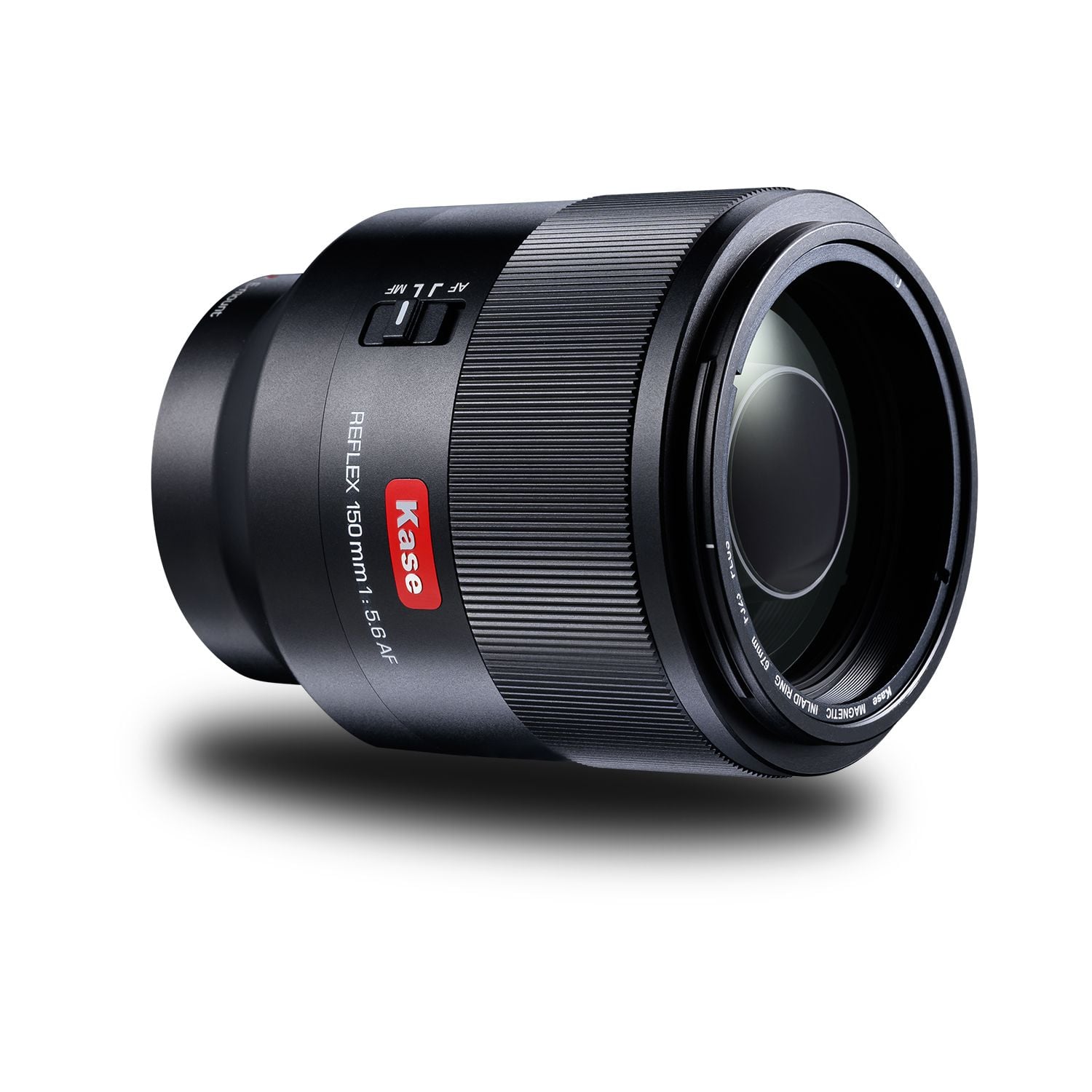
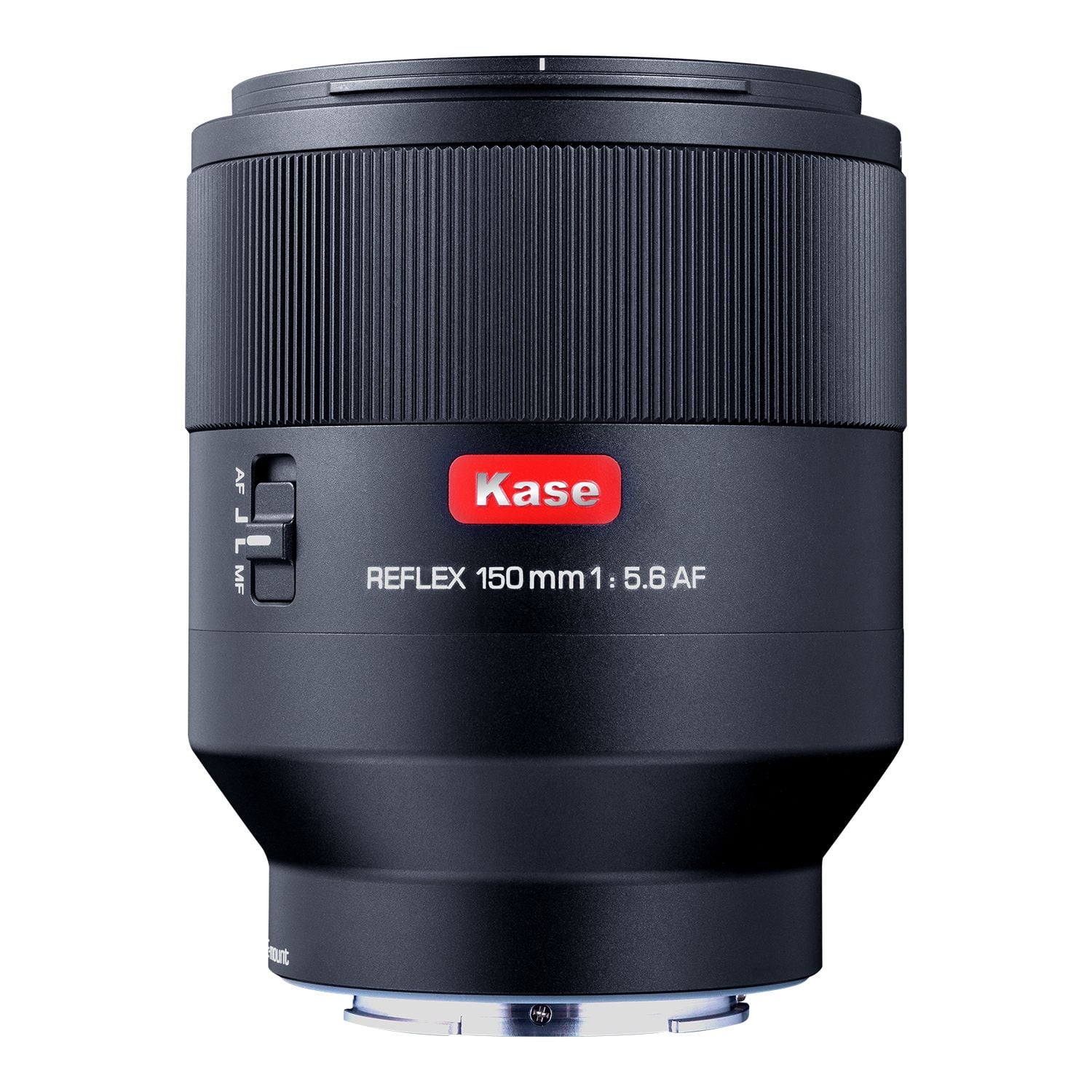
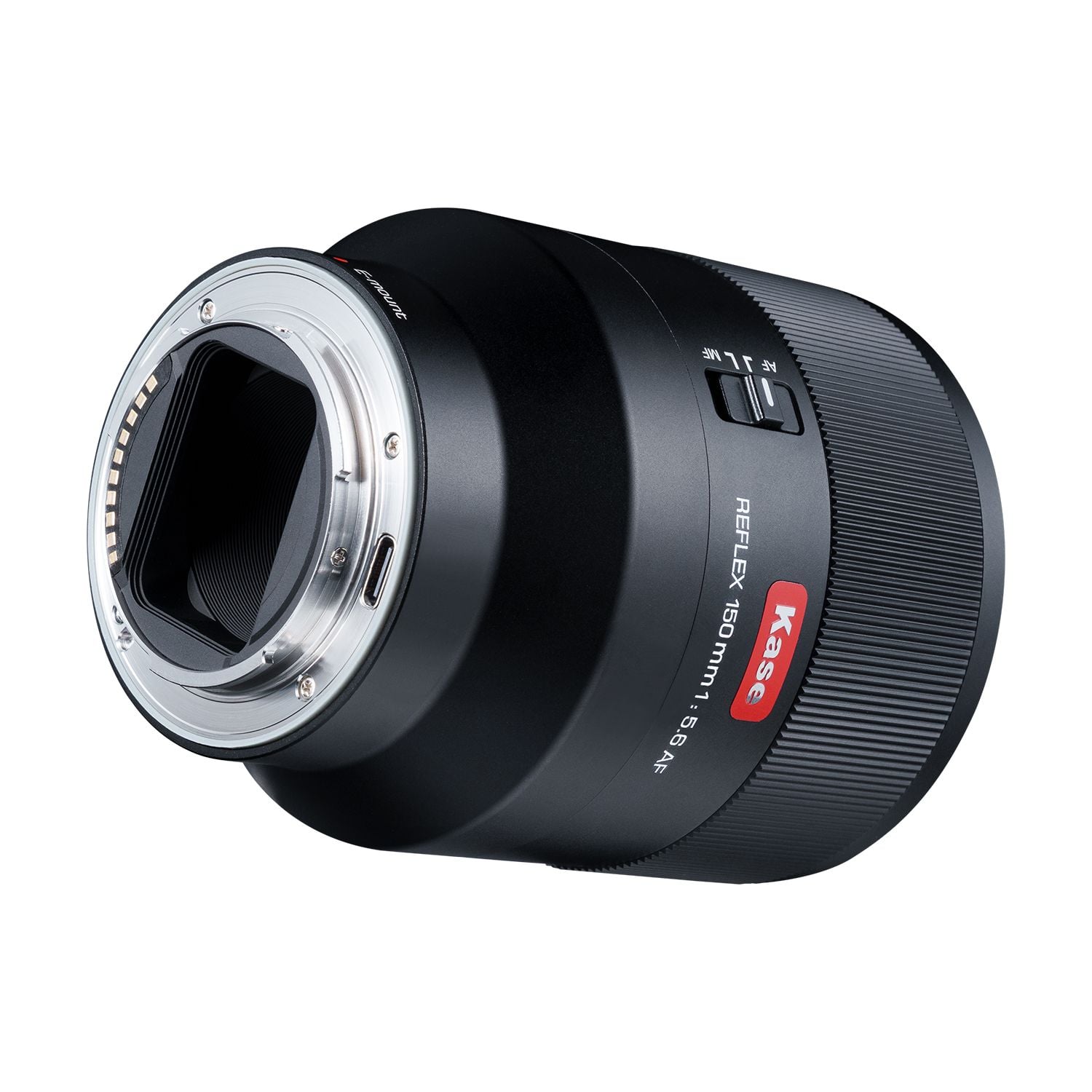
The new Kase 150mm f/5.6 AF reflex mirror lens for Z/G/E/EF mount is now available for pre-order. Here are the key specs & design:
The Kase 150mm f/5.6 AF Reflex (mirror/catadioptric) lens is a compact, full-frame medium-telephoto prime that Kase Optics (primarily known for filters) launched in March 2026. It’s generating buzz as the world’s first autofocus mirror lens at this focal length – most reflex designs are manual-focus only and much longer (300mm+).
Focal length & aperture: 150mm with a fixed f/5.6 aperture (no variable iris, typical for reflex lenses).
Optical design: 5 elements in 4 groups using mirrors + glass for a catadioptric layout. This keeps it much smaller and lighter than a conventional 150mm prime.
Minimum focus: 1.5 m.
Filters & accessories: 67mm screw-in thread, compatible with magnetic filter systems, and includes a magnetic pinch lens cap (works even with a hood attached).
Build: Aluminum alloy body with a grooved focus ring; compact and handheld-friendly.
Very compact size for a 150mm telephoto.
Signature “donut” bokeh – out-of-focus highlights render as bright rings with dark centers. This creates a dreamy, artistic, or vintage look.
Autofocus & Mounts: It offers full AF with AF/MF switch (plus manual override). Availability varies by mount due to camera maker restrictions.
Shanghai, China – Bund downtown river view. 70 image 360-degree panorama.
Sony a7R IV | 35mm GM | F1.4 | 1/125 sec | ISO 1600 Photo: Kevin Zhang
Kevin Zhang, known as fatplanediaries in the wider community, began photographing at a young age under his father's influence, a dedicated Leica street photographer. What started as a focus on street photography evolved over time, especially after a chance moment in Shanghai, when he experimented with panoramas using only a prime lens. Since then, his work has developed into a distinctive blend of candid street scenes and highly detailed panoramic images, each discipline informing the other.
"I was far from a prodigy; it took a million photos until I considered myself to be halfway decent. I still have a long way to go, always looking at my own photography as an ever-developing thing. The style changes all the time as I try to demolish what I did previously."
This story is part of our What's in your bag? community spotlight series. The series showcases the diverse gear and photography of our community, and shares their stories of how that gear helped them to capture the perfect shot.
Sony a7R IV | F1.4 | 1/200 sec | ISO 1600 Photo: Kevin Zhang
Meet Kevin Zhang (fatplanediaries)
Home base: New York, USA, but also Shanghai, China
Favorite camera and lens: Kevin’s go-to setup centers around the Sony a7R IV, a high-resolution full-frame camera known for its exceptional detail and well-suited to his panoramic work. He pairs it with Sony’s G Master lenses, particularly the 24–70mm f/2.8 GM II and 35mm f/1.4 GM, which provide the sharpness and consistency he prioritizes. This setup supports both his fast-paced street shooting and the precision required for high-resolution stitched panoramas.
Support gear: Kevin hates tripods and viewfinders, relying instead on a SmallRig cage for grip on his Sony a7R IV and custom lens-head holding techniques to shoot 20-frame panoramas in 10 seconds handheld – even against glass at observation decks or amid NYC street dance battles. He carries 4 Viltrox FZ100 USB-C batteries, dual Peak Design Captures (one for camera, one for E-mount lens kit), and a backpack-mounted DJI Osmo 360 with remote for video content.
Camera bags: Kevin uses the Peak Design Everyday Backpack V2, which has endured alongside his a7R IV through some rather tough conditions.
"I'm rather nostalgic for when Peak Design felt cutting-edge. The bag I have comes with side-access via two captures for a camera and an E-mount lens kit."
Kevin's camera bag
Photo: Kevin Zhang
Accessories can make or break a field trip. What does your bag have?
"DJI Osmo 360 with a jerry-rigged way of attaching it to my backpack as a 360 camera antenna (because my generation of people are encouraged to make video content about their photography to be successful), plus the remote for it."
"2 Peak design captures on my backpack, one for my camera and one for the Peak Design e-mount lens kit, so I can change lenses easily."
"I also carry a variety of tools, snacks, personal hygiene items, etc. This includes my trusty Macbook Pro with case on (often need to check my panos in the middle of a shoot). Some other miscellaneous supplies and trinkets of mine:
Shokz Openrun Pro 2 (great way of listening to maps, navigation directions, while still listening to the world, plus I always listen to music while shooting)
Apple Watch Ultra 2 (weather, humidity level, sunset time, compass, etc. Very essential to my use case)
Technics az100 (just a tws I like and keep with me when I want to shut out the world, plus it can connect to my MacBook and my two phones at the same time)
Sony a7R IV | 24-70mm GM | F2.8 | 1/200 sec | ISO 4000 Photo: Kevin Zhang
What got you started, and how long have you been a photographer?
"My dad became a Leica enthusiast shortly after I got into middle school, and it's been downhill from there, lol. He became a really good street photographer, so I followed in his footsteps and essentially focused on street photography for the next decade or so. I only stopped for a few years when I went to film school to focus on film."
"A few months after I graduated, I was stuck with a prime lens while at a very scenic landscape view in Shanghai, so I just winged it and gave panoramas a shot. Ever since then, my focus has been on panoramas and street photography. It's a truly odd combination, but I like to say they complement each other and, in a weird way, my film career. So I keep doing photography even if I don't get enough gigs in this field as I'd like."
"I've been doing photography since age 10, I think? The launch day Sony a7R IV I currently own has been with me for more than a quarter of my life, which feels crazy to say, as my memory of that camera launching is still very fresh."
The Jam Showcase Volume 9. Full audience 8-image panorama.
Sony a7R IV | 35mm GM | F1.4 | 1/250 sec | ISO 3200 Photo: Kevin Zhang
What's different about street scenes?
"I like to shoot candid street subjects, but I'm often pretty shy about approaching people to get the right shot. The best alternative is to get hired for events instead; everyone's vying to have you shoot them in those kinds of situations. I've had a lot of good practice at my friends' parties before getting to events as a photographer."
"On the panorama end, I like detail – lots and lots of detail. Ever since the Pureview 808 launched, my dream kind of photo has been the one where you can zoom in nearly infinitely and see a very complex world. That's been the ethos of my panoramas. They tickle that itch really well. I zoom into my own 750mp PTGui stitches all the time."
How has your photography evolved over the years?
"I've always loved reading Roger Cicala's articles, absorbing DXOMark data, and of course, content on DPReview. All the technical deep dives and teardowns that teach you technical stuff, YouTube will never teach you about. That's always helped me out a lot I think, just being nerdy about stuff, and having a good theoretical foundation so that you never need to second guess yourself when you're out and about shooting."
"I really miss Barney Britton from the 2009 era. His Chris Burkard a6000 video was what got me hooked into DPReview in the first place."
New York City skyline from Staten Island Ferry. 12-image panorama.
Sony a7R IV | Tamron 70-180mm G2 | F5.6 | 1/800 sec | ISO 160 Photo: Kevin Zhang
What unique street environments have you discovered?
"Probably the most unique environment I've shot at is the New York City street dance events. There's one called Battle 101, and at the end of the year, they host a massive battle with hundreds of spectators. In that sort of situation, the subjects you're shooting are also the background. If you shoot your handheld panos fast enough, you can also do them for people. Really. Not a lot of others have tried it but me."
What can the community take away from your experiences?
"Be humble and be open to drastically altering your approach. Be happy to teach other people and learn from others. Both G.A.S. and the Dunning-Kruger effect are way too commonplace in photography. And please don't be a snob."
Kevin really enjoyed writing the content for this spotlight article and would be grateful for you to join him in discussion in the forums. Thanks, Kevin, for being featured!
If you'd like to share your photography, tell us about your main camera, lens choices, key settings and strategies. Your photos and story could be featured in the next article!
Editor's note: This article continues a series, 'What's in your bag?', highlighting DPReview community members, their photography and the gear they depend on. Would you like to be featured in a future installment? Tell us a bit about yourself and your photography by filling out this form. If you're selected for a feature, we'll be in touch with next steps.
When you use DPReview links to buy products, the site may earn a commission.
Image: LK Samyang
LK Samyang's AF 14-24mm F2.8 is officially available for L-mount. The company previewed the lens at CP+ earlier this year, following the ultra-wide zoom's E-mount debut last year as LK Samyang's first co-branded lens with German optics specialist Schneider-Kreuznach.
The L-mount version of the AF 14-24mm keeps the same optical design and features of the E-mount model. It comprises 15 elements in 11 groups, with three aspherical lenses, five high-refractive elements, and three ED elements. It can focus as close as 0.18m, features a customizable control button and MF/AF switch, and promises fast and quiet autofocus driven by a linear stepping motor.
Like the E-mount version, it accepts front filters (77mm), making it the only L-mount 14-24mm F2.8 lens to do so. The Sigma and Leica equivalents use rear sheet filters due to the bulbous front elements. It's also noticeably more compact and lightweight than the other 14-24mm F2.8 lenses. It weighs just 441 g (15.5 oz) and is 87mm (3.4") long. For comparison, the Sigma take on the lens weighs 795 g (28 oz) and measures 131 mm (5.16") long.
We saw a preview of the lens at CP+ this year. It is quite compact compared to other lenses in its class.
Photo: Mitchell Clark
LK Samyang joined the L-Mount Alliance in 2023, but so far, its only L-mount release has been the AF 35-150mm F2-2.8. At CP+ this year, a representative told us that the company is looking to expand its mount offerings, though it isn't clear if that means more L-mount lenses specifically or additional mounts beyond that.
The company also teased an AF 60-180mm F2.8 FE at CP+, which will form a nice trio with its AF 24-60mm F2.8 and AF 14-24mm F2.8 offerings. Hopefully, both the standard zoom and the upcoming telephoto zoom lenses also make their way to L-mount sooner rather than later.
The LK Samyang 14-24mm F2.8 lens is available for purchase today. The company didn't provide pricing information, but the E-mount version costs $1200.
LK Samyang Expands Its Co-Developed Super-Wide Zoom AF 14-24mm F2.8 FE to L-Mount
Key Message
Co-developed ultra-wide zoom with Schneider-Kreuznach Combining German optical expertise with LK Samyang's advanced AF technology
A key lens in the expanding compact zoom lineup From 14-24mm to 24-60mm and the upcoming 60-180mm, completing a unified zoom system
Expanded to L-mount for broader user accessibility Delivering the same proven performance across more camera systems
April 30, 2026 - LK Samyang, a global optical solutions company, announces the expansion of its first compact zoom series product, co-developed with Schneider-Kreuznach, the AF 14-24mm F2.8 FE, now available in L-mount.
The AF 14-24mm F2.8 FE is a jointly developed product that combines Schneider-Kreuznach's renowned optical design expertise with LK Samyang's advanced manufacturing and autofocus technologies. Upon its release, the lens set a new benchmark in the ultra-wide zoom category, offering a compact and lightweight design along with a unique 77mm front filter capability.
Following its launch, the compact zoom series expanded with the introduction of the standard zoom AF 24-60mm F2.8 FE, delivering both portability and versatility. Furthermore, at CP+ this year, LK Samyang revealed its plan to complete the lineup with the upcoming telephoto zoom AF 60-180mm F2.8 FE.
Key Features
Co-developed optical design with Schneider-Kreuznach Combining German optical precision with LK Samyang's advanced AF technology
Ultra-wide 14-24mm zoom range Expansive field of view from 114.2º to 24mm for versatile shooting
Constant F2.8 aperture Reliable performance in low-light conditions with excellent depth control
Compact and lightweight design (441g) Exceptional portability compared to other ultra-wide zoom lenses
77mm front filter compatibility Rare feature in ultra-wide zoom lenses, enabling creative filter use
Minimum focusing distance of 0.18m Enables dynamic close-up shots with strong perspective
Fast and quiet autofocus performance Optimized for both stills and video with Linear STM
This new L-mount version of the AF 14-24mm F2.8 maintains the same optical performance and key specifications as the original FE mount version, while featuring a compact length of approximately 86.8mm, an ultra-lightweight design of just 441g, and a minimum focusing distance (MOD) of 0.18m. Through this expansion, LK Samyang aims to offer a broader range of options to global users across diverse camera systems.
This L-mount expansion goes beyond a simple mount addition. It represents a strategic move to make LK Samyang's optical technology accessible to a wider community of creators. LK Samyang will continue to develop and introduce products optimized for various systems and user environments, further strengthening its presence in the global market.
Availability
The LK SAMYANG AF 14-24mm F2.8 L lens will be available for purchase starting today, with sales gradually launching across global markets through LK SAMYANG's distribution network and authorized retailers. In addition, cashback promotions are set to launch in Japan and across Europe, with details varying by region. More information is available on the official website: https://www.lksamyang.com/ko/about/notice-list
Welcome back to our Question of the Week series! This reader-focused series aims to get our photographic community to share thoughts on all sorts of photography-related topics in our forums. We pose questions about gear, favorite camera stores, advice, problem-solving and more, and you share your thoughts and opinions.
This week, we’re leaning into the holiday spirit! The season of giving (and occasionally re-gifting) is upon us, and that means it’s time to unwrap some memories – both heartwarming and hilarious.
What are the best (and worst) photography-related gifts you've received?
What’s the best photography-related gift you’ve ever received? Maybe it was a dream lens that caused you to take on an adventure deep in the mountains, or a handmade camera strap that’s now an essential part of your kit. And what about the worst? Perhaps someone thought you needed yet another "World’s Best Photographer" mug, or that odd lens filter set that turned every photo a shade of green.
In this edition of our Question of the Week series, we want to hear your gift stories: the memorable, the useful and the truly baffling. Share your favorites (and flops) in the forum link below. Photos of the gifts (or what you created with them) are also more than welcome! We'll highlight some of your most entertaining and heartfelt responses in next week's roundup.
Between delivering commercial work for clients and feeding the ever-voracious YouTube algorithm, Joshua Martin spends more time than most with a camera in his hands. Until recently, that camera was his trusty Fujifilm X-H2S.
But after upgrading to the GFX system for his commercial work, Martin realized it was time to part ways with the X-H2S in favor of a more compact camera that could meet his needs for both still photography and video.
In the third episode of ISO: Upgrades on a Budget, our series produced in partnership with MPB, Martin sets out to find a new daily driver.
Image: DPReview
After diving into our camera comparison tool, Martin narrowed his search to three contenders:
Martin then rented all three cameras to stage a three-way test before purchasing it from MPB, the leading platform for buying, selling, and trading camera equipment.
No spoilers here, so you'll have to watch the video above to find out which camera he chose. And let us know in the comments: which camera would you have picked?
If you have gear collecting dust on a shelf or you're simply looking for something new-to-you, head over to MPB to upgrade your kit today.
ProGrade announced a price increase on memory cards for May 1st. Memory prices are rising sharply because of a global shortage of NAND flash – the key material used in memory cards, SSDs, and similar storage. AI data centers are demanding huge amounts of special high-speed memory, so major chip makers like Samsung and SK Hynix have shifted production away from regular consumer flash. This has driven costs up dramatically across the industry and is the main reason companies like ProGrade Digital are increasing prices on memory cards starting May 1st. I am sure other brands will follow.
Three months ago, we wrote to you about the flash memory shortage driven by AI datacenter demand. Since then, the situation has intensified rather than stabilized, and we want to give you a clear update on what we’re seeing in the market.
Prices continue to rise, and we don’t expect memory prices to go down in 2026. While some industry analysts project this could extend into 2027, we’re focused on what we can see clearly: the pricing pressure and allocation constraints will persist through the remainder of this year.
We did not make any price increases in April. However, our costs are increasing significantly, and we will have to increase prices in May. We’re sharing this now not to drive urgency, but to give you the information you need to plan your own equipment decisions. Whatever timing works for your business, we wanted you to hear it directly from us.
These cost increases are industry-wide, not specific to ProGrade Digital. We’re grateful to our retail partners—including our own site, Amazon globally, and our authorized resellers around the world—who are working with us to navigate these challenges and keep product available to you wherever you prefer to shop.
Our approach hasn’t changed: we build the same quality into every product, and we communicate openly about market conditions rather than leaving you to guess what’s happening. That’s been our commitment from day one.
Our goal is to keep you shooting and delivering for your clients. We recognize these increases create real budget pressures, especially for independent creators and small production companies. We’re navigating the same constraints on our side, and we’re committed to being as predictable as we can be in an unpredictable market.
If you have questions or concerns, we want to hear from you. Our support team is in San Jose, CA, and we are available at support@progradedigital.com or by phone at +1.408.708.9290.
Jeff Bridges and his SilverBridges team have been hard at work reviving his beloved panoramic, panning-lens film camera, the Widelux. Last month, they shared a video of Bridges and his wife unboxing two prototypes (which was pure joy), and now, they have announced that the WideluxX is officially available for pre-order.
The SilverBridges team is developing the WideluxX from the ground up, with manufacturing and hand-assembly taking place in Germany. The website states that this initial run of pre-orders is limited to 350 cameras. In case the camera alone isn't special enough as-is, each camera will also be personalized with two or three letters, which you can enter when ordering.
With pre-orders now open, SilverBridges has also shared more details about the camera itself. It features a 26mm lens with an aperture range of F2.8 to F11, and it produces 24×58mm images, with approximately 21 images per 36-image roll of 35mm film. It offers only three shutter speeds: 1/15, 1/125 and 1/250 sec. Focus is fixed from 1.5m (5 ft) to infinity, and the camera weighs 880g (1.9 lb).
The first pre-orders are expected to ship six to eight months after orders open, and the entire production run is expected to be completed in a year. For added peace of mind, the website also states that pre-order customers will receive a full refund if their camera isn't shipped within 12 months.
As you may have guessed from the above details, the price is steep. If you want one of the first WideluxX cameras, it will cost you $4400. Don't wait if you are interested, though. At the time of writing, there were only 244 remaining.
The limited-edition covers feature designs meant to stand out rather than blend in.
Image: DJI
DJI has announced the successor to its popular Mic Mini, but the Mic Mini 2 is a subtle iteration rather than a substantial upgrade. The most prominent changes are colorful magnetic covers for the transmitters, new bundles for mobile and solo creators and a lower price.
Most wireless microphones aim to be discreet, and as a result, they tend to stick to black or white colorways. DJI is bucking that trend, however. The Mic Mini 2 transmitters are compatible with optional magnetic covers, which let users better match colorful outfits or intentionally add a pop of color. Each cover still features a large white DJI logo, though.
DJI is offering a separate kit of solid colors for those who want something other than white or black.
Image: DJI
The Mic Mini 2 comes with black and translucent white covers; if you want the colorful options, you'll need to pick them up separately. A kit of eight solid colors, including teal, green, two blues, yellow, orange, purple and pink, costs £19.00. DJI is also offering a set of four limited-edition covers featuring colorful, painterly designs meant to "capture different stages of life" that were created by illustrator Victo Ngai. The special edition kit costs £35.00 for four covers.
Beyond the cosmetic changes, DJI added three voice tone presets. Users can choose from regular, rich and bright presets to tailor the sound to their recording environment. Otherwise, like the original Mic Mini, the Mic Mini 2 offers 24-bit audio, two-level noise cancellation and a transmission range up to 400m. It does not include internal recording, but DJI teased that a new version, called the Mic Mini 2S, will be released later this year with that feature.
A new bundle option includes the mobile receiver and only one transmitter.
Image: DJI
While the Mic Mini 2’s core specs are similar to those of its predecessor, DJI is offering additional bundles. One includes the standard receiver with a 3.5mm mic output for cameras, along with two transmitters and the charging case. The other includes all of the same items, except it features DJI's more compact mobile receiver with a USB-C port for easier connection to smartphones. Users who want the mobile receiver can choose between one- and two-transmitter kits, allowing solo creators to save some money.
Another big plus with this launch: the price. The Mic Mini 2 bundle with camera receiver costs £89, which is a substantial price cut from the £169 launch price of the original Mic Mini in 2024. The bundle with mobile receiver and two transmitters costs £69, while the solo mobile creator kit costs £49. As with other recent DJI releases, the Mic Mini 2 is not available in the US. It is, however, available elsewhere as of today.
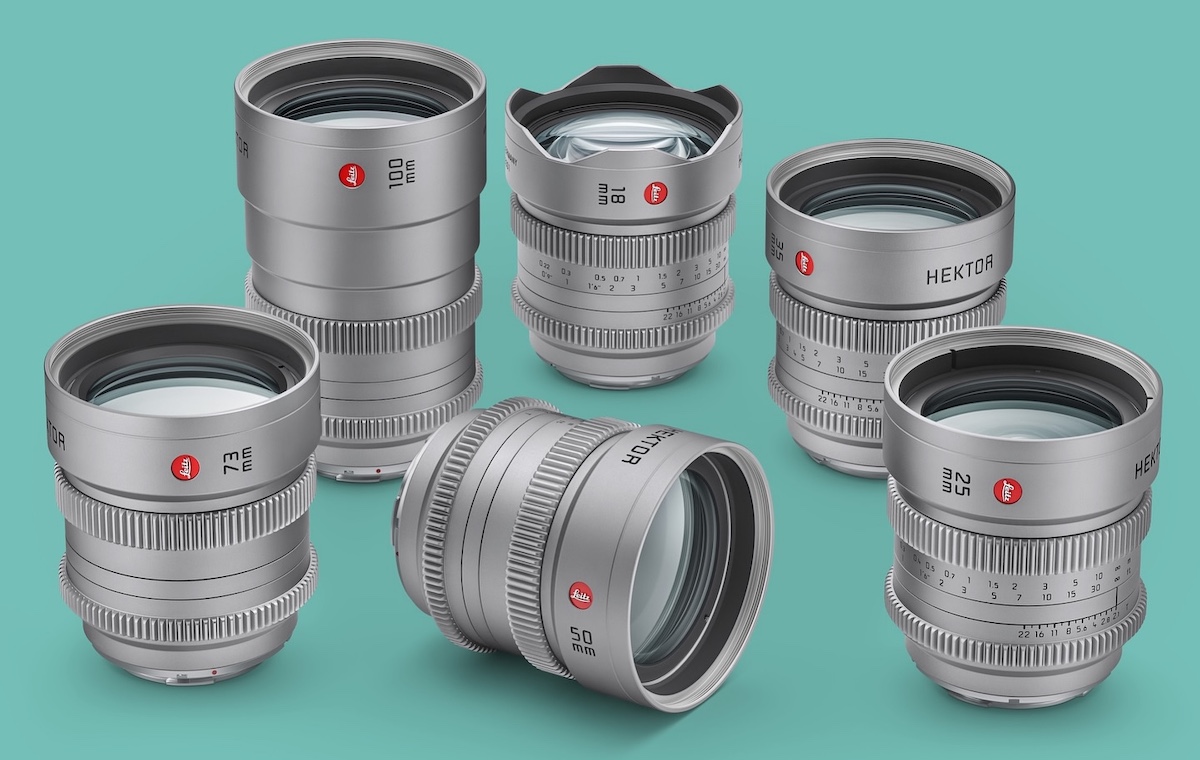
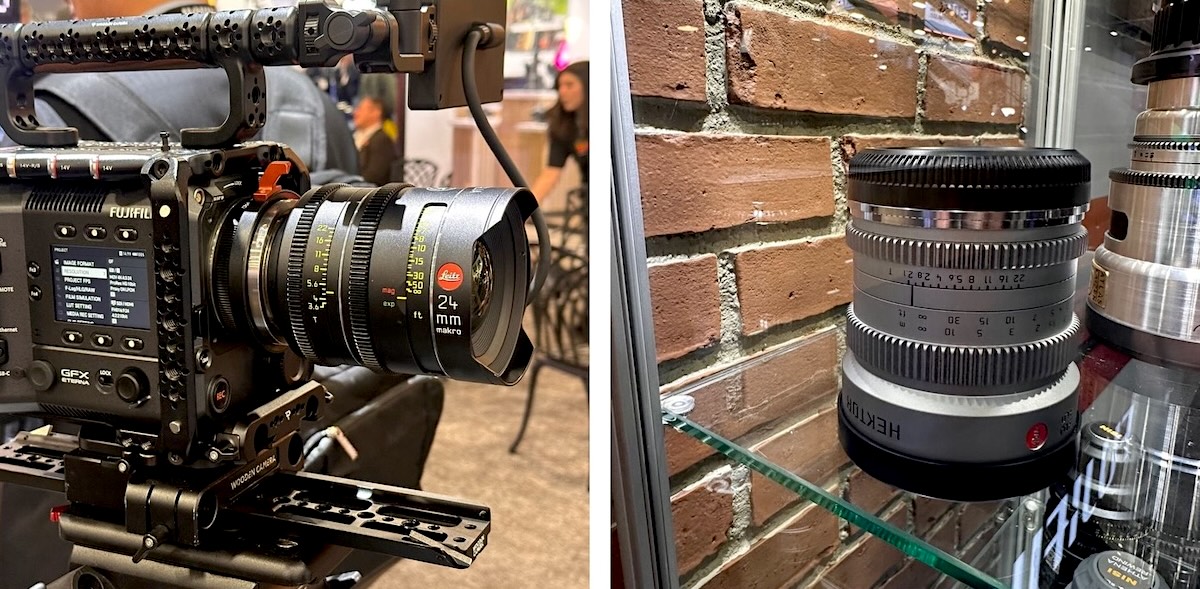
The six Leitz Hektor full-frame prime cine lenses are now available for Fujifilm G mount, marking a significant expansion of Leitz Cine’s mirrorless prime series to Fujifilm’s GFX ecosystem, including the GFX ETERNA 55 cinema camera and GFX100 stills models. This new user-interchangeable G mount joins the existing lineup of Sony E, Leica L, Canon RF, and Nikon Z options. While the optics do not cover the full sensor area of the larger GFX ETERNA 55 format, most focal lengths deliver generous coverage suitable for most cine formats. Check the pricing at B&H Photo. Additional information on the Leitz Hektor T2.1 mirrorless cinema lenses can be found here:
Nikon has announced the ZR, a video-focused camera with Red co-branding. It features the same 24.5MP 'partially Stacked' sensor as the Z6III and inherits many capabilities from the more stills-oriented camera, but gains a new Raw video codec, video-focused UI and internal 32-bit float audio recording – a first in the industry.
Key Specs:
24.5MP full-frame 'partially Stacked' CMOS sensor
Nikon Z-mount
7.5EV IBIS
Up to 6K 60p
R3D (NE) Raw video codec
4" 3.07M dot (1280 x 800px) 1000 nit display
CFexpress Type B / microSD
Autofocus subject detection for people, animals, vehicles and planes
Internal 32-bit float
No mechanical shutter
The ZR retails for $2199 – $500 cheaper than the Z6III, and has been available since October 2025.
While the ZR's heart may be the same as the Z6III, less the mechanical shutter, it's not immediately obvious by looking at it. The camera has a boxy, EVF-less design with a minimal grip, making it easy to mount on a gimbal without having to worry about clearance.
On the back is a massive 4" 3.07M dot display. It's in a video-friendly 16:10 aspect ratio, with a 1280 x 800 pixel resolution. It has a peak brightness of 1000 nits. Nikon says it supports the P3 color gamut, giving you a more accurate preview of what your colors will look like, when working beyond the limits of sRGB.
On the back of the display are the Nikon and Red logos. The ZR is the first camera since Nikon's acquisition of Red to come with both companies' branding (unless you count the Z-mount Raptor's body cap).
R3D (NE) Codec
The ZR includes a new Raw video codec called R3D (NE), alongside Nikon's N-Raw format and ProRes Raw. While it's not exactly the same as the Redcode Raw that Red's cinema cameras shoot, it is made to be cut together with it and uses the same Log curve and color gamut.
Importantly, this means you can use the Look Up Tables, or LUTs, that already exist for Red cameras, making it much easier to cut footage from the ZR and Red's cinema cameras together.
When shooting in R3D (NE), the ZR can capture 6K and DCI 4K at up to 60p, and UHD 4K at up to 120p. These same options are available for N-Raw, though the red-flavored Raw doesn't have any compression settings like the ones available for N-Raw. We'll touch on the differences between the ZR's Raw formats later on in this review, but have covered them in more depth in a separate article.
Cine EI
R3D Raw also comes with a different approach to gain. Instead of applying it in-camera based on your ISO setting, the camera will lock it to either its low (ISO 800) or high (ISO 6400) gain step. If you adjust your ISO, the camera will note it as a metadata tag and adjust its metering to capture a different balance of highlights and shadows, but it won't change the amount of gain added to the footage. This approach is comparable to the Cine EI (exposure index) mode Sony includes on its video-focused cameras, and gives you more control over your video's lightness ("ISO") in post. By contrast, N-Raw is shot with variable gain, just like photo mode, so you can't adjust this after the fact.
Alongside R3D (NE), the ZR supports the two other Raw formats the Z6III could shoot: Nikon's own N-Raw codec, as well as Apple's ProRes Raw. Though, as has been the case in Nikon's previous cameras, the widely-supported ProRes Raw option isn't available at the camera's fastest resolutions and frame rates.
Internal 32-bit float recording
The ZR is the first mirrorless camera to include fully-internal 32-bit float recording for audio. If you're unfamiliar, 32-bit float encodes audio in an entirely different fashion than traditional 16 or 24-bit encoding, allowing it to record a much wider range of values. Typically it's combined with dual gain amplifiers to ensure both quiet and loud sounds can be captured.
The benefit is that you don't need to finely adjust gain and worry about clipping (other than the point at which your mic itself is overwhelmed). While we've seen other cameras, such as the Panasonic GH7, that support 32-bit float recording with an external XLR adapter, the ZR can do it without one, obviating the need for a costly accessory.
What's more, it can be used to record audio from the camera's internal microphone – using OZO directional technology from Nokia – as well as from the 3.5mm microphone jack, meaning you can use it all the time.
Digital hotshoe
While the ZR has a traditional 3.5mm microphone input, it also includes a digital hotshoe with support for audio. Nikon sells a compact microphone that uses it, and Tascam offers an XLR adapter.
Currently, it's unclear what abilities other third party companies have to create accessories for it. For example, some DJI wireless microphone receiver packs can plug directly into the digital hotshoes on Sony's cameras, making it so you don't have to connect them with a 3.5mm cable. Whether they'll make something comparable for Nikon's system remains to be seen.
How it compares
You only need to look at the ZR to recognize that it's a competitor to Sony's FX range of cameras for film makers. Its lack of viewfinder will draw immediate comparison with the FX3 and APS-C/Super35 FX30 models, but the price is more in line with the FX2. However, the Nikon has a sensor much better suited to video than the FX2, which uses the rather slow to read-out chip from the a7 IV.
Despite the apparent similarities (high res 60p Raw capture), it's not quite a like-for-like competitor to Canon's C50, which launched on the same day. That is an unstabilized, actively-cooled camera, rather than a hand-held model. The provision of capabilities such as a timecode socket, desqueeze preview modes for working with anamorphic lenses and the option of bolt-on mount adapters suggests a focus on industry use, rather than beginners and owner-operator outfits.
Nikon ZR
Sony FX2
Nikon Z6III
Canon C50
MSRP at launch
$2199
$2699
$2699
$3899
Sensor res
24MP
33MP
24MP
32MP
Sensor type
Partially Stacked CMOS
BSI CMOS
Partially Stacked CMOS
CMOS with dual pixel AF
IBIS rating (Center / Periphery)
7.5 /
5.0 / 5.0
8.0 /
N/A
Mechanical shutter
No
No
Yes
No
Media types
CFe B / XQD UHS-I Micro SD
CFe A / UHS-II SD UHS-II SD
CFe B / XQD UHS-II SD
CFe B UHS-II SD
Viewfinder
N/A
3.68M dots 0.7x mag tilting
5.76M dots 0.8x mag
N/A
Rear screen
4.0" 3.07M dots (1280 x 800 px) 1000 nits
3.0" 1.04M dots (720 x 480 px)
3.2" 2.09M dots (1024 x 680 px)
3.0" 1.62M dots
Maximum res/rate
6K/60
DCI 4K/30 60 with 1.5x crop
6K/60
7K/60 7K/30 open-gate
Proxy rec
To same card
Yes
To same card
Yes
Raw options
R3D, N-Raw, ProRes RAW
Output to Atomos Rec
N-Raw, ProRes RAW
Canon Raw Light
Cine EI option?
Yes
Yes
No
No
Audio capabilities
4ch 32-bit float / 24-bit
4ch 24-bit
4ch 24-bit
4ch 24-bit
LUT upload
10 Preview only
12 Preview, Embed, Apply
No
Apply only (Built-in Preview LUTs)
Anamorphic desqueeze
No
Yes (2.0 or 1.3x)
No
Yes (2.0, 1.8, 1,5 1.3x)
Active cooling?
No
Yes
No
Yes
Battery life (CIPA) Actual / Cont
90 / - min
155 / 100 min
100 / - min
Not specified
Dimensions
133 x 81 x 49mm
130 x 78 x 104mm
139 x 102 x 74mm
142 x 88 x 95
Weight
630g
679g
760g
670g
The Nikon ZR looks essentially like one of Sony's small FX models but without their active cooling. And, in the same way that the FX2 and FX3 share much of their hardware with the more photo-focused a7 IV and a7S III bodies, respectively, the ZR is essentially a video-ized Z6III. So, while you lose the viewfinder, photo-friendly body shape and mechanical shutter, you gain more Raw video options, a hotshoe with digital inputs and 32-bit float audio. Despite this, Nikon has brought the ZR in at a price significantly below that of the Z6III.
But, more significant is that it undercuts the price of the FX2, which isn't built around an especially video-adept sensor, and at nearly half the $4100 asking price of the FX3, which has comparable rolling shutter, but captures native 4K, rather than the Nikon's 6K. In most regards, the ZR looks like a bargain.
Body and handling
The ZR is a relatively compact body, immediately bringing to mind the original Sony FX3, but without the prevalence of 1/4-20 mounting points, and without the finned exhaust ports, as the ZR does not feature active cooling.
It's just as much a Z6III shorn of its viewfinder as anything else, and has a similarly solid-feeling build. It uses the same fibre-reinforced plastic that Nikon has been using for some years, which gives a good sense of solidity without adding excessive weight. This is likely to be a benefit if you choose to mount it on a gimbal.
Ports
The ZR has most of the ports you'd expect from a video camera: USB-C, running at 3.2 speeds and 3.5mm headphone and microphone jacks. The one surprise is the presence of micro, rather than full-size, HDMI. It does make sense given the camera's smaller form-factor, but those planning to routinely plug in monitors or external recorders to this camera will likely wish for a more robust connector.
Its storage mediums are also unconventional. While its CFexpress Type B slot is exactly what you'd expect on a high-end video camera, the secondary UHS-I microSD card slot isn't. It's not fast enough to support most of the formats that the camera can, so you can't use it to back up your recordings, nor can it be used to record proxies (though if you're shooting in R3D (NE) or N-Raw, proxy files will be recorded to the main card). Most people, then, will likely just use it for transferring settings and LUTs, or perhaps for shooting stills.
Battery
The Nikon ZR uses the same EN-EL15c battery as the Z6III. It's a 16Wh battery which powers the Z6III to a respectable 390 shots per charge when shooting photos and 100mins of "actual" video shooting, according to CIPA's standardized tests.
Nikon hasn't provided the rated values for the ZR, but they're pretty comparable: good, but not exceptionally so.
Video capabilities
As you might expect, Nikon is putting most emphasis on the ZR's Raw capabilities, but for many people, good 10-bit Log footage offers a less data-intensive workflow with plenty of editing flexibility (there's a much smaller difference in editing flexibility between 10-bit Log and 12-bit linear Raw than between JPEGs and Raw stills).
Encoded options
The ZR offers plenty of gamma-encoded video options, in a choice of All-I ProRes 422, 10- or 8-bit 4:2:0 H.265 or 8-bit, 4:2:0 H.264 MP4s.
As is often the case, the most data-intensive options aren't available in ProRes. And, like the Z6III, the ZR needs to crop in to an APS-C / Super35 region to shoot 4K/120 or 100.
Resolution
Framerates
Region
ProRes 422 10-bit MOV
H.265 (4:2:0) 10 or 8-bit MOV
H.264 (4:2:0) 8-bit MP4
5.4K
60 / 50
Full-width
No
Yes
No
30 / 25 / 24
Yes
Yes
No
4K (3840 x 2160)
60 / 50 / 30 / 25 / 24
Full-width or 1.5x crop
Yes
Yes
No
120 / 100
1.5x crop
No
Yes
No
Full HD (1920 x 1080)
120 / 100
Full-width or 1.5x crop
Yes
Yes
No
60 / 50
Full-width or 1.5x crop
Yes
Yes
Yes
30 / 25 / 24
Full-width or 1.5x crop
No
Yes
Yes
240 / 200
1.03x crop
No
Yes
No
Raw options
Even if they're not necessarily the easiest options to capture or work with, the ZR's Raw video modes are likely to be the most eye-catching.
The camera can capture either the Red-derived R3D NE Raw or the existing Nikon N-Raw at up to 6K/60. It has to drop to 30p to utilize the more widely-supported ProRes RAW codec.
Resolution
Region
Frame rates
R3D NE
N-Raw
ProRes RAW HQ
6.0K
6048 x 3402
Full-width
60/ 50
Yes
Yes
No
30/ 25/ 24
Yes
Yes
Yes
4.0K
4030 x 2268
Full-width
60/ 50/ 30/ 25/ 24
Yes
Yes
Yes
3984 x 2240
1.52x crop
120/100
Yes
Yes
No
60/ 50/ 30/ 25/ 24
Yes
Yes
Yes
It's worth noting the different ways the R3D and N-Raw modes handle ISO. Currently, most software doesn't support lens corrections for R3D NE, though the format itself does, and they can be added using Red's RedCine-X Pro transcoding software.
Shutter angle
The ZR is the first Nikon camera to let you set exposure in terms of shutter angle, out-of-the-box (it was added to the Z8 and Z6III in firmware, post-launch). This is especially valuable on a camera that can shoot 60 and 50 fps footage as readily as it can 30, 25 or 24p, as it means you can switch frame rates and have the exposure time respond accordingly, avoiding the risk of forgetting, and shooting footage with too high or low a shutter speed, after you switch.
Video image quality
Image Comparison
This widget is not optimized for RSS feed readers. Click here to open it in a new browser window / tab.
As with the Z6III, the ZR's compressed footage is very detailed in both 4K and 5.4K. However, Nikon has clearly changed how it processes this footage, and it appears to be applying less, or more subtle, sharpening than the Z6III.
Compared to hybrid stills/video cameras, the ZR has similar levels of detail to the similar-pixel-count Panasonic S1II, as well as to the Canon EOS R6 III's oversampled 4K mode. However, the Canon's 7K open gate footage provides much more detail than the ZR's 5.4K capture, though it will take up more storage and has to be edited before delivery. The highest-resolution footage you can get from the ZR offers more detail than the Sony a7 V's oversampled 4K footage, though some of that is almost certainly aliasing. That's also the case if you compare the cameras' 4K output, with the ZR's having more aliasing, thus not necessarily representing the scene better. It's also worth noting that the ZR comes in at a substantially lower price point than those cameras (though with a corresponding decrease in stills capabilities).
While bumping up to 60p doesn't come with a cost to field of view or detail, if you want to shoot in 120p, the camera will have to crop down to a smaller APS-C region of the sensor. This results in less detail being captured, as is expected given the extra noise coming from using a smaller region of the sensor, and the higher shutter speeds required for shooting at higher frame rates, though it's the same amount as captured by the APS-C 24p mode.
Image Comparison Slider
This widget is not optimized for RSS feed readers. Please open this article's permalink in a browser to view this content.
Crop of 5.3K 10-bit H.265 footage at frame 1 of a recording, and frame 21 (click to see full-resolution frames). LUT applied. Nikon ZR | 1/320 | F8 | ISO 800
The ZR shares a video IQ quirk with several of Nikon's other cameras, in that, for around the first second of an H.265 recording, the bitrate is substantially lower, resulting in noticeably softer and blockier footage. While it's certainly a ding against a hybrid camera, having to leave a second of lead time on each of your shots is borderline unacceptable for a video-focused camera.
Three flavors of Raw
The Nikon ZR supports internal Raw recording to three different formats: N-Raw, ProRes Raw, and R3D NE, a format currently unique to it. They all have the common caveats associated with Raw recording – using it will require post-processing (often using specific editing software), and the difference between Raw and Log isn't anything like as great as the difference between Raw and JPEG for stills – but for those that need it, it's available.
As you'd expect, the ZR's three flavors of Raw capture comparable amounts of detail at their 6K settings, though their default LUTs offer fairly different foundations to build your own grade on. Despite the similar image quality each version of Raw offers, there are substantial differences between what it's like to shoot them. You can read our in-depth comparison below.
The ZR's N-Log mode for H.265 does more than just record in a different gamma; it also has a big impact on the amount of apparent detail in the footage compared to the camera's default H.265 color mode. Even with the LUT applied to roughly match color and lightness, the footage is substantially softer. When shooting in N-Log, the camera doesn't appear to apply any of the "Picture Control" adjustments, including sharpening, which may account for some of the visual differences; rather than doing it in-camera, it seems like Nikon is assuming that those shooting Log will want control over sharpening in post.
Despite sharing a sensor, Log footage recorded in H.265 from the ZR clearly has more noise reduction in the shadows than footage shot on the Z6III with the same settings. This noise reduction isn't applied to Raw footage, but for those who would prefer smaller file sizes will have to give up some control over how sharp the footage is straight out of camera. Given the controversy around the Z6III's relatively noisy and sometimes flickering shadows when recording Log, it's not surprising that Nikon has made some changes.
In use: a photographer's perspective
By Mitchell Clark
The Nikon ZR produces the same level of image quality as the Z6III. But the shooting experience is a world apart. Nikon ZR | Nikkor Z 24-120 F4 S | 90mm | F5.6 | 1/160 sec | ISO 200 Photo: Mitchell Clark
As with other video-focused cameras, there will be photographers who ignore the ZR's Red branding to focus purely on the sensor and the boxy shape, reminiscent of a rangefinder. If that's you, we implore you: do not buy this camera.
Of course, it can take stills, and it even has a switch on the top to go between its photo and video modes. But its lack of a mechanical shutter essentially rules out flash photography (it can only sync at 1/60 sec), and means you may have to deal with banding when shooting under artificial lighting. And while I'd welcome a rear display this large and bright on a hybrid camera, I still found myself missing an EVF when shooting pictures with the ZR.
While I, like many of you, would love it if Nikon (or anyone, for that matter) released a camera roughly this shape and size aimed at photographers, the ZR isn't it. It's a video camera that can shoot the occasional still when needed, and should be treated as such.
Conclusion
By Mitchell Clark
Pros
Cons
Great video quality across formats (with a few caveats)
Large, bright screen makes monitoring easy
32-bit float audio relieves stress of clipping audio
Video-specific controls and menus are easy to operate
Autofocus generally capable and controllable
Wide array of recording options with well-controlled rolling shutter
IBIS very capable for vertical shooting
Sensor not the best for Log/Raw workflow
Noise reduction reduces peak IQ in H.265
H.265 footage uses very low bitrate for first second
Card slots inaccessible when camera's mounted
Could use an extra button or two
Screen interferes with audio ports
Some video tools (zebras, focus peaking) need some work
microHDMI and microSD aren't wonderful
Open-gate would've been a nice option
As the Nikon ZR is a video camera, we thought it best to present the majority of our conclusion as a video, primarily shot using the ZR and with lots of sample footage.
To briefly summarize: on the vlogging to production workhorse spectrum, the ZR sits far closer to the Sony ZV-E1 and Panasonic S9 at the vlogging side of things, rather than on the S1H and FX3 side. But for those who are looking for that kind of camera, which will likely be the majority of shooters, it's remarkably capable at that job.
The ZR has a few first-gen quibbles, which isn't necessarily a surprise. As it stands, it feels like Nikon was able to incorporate some of Red's expertise as it finished up the ZR, rather than building it from the ground up with that knowledge. What's there is quite good, but it'd be interesting to see what a version of this camera would look like if that production-focused perspective were available earlier in the process.
Nikon also seems to already be taking some of the user feedback to heart. At the time of writing, the company is promising a firmware update to the ZR that will:
Allow users to record using the more sophisticated Log3G10 in H.265, instead of being stuck with N-Log
Bring "general quality improvements" to H.265
Let you use focus peaking and view assist concurrently when shooting in R3D NE
Add a further compressed version of R3D NE, as is available when shooting N-Log (a big help in the time of skyrocketing storage costs)
If all of that comes to fruition, the ZR will be further refined as everyday vlogging/video camera. And while it may not be the best pick if your intent is a multi-operator, budgeted production, its very competitive price certainly makes that easier to accept. This capability, combine with a price that makes the camera punch a fair bit above its weight, earn it our Gold award.
Scoring
Scoring is relative only to the other cameras in the same category. Click here to learn about what these numbers mean.
Nikon ZR
Category: Mid Range Full Frame Camera
Build quality
Ergonomics & handling
Features
Metering & focus accuracy
Image quality (raw)
Image quality (jpeg)
Low light / high ISO performance
Viewfinder / screen rating
Optics
Performance
Movie / video mode
Connectivity
Value
PoorExcellent
Conclusion
The ZR is one of the best vlogging cameras we've seen, providing plenty of headroom for expanding your production values.
Good for
Vloggers and YouTubers
Owner/operator video producers
Not so good for
People who care about stills
Professional productions
90%
Overall score
Compared to its peers
Compared with Nikon's own Z6III, the ZR is the obvious choice for video-first shooters, thanks to its larger, brighter display with video-focused menu, 32-bit internal float, and the option of using the more sophisticated R3D NE format. By default, the ZR sharpens its footage less, which we find to provide a better starting point for editing, though it also has more aggressive noise reduction, which is especially noticeable when shooting H.265 in Log. That means you lose a touch of detail in the shadows, but we'd consider it a fair trade-off (and one that could be fixed with a firmware update). For anyone intending to regularly shoot stills, though, the Z6III will be a much better option.
Looking at the Panasonic S9, its lack of internal Raw, rock-solid IBIS and ability to burn LUTs into your footage signal its role as a more beginner vlogging camera focused on providing ready-to-output footage. If you do want to edit, though, it also provides open-gate shooting, a feature the ZR lacks. While the S9 is a relatively capable video camera, especially given its price, the ZR is more well-rounded with its faster sensor with better rolling shutter rates and full-width 4K/60, 32-bit float audio and large screen. We also prefer its autofocus and controls, and the fact that it has a headphone jack for monitoring.
While we haven't tested the Sony FX2, we are familiar with its sensor, which has much slower readout speeds and requires a crop to an APS-C region to do 4K/60, which the ZR does not. Unless you have a very specific need for a production-focused camera, the ZR is a much better choice, thanks to its faster sensor, 32-bit float audio, choice of Raw and Log workflows, and larger screen. The FX2 will likely have cleaner footage in the deep shadows, and has a mechanical shutter and EVF for stills, but those qualities can also be had in cameras much better suited to both stills and video than it.
Adobe has rolled out a handful of updates to Photoshop and Lightroom aimed at smoothing out common editing bottlenecks. The latest additions include tools for composite photos, organizing complex files, finding images with natural-language search and managing work from large shoots.
In Lightroom, Adobe is delivering on some features it showed off at its Adobe Max conference in October of last year. One is the improved search functionality, which allows users to search with natural language, much as they may be accustomed to in cloud-based photo management tools from the likes of Apple and Google. It was previously available in Lightroom for the Web, but is now available in the desktop version as well.
The AI Filters in the Assisted Culling tool allow users to quickly sort out images that are in focus.
Image: Adobe
Another Max-previewed feature that is now fully available is Assisted Culling, which makes it easier to sort through large quantities of images. The tool is an AI-powered filter that allows users to quickly narrow down images by sorting out those that are properly exposed and in focus. It gives users control over how picky they want to be, and still lets them select or reject images that the system would have done the opposite.
Speaking of speed, Adobe says that interactive slider performance will be five times faster in this update. It's also added support for all Sony a7 V formats, since it previously didn't support the new compressed Raw format Sony introduced with that camera. Lastly, there are new film-inspired presets for those interested in editing to create a more retro look.
The Rotate Object tool is found in the Contextual Task Bar, making it faster to access transformation tools.
In Photoshop, Adobe has made its Rotate Object tool widely available, following the feature's public beta release in March. Rotate Object makes it much easier to refine composite images, saving users from the traditional multi-step process of adjusting an object's position with separate Transform tools. It essentially turns a 2D object into a rotatable 3D image, allowing users to adjust its angle and perspective in real time to make it fit more naturally into a scene.
Adobe also added a Layer Cleanup tool to Photoshop, which can streamline and declutter files by renaming layers and automatically removing empty ones. Plus, Firefly Boards are now integrated with Photoshop, making it easier for creatives to move from concept phases to final execution.
All of the new features are available in Photoshop and Lightroom as of today.
NASA astronaut and Artemis II commander, Reid Wiseman (foreground), and CSA (Canadian Space Agency) astronaut and Artemis II mission specialist, practice lunar photography at NASA's Johnson Space Center in Houston.
Photo: NASA / Kelsey Young
The Artemis II mission came to a successful end a few weeks ago, but excitement over the historic journey remains high, thanks in part to the remarkable photographs the four-person crew captured aboard Orion. It turns out those images were successful because the astronauts were doing more than pointing a camera out the window and hoping for the best. Before launch, they received dedicated photography training to help them document the Moon, Earth and the spacecraft’s journey between them.
In an Instagram video from Reuters, NASA flight operations imagery instructor Paul Reichert explains the photography training process for astronauts. He says that when individuals are first brought on as astronauts or astronaut candidates, they receive about four to six hours of training from him and his fellow instructor, Katrina Willoughby. The goal at that point is to bring them to a basic level.
Before astronauts are assigned to a specific mission, Reichert says they may take some classes and have the opportunity to check out gear to get familiar with it. Then, once an astronaut is assigned to a mission, they have about 10 classes, which he says amounts to about 20 hours of training.
The crew practiced for the mission using an Orion mock-up and a large, inflatable moon.
Photo: NASA / James Blair
According to the Rochester Institute of Technology (RIT), Willoughby and Reichert, who are both alumni of the RIT photographic sciences program, worked with the Artemis II crew for two years to ensure they were fully prepared. Mission pilot Victor Glover said their training included on-the-ground drills that involved taking pictures inside a mock-up of the Orion capsule, according to Reuters.
"Most people can use a camera and get a photo that is good enough, but good enough isn't what we're after scientifically. We’re really teaching the astronauts how to go beyond the basics," Willoughby says in the RIT article. "Being able to understand how to use the equipment, and what the options are, gives us a lot more capability."
Artemis II Pilot Victor Glover and Mission Specialist Christina Koch gather images and observations of the lunar surface to share with the world during the lunar flyby on the sixth day of the mission. The crew spent approximately seven hours taking turns at the windows of the Orion spacecraft as they flew around the far side of the Moon.
Photo: NASA
Images taken on such missions play an important role in research, but their importance goes beyond that, too. "There are pictures we want to get, and then there are pictures that the team is depending on. The imagery is their data," says Willoughby. "If something breaks, for example, we need a picture or video to show us on the ground what's going on. Sometimes, the imagery is what is needed to move forward, so it is important that the crew can get it right the first time."
A Reuters article also details the camera gear chosen for the mission and why those particular devices were selected. We've seen lots of questions here at DPReview about why NASA opted for the Nikon D5, a decade-old camera. The answer appears to come down to what was tried and tested. "We had a lot of flight experience with it," Reichert told Reuters. "We knew it could handle radiation, at least several years of radiation dosage on the ISS, and it didn't have any problems with it."

 Connexion