When you use DPReview links to buy products, the site may earn a commission.
The Viltrox AF 28mm F4.5 "Chip" is finally available for L-mount.
Image: Viltrox
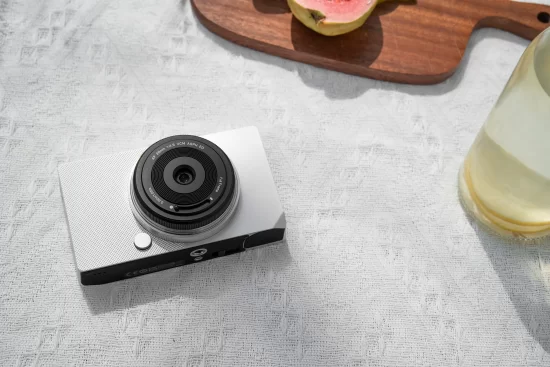
After months of teasing, Viltrox has released the L-mount version of its full-frame AF 28mm F4.5 "Chip" lens. It becomes the company's second autofocusing lens for the system since it joined the alliance in September, 2025, and is a truly tiny option for people with cameras that use the mount.
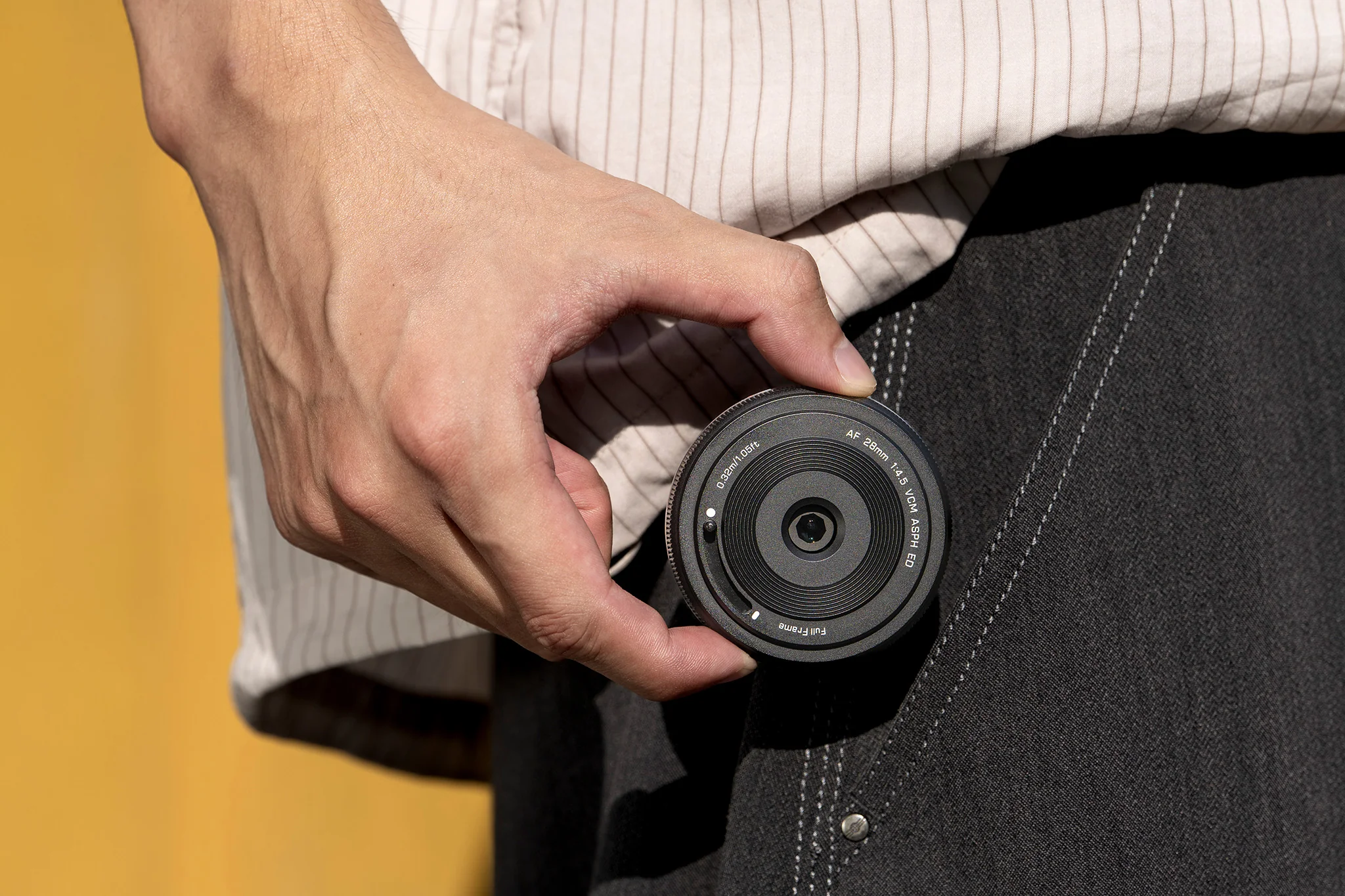
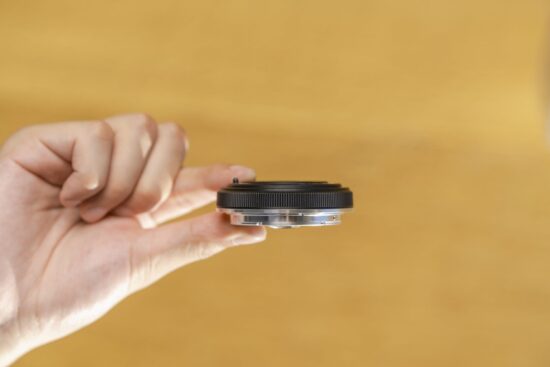
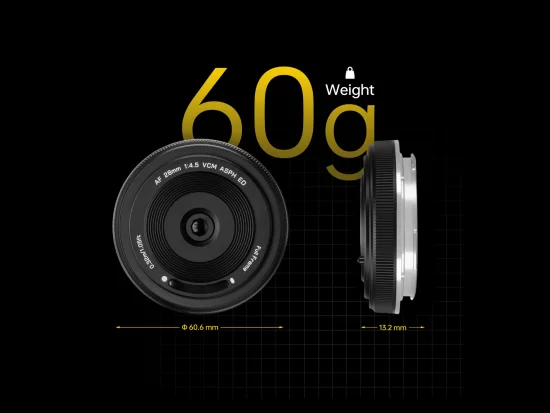
The lens design has been around for a few years on Sony E and Fujifilm X mounts, and it gets its name and notoriety from its size: it's 15.3mm (0.6") thick, and weighs 60g. That, and its relatively wide focal length, make it an attractive prospect for anyone looking for an as-small-as-possible kit for everyday shooting.
That's an especially interesting proposition on L-mount, where there haven't been that many choices for that kind of lens, despite how much small, gripless cameras like the Panasonic S9 and Sigma BF would benefit from one. Panasonic itself released a relatively small 40mm F2 recently, and there are a few similarly-sized options from other brands, but even those are still noticeably bigger and heavier than the Chip. And while Panasonic's 26mm F8 is similarly-sized, it's quite a bit slower, and manual-focus only.
Image: Viltrox
Conversely, the Viltrox has a voice coil motor (or VCM) for autofocus and can't be manually focused. It also includes an integrated lens cap, which you can deploy by sliding a switch to keep the front element protected if you're sliding the lens into a bag.
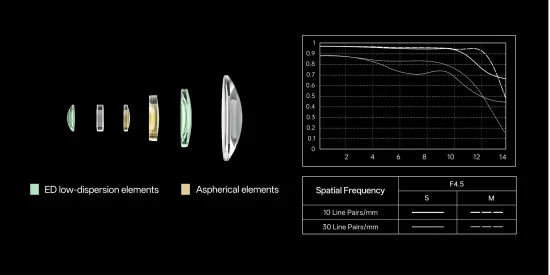
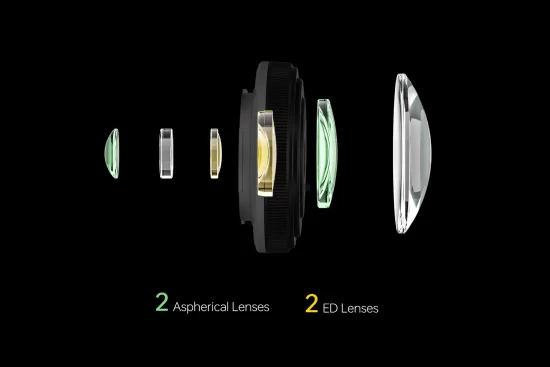
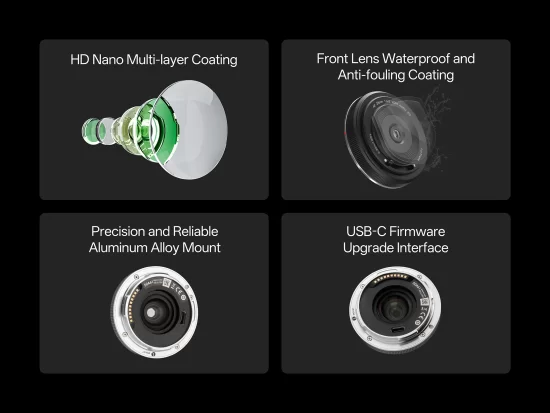
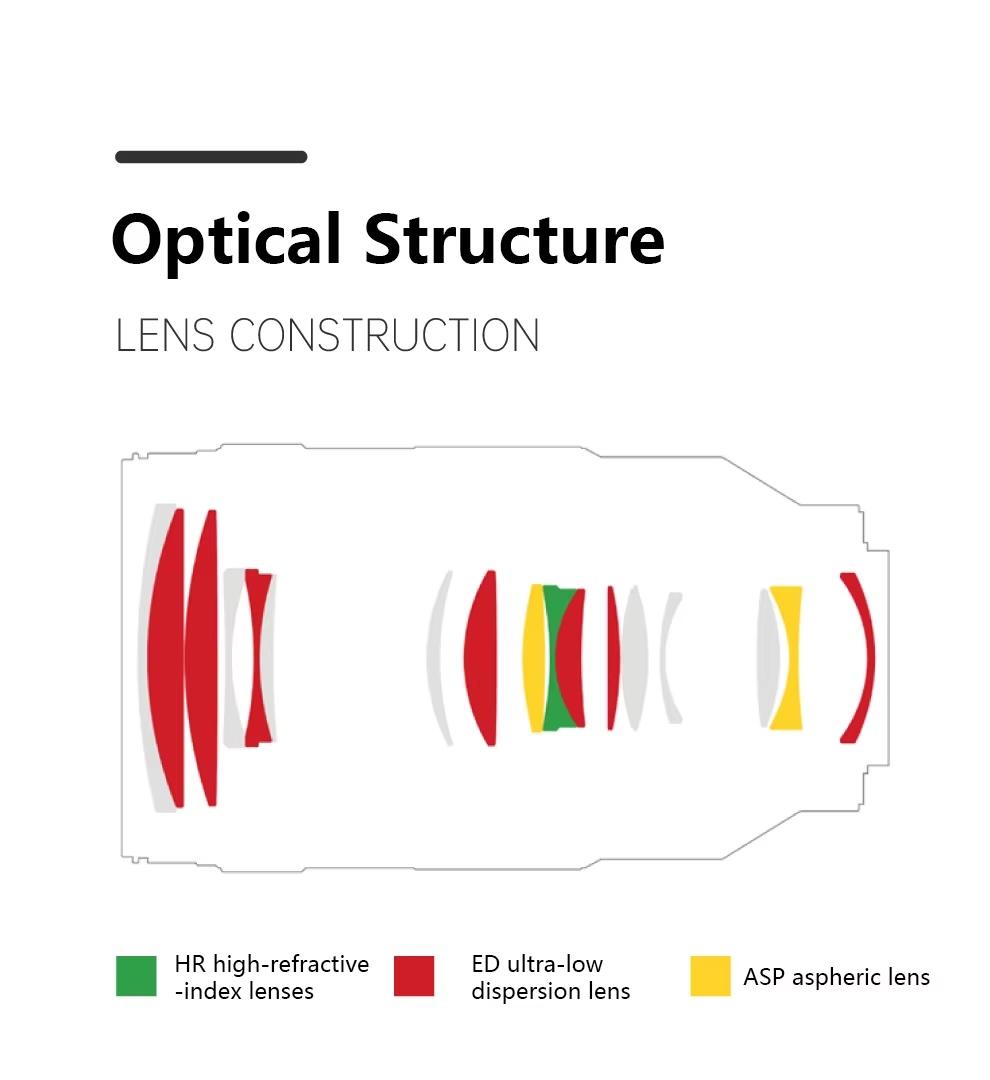
The lens is made up of six elements in six groups, with two aspherical and two ED lenses, as well as coatings to reduce reflections and to repel water and oils from the front element. Perhaps its biggest drawback is the aperture: while you may be willing to trade the speed of the ~F2 options for the size and weight savings, it is worth noting that the Chip is a fixed F4.5 lens, meaning you also can't stop it down any further if it's particularly bright or if you want to capture more depth of field or blur motion.
While it's exciting to see Viltrox release a new lens for L-mount, especially one that fits into an underserved niche, this release also highlights the company's relatively slow entrance into the L-mount ecosystem. In the ten months since it announced it was joining the alliance, it's only released this lens and its 16mm F1.8 for the mount, both of which were promised at the beginning. In that time, it has released six other full-frame lenses for other mounts (mainly Sony's E and Nikon's Z), with the only word on L-mount versions coming in the form of responses to Instagram comments.
Still, the release of the AF 28mm F4.5 Chip is a sign that there's at least some work being done at Viltrox for L-mount. It's available today for $99.
Ultra-compact, ultra-light pocket-size full-frame lens built for street photography, travel, or spontaneous everyday shots
Shenzhen, China, June 16, 2026 — Viltrox today announced its new AF 28mm F4.5 Chip L, a full-frame autofocus pancake lens for L-Mount cameras. The lens combines an ultra-slim profile, exceptional lightness, and excellent portability that’s ideal for everyday shooting, travel, and street photography.
With the launch of the AF 28mm F4.5 Chip L, Viltrox further expands its L-Mount lineup. In addition to support for in-camera correction functions, the lens is optimized to work seamlessly with modern L-Mount camera systems, delivering a compact and effortless shooting experience for everyday photography.
Weighing just ~60g and measuring just 13.2mm thin, this ultra-compact autofocus lens is comparable in size to a simple lens cap or camera body cap, transforming a professional mirrorless camera into a pocket-friendly companion. When paired with cameras such as the Panasonic Lumix S9 and Lumix S5II, the AF 28mm F4.5 Chip L creates a remarkably compact full-frame setup, allowing photographers to stay highly mobile with minimal bulk.
An Ultra-Lightweight Pancake Lens for Everyday Creativity
The Viltrox AF 28mm F4.5 Chip L features a fixed F4.5 aperture and a VCM (Voice Coil Motor) autofocus system that delivers fast and quiet autofocus performance. Its versatile 28mm focal length and minimum focusing distance of just 0.32m make it well suited to a wide range of everyday shooting scenarios, providing a natural balance between environmental context and subject emphasis.
To maximize convenience, the lens incorporates a signature slide-lever lens cover design. This built-in mechanism allows users to open and close the integrated lens cover without the need for a separate lens cap, further streamlining the transition from carrying to capturing.
The lens also features a distinctive polygonal aperture plate design that produces recognizable starburst effects around point light sources in backlit and night scenes, adding a unique visual signature to select images.
Learn more: https://bit.ly/4fGYGQh
Pricing and Availability
Viltrox AF 28mm F4.5 Chip L MSRP - $99 / €109 / £90
Amazon Store US: https://www.amazon.com/dp/B0H338KPY6
Amazon Store Europe: https://www.amazon.de/dp/B0H338KPY6
With 100Ws of power and 1/8000s high-speed sync, the NEEWER Z3R 100Ws 2.4G TTL Round Head Flash Speedlite can handle everything from entirely backlit scenes to fill flash for outdoor portraits and fast-moving subjects.
A round head produces softer, more natural light than a traditional rectangular type, while dual LED modeling lamps make it easier to preview the effect of the flash output before you’ve even pressed the shutter button. Add fast recycling, a high-capacity rechargeable battery and an efficient cooling system into the mix and the Z3R can deliver professional-level results in a huge range of situations. Let’s get into the details.
The power you need
The Z3R delivers the output and responsiveness photographers need in demanding conditions. Its 100Ws of power and high-speed sync up to 1/8000s help balance ambient light, maintain exposure and support shallow depth of field photography, making it especially effective for portraits, action and fast-paced location shoots.
Support for both the NEEWER Q and Godox X wireless flash ecosystems means your setup options are expansive, while dedicated Canon, Sony and Nikon versions ensure compatibility with major DSLR and mirrorless camera systems. The result is a flashgun that fits easily into existing workflows without sacrificing control or performance.
Designed to support your creativity
Photo: NEEWER
Adjustments are quick and straightforward thanks to an intuitive 2.8-inch full-color touchscreen and one-click TTL/M switch. Dual 3300K +/- 200K LED modeling lamps with 10 brightness levels help you preview light direction and light shape so you can perfectly refine a setup on the fly, without relying on time-consuming test shots.
The round flash head also works with NEEWER CRM2, M12, CRS6, CRS7 and CRB1 mounts, opening the door to a wide range of perfectly matched accessories and creative lighting effects. Plus, the Z3R is compatible with the SEKONIC L-858D Light Meter (RT-GX modules) for ultimate control over flash exposure.
Speed and power without the drawbacks
Photo: NEEWER
The Z3R is built to keep pace during demanding shoots. Its advanced cooling system supports 70–100 consecutive full-power flashes across a 28–105mm focal length range, while the 3000mAh lithium battery is good for up to 500 full-power flashes per charge with a fast 1.7-second recycle time. This combination – plus easy USB-C charging – makes the Z3R ideally suited to high-intensity applications including weddings, events and longer assignments where flexibility and stamina matter.
The Z3R’s round head design and premium quartz flash tube deliver excellent light quality, with a soft spread, clean catchlights and accurate skin tones. And, because it’s rated for 100,000 flashes, you can rely on the Z3R to deliver long-term durability.
Overall, the NEEWER Z3R is a highly capable, well-rounded flash for photographers who need power, speed and flexibility in a compact, affordable unit. From fast recycle times to intuitive controls and broad compatibility, it offers a powerful, flexible lighting solution that adapts easily to portraits, events and demanding location work. With an MSRP of $279.99, the NEEWER Z3R offers pro-level performance at a solid value.
The action camera world has recently turned into a legal battlefield. At the moment, the major patent battles are:
GoPro vs. Insta360 (ITC + U.S. federal litigation)
DJI vs. Insta360 (Shenzhen patent ownership dispute)
DJI vs. Insta360 (Texas Luna/Osmo Pocket patent infringement lawsuits)
Insta360 vs. DJI (U.S. countersuits involving five patents)
Here are the latest updates on the major patent lawsuits involving GoPro, Insta360, and DJI:
GoPro vs. Insta360 (ITC Case)
GoPro filed a complaint with the U.S. International Trade Commission (Investigation No. 337-TA-1400) accusing Insta360 of infringing multiple patents, including HyperSmooth stabilization technology and the iconic HERO camera design.
Final ruling (February 2026):
GoPro won on its design patent – the ITC issued a Limited Exclusion Order and Cease & Desist Order against certain older/legacy Insta360 Ace models.
GoPro lost on all five utility patents covering stabilization, horizon leveling, and distortion correction. These claims were ruled invalid, not infringed, or both.
Current Insta360 cameras (2025+) are unaffected. Insta360 called it a “complete victory” on the important technical patents.
DJI sued Insta360’s parent company, Arashi Vision, in the Shenzhen Intermediate People’s Court. The case involves six patents related to drone flight control, structural design, and image processing.
DJI claims these patents are “service inventions” that rightfully belong to DJI because they were developed by former DJI engineers who joined Insta360 within one year of leaving the company (under Chinese patent law).
Insta360 has strongly denied the claims, stating the innovations were created independently. The case is still ongoing with no major public updates since the initial filings.
DJI vs. Insta360 & Insta360 vs. DJI (U.S. Lawsuits – June 2026)
This is the newest and most active front.
DJI’s lawsuits (filed June 10–11, 2026): DJI filed two complaints in the U.S. District Court for the Eastern District of Texas against Insta360’s new Luna and Luna Ultra pocket gimbal cameras. The suits allege infringement of:
2 design patents (overall look and layout)
4 utility patents (gimbal control modes, subject tracking, and on-device display features)
DJI is seeking an injunction to block U.S. sales of the Luna series plus damages.
Insta360’s countersuits (filed June 12, 2026): Insta360 quickly responded with two countersuits asserting five of its own utility patents against DJI. The patents cover gimbal stabilization, directional control, and panoramic video stabilization. The accused products include DJI’s Osmo Pocket series, Ronin/RS gimbals, Osmo Mobile, and Osmo 360.
Insta360 founder JK Liu stated the company will “take decisive action to defend our intellectual property” while emphasizing that the Luna was developed independently since 2020.
When you use DPReview links to buy products, the site may earn a commission.
Image: 7Artisans
Early this year, 7Artisans launched a new series of F1.8 autofocusing APS-C lenses: a 25mm, 35mm and 50mm (38mm, 53mm and 75mm equiv., respectively). They were initially available for Sony E and Fujifilm X mount, but the company has just made them available on Nikon's Z mount as well.
The trio of lenses makes up the company's "Lite" series, owing to the fact that they all weigh around 180g (6.3oz), and are compact to make it easier to carry them around. You can read the full specs, including optical formulas, in our launch coverage for the lenses, but they're designed to be as similar to each other as possible so it's easy to switch between them, especially if you're using a gimbal for video work. They're all 67mm by 51mm (2.6 x 2") and threaded for 58mm filters. They also all use high-refractive-index glass and have nine-bladed apertures.
While the company and other lens makers have provided similar options for the mount before, it's nice to see it continuing to do so with lenses that use its latest optical and industrial designs. It's also interesting that third parties like 7Artisans have continued to make autofocus lenses for Nikon's mount after the company filed a lawsuit against Viltrox and encouraged people to use officially licensed lenses. So far, only Sigma and Tamron have made any claims about their lenses being licensed, and that doesn't appear to be changing today.
Like their counterparts for E and X mounts, the Z mount versions of the lenses cost $125 each. 7Artisans also sells them as a set for $359, letting you save a bit of money if you were already planning on getting all three. They're available to order now from the company's site and other retailers.
Last week, we asked what nature photos you're most proud of taking. Every time we post one of these prompts, I'm pleasantly surprised by the sheer variety and originality of the scenes. This week's entries delivered the full package: stunning landscapes, animals minding their own business as if they hadn't signed a release form, and cloud formations that looked like the atmosphere was showing off a little. Scrolling through the submissions honestly felt more like taking a very efficient world tour from the comfort of my desk.
We actually received so many creature-based photos, we'll be running another mini-challenge in the future with this theme, so get your camera ready!
View the slideshow above of the community's submitted photos to see a great view of Earth's magnificent nature. Many more photos could not be included, so check them out in the forums. We'd love to see you contribute your own nature discoveries, too.
"This image of a gull in the landscape makes me feel mellow and gives good memories of a foggy morning in Tenby, Wales, UK, earlier this year. I tend to photograph birds more intimately, but I was carrying an old Minolta MD 28mm lens adapted to my X-T3, and I wanted views of the fog, sea, rocks, cliffs and beach, with a bird in frame."
"One of my all-time favorite photos shot at Ngorongoro Crater in Tanzania. I love the inclusion of landscape with the wildlife, the atmosphere of low-hanging clouds, and sunrays coming through. It is a magical place, and I don't think we are going back there in the near future. So this remains one of my most cherished photos."
"Different years, different cameras. Mainly the Pentax K-1 MII and cameras with Foveon sensors. Photographs were taken on the islands of Lake Ladoga and in high-altitude beech forests and etc."
"Ten days ago, one of the pair of great spotted woodpeckers that visit our garden was taken by a sparrowhawk. It turned out to be the male of the pair; the adult female continued to visit the garden.
On Saturday, she not only appeared again but this time brought a juvenile with her.
I had a short window of opportunity with my camera, and this is probably my favorite image. In this one, you can see that she (on the right) has just fed junior, as there is a saliva trail between them."
"Right around the corner sits Arthur Marshall Loxahatchee Natural Wildlife Refuge. I call it my backyard. Sitting at the Northernmost tip of the Everglades, America's greatest swamp, it's the home of the American Alligator and hundreds of species of birds. I don't photograph birds or reptiles or animals, I just walk the trails, watch the light, track the seasons. One of America's treasures, greatly underused and underappreciated."
"I'm trying to make a series of photos that combine a close-up of the subject with a blurry evening sun in the background. The sun is therefore greatly enlarged in the shot. So far, I have two photos that I'm somewhat satisfied with."
DxO started a new summer sale where you can get 20% off any DxO software with the discount code SummerRumors2026 (valid for new customers only). This offer is valid from June 15th to July 10th, 2026. See the latest DxO releases here.
Adobe has announced a new round of updates for Lightroom and Photoshop, which improve on some of the useful new features it's been rolling out, as well as making them available in more places.
To start, the company says it's improving Lightroom's Assisted Culling feature, which is designed to automatically pick out images that are in focus with proper exposure, so you don't spend your time looking through a bunch of images destined for the bin. The company says it's now "generally available" – previously it was marked as being in early access – and that there's a new "Face View" that will show each person detected in a photo to make it easier to assess for yourself whether the tool was correct about them being in focus, and the subject's eyes being open. The company also says that the stacking feature will now try to show you the best image first out of a batch of near-identical ones.
Image: Adobe
As has been the case since we demoed the feature at last year's Adobe Max, there are lots of controls to customize what the tool will select or reject, and how picky you want it to be.
The company also says you can now use Topaz Lab's "Noise-Aware Sharpen model" from directly within Lightroom, letting you "recover fine details on flower petals, fur, foliage and more with pixel-level precision." This is part of a broader effort for the company to not just integrate its own AI tools into its photo editing tools, but to also offer third-party models that you'd typically have to go into another program to use. However, these often require the use of AI feature credits that aren't included in all Creative Cloud plans.
Finally, Lightroom now supports all of the Raw formats used by the Sony a7R VI, including the company's new "Compressed (HQ)" option. This means they're also supported in the Adobe Camera Raw processing used for Photoshop.
Speaking of Photoshop, the company has updated the Remove tool, which has, for a while, given you the option of using generative AI or not. If you chose to, the program would have to use a model stored on Adobe's cloud, though the company told us it was efficient enough that it didn't cost any credits. Now, however, you have the option to use the generative AI removal algorithm on-device, which could be useful if you'd prefer not to send your image to Adobe's servers, or if you're working offline.
We've had impressive results with Adobe's reflection removal tool in the past, and the company has made it even more versatile. Image: Adobe
Finally, the company has updated the Reflection Removal tool that was originally introduced in Adobe Camera Raw. It says the tool will now isolate those reflections in a separate layer, rather than just hiding them, "giving you precise control over opacity for natural, nondestructive results."
The company says all these updates, plus new features for Premiere and After Effects, will be rolling out to Creative Cloud subscribers throughout the week.
Press release:
From culling to compositing: New Creative Cloud innovations across every stage of your workflow
Have you ever spent hours manually reviewing thousands of photos from an event or portrait shoot to find the selects your clients will love? Redrawn a roto mask from scratch because the footage moved? Taken the perfect street portrait only to notice the shop window reflection cutting right across your subject's face? Every creative project has moments that are essential and moments that are simply necessary, and every minute spent on the latter is time away from the work that matters most to you.
Today we're sharing new features and upgrades designed to remove that friction and keep you in creative control, so you can get back to your craft.
Let’s dive into what’s new this week:
Faster culling, motion editing, and sharper results in Lightroom
We are evolving Lightroom into your complete photography workflow experience where you can organize, enhance, and edit your photos, all without leaving the app. This week’s updates make every stage of your process faster and more powerful:
Assisted Culling is now generally available, ready for the most discerning photo editor with enhancements based on close collaboration with our photo community. New capabilities include:
Face View which isolates each person in a photo and analyzes Eyes Open and Eye Sharpness, making it easier to evaluate shots at a glance.
Stacking automatically groups similar images and recommends the strongest one, so you can manage near-duplicates in a few clicks.
Customizable filters, precision dials, selection overrides, and more give you control over the entire process.
Photo to Video brings your images to life, transforming any photo into polished b-roll or reels with AI-generated motion powered by Firefly and Google Veo. Use smart prompts based on your image or input your own creative direction to achieve your own vision.
AI Sharpen brings Topaz Labs’ Noise-Aware Sharpen model directly into Lightroom, no exporting required, to recover fine details on flower petals, fur, foliage and more with pixel-level precision.
All Sony RAW formats on the recently announced Sony a7R VI are now supported across Lightroom, Lightroom Classic, and Adobe Camera Raw, so you can move from import to export without missing a step.
From the timeline to the audio track, Premiere's latest updates are built around how editors actually work
With updates across Premiere this week, you now have faster AI masking, new effects, smarter audio controls, and tighter connections to Stock and Firefly, all without pulling you out of the timeline:
Global Audio Mute lets you silence audio across the entire app in one click. Marker Search lets you pull up any marker by color or name across every open project.
With Channel Blur, Gradient, and Noise FX, you can handle precise compositing or add organic animated texture right inside the timeline.
3D Spinback and Slide transitions give you dynamic motion with professional-grade easing controls built directly into your editing workflow.
Single Word Captioning puts you in control at the word level without disturbing the broader caption block.
The new Stock Panel Checkout lets you preview and license Adobe Stock assets without leaving Premiere. When you send multiple assets into a project through Firefly Boards, a sequence is created for you automatically.
Object Mask is now faster and more refined. You get softer, more natural masks, and if media goes offline and gets relinked, you can regenerate the mask without starting over.
The Sequence Index Panel gives you long-form edit control in one place. A/V Display Mode shows video and audio waveforms together in the Source Monitor, so complex timelines are easier to read and navigate.
Latest tools in After Effects make complex motion work faster, smarter and more connected
From rotoscoping to 3D rendering to vector workflows, After Effects' latest updates this week remove the tedious work that creates friction and slows down your creative process:
Object Matte reimagines rotoscoping with four AI-powered tools, Object Selection, Quick Selection, Selection Brush, and Refine Edge, replacing the brush-only Roto Brush with the same AI precision already available and loved in Premiere.
3D in After Effects is getting a major upgrade, bringing your motion design work closer to full 3D production. You can now add real surface depth with Displacement Maps, apply cinematic Depth of Field across models, meshes, text, and shape layers, and use scripting APIs for Parametric Meshes for more control over complex scenes.
You can now import SVG files directly into After Effects as editable shape layers, with gradients, strokes, and transparency all intact. And with a new copy-paste workflow from Illustrator, you can bring vector content across without any conversion.
More control with image editing in Photoshop
Photoshop's latest updates available now, give you more precise control over cleanup and reflection removal:
Reflection Removal automatically detects and removes reflections from images shot through glass. Reflections are isolated in a separate layer, giving you precise control over opacity for natural, nondestructive results.
Remove Tool now gives you access to a generative AI model on-device and offline, so your editing workflow doesn’t have to wait for a connection.
Illustrator's newest tool removes the friction between a rough concept and a finished vector
We know designers want tools that remove friction and speed up tedious workflows, without sacrificing creative control.
We recently introduced the new Concept to Vector feature, available now in Illustrator, to help professional designers move faster from rough concepts to usable work. Concept to Vector turns sketches or low-quality assets into clean, editable vector drafts, or can generate multiple stylistic variations from a single sketch or source image – directly within Illustrator.
Explore what’s new and let us know what you think
The latest Creative Cloud updates are rolling out this week. Together these bring you more creative control with less friction. Explore what's new and tell us what you think
Welcome back to our Question of the Week series! This reader-focused series aims to get our photographic community to share thoughts on all sorts of photography-related topics in our forums. We pose questions about gear, favorite camera stores, advice, problem-solving and more, and you share your thoughts and opinions.
This week, we’re leaning into the holiday spirit! The season of giving (and occasionally re-gifting) is upon us, and that means it’s time to unwrap some memories – both heartwarming and hilarious.
What are the best (and worst) photography-related gifts you've received?
What’s the best photography-related gift you’ve ever received? Maybe it was a dream lens that caused you to take on an adventure deep in the mountains, or a handmade camera strap that’s now an essential part of your kit. And what about the worst? Perhaps someone thought you needed yet another "World’s Best Photographer" mug, or that odd lens filter set that turned every photo a shade of green.
In this edition of our Question of the Week series, we want to hear your gift stories: the memorable, the useful and the truly baffling. Share your favorites (and flops) in the forum link below. Photos of the gifts (or what you created with them) are also more than welcome! We'll highlight some of your most entertaining and heartfelt responses in next week's roundup.
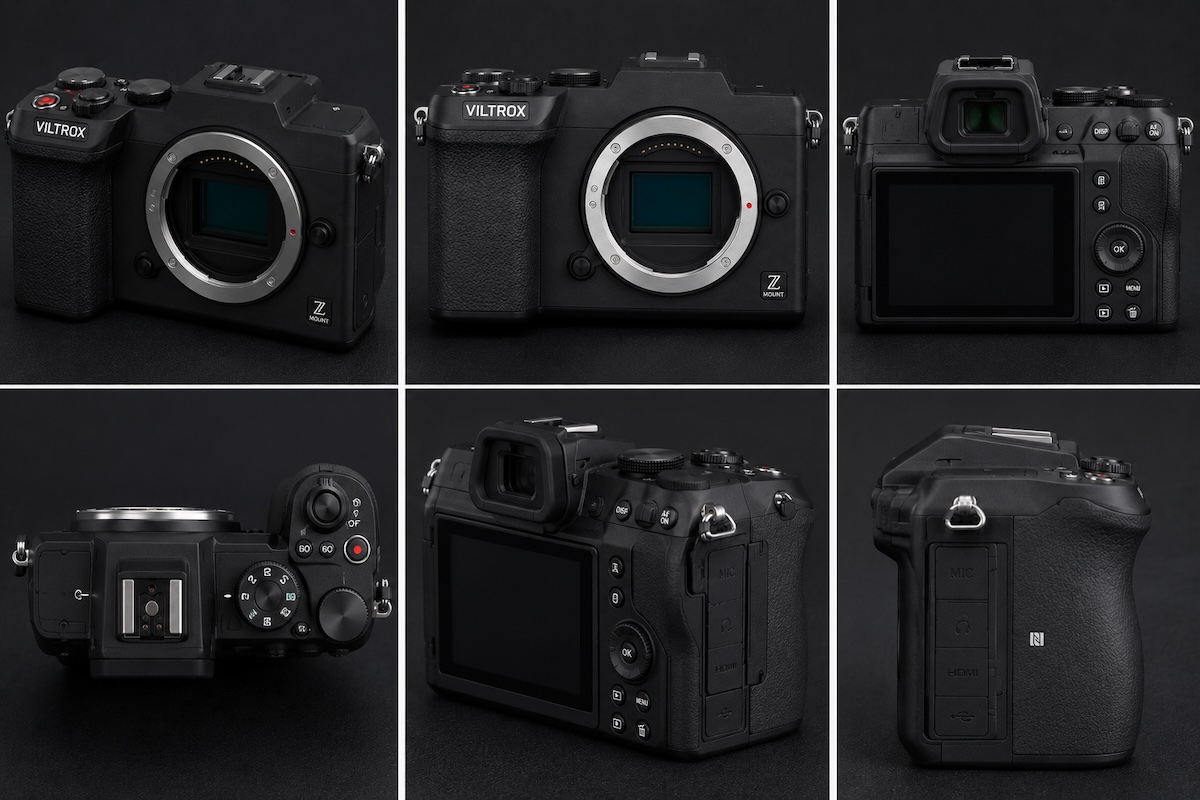
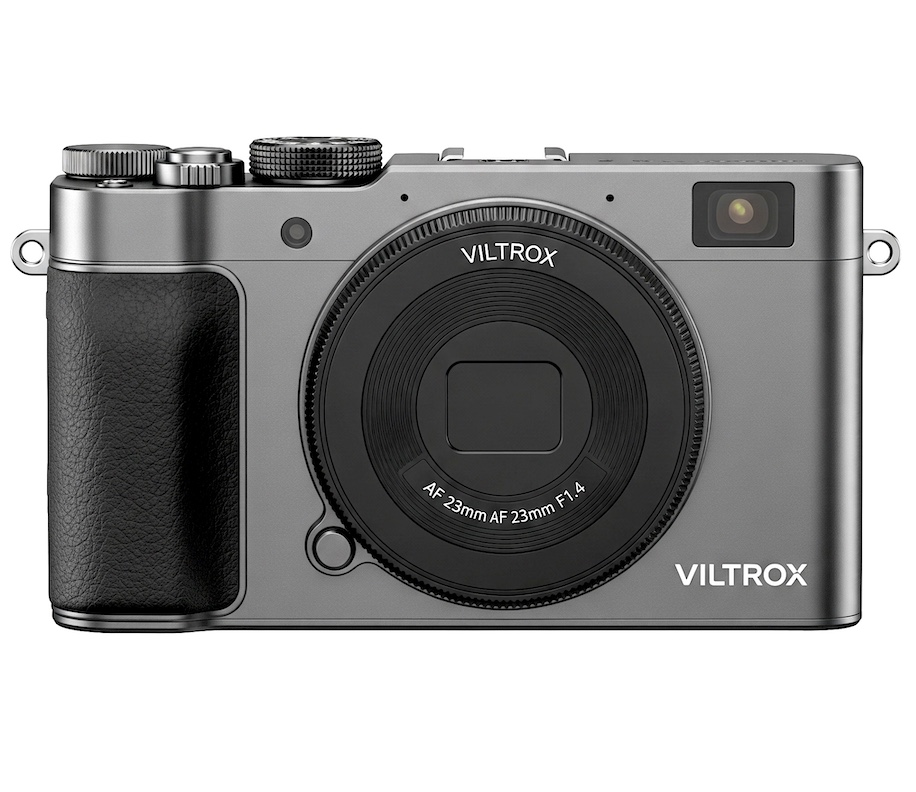
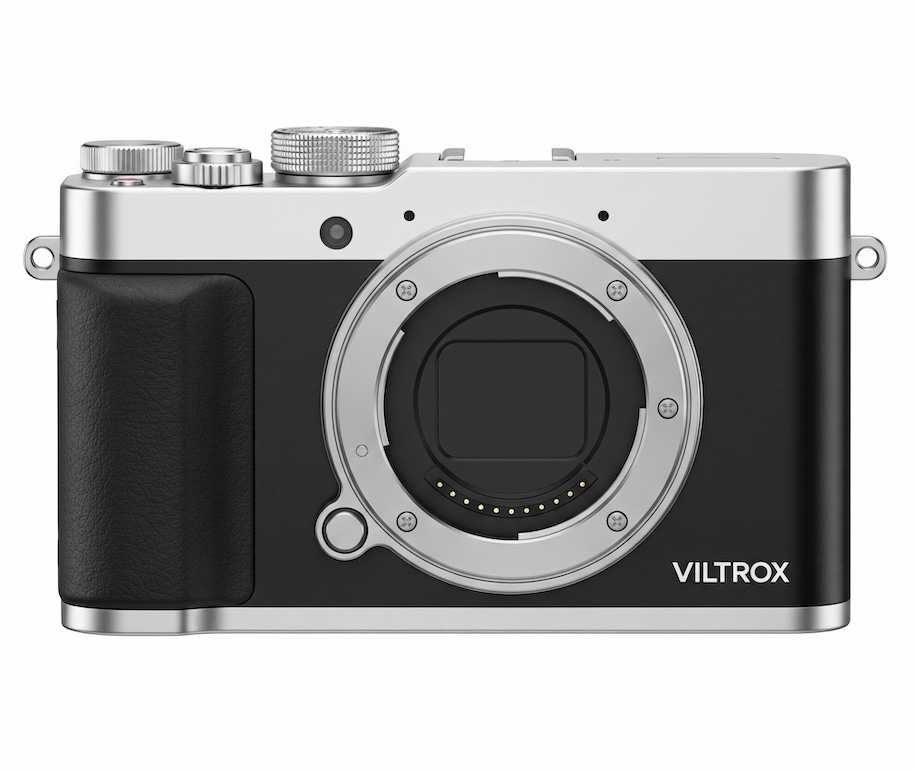
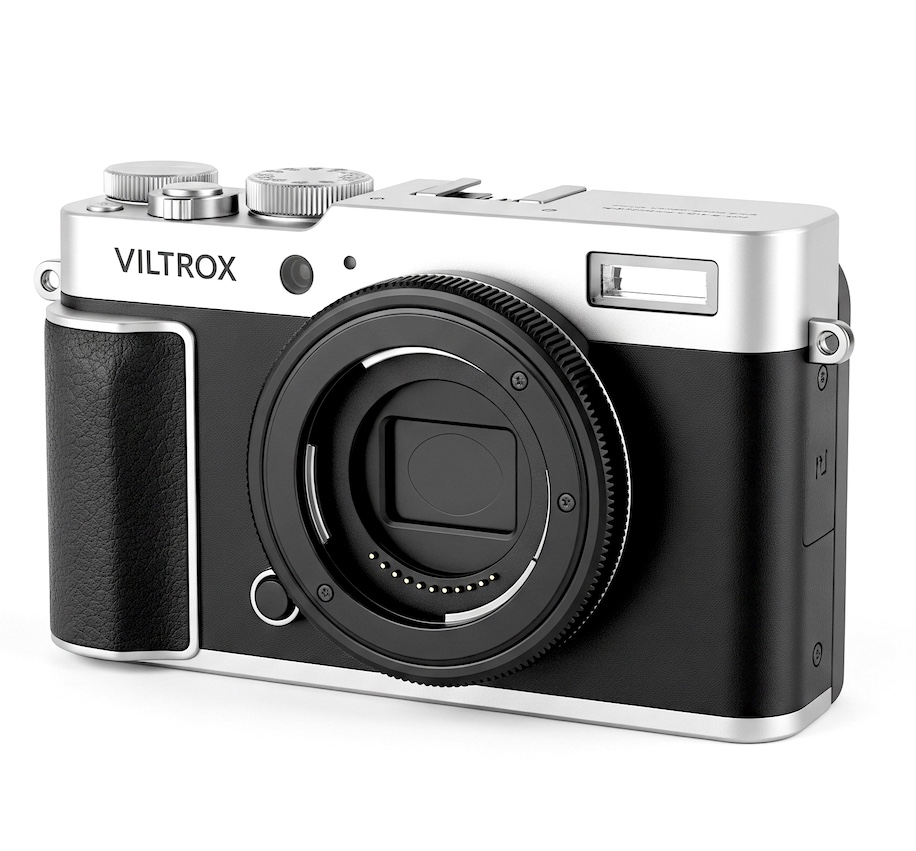
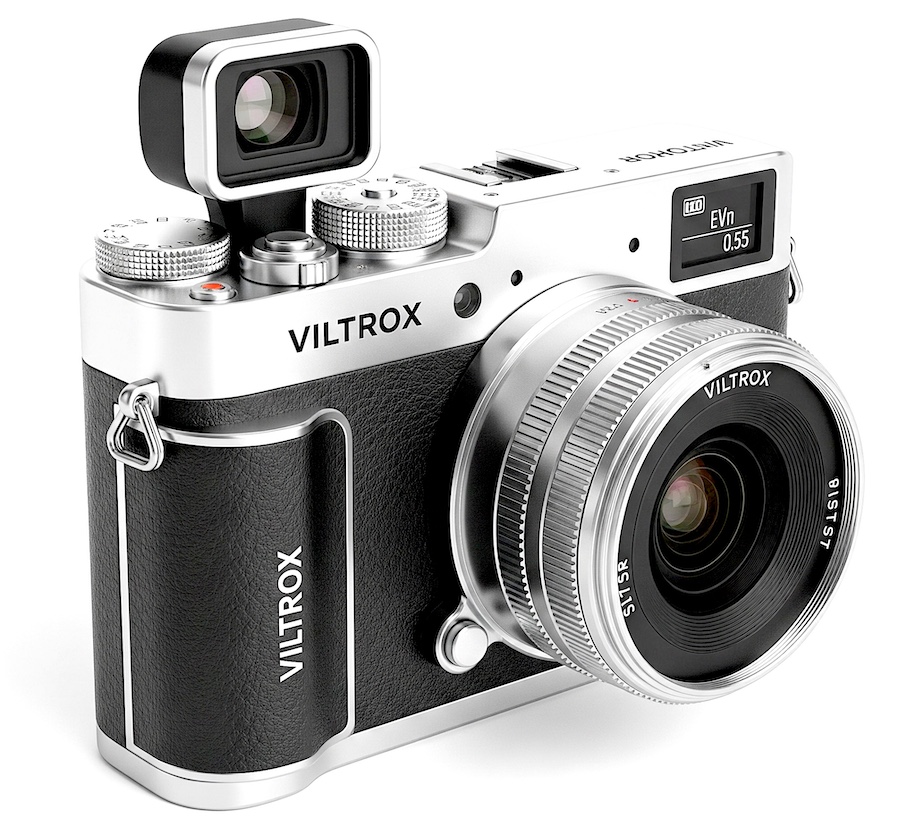
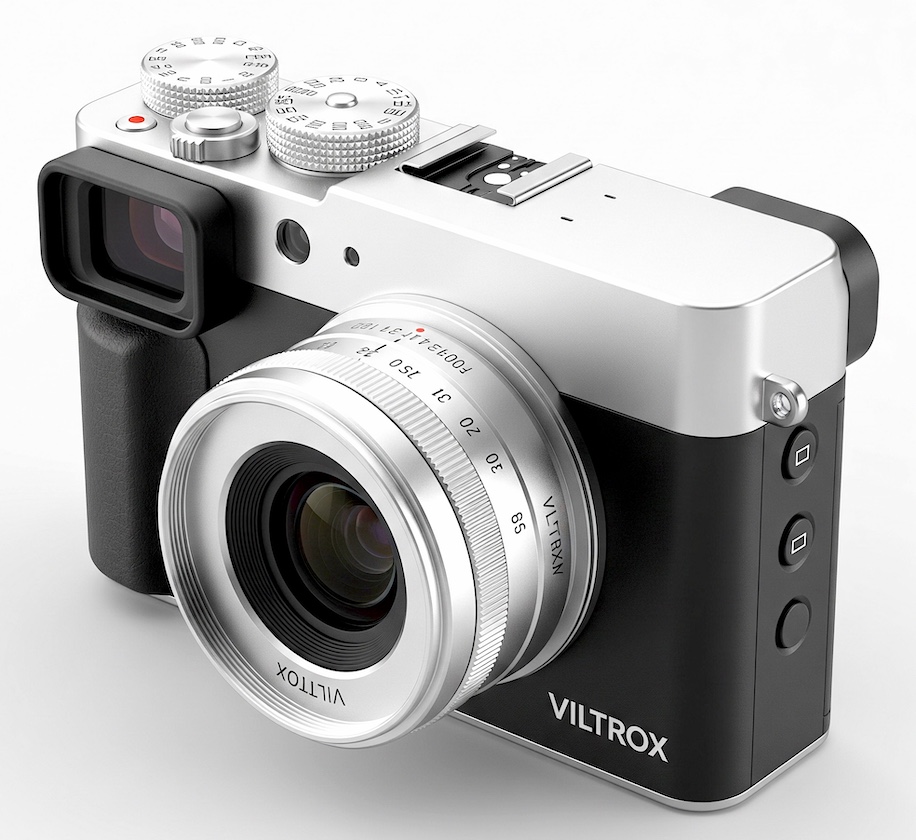
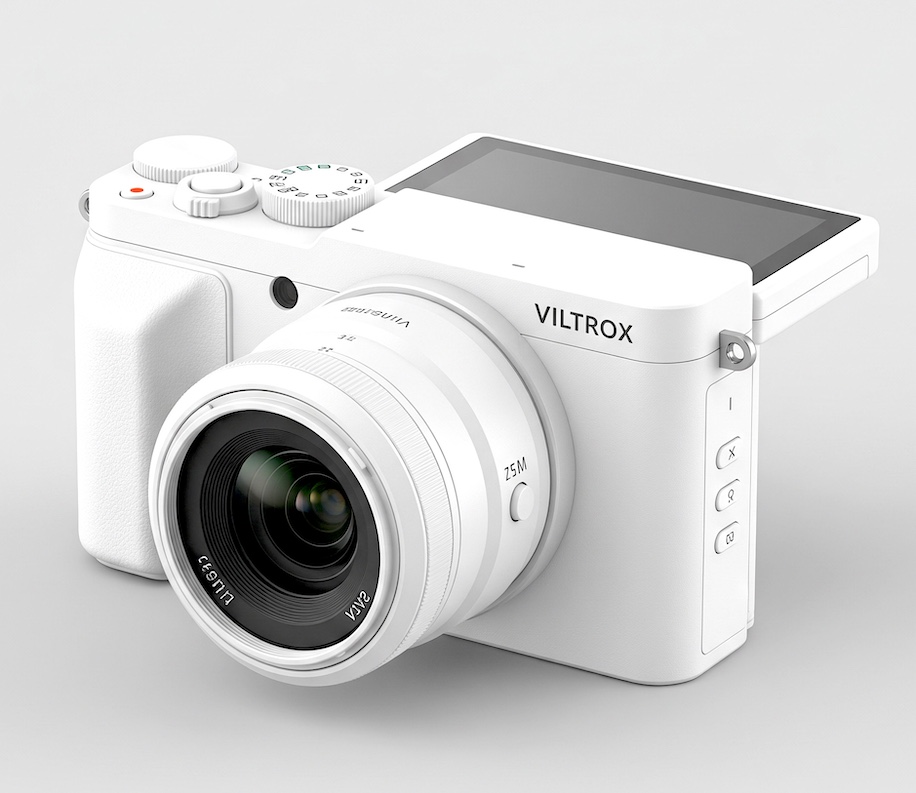
Viltrox digital mirrorless camera with Nikon Z-mount mockups
Fresh rumors circulating in Chinese‑language photography communities suggest that Viltrox may be preparing to enter the camera market with its own mirrorless model, and one of the strongest claims is that it could use the Nikon Z mount.
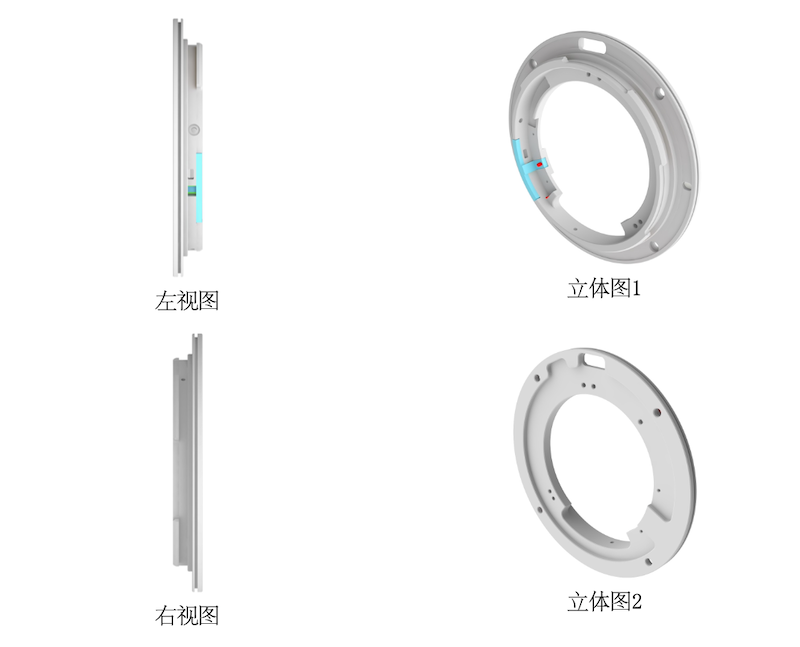
Other speculations refer to a recent Viltrox patent filed in China that involves the Nikon Z-mount – could it be that Viltrox designed a mount similar to the Nikon Z-mount but different enough, so they do not get into legal trouble? Some Chinese commenters speculate that:
“If Nikon restricts Viltrox lenses, Viltrox may build its own camera body to avoid dependency.”
Why a Nikon Z-mount camera from Viltrox is unlikely:
Legal barriers: Nikon is actively litigating Z-mount IP against Viltrox for lenses. A full camera body would require even deeper integration and licensing.
Technical/financial scale: Viltrox excels at lenses (strong in AF primes across mounts). Building a competitive mirrorless body (sensor, processor, IBIS, EVF, firmware, etc.) is a completely different and capital-intensive endeavor. No Chinese lens maker has successfully done this at scale recently without major partnerships or rebadging.
Business focus: Viltrox continues to aggressively expand its lens lineup (including Z-mount models) rather than pivoting to bodies.
My current estimate is that the “Viltrox Nikon Z camera” story is likely a rumor chain that started from the newly discovered Z-mount patent and then evolved into speculation on Chinese forums. These rumors remain unconfirmed, fragmentary, and not supported by any of my sources.
Removing backgrounds from images has always been one of the more time-consuming parts of photo editing. Fine hair, fur, feathers, and semi-transparent objects like glass or veils often require precise manual masking, which slows down the entire workflow.
Fortunately, recent advances in AI-powered image processing are making this task easier. One solution gaining attention among designers and photographers is Aiarty Image Matting, an AI-driven background removal tool designed to deliver precise cutouts while preserving intricate details.
Aiarty Image Matting: Precise Background Removal with AI
Aiarty Image Matting uses advanced AI algorithms to automatically detect subjects and separate them from backgrounds with minimal user input. You can batch export transparent cutouts, replace background color, or refine the matte to blend the subject with any new backgrounds.
Key advantages include:
1-click detection with AI for one or multiple subjects.
Precise masking for transparent, fuzzy edges, or solid subjects.
Preserve transparency variations in tricky edges, hair, lace, glass, etc.
Quick auto masking and optional brush editing for refinements.
atch export transparent cutouts, mattes, or custom backgrounds.
For product listings, portraits, custom stickers, and creative composites, Aiarty Image Matting makes background removal faster and more precise. It is particularly useful for portrait, wildlife, and commercial photographers dealing with challenging subjects that contain fine edge details.
Anniversary Offer: 43% OFF Lifetime License + Extra Saving
Aiarty is currently celebrating its anniversary with 43% OFF Aiarty Image Matting Lifetime License. For photographers and designers looking to streamline their workflow, it’s a nice chance to enjoy these benefits:
Unlock full features and use on up to 3PCs/Macs.
Free updates to all versions for a lifetime.
30-day money-back guarantee.
Besides, by entering the limited-time code “ANNIVERSARY” at checkout, you can also enjoy extra $5 OFF Aiarty Image Matting, or extra $10 OFF Bundle product purchase. The special offer ends June 21.
Below are some hands-on tests of this background remover and background replacement tool, from professional projects to family and hobbyist use cases.
Remove Backgrounds and Preserve Fine Hair, Fur, and Feathers
Traditional masking tools often require hours of manual tracing around complex edges, and they fail to preserve the natural edges in flowing hair or fuzzy fur.
AI models in Aiarty Image Matting are trained to recognize and preserve individual strands of hair, animal fur, and bird feathers, producing a clean result for both transparent output and blend in with new backgrounds.
Handle Transparent and Semi-Transparent Subjects
Glass, lace, veils, and transparent materials are notoriously difficult to mask accurately. Aiarty maintains gradual transparency values while separating the subject from the background, delivering realistic transitions.
This image background remover helps photographers maintain a professional look when working with product photography, event banners, and creative composites.
Separate Subjects from Complex Backgrounds
A complex environment often confuses traditional background remover tools, with background remnants sticking around a subject in cutouts.
To solve that, AI inference in Aiarty Image Matting helps distinguish subjects even when backgrounds contain complicated textures, branches, foliage, or overlapping elements.
Create Stickers for Journals and Creative Projects
For wildlife photographers, nature journal hobbyists, and school projects, Aiarty Image Matting makes it handy to create stickers in batches, which can be used in field journals, presentations, banners, infographics, posters, and other creative projects.
Flexible Auto Masking and Manual Refinement
Some background removal tools fall into one of two extremes: fully automatic tools that offer little control over the result, or manual masking features that require time-consuming tracing.
Aiarty Image Matting combines the strengths and flexibility of both approaches. With a single click, its AI models can auto-detect and isolate subjects, creating a high-quality mask as a strong starting point for most images.
For further refinement, it also provides editing tools to adjust masks, erase unwanted areas, or brush over to bring back details. The combination of the Mask alpha curve tool and erasing threshold is handy to handle challenging areas such as hair, fur, lace, and transparent objects.
Batch Processing for Large Projects
Editing and masking hundreds of images individually is inefficient. Aiarty supports batch processing, allowing designers and photographers to process large numbers of images automatically.
Whether handling event photography, wildlife shoots, or e-commerce catalogs, photographers can save editing time with precise masking and background removal.
Optionally, you can use the built-in 2X upscaling feature to enhance image quality, making the cutouts clear even at 4K and 8K displays.
Specialized AI Models for Different Scenarios and Subject Types
For clean cutouts and transparent PNGs, users might prefer a clear edge around the subjects. For background replacement, such as placing the person on a new canvas, a natural blend-in requires transparency transitions near the edges.
Instead of providing a one-size-fits-all tool, Aiarty Image Matting has 4 AI models optimized for different image types and masking scenarios.
Masking Model: AlphaStandard V2
It is designed for semi-transparent and translucent subjects such as wedding veils, glassware, water splashes, fine hair, and animal fur.
When you prefer to preserve natural transparency and smooth transitions, apply this model.
Masking Model: AlphaEdge V2
For those semi-transparent and translucent objects mentioned above, when you want to prioritize edge sharpness over soft transparency variations, then instead of using AlphaStandard, apply AlphaEdge.
Masking Model: EdgeClear V2
It is built for detailed solid objects such as vehicles, jewelry, sports equipment, and furniture. When you want to emphasize edge clarity while maintaining realistic detail, use this model for background removal and replacement.
Masking Model: SolidMat V2
It is trained for products and structured subjects with defined boundaries, including: buildings, consumer products, electronics, and commercial catalogs.
Besides the 4 AI models, Aiarty has an Alpha mask curve, brushes, and erasers, and more options to refine selection. With both auto masking and optional manual adjustment, it is versatile enough to tackle various subjects and scenarios, be it for semi-transparency variations, fuzzy edges, or solid subjects.
Final Thoughts
Background removal doesn’t have to be slow or tedious. With AI-powered subject isolation and optional manual refinement, Aiarty Image Matting offers photographers and designers a faster way to create clean cutouts while keeping full control over tricky edges.
For PhotoRumors readers, Aiarty Image Matting is currently available for $65 (43% off the regular price). The Lifetime License works on up to 3 Windows or Mac computers and includes free lifetime upgrades. Apply the code ANNIVERSARY at checkout to get an extra $5 off. The special offer ends June 21.
For those looking for a more creative toolkit, Aiarty also offers Anniversary bundles with image enhancement, upscaling, and video software – currently discounted up to 52%.
I was somewhere way back at the end of this line of photographers on a photowalk. Photo: Zach Sawyer
Confession: I'm an introvert. I like – and often thrive on – my alone time. Putting myself in situations to meet people doesn't come naturally. That's especially true when it comes to meeting other photographers. And as someone who has moved every three to four years in my adult life and works from home, connecting with other photographers is even more difficult. While that solitude can be valuable in certain doses, it can become isolating, and it also may not be the best way to build a sustainable relationship with photography.
That's where community comes into play. The importance of community has become especially clear to me over the past year or so and has inadvertently become a recurring theme in my life. It's come up in various ways, but most notably, it's been a consistent theme as I've been taking part in some local photography clubs for the first time ever.
Taking the first step
The first meetup I attended was on a beach to photograph storm-damaged houses. Photos: Abby Ferguson
Last year, I connected with a local photographer via Instagram who invited me to a group chat filled with photographers of all levels who participated in photo walks through a handful of casual clubs in the area. I conversed in the chat, but I purposefully avoided joining the photowalks that were posted. To be honest, going on a group walk with people I didn't know was intimidating, and I was unsure if it was something I would enjoy. After all, photography is often a solitary endeavor for me.
Despite my reluctance, I knew meeting other photographers would only be a good thing. Plus, as this is a place my husband and I will be for the long term, I wanted to set down some roots and finally make some connections here. And so, last fall, I finally put aside my reservations and attended a meetup.
A group shot (excluding me) of that first meetup that I attended. Photo: Abby Ferguson
The walk was a smaller, more casual one than most; there were only five of us, which was part of what pushed me over the edge to attend. We met in the evening and grabbed some dinner before heading to a beach where some houses had been left abandoned or in disrepair after hurricanes a few years ago. Cameras ranged from 35mm point-and-shoots to full-frame DSLRs and even a 4x5 view camera, and conversation was easy as we all meandered and, at times, did our own thing.
Overall, the meetup hit the sweet spot of being with others while still allowing me to focus on my own images if I wanted to.
Shared interests matter
A group shot from the first larger photowalk I attended. Photo: Jeremy McGuire
That initial meetup left me feeling inspired and connected with new friends who also love photography. It also gave me the confidence to try something new and join larger photo walks on a somewhat regular basis. Knowing a few people makes it easier, of course, but I also now know I can still do my own thing to get images I'm excited about, without feeling trapped by the group.
I also take part in regular conversations about photography in the group chat, everything from answering questions to geeking out about something (especially new film). I've met some very good friends through the group chat and the meetups. It's through these groups that it's really hit home how important it is to build community, especially community around shared interests.
Another bonus of hanging out with fellow photographers is that no one cares when you stop to take photos. And you may even get photos of yourself in action. Photo: Marcelo Murillo
Like other hobbies or specialties, photography has highly specific jargon and gear. To someone who isn't interested in photography, it can be like a foreign language. It makes a significant difference being able to talk to people who understand why you care about cameras, composition, prints, editing, lenses or waking up early to catch the good light.
Even if you aren't a gearhead, having people who understand the specific joys and frustrations of photography can make the practice feel less lonely. Being able to share an image I worked hard to get with a fellow photographer is very different from sharing with someone who doesn't care about or understand photography.
Motivation and accountability
Photowalks give me the opportunity to scratch my portrait itch more often, too. Photo: Abby Ferguson
I've written a fair amount about working through creative droughts or doubts with photography, and community can be a significant factor in getting out of those times.
Knowing there are regular photo walks gives me a reason to get out with a camera, even when I might otherwise talk myself out of it. That said, it's not accountability in a strict sense. After all, no one is checking whether I show up or thinking less of me if I don't. But having a group of people making plans, sharing images and talking about photography keeps the medium more present in my everyday life, which can keep it fresh and interesting.
Don't forget about online communities
I met these two through Flickr (which they also met through). This image was taken in 2012, not long after we first met in person, on a Lomo LC-A borrowed from Tim, on the right. Photo: Abby Ferguson
I think there is real value in connecting with people face-to-face and building community locally. However, I'm also of the internet age and recognize the importance of online communities, too. Some of my best friends in real life are people I've met online first (shoutout to Flickr for being the start of this). I also found my local photography groups because I connected with someone on Instagram.
I also recognize that not everyone has access to local photography groups with in-person meetups. I'm extremely fortunate to have multiple groups that hold meetups within a few hours' drive, but that's not the reality for many. Online communities, such as ours here at DPReview, can be excellent stand-ins and supplements to in-person connection.
Solitude and community can coexist
To be clear, I still very much value the solitary aspects of photography. I don't want every outing with my camera to be a social event. But joining my local photography groups has reminded me that it doesn't have to be an isolating medium. Sometimes being around others who care about the same strange, oddly specific things can make photography feel more fun and energizing, and it's worth getting out there when possible.
DJI and Insta360 have filed patent infringement suits against each other in the U.S., just days after Insta360 launched its new Luna gimbal camera line and amid the buildup for the Osmo Pocket 4P. Indeed, the two devices are remarkably similar: they are both handheld vlogging cameras with two lenses and integrated gimbals, and a similar form-factor.
DJI fired first, filing two lawsuits on June 10, the same day the Luna Ultra went on sale, in the Eastern District of Texas. The complaints allege that the Luna Ultra, its accessories, and app "blatantly copy DJI's patented inventions," including its subject-tracking system, follow/lock gimbal modes, and overall physical design. DJI is seeking a permanent injunction that would ban the accused products from the U.S. market, along with damages.
Insta360 isn't backing down, though. It pushed back today with two countersuits of its own, asserting five patents against DJI. The company claims DJI's products, including the Osmo Pocket, Ronin/RS, Osmo Mobile and Osmo 360, infringe its patents covering gimbal stabilization and directional control, among other technologies.
The suits from both companies are ongoing
Insta360 CEO JK Liu rejected DJI's infringement claims, saying Luna Ultra development began in 2020 and is the result of "years of independent R&D, not a response to any competitor's product." He characterized DJI's decision to file on launch day as "exposing their fear of competition from a highly competitive product."
According to the complaints, DJI sent Insta360 a letter on May 26 putting the company on notice about the patents two weeks before the Luna Ultra launched. That suggests the lawsuits were not filed without warning. The suits from both companies are ongoing, and it remains to be seen how the courts will rule on the competing claims.
This book has been one of my prized possessions since I bought it nearly two decades ago. Photo: Abby Ferguson
Sitting on my bookshelf immediately behind my desk is a copy of Duane Michals' The House I Once Called Home, inscribed to me by the artist himself. I've had it for nearly two decades, and I still pick it up from time to time because it has had such a significant influence on me as an artist and photographer. And so, it was with deep sadness that I learned Michals passed away on June 9.
The DC Moore Gallery, which represented Michals, confirmed his death at the hospital following a short illness. He was 94.
For anyone who has spent serious time studying the art of photography, Michals is one of those artists who fundamentally changes how you think about what the medium can do. His influences were more literary and surrealist than photographic, including William Blake, René Magritte, Lewis Carroll and Joseph Cornell. He published more than forty books over his career and continued exhibiting well into his 90s.
He came to prominence in the early 1960s, when photography was largely defined by documentation and reportage, but he wanted no part of that. Instead, he built sequences of staged black-and-white images that played out like short films, frequently using multiple exposures. These were often accompanied by handwritten text that told you, as he put it, "what you can't see."
"You are either defined by the medium, or you're redefining the medium."
Michals was self-taught, never belonged to a movement, and didn't seem particularly interested in fitting in anywhere. As he once said, "You are either defined by the medium, or you're redefining the medium," and he truly lived that throughout his career.
I had the chance to see Michals lecture when I was in undergrad, and I distinctly remember his wit. It was there that he signed one of my favorite photography books. He was one of my very first photographic influences, inspiring me to explore concepts of memory more deeply and leading me to start employing multiple exposures in my work. In fact, those multiple exposures were part of what led to my acceptance into graduate school and became the basis for my graduate thesis work.
Photography lost one of its true originals this week. But his books, and the boundary-pushing ideas within them, aren't going anywhere.
Camera companion apps can unlock useful features such as remote camera control, wireless image transfers, GPS data and more, but that's only if they work well. Nikon's primary app, SnapBridge, has been around for roughly a decade, but that doesn't necessarily mean all the kinks are worked out.
It currently supports all Nikon Z-series cameras, though support for older DSLR and compact models is more limited. I've spent some time with the app to see how it performs and what features it offers. All of my testing was done on the Google Pixel 10a and iPhone 15 Pro with the Nikon Zf. Your specific smartphone and camera may change your experience and the features available.
Bluetooth connection is just as simple as pairing other standard Bluetooth devices.
When initially setting up SnapBridge, you can choose to connect via Wi-Fi and Bluetooth or Wi-Fi only. Bluetooth establishes a constant connection between the camera and smart device, enabling automatic downloads of small files, along with remote control and location data. Wi-Fi is required for larger image transfers and remote live view functionality. I opted for that combination for my testing.
The initial Bluetooth connection is very straightforward and quick. The process requires a few steps on both the camera and app, but instructions are clear, and it paired quickly. Once connected, the Bluetooth connection was stable and reliable. I even have two phones paired, and while I had to manually select the phone I wanted at times, I had no issues with Bluetooth connecting quickly and staying connected.
Wi-Fi connectivity
To get my Wi-Fi connection to work, I needed to turn off encryption by navigating the following path: 'Network Menu' > 'Connect to smart device' > 'Wi-Fi connection'> 'Wi-Fi connection settings' > 'Authentication/encryption' > 'Open'
Wi-Fi pairing was a far different story. A colleague and I had the same difficulties connecting across multiple cameras using multiple phones. Unfortunately, these problems couldn't be easily solved through troubleshooting. A Nikon representative suggested changing from the default WPA2/WPA3 Wi-Fi encryption to open authentication. This solved the issue on the Zf that I was testing with, but it does mean that the connection is less secure.
STA mode changes what tools you have available in SnapBridge.
It's also worth noting that some Nikon cameras offer two Wi-Fi options: AP mode and STA mode*. AP mode is a direct Wi-Fi connection using the temporary network process as outlined above, while STA mode uses an existing network, such as your home Wi-Fi. STA mode is fast and easy to set up, with far fewer initial issues than AP mode during my testing.
While STA mode is quick to establish, reliable, and means your smart device remains connected to Wi-Fi, there are limits to what you can do in SnapBridge with it. You can't download firmware or use Bluetooth remote control, and automatic photo downloads are limited to 2MP, instead of the 8MP available in AP mode (though only some cameras support 8MP).
* STA mode is available on newer Z-series bodies, but it isn't available on all Nikon cameras at the time of writing. You can see what SnapBridge features are compatible with your camera on the support website.
If you switch between connection types or connected devices, you'll need to access the camera menu quite frequently.
Frustratingly, there's a fair amount of manual selection required when switching between connection options. For example, connecting to Wi-Fi via STA mode automatically turns Bluetooth off on the camera. If you want to go back to Bluetooth, you'll need to navigate to the Network Menu on the camera, turn Bluetooth back on and also select 'Exit Wi-Fi STA mode' in SnapBridge.
Transfer, editing and sharing tools
Auto link uses Bluetooth connectivity to automatically transfer photos to your phone.
SnapBridge lets you wirelessly transfer images and videos from your camera to a smart device in two ways. One is 'Auto link,' which automatically downloads new photos to your connected phone or tablet. SnapBridge offers two Auto link options: in the background (transfers occur even when your phone is in sleep mode) or in the foreground (transfers only occur when you are in the app).
There are some pretty significant limitations to Auto link, though. First, it isn't available when the camera and phone are connected via Wi-Fi AP mode, so you'll have to use Bluetooth or STA mode. It also doesn't support Raw, TIFF or video files, and limits photos to 8MP on most newer Z-series cameras and 2MP on all others. Newer Z-series cameras support automatic transfer of HEIF images alongside JPEGs.
The auto-downloading of photos via Bluetooth is reliable, though with a caveat: you have to keep your phone and camera relatively close together. If I walked to another room in my house with my phone, the syncing would stop. My house isn't all that large, and the range would have been close enough for a speaker or headphones to keep working, but not so for syncing photos to SnapBridge.
The STA Wi-Fi mode also offers an auto download function, though only at 2MP. However, despite having this turned on, I was never able to get the app to sync new photos when connected via STA mode on both the iPhone and Pixel.
Downloading images manually allows you to sync Raw files.
If you want larger files, you'll need to transfer manually, which requires one of the two Wi-Fi connections. Manual transfers in SnapBridge support Raw files from all Z-series bodies, but not DSLRs or older compacts. That said, by default, the view for transferring images is filtered to JPEG only. If you shoot Raw or HEIF, it will appear as though you don't have any images to choose from until you change the display options via the top menu.
Manually saving files to my phone was also easy. Tapping on an individual image from the grid opens it larger with a 'Download' button at the bottom. You can then choose which size and file format you want to download. Raw files naturally take more time, but even when downloading a handful at once, it wasn't unreasonably slow. I never tried to download more than 10 at a time, but for that volume, it's a reasonably fast process.
You can share photos to various apps and sync images to Nikno's Image Space, that's the extent of the options in SnapBridge.
The SnapBridge app is quite limited in terms of what you can do with your photos beyond syncing them to your phone. You can share files to various apps such as Instagram, Facebook, email and more, but that's all.
There are no editing tools, so you'll need a different app if you want to edit on your phone. There's also no way to transfer Look Up Tables (LUTs) or color profiles from your phone to the camera via SnapBridge.
If you're looking for a more robust image transfer, Nikon's direct camera-to-cloud service, Imaging Cloud, is the better option. It offers automatic full resolution uploads to third-party services like Lightroom, Google Photos, Dropbox and OneDrive. Imaging Cloud also supports user-created image presets, which you can't access in SnapBridge.
Remote control and live view
The Bluetooth remote is as simple as it gets.
The SnapBridge app offers two remote options: one with live view and one without. Bluetooth connectivity is used for the remote trigger option, which lacks live view or any access to settings. It does support interval timer shooting, time-lapse video recording, and focus shift shooting, though. It also features a "Press halfway" button to focus, though you can't change your focus point, so you'll have to set that on the camera.
Oddly, the Bluetooth remote also lets you pull up the playback menu on the camera from afar, with the ability to zoom in and out, scroll forward and back, and show or hide information.
All of the features in the Bluetooth remote option work seamlessly. The autofocus is responsive when I tap to half-press, the shutter triggers right when I tap the button, and the small selection of additional modes also works well.
The Wi-Fi-based remote gives you more control over settings, but doesn't have some of the features found in the Bluetooth remote.
The other option, which is labeled 'Remote photography' in the app, adds much more control from your smart device. It requires a Wi-Fi connection, but once connected, you'll have access to live view and the ability to change the shutter speed, aperture, exposure compensation, ISO and white balance. You can also change between manual, shutter priority, aperture priority and program (there is no option for auto).
The Wi-Fi version of the remote also lets you choose if you want to automatically download the photos, and if you want those to be 2MP, 8MP or the original format. However, those files will be JPEGs or HEIFs, as Raw files are not supported here. This remote option also gives you the ability to use a self-timer, and you can change the focus point by tapping anywhere on your phone screen.
I found the 'Remote photography' feature to be highly responsive. The live view instantly adjusts to any reframing or exposure changes, and the autofocus is also very snappy. Having the instant image download option turned on slows down the process of taking photos a bit, since it loads for a split second after I tap the shutter, but that's the only slowdown when using the remote with live view.
It was also very stable, staying connected for long periods with no issues. Plus, as long as I didn't end the Wi-Fi connection, I could leave the remote to use other parts of the app and instantly jump right back into remote shooting.
GPS sharing
SnapBridge supports location data, meaning you can sync your phone's GPS data to the camera so that your images have a location tied to them. When using Bluetooth connectivity, the app lets you choose if you want high, medium or low accuracy. High accuracy will use more battery in both the camera and smart device, though with more precise location data, while low will use less battery with less precise data.
There's also a battery saving mode, which pauses the location data link to save battery if the camera isn't used after a period of inactivity (Nikon doesn't specify the time limit). Using the camera will automatically reconnect the feature.
I have the location data set to medium, and it is still incredibly precise. It did drain my phone's battery faster than usual, but I still wouldn't have any reservations about setting it to that unless I knew I wouldn't have access to power for a while.
Firmware updates
Firmware updates are simple through the SnapBridge app.
SnapBridge supports firmware updates, so you don't have to fuss with downloading firmware to your computer and transferring it to the camera. However, it's important to note that you must use the AP mode, not the STA or Bluetooth connections. I only had one firmware update to install, but the process was straightforward and quick, with the new version ready to use in a few minutes.
While firmware updates through SnapBridge are easy, they aren't automatic. If you want your firmware to stay updated without any input from you, Imaging Cloud is what you'll want to use.

 Connexion