Vue normale

Skylum Luminar Neo Summer Sale: up to 70% off

Par : PR admin
6 juin 2026 à 17:28


Skylum has launched a new Luminar Summer Sale with discounts of up to 70%. The campaign runs June 5-28, 2026. Here are the details:

For new users:

  • Desktop Perpetual – $119 / €99 + free Neo video course
  • Cross-device Perpetual – $149 / €129 + free Neo video course
  • MAX Perpetual – $164.99 / €134.99 + free Neo video course + free gift

For existing users:

  • Cross-device Perpetual – $99.99 / €89.99 + free Neo video course
  • MAX Perpetual – $109.99 / €99.99 + free Neo video course + free gift

Luminar Neo is an AI-powered photo editor that makes it easy to achieve professional results with simple and fast edits (available on both desktop and mobile). All plans are perpetual (one-time purchase) licenses with no subscriptions required. The Max plan unlocks the complete experience: desktop + mobile apps, plus access to the creative assets library (skies, overlays, LUTs, presets, and more to fuel your creativity). Here are the main benefits:

  • AI-powered editing made simple
  • Professional results with minimal effort
  • Works across desktop + mobile
  • Strong value with lifetime licenses

The post Skylum Luminar Neo Summer Sale: up to 70% off appeared first on Photo Rumors.

Apple Is Bringing Age Verification To Texas This Week

Par : BeauHD
4 juin 2026 à 16:00
joshuark shares a report from The Verge: Apple will introduce age verification in the App Store for users in Texas starting on Thursday, June 4th. The move, as spotted by MacRumors, comes just days after a federal appeals court allowed Texas' App Store Accountability Act to go into effect while a lawsuit against it proceeds. People in Texas who are creating a new Apple account will need to verify they're over 18 using a credit card or government ID. Apple may also automatically verify users' age using the age of their account and whether they have a credit card on file. Despite Apple's attempts to push back on app store-level age verification, the company has announced plans to implement age checks to comply with laws in places like Utah, Louisiana, Brazil, Australia, Singapore, and the UK. Google is required to make similar changes to the Play Store and is also introducing age-checking tools for developers. Last December, a judge blocked the App Store Accountability Act (SB 2420) from taking effect, but an appeals court has now reversed this decision -- at least while the court figures out whether the law is constitutional. Even if this law gets struck down in Texas, a federal version with the same name is still making its way through Congress and could impose age verification at the app store nationwide.

Read more of this story at Slashdot.

Aiarty Image Enhancer: Restore Old Photos and Recover Blurry Faces with AI (49% Lifetime License)

Par : PR admin
23 mai 2026 à 18:27

Aiarty Image Enhancer: Restore Old Photos and Recover Blurry Faces with AI (49% Lifetime License)

Restoring old photos is rarely as simple as increasing sharpness or removing visible damage. Many photographers and families are now digitizing decades-old prints, film negatives, and family albums to preserve them before physical deterioration becomes irreversible. However, scanned family photos and aging film prints often suffer from multiple issues simultaneously, including faded colors, scratches, dust, low-resolution scans, compression artifacts, and facial detail loss accumulated through years of storage, rescanning, and digital compression.

For photographers and archive enthusiasts, the challenge is restoring clarity without destroying the original texture and character of the image. Film grain is often mistaken for digital noise, facial details become overprocessed, and low-quality scans leave limited data for accurate restoration or upscaling.

Traditional workflows still rely heavily on manual Photoshop adjustments such as denoising, retouching, sharpening, scratch removal, and color correction, especially when processing larger photo archives or film scan collections.

AI-assisted restoration tools are increasingly being used to simplify repetitive cleanup tasks within a broader editing workflow. Designed around a restoration-oriented approach rather than one-click filters, Aiarty Image Enhancer combines denoising, deblurring, face recovery, scratch cleanup, upscaling, and color correction into a single workflow pipeline while maintaining more natural-looking results.

To celebrate its anniversary, the software is currently available at 49% OFF lifetime pricing, with the coupon code ANNIVERSARY providing an extra $5 off single products and $10 off bundles. The special offer runs through June 8.

The lifetime plan includes:

  • Use on up to 3 Windows or Mac computers
  • Unlimited access to all features
  • Free lifetime upgrades and priority technical support
  • 30-day money-back guarantee

How Aiarty Image Enhancer Fits Into Modern Photo Restoration Workflows

Rather than functioning as a one-click AI filter, Aiarty Image Enhancer is designed around a workflow-oriented approach for restoring old photos, film scans, and archived images while maintaining natural-looking detail.

A video demonstration showing real restoration results can be viewed below:

Its AI denoise and deblur tools help recover clarity from noisy or slightly soft scans without aggressively removing texture. A built-in Strength slider allows more controlled adjustments, which is particularly useful when working with film grain or older portraits where overprocessing can quickly create artificial-looking results.

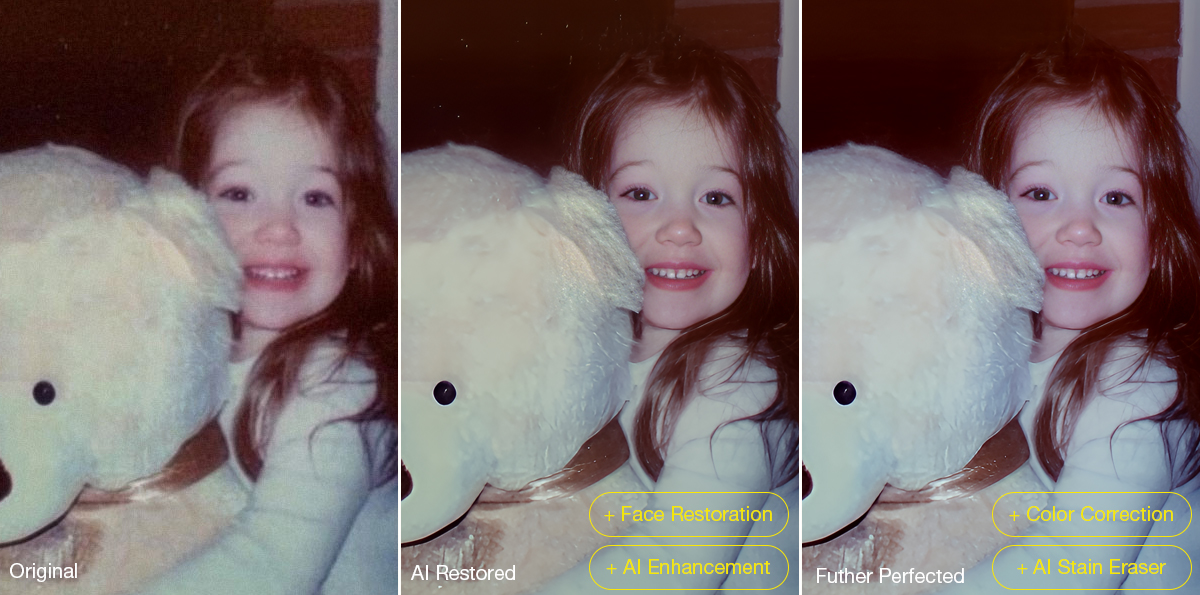
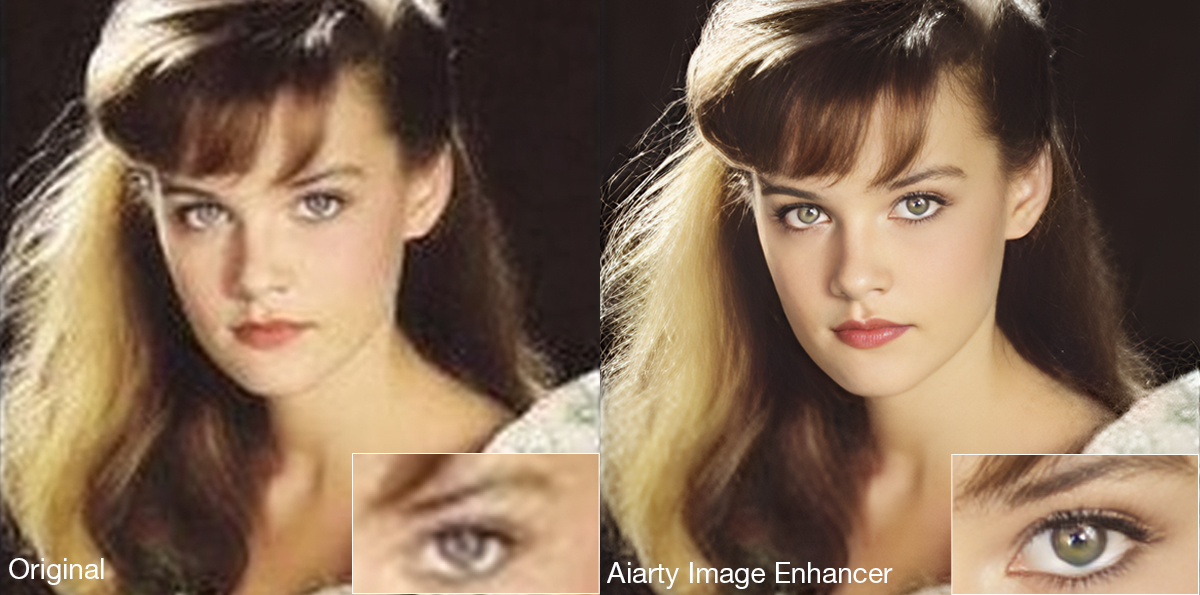
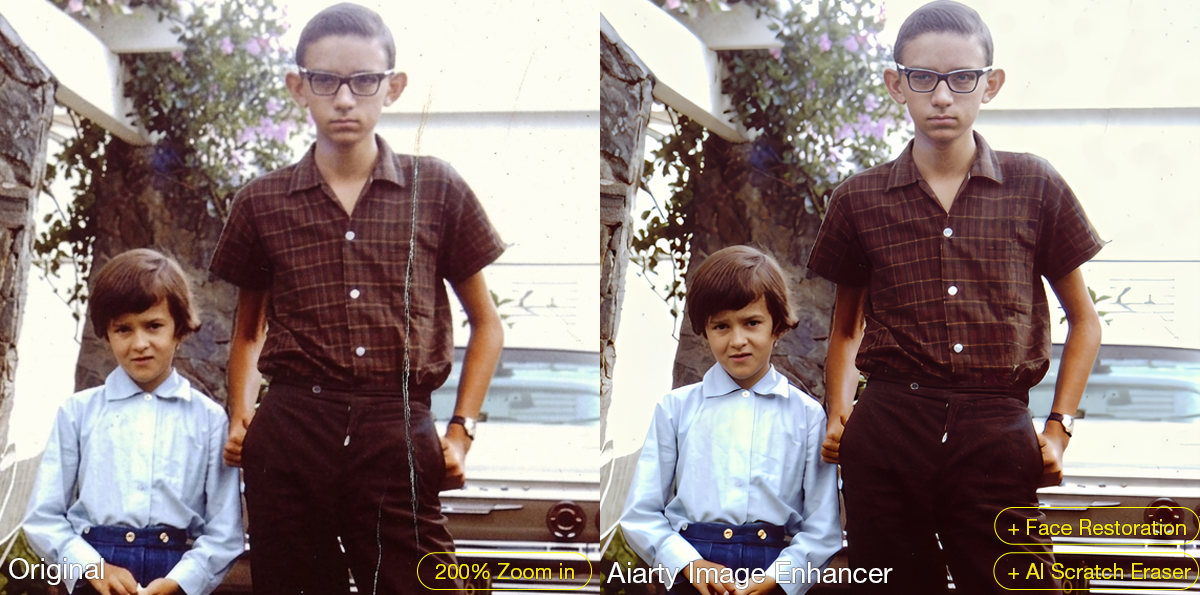
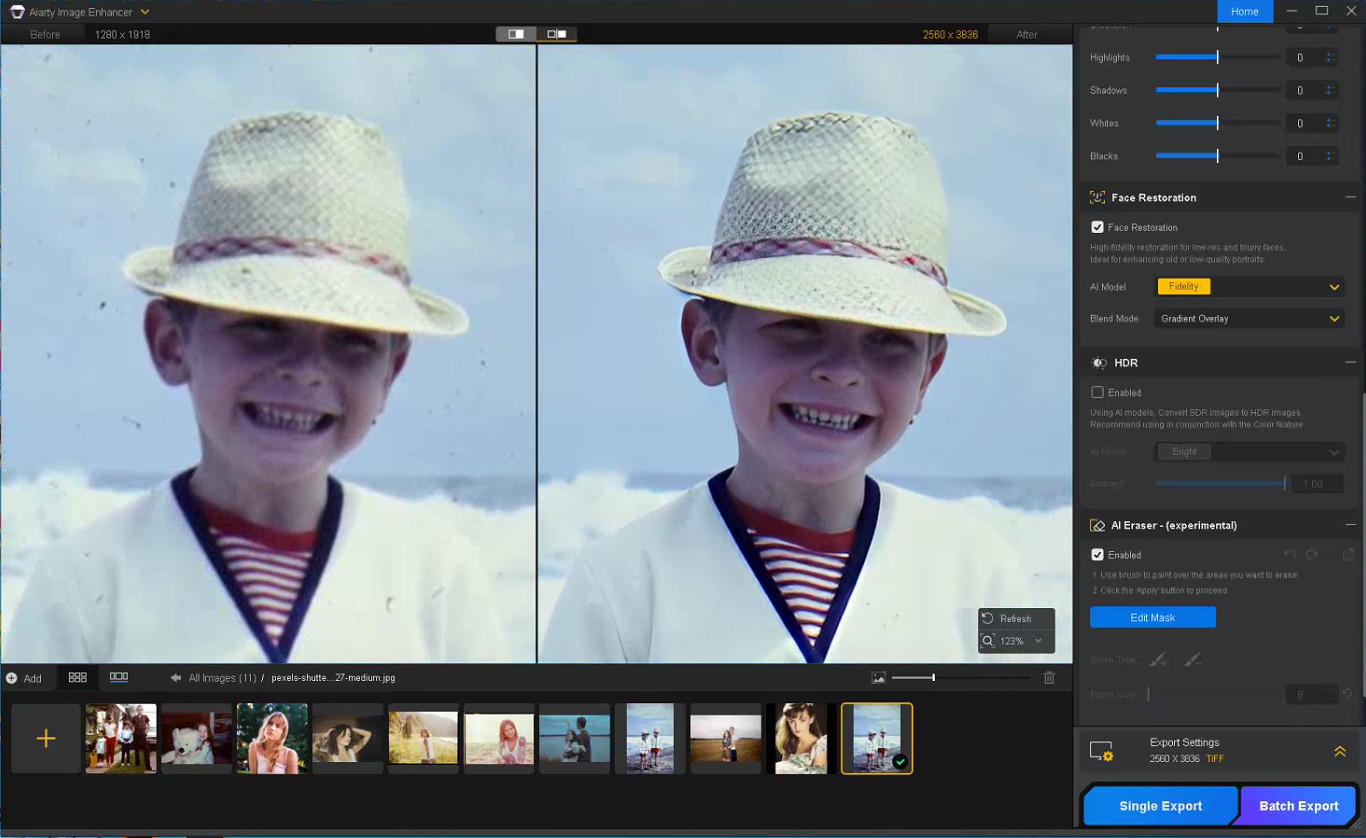
The latest Face Restoration improvements focus on rebuilding blurred facial areas while preserving realistic skin texture and facial structure. For damaged prints, the integrated AI Eraser can remove dust spots, scratches, stains, fold marks, and other small distractions commonly found in archived photographs.

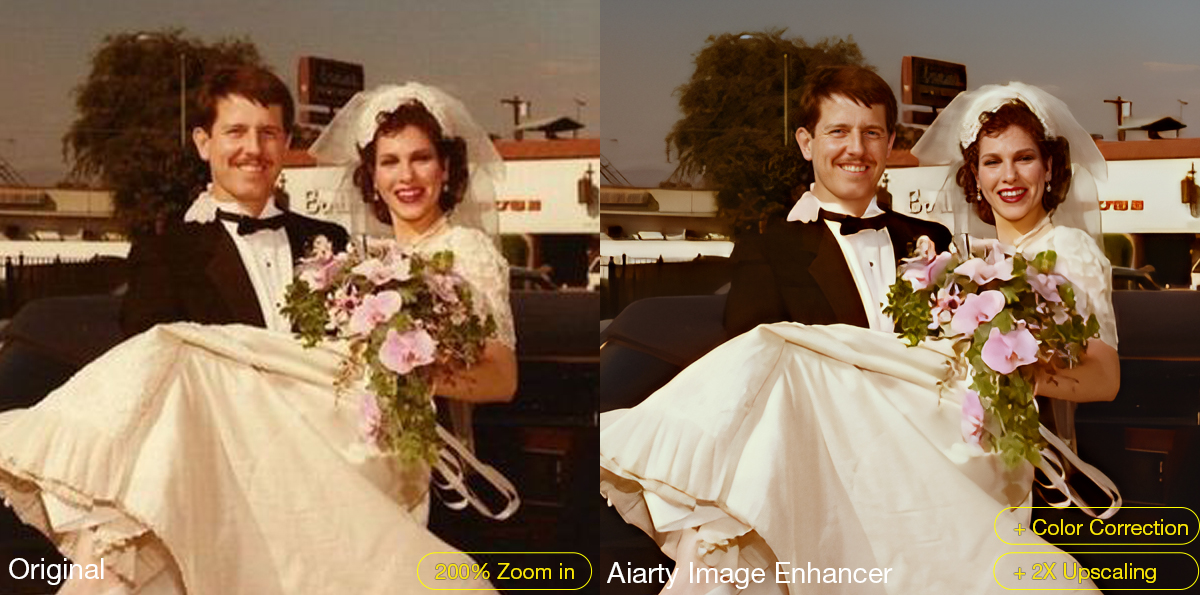
The software also supports AI upscaling for printing, digital archiving, and recovering low-resolution scans. Upgraded color controls help correct faded tones and yellow aging, while TIFF/DNG export support improves compatibility with Lightroom, Photoshop, and non-destructive editing workflows. Batch processing can further simplify repetitive cleanup work across multiple images or film scans.

A Practical Workflow for Restoring Old Photos

Step 1: Scan the Original Photo Properly

The quality of the restoration process still depends heavily on the original scan. For best results, scan photos at least 300dpi or higher, use TIFF when possible, avoid repeated JPEG compression, and clean the scanner surface before digitizing older prints.

Step 2: Reduce Noise and Upscale the Photo

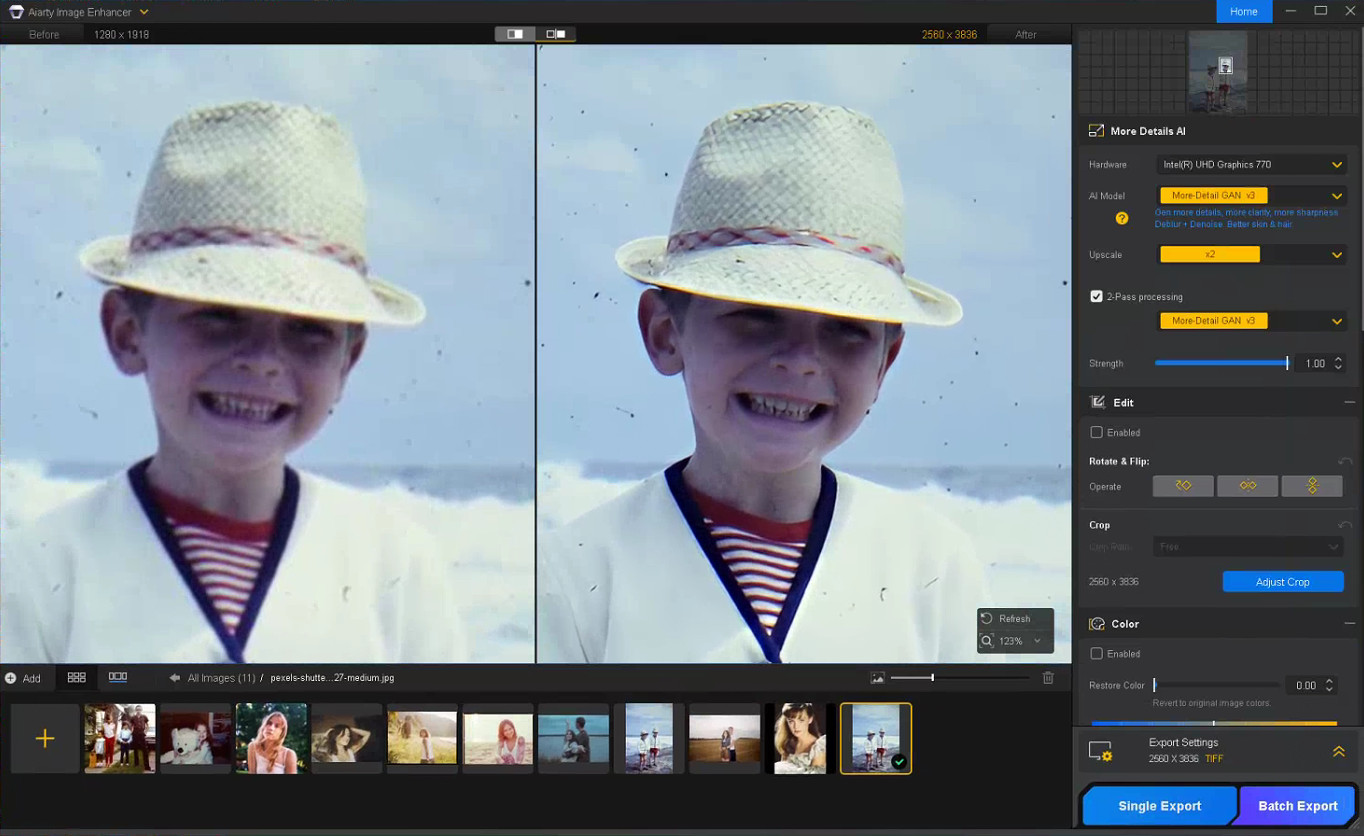
The first stage of restoring old photos usually focuses on improving image clarity while preserving the original texture of the photo. In Aiarty Image Enhancer, denoising, detail enhancement, and AI upscaling are processed together within the same AI pipeline.

Choose a suitable AI model and upscale factor depending on your old/damaged photo restoration goal. Using x1 applies denoising and enhancement only, while higher upscale settings can help AI upscale photos from low-resolution scans and prepare restored photos for printing or digital archiving without heavily over-smoothing fine details.

Step 3: Restore Facial Details Carefully

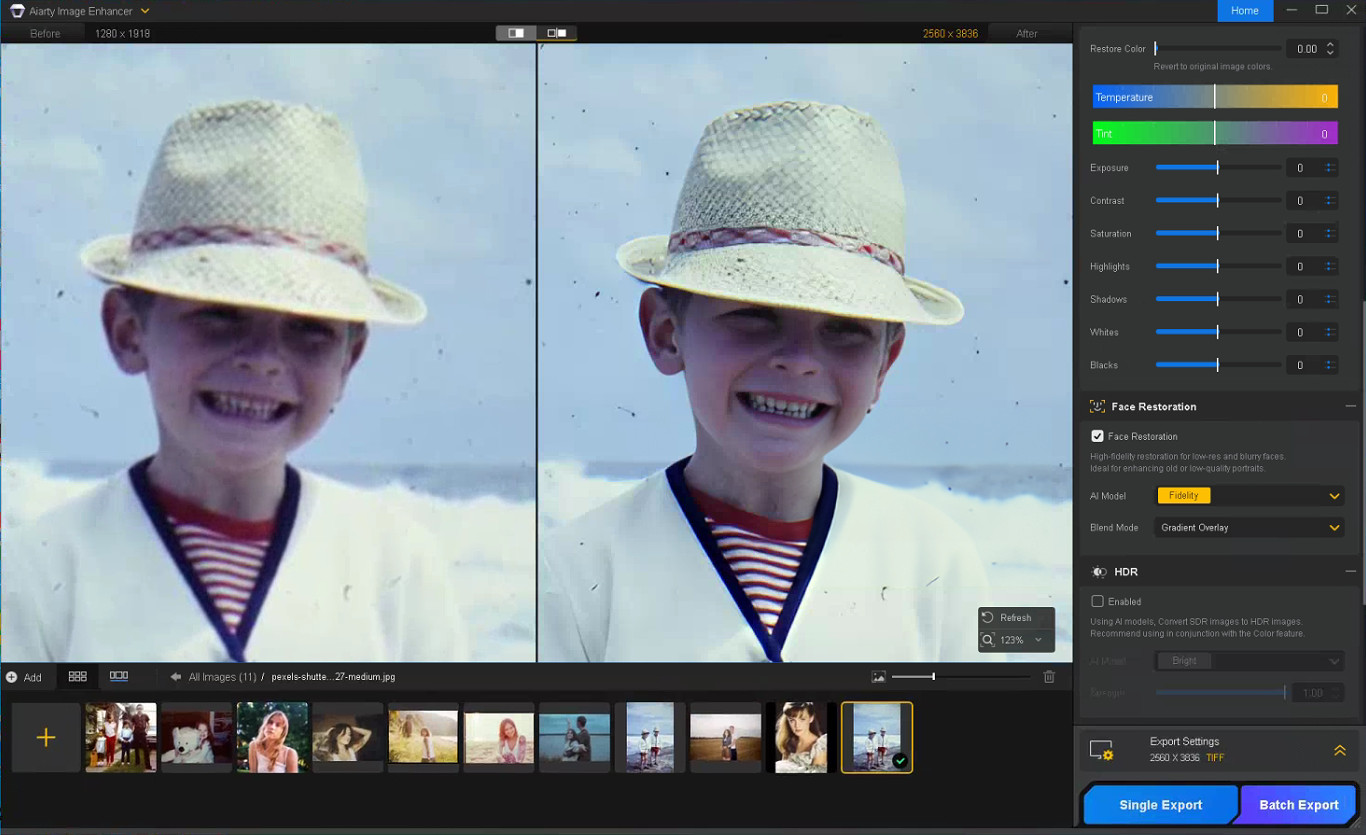
Enable Face Restoration and choose the Fidelity mode to better preserve the original facial structure and maintain more realistic-looking results. Rather than aggressively sharpening every facial feature, Aiarty’s Face Restoration focuses on recovering eye clarity, hair detail, facial edges, and natural skin texture while avoiding an over-smoothed or artificial appearance.

Step 4: Remove Scratches, Dust, and Small Damage

Enable the AI Eraser and mask scratches, stains, fold marks, or other distracting elements. Working in smaller sections with a properly adjusted brush size generally produces more natural-looking results than masking large areas at once.

Step 5: Correct Faded Colors and Improve Contrast

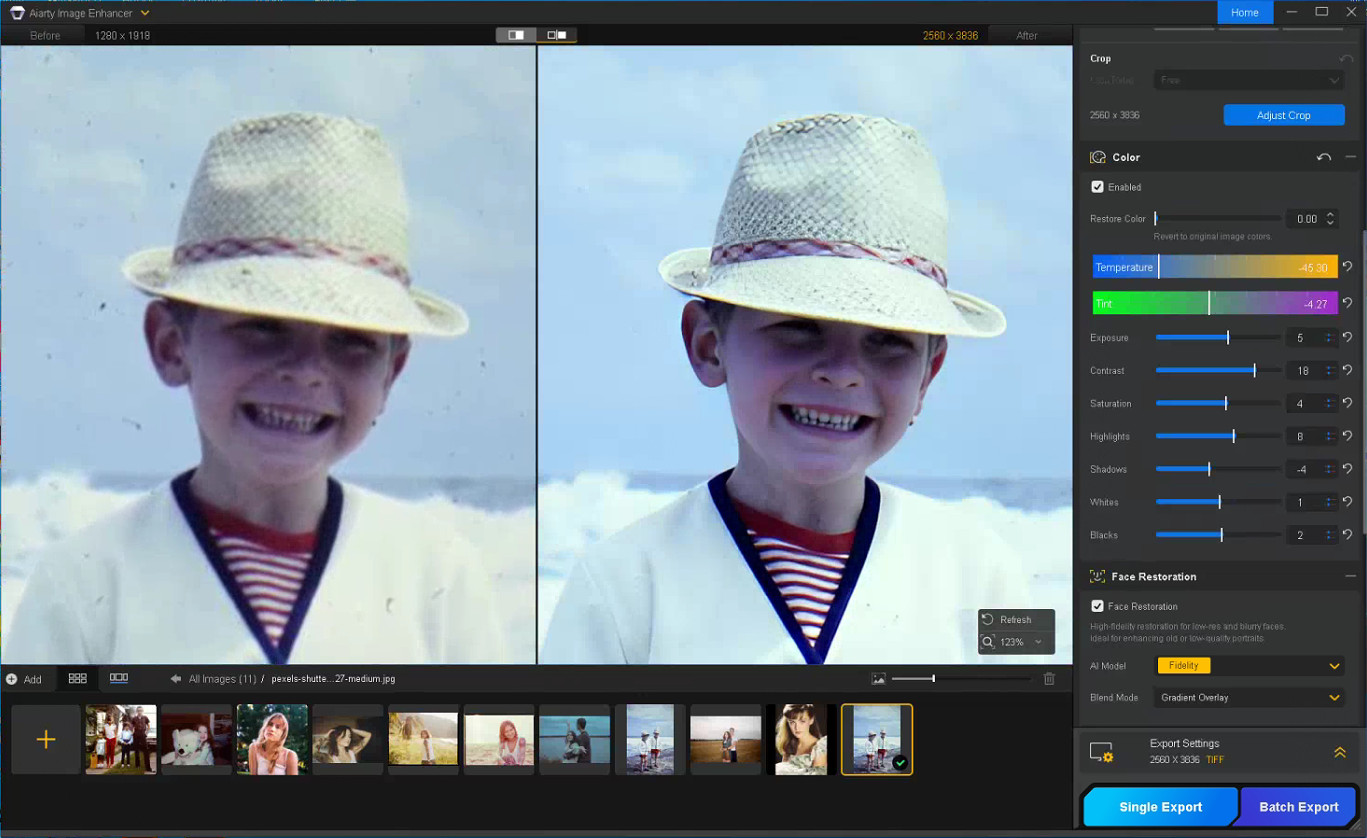
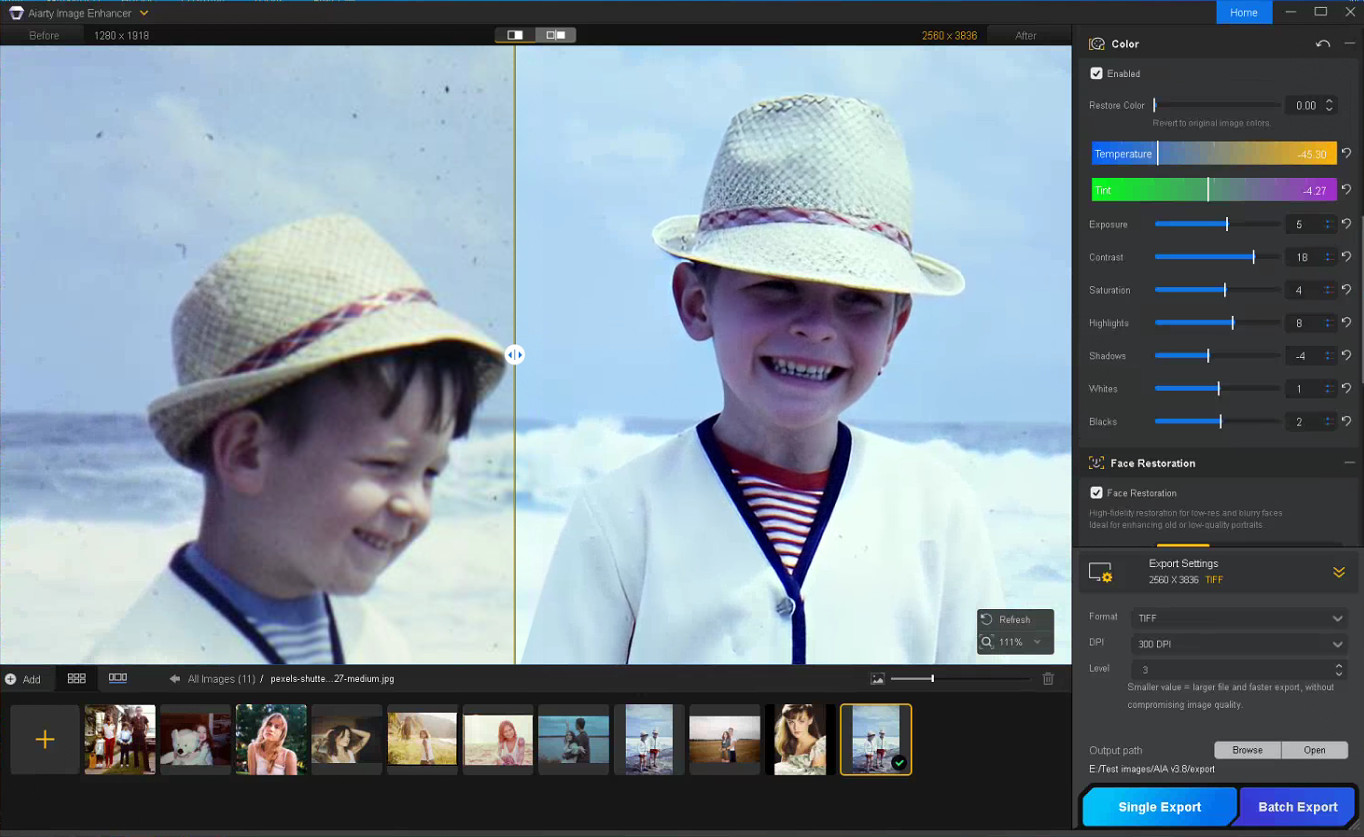
With the Color option enabled, you can fine-tune temperature, tint, contrast, exposure, shadows, and other parameters to correct yellow tint, faded contrast, washed-out shadows, and uneven color fading commonly found in older photos, helping restore depth and readability without making the image look overly processed.

Step 6: Export the Restored Photo

Once restoration is complete, choose the output format, DPI, and quality settings before exporting the final image. TIFF and DNG formats are recommended for preserving image quality and maintaining compatibility with Lightroom and Photoshop workflows.

Notes for Getting Better Restoration Results

Old photo restoration results can vary depending on the condition of the original image, so small workflow adjustments often produce better outcomes.

Trying Different AI Models

Each AI model in Aiarty Image Enhancer is optimized for different enhancement scenarios.

  • More-Detail GAN v3: Enhances detail and sharpness while reducing blur and noise
  • AIGCsmooth v3: Optimized for AI-generated images and smoother surfaces
  • Real-Photo v3: Designed for high-quality photos with more natural detail recovery

Experimenting with different AI models can help identify which one produces the most natural-looking old photo restoration for a specific image.

Adjusting the Strength Setting

If the restored image looks slightly waxy or overprocessed, lowering the Strength value can help preserve more natural texture and finer details.

Restoring Before Upscaling

For printing or digital archiving, it is generally recommended to complete denoising and face correction before applying upscaling, as cleaner base images usually produce more stable results.

In some cases, sequential upscaling (such as 2x + 2x) may also preserve detail better than applying a direct 4x upscale in a single pass.

Using Face Restoration Selectively

Face Restoration works best on photos where facial details are still partially visible but have become soft or faded over time. Fidelity mode keeps results closer to the original image, while Rebuild focuses more on reconstructing missing facial details.

Final Thoughts

The photo restoration workflow used in Aiarty Image Enhancer helps streamline the process while preserving more natural-looking detail compared to isolated manual adjustments. By combining cleanup and enhancement into a structured sequence, it reduces repetitive Photoshop work and improves consistency across different image types.

Beyond old photo recovery, the same workflow can also improve compressed social media uploads, AI-generated images, low-quality web photos, and images prepared for posters or large-format printing.

With the anniversary promotion, users can get the Aiarty Image Enhancer Lifetime License for only $74 (up to 52% OFF) with the code “ANNIVERSARY”, including lifetime access, lifetime free updates, and a 30-day money-back guarantee with no hidden fees.

The post Aiarty Image Enhancer: Restore Old Photos and Recover Blurry Faces with AI (49% Lifetime License) appeared first on Photo Rumors.

CUDA Proves Nvidia Is a Software Company

Par : BeauHD
11 mai 2026 à 22:00
Nvidia's real AI moat isn't "a piece of hardware," writes Wired's Sheon Han. It's CUDA: a mature, deeply optimized software ecosystem that keeps machine-learning workloads tied to Nvidia GPUs. An anonymous reader quotes a report from Wired: What sounds like a chemical compound banned by the FDA may be the one true moat in AI. CUDA technically stands for Compute Unified Device Architecture, but much like laser or scuba, no one bothers to expand the acronym; we just say "KOO-duh." So what is this all-important treasure good for? If forced to give a one-word answer: parallelization. Here's a simple example. Let's say we task a machine with filling out a 9x9 multiplication table. Using a computer with a single core, all 81 operations are executed dutifully one by one. But a GPU with nine cores can assign tasks so that each core takes a different column -- one from 1x1 to 1x9, another from 2x1 to 2x9, and so on -- for a ninefold speed gain. Modern GPUs can be even cleverer. For example, if programmed to recognize commutativity -- 7x9 = 9x7 -- they can avoid duplicate work, reducing 81 operations to 45, nearly halving the workload. When a single training run costs a hundred million dollars, every optimization counts. Nvidia's GPUs were originally built to render graphics for video games. In the early 2000s, a Stanford PhD student named Ian Buck, who first got into GPUs as a gamer, realized their architecture could be repurposed for general high-performance computing. He created a programming language called Brook, was hired by Nvidia, and, with John Nickolls, led the development of CUDA. If AI ushers in the age of a permanent white-collar underclass and autonomous weapons, just know that it would all be because someone somewhere playing Doom thought a demon's scrotum should jiggle at 60 frames per second. CUDA is not a programming language in itself but a "platform." I use that weasel word because, not unlike how The New York Times is a newspaper that's also a gaming company, CUDA has, over the years, become a nested bundle of software libraries for AI. Each function shaves nanoseconds off single mathematical operations -- added up, they make GPUs, in industry parlance, go brrr. A modern graphics card is not just a circuit board crammed with chips and memory and fans. It's an elaborate confection of cache hierarchies and specialized units called "tensor cores" and "streaming multiprocessors." In that sense, what chip companies sell is like a professional kitchen, and more cores are akin to more grilling stations. But even a kitchen with 30 grilling stations won't run any faster without a capable head chef deftly assigning tasks -- as CUDA does for GPU cores. To extend the metaphor, hand-tuned CUDA libraries optimized for one matrix operation are the equivalent of kitchen tools designed for a single job and nothing more -- a cherry pitter, a shrimp deveiner -- which are indulgences for home cooks but not if you have 10,000 shrimp guts to yank out. Which brings us back to DeepSeek. Its engineers went below this already deep layer of abstraction to work directly in PTX, a kind of assembly language for Nvidia GPUs. Let's say the task is peeling garlic. An unoptimized GPU would go: "Peel the skin with your fingernails." CUDA can instruct: "Smash the clove with the flat of a knife." PTX lets you dictate every sub-instruction: "Lift the blade 2.35 inches above the cutting board, make it parallel to the clove's equator, and strike downward with your palm at a force of 36.2 newtons." "You can begin to see why CUDA is so valuable to Nvidia -- and so hard for anyone else to touch," writes Han. "Tuning GPU performance is a gnarly problem. You can't just conscript some tender-footed undergrad on Market Street, hand them a Claude Max plan, and expect them to hack GPU kernels. Writing at this level is a grindsome enterprise -- unless you're a cracker-jack programmer at DeepSeek..." Han goes on to argue that rivals like AMD and Intel offer competitive specs on paper, but their software stacks have struggled with bugs, compatibility issues, and weak adoption. As a result, Nvidia has built an Apple-like moat around AI computing, leaving the industry dependent on its expensive hardware.

Read more of this story at Slashdot.

'Notepad++ For Mac' Release Is Disavowed By the Creator of the Original

Par : BeauHD
5 mai 2026 à 15:00
An anonymous reader quotes a report from Ars Technica, written by Andrew Cunningham: As its name implies, the venerable Notepad++ text editor began as a more capable version of the classic Windows Notepad, with features such as line numbering and syntax highlighting. It was created in 2003 by Don Ho, who continues to be its primary author and maintainer, and it has been a Windows-exclusive app throughout its existence (older Notepad++ versions support OSes as old as Windows 95; the current version officially supports everything going back to Windows 7). I'm not a devoted user of the app, but I was aware of its history, which is why I was surprised to see news of a "Notepad++ for Mac" port making the rounds last week, as though it were a port of the original available from the Notepad++ website. Apparently, this news surprised Ho as well, who claims that the Mac version and its author, Andrey Letov, are "using the Notepad++ trademark (the name) without permission." "This is misleading, inappropriate, and frankly disrespectful to both the project and its users," Ho wrote. "It has already fooled people -- including tech media -- into believing this is an official release. To be crystal clear: Notepad++ has never released a macOS version. Anyone claiming otherwise is simply riding on the Notepad++ name." Ho repeatedly asked the developer to stop using the brand and eventually reported the trademark use to Cloudflare, the CDN of the Notepad++ for Mac site. "Every day that website remains active, you are in further violation of the law," Ho wrote. "I cannot authorize a 'week or two' of continued trademark infringement." Letov has since begun rebranding the app as "NextPad++," though the old branding and URL reportedly remained available. The name changes is "an homage to NeXT Computer," notes Ars, "and uses a frog icon rather than the Notepad++ lizard."

Read more of this story at Slashdot.

The latest Topaz Labs updates

Par : PR admin
14 avril 2026 à 22:05


Here are the latest Topaz Labs updates:

TOPAZ PHOTO

  • True Detection Model: Automatically identifies false resolution images and corrects them before upscaling, improving overall image quality (Desktop only).

TOPAZ VIDEO

  • This update introduces new models designed to improve both speed and output quality across animation, generative, and live action content.
  • Gaia 2 (available to all users): 2x upscaling model built specifically for animation workflows like stop motion and motion graphics.
  • Starlight Fast 2 Local (Pro Only): Local, speed-focused video upscaling model delivering high quality results up to 5x faster, with improved face detail and motion stability.
  • Starlight HQ Local (Pro Only): Local video upscaling model built for mid-to-high-quality content with a good balance of detail and sharpness while keeping the intent of the original video source.

TOPAZ ASTRA

  • Starlight 2.5 (SLP-2.5): Groundbreaking video upscaling model built to enhance realism and reduce plastic, artificial-looking artifacts while upscaling clips from the latest GenAI models to 4K.
  • Enhances AI-generated content into cleaner, more realistic 4K.
  • Improves soft or overly processed visuals, especially in face-heavy shots.
  • Performs well on archival footage from the 2000s onward when the source is relatively clean.

The post The latest Topaz Labs updates appeared first on Photo Rumors.

'Negative' Views of Broadcom Driving Thousands of VMware Migrations, Rival Says

Par : BeauHD
9 avril 2026 à 23:00
"One of VMware's biggest competitors, Nutanix, claims to have swiped tens of thousands of VMware customers," reports Ars Technica. They said higher prices, forced bundling, licensing changes, and more strained partner relationships have frustrated customers and driven them away from the leading virtualization firm. From the report: Speaking at a press briefing at Nutanix's .NEXT conference in Chicago this week, Nutanix CEO Rajiv Ramaswami said that "about 30,000 customers" have migrated from VMware to the rival platform, pointing to customer disapproval over Broadcom's VMware strategy, SDxCentral, a London-based IT publication, reported today. "I think there's no doubt that the customer sentiment continues to be negative about Broadcom," Ramaswami said, per SDxCentral. Nutanix hasn't specified how many of the customers that it got from VMware are SMBs or enterprise-sized; although, adoption is said to be strongest among mid-market customers as Nutanix also tries wooing larger customers, often by starting with partial deployments. During this week's press briefing, Ramaswami reportedly said that some of the customers that moved from VMware to Nutanix during the latter's most recent fiscal quarter represented Nutanix's "strongest quarterly new logo additions in eight years." "Most of the logos came from our typical VMware migrations on to the [hyperconverged infrastructure] platform," he said. During the Nutanix conference, Brandon Shaw, Nutanix VP and head of technology services, said that Western Union has been migrating from VMware to Nutanix for six months, The Register reported. The financial services company is moving 900 to 1,200 applications across 3,900 cores. Shaw said that Western Union has been exploring new IT suppliers to help it become more customer-focused. Despite Broadcom's history of "decent lines of communication" with Western Union, Shaw said that Western Union had "challenges partnering with them." Shaw also pointed to Broadcom's efforts to push customers to buy the VMware Cloud Foundation (VCF), despite the product often having more features than companies need and at high prices. Since moving to Nutanix, the Denver-headquartered financial firm is also benefiting from having more flexibility around workload locations, which is important since Western Union is in over 200 countries, The Register said.

Read more of this story at Slashdot.

Remove Complex Backgrounds with Precision: Aiarty Image Matting for Photographers (Exclusive Deal Inside)

Par : PR admin
24 mars 2026 à 12:14


Beyond the Pen Tool: A Faster Way to Handle Complex Masking with Aiarty Image Matting (guest post)

We’ve all been there: the shoot was perfect, but now you’re zoomed in at 400%, wrestling with a stray strand of hair that just won’t stay in the selection. It’s the least creative part of photography, yet it’s often where the professional polish happens.

The irony of the current AI boom is that while it’s easier than ever to remove background from photo files with a single click, the results rarely hold up on a high-res monitor. Even when you remove background in Photoshop using the latest Select Subject features, the AI tends to treat edges as a binary choice. It works for a clean product shot, but it falls apart on a bride’s translucent veil or a portrait against a leafy backdrop, leaving that jagged, “cut-out” look.

This is when the distinction between a simple “remover” and true Image Matting becomes critical. What I was really looking for was something that understands the physics of light and transparency – the sub-pixel details that make a subject feel natural in its environment. In testing different tools, I came across Aiarty Image Matting, which stood out in how it handles these “impossible” edges with a level of nuance I haven’t seen in most standard plugins.

It’s worth a look for photographers who frequently deal with complex selections and high-resolution workflow. Now PhotoRumors readers can access an exclusive offer to get Aiarty Image Matting Lifetime License at up to 43% OFF, with benefits including:

  • Use on 1 Windows + 1 Mac, 3 Windows or Mac computers
  • Unlimited access to all features
  • Permanent free upgrades and technical support
  • No subscription, no recurring cost

Why Aiarty Image Matting is the Secret to Professional Composites

The term “background removal” is a bit of a misnomer in professional circles. Most tools – from the built-in best background removal app on your phone to standard web filters – simply use a mask to hide pixels. This often results in a “cookie-cutter” effect where the edges look harsh and artificial.

Aiarty Image Matting operates on a different level. It uses dedicated AI models to calculate an “alpha matte,” which essentially determines the exact transparency of every single pixel on the boundary. Instead of a binary “in or out” choice, it understands that a stray hair or a glass edge is partially transparent. If you’ve ever wondered which ai tool is best for background removal for high-end work, the answer lies in how it handles these “soft” edges. Aiarty doesn’t just cut the subject out; it extracts it.

This extraction process achieves a level of sub-pixel precision that identifies details thinner than a single pixel – think individual eyelashes or the fuzz on a woolen sweater. It also solves one of the biggest headaches when you remove background from photo: color decontamination. We’ve all dealt with that annoying color spill, like a green tint on a model’s skin from a forest backdrop. Aiarty’s AI is trained to “clean” these edges, ensuring the subject looks natural when placed in a completely different lighting environment.

For things like steam, smoke, or a translucent bridal veil, the software preserves the true, semi-transparent nature of the material. This is a game-changer for anyone trying to make background transparent without losing the ethereal, airy quality of the original shot. By moving away from simple “erasing” and toward “intelligent extraction,” it finally bridges the gap between a quick social media edit and a gallery-ready composite.

Key Features: How Aiarty Streamlines Complex Masking

When you’re looking for the best background removal software, you’re really looking for consistency. You want a tool that doesn’t require you to go back in with a layer mask to fix 20% of the edges. Most standard matting tools rely on simple edge detection that often fails the moment things get slightly out of focus or highly detailed. Aiarty Image Matting differs by using deep-learning models that actually understand the “semantic” structure of a photo – it knows the difference between a strand of hair and a stray digital artifact. Instead of just tracing a line, it reconstructs the edge data based on real-world light and texture.

In my time testing the software, four specific capabilities stood out as legitimate game-changers for a professional workflow:

  • Hair-Level Fidelity: This is the ultimate stress test. Whether it’s a high-fashion portrait with flyaway hair or a wildlife shot of a wolf’s fur, Aiarty’s AI models are trained on millions of real-world edge scenarios. It identifies individual strands that traditional “Select Subject” algorithms usually blur or chop off. If you’ve ever wondered how to remove white background from image files with fine texture, this level of detail is a massive relief.
  • Complex Transparency Awareness: Most “one-click” apps treat glass, smoke, or veils as solid objects or just erase them. Aiarty actually understands the transparency levels. This means if you have a shot of a bride in a lace veil, the software preserves the semi-transparent layers, allowing the new background to show through naturally. It’s easily the best ai tool to remove background from delicate, translucent subjects.

  • Seamless Background Replacement: Beyond just cutting things out, the tool makes it remarkably easy to change background of photo assets for creative composites. It handles the edge blending so well that you don’t get that “pasted-on” look. You can drop in a solid color for a clean e-commerce shot or a complex landscape for a fine-art piece, and the lighting and transparency on the edges remain believable.

  • Privacy and Speed via Local Processing: This is a big one for me. Many “best free ai background remover” tools are browser-based, meaning you have to upload your high-res (often sensitive) client work to a cloud server. Aiarty runs entirely on your local GPU. It’s faster, more secure, and allows you to automatically remove background elements from an entire folder of RAW files in a single batch, without hogging your bandwidth.

Instead of just being another best background removal app for casual use, it feels like a specialized instrument designed to handle the 10% of “impossible” masking jobs that usually take up 90% of our editing time.

Aiarty Image Matting Real-World Scenarios

In practice, a tool like this isn’t just about saving a few minutes; it’s about enabling shots that would otherwise be a nightmare to edit. I’ve been testing Aiarty across a few common scenarios where most “best background removal app” contenders usually fail:

  • Portrait & Fashion Photography: We’ve all struggled with how to remove background from a subject with flyaway hair or fur. Standard AI usually “muds” the edges. Aiarty preserves individual strands, making the transition to a new background look organic. It’s a lifesaver for high-end beauty retouches where the halo effect is a deal-breaker.

  • Commercial & Still Life: If you’ve ever tried to make background transparent for a glass bottle, a liquid splash, or a watch face, you know the refraction usually gets ruined. This tool actually maintains the transparency of the material, allowing the new environment to show through naturally. It’s much faster than manually painting alpha channels for product composites.

  • High-Volume E-commerce: For those of us who need to remove background elements across a hundred RAW files locally, the batch processing feature is a massive win. You aren’t tethered to a slow cloud upload, and the consistency across the set – keeping the same edge softness – is much higher than manual masking.

By handling the heavy lifting of the selection process, it lets you get back to the creative part: the color grading, the composition, and the storytelling.

Final Thoughts

In an industry that’s increasingly shifting toward subscription-based tools, having a reliable one-time purchase option still feels refreshing—especially for something as time-consuming as precise masking.

For photographers who regularly deal with fine details like hair, transparency, or complex backgrounds, tools like Aiarty Image Matting can make a noticeable difference in both speed and final image quality.

It’s not just about saving time—it’s about getting results that hold up under close inspection.

At the time of writing, PhotoRumors readers can access an exclusive 43% discount on the lifetime license, making it a relatively accessible addition to a professional editing workflow.

The post Remove Complex Backgrounds with Precision: Aiarty Image Matting for Photographers (Exclusive Deal Inside) appeared first on Photo Rumors.

❌