The Canon EOS R6 III is an enthusiast-class camera with a new 32MP full-frame CMOS sensor, aimed at photographers and videographers who need high burst rates and fast readout speeds.
Key specifications
32MP full-frame CMOS sensor
Built-in image stabilization rated to 8.5EV
40fps burst rate w/ pre-capture
3.0", 1.62M dot fully-articulating screen
7K recording up to 60p (Canon Cinema Raw Lite)
Oversampled 4K ≤60p, subsampled 4K 120p
3:2 Open Gate recording up to 30p
The Canon EOS R6 III is available at a recommended price of $2799, a $300 premium over the Mark II's launch price. The EOS R6 II has formally dropped to a $2299 price point. There is also a variant costing $100 more, designed to work with the professional stop-motion software, Dragonframe.
The EOS R6 III is available as a kit with the RF 24-105mm F4-7.1 IS STM for around $3150 and with the RF 24-105mm F4.0 L IS USM for $4050.
The 33MP FSI CMOS sensor at the heart of the EOS R6 III is a new one for Canon's hybrid mirrorless lineup, having only appeared recently in the cinema-focused EOS C50. Canon isn't claiming any particular technological leaps with this sensor, but it has even faster readout speeds than the lower-resolution chip found in the EOS R6 II. As usual for Canon, it has a dual pixel design with two sub-pixels at each location, one capturing the left half of the image, the other capturing the right, allowing the entire sensor to be used for phase detection AF.
The faster readout speeds, paired with changes to the card slot and processor, allow for big improvements to video capture. The stabilization system has also gotten a bit of a bump, going from 8EV to 8.5EV.
Updated ports
The EOS R6 III replaces one of its predecessor's dual UHS-II SD card slots with a CFexpress Type B one. While you can still use most of the camera's features with an SD card, you will need to use the faster, larger and more expensive storage to record Raw video.
Speaking of video, the EOS R6 II's microHDMI port is no more on the EOS R6 III. In its place is a full-size one, which is much more appropriate on a camera destined to be many people's workhorse.
Better burst
Despite having the same rates, the EOS R6 III improves on its predecessor's burst rates, no longer requiring a special Raw Burst mode to enable pre-burst capture. Instead, there's now a pre-continuous shooting option that you can simply enable when in the H+ drive mode. Canon says this is largely thanks to that CFexpress card slot and its faster write speeds.
Raw Burst mode is no longer on the camera, though it's hard to be sad about that. While there were benefits to Raw Burst mode, such as it displaying bursts as a single thumbnail in the playback menu, it was overall a relatively clunky experience. To edit the photos you took outside of Canon's own software, you had to select the individual frames you want, and save them as a standard .CR3 Raw files, JPEGs, HEIFs or combinations thereof. That extra step is no longer necessary.
Canon also now says the shutter has been durability tested to 500,000 actuations. We're not used to Canon explicitly giving a figure for a camera at this level.
Raw, 7K and open-gate video
The Canon EOS R6 III gains the ability to record Raw video internally at up to 7K/60 in Canon's proprietary Canon Cinema Raw format. It can also now shoot 'open-gate' video at up to 7K/30, recording the entire area of the sensor to produce a 3:2 image that you can take vertical and landscape crops from.
The menus for selecting your recording mode have also been updated. The EOS R6 II presented you with an overwhelming list containing each possible combination of resolution, frame rate and compression settings, but the EOS R6 III thankfully lets you choose these all independently.
The EOS R6 III also now gains a dedicated red tally lamp, making it obvious to both you and your on-screen talent when you're recording.
AF Upgrades
Looking at the autofocus system, it seems largely the same as the one in the EOS R6 II, with subject recognition support for people, animals and vehicles, as well as an auto mode. However, Canon says the algorithms underpinning those modes have been updated to match the ones on cameras like the EOS R1 and EOS R5 II, making it even more reliable.
The EOS R6 III's Register People Priority supports up to ten faces, and will prioritize them according to your set order.
The EOS R6 III also gains the Register People Priority feature, where you can train it to recognize a specific person and principally focus on tracking them over other people that may be in the scene.
While the cameras theoretically both have 'Digic X' processors, Canon says it's made intergenerational improvements to the chip that allow for some of the EOS R6 III's new features.
What is it?
The EOS R6 III is part of the class of "do anything" hybrid cameras.
The EOS R6 III is Canon's enthusiast-tier full-frame camera, which means it's designed to excel at pretty much whatever you want to shoot with it. Like the rest of the cameras in this class (and its predecessor), it's capable enough for most kinds of photography, from landscape shooting to fast-paced action and sports, and comes equipped with the kinds of video features you would've had to buy a cinema camera to get just a few years ago. It also has weather sealing and dual card slots.
Of course, there are some things that separate it from the even higher-end stacked sensor cameras like Canon's own EOS R5 II. It misses out on a bit of extra resolution and a few features that pros might want, such as the ability to control the focus point with your eye, in-camera 'AI' upscaling and Action Priority modes. Canon says the latter two require a still-expensive co-processor that just wasn't in the budget for this camera, but it should still easily handle whatever tasks enthusiasts throw at it.
It supports pre-burst capture, which can help if you're just a bit too slow to the shutter
It can shoot at a 40fps burst rate for up to 150 shots in Raw and JPEG, and supports pre-burst capture, which can help if you're just a bit too slow to the shutter. You no longer have to use the somewhat clunky Raw burst mode to access pre-burst capture, like you did with the EOS R6 II.
It also supports HDR output, with its ability to produce 10-bit HEIF stills with the PQ tone curve, in place of JPEGs. While PQ isn't as broadly supported as the HLG curve used by other companies like Nikon and Panasonic, it can, at least, simultaneously record both HEIF and Raws, unlike Sony, which makes you choose between Raw capture and HDR output files. When shooting video, it can capture HDR video footage using either PQ or HLG. The latter is more widely supported when it comes to playback and is a new addition compared to the EOS R6 II.
Speaking of video, the EOS R6 III is well-equipped for motion pictures too. It supports internal Raw recording, a false color overlay to help you nail exposure and the >4K open gate capture gives you greater flexibility in post.
The EOS R6 III in context
The EOS R6 III is launching into a market segment with robust competition. Its predecessor was still quite a sensible option, so we've included it in the comparison, alongside the Nikon Z6III, which offers a similar combination of fast shooting, top-tier autofocus and incredible video specs. We're also comparing the Sony a7 IV, as its 33MP sensor makes it an obvious competitor, even if it can't match the speed of the other cameras on this list.
Log view assist Custom LUTs Auto Framing Framing Stabilizer
Viewfinder res/ magnification/ eyepoint
3.69M dot 0.76x 23mm
3.69M dot 0.76x 23mm
5.76M dot 0.8x 21mm
3.69M dot 0.78x 23mm
Rear screen
3.0" 1.62M dot Fully-articulating
3.0" 1.62M dot Fully-articulating
3.2" 2.1M dot Fully-articulating
3.2" 2.1M dot Tilt + Fully articulating
Media types
1x CFexpress Type B 1x UHS-II SD
2x UHS-II SD
1x CFexpress Type B 1x UHS-II SD
1x Combo CFexpress Type A / UHS-II SD 1x UHS-II SD
Battery life EVF / LCD
270 / 510
320 / 580
360 / 390
630 / 750
Dimensions
138 x 98 x 88mm (5.5 x 3.9 x 3.5")
138 x 98 x 88mm (5.5 x 3.9 x 3.5")
139 x 102 x 74mm (5.5 x 4 x 3")
130 x 96 x 72mm
Weight
699g (25.7oz)
680g (24.0oz)
760g (26.8oz)
695g (24.5oz)
*When combined with a stabilized lens
The Z6III's partially stacked sensor has higher read noise than other designs, which gives it a disadvantage compared to other cameras when raising the shadows (though, importantly, this has no impact on the midtones, and the EOS R6 III doesn't perform markedly better). For both cameras, it's worth checking to make sure whether the lenses you want exist before choosing a system, as both companies place restrictions on third-party lens makers.
The a7 V is a very capable camera with excellent image quality and dynamic range, though it lacks a few of the more niche video features that most of the other cameras in this class offer, such as open gate and internal Raw recording. While Sony does allow third-party lenses on E-mount, buyers should be aware that it limits non-Sony lenses to 15fps.
Body and Handling
The EOS R6 III hews close to Canon's tried-and-true design formula, and its body is very similar – though not exactly the same – as the EOS R6 II. It has a hefty grip that fits well in your hand, even with a heavier lens attached. It has an array of customizable buttons – nine in total – which can have different functions depending on whether you're in stills or video mode. Switching between the two modes is handled by a dedicated lever to the left of the EVF.
The autofocus joystick and surrounding buttons are placed within easy reach of where your thumb naturally falls when you're holding the camera, and are grouped in ways that help you tell which one you're pressing by feel, even when your eye is up to the EVF.
Canon's M-Fn menu can be used to bring up a customizable menu that lets you change nine different settings.
The EOS R6 III has plenty of buttons that provide a decent degree of customization. There are a few functions that we'd like that currently can't be assigned (quickly being able to turn AF tracking on and off, or adjust your auto ISO minimum shutter speed), but there are also relatively robust options for quickly recalling sets of specific exposure or autofocus settings, or directly cycling through options like AF selection point or subject detection.
Canon also has its M-Fn menu (by default assigned to the M-Fn button, but you can move it if you wish), which lets you have up to five pairs of settings that you can control using the top and rear plate dials. You can customize which of nine settings you want to control:
ISO
Drive mode
AF mode
White balance
Flash exposure compensation
Exposure compensation
AF selection point
Metering mode
Color mode
Beyond this, the camera expects you to control most of its settings through the Q menu, which has 11 customizable slots. Like the rest of its menus, it can be controlled entirely using the touchscreen, entirely via the dials, or with a mix of both.
Screen and viewfinder
The viewfinder and LCD have been unchanged from the EOS R6 II, though that's not really a complaint. The rear 3.0" screen is fully-articulated, which will be welcome to those using the camera for video. It's relatively bright, but can be a little difficult to see in extremely bright sunlight.
The viewfinder is large and can refresh at up to 120fps for a very responsive preview. It's not the highest resolution model out there, though, and it can't quite manage to show you a proper HDR preview when you're shooting in PQ mode, though it does have Canon's OVF simulation mode that gives you a better idea of how much dynamic range you're capturing, at the cost of truly previewing your exposure.
There's no discernible viewfinder blackout when shooting in at the highest burst rate settings using the electronic viewfinder, though it'll show up when shooting in lower burst rates or with the mechanical shutter.
Ports
The EOS R6 III has all the connectivity you might expect from this class of camera: USB C, headphone and microphone sockets, a multi-function hotshoe, 2.5mm remote terminal and full-size HDMI port. The latter represents a bit upgrade from the less-reliable and robust microHDMI port found on the EOS R6 II.
It has two card slots: one CFexpress Type B, and one UHS-II SD. You'll have to use the former if you want to record Raw video internally.
Battery
The EOS R6 III uses 16Wh LP-E6P battery, to give battery life ratings of 270 shots per charge via the viewfinder and 510 if you use the rear screen. These numbers jump to 390 and 620, respectively, if you engage power saving mode. As always, the CIPA-defined tests tend to under-represent how many images you can actually get, with double the rated figure not being unusual, but they're useful to compare between cameras.
These are reasonable but not great for a camera likely to be used quite heavily by an enthusiast photographer. If you have an extremely long shoot, you are able to roughly double the battery life with Canon's BG-R20 battery grip, the same model used by the rest of the EOS R6 and R5-series cameras,
The camera will still work with older batteries such as the LP-E6NH, though it warns that not all features will be available, and that some accessories won't work. Most notably, the camera loses support for network connectivity, refusing to connect to your smartphone or other devices.
Image Quality
Our test scene is designed to simulate a variety of textures, colors, and detail types you'll encounter in the real world. It also has two illumination modes, full even light and low directional light, to see the effect of different lighting conditions.
Image Comparison
This widget is not optimized for RSS feed readers. Click here to open it in a new browser window / tab.
As you might hope, the Canon captures more detail than its 24MP rivals, and comparable amounts to its 33MP Sony peer, while also matching the color response of the EOS R6 II. The slightly richer, more yellowy pinks than the Sony and Nikon suggest it'll give the skin tone response that many Canon users have come to enjoy.
The detail difference is more apparent in the processed Raws, where the Canon and Sony present the horizontal lines in the doorway in a similar manner, whereas the R6 II and Nikon Z6III can't. Interestingly, the Nikon presents a convincing but completely spurious representation of the vertical lines above the door, while the EOS R6 II represents similar thick lines horizontally: both the result of aliasing.
At mid-to-high ISO there's little to choose between any of these cameras in terms of noise. As you creep towards the very highest ISOs the gap starts to open up, but it's only in the camera's extended 102,400 setting that the difference becomes clear. Even then, this is unlikely to be the difference between the images from some of these cameras being usable and others not: they're all going to be pretty hard to salvage.
It's also worth noting that the noise that is visible appears slightly smeared, rather than as individual points, which could be indicative of noise reduction. Our scene has plenty of fine detail, much of it with low contrast, if you want to download the files and see if you think it'll have any impact when processed with your preferred workflow.
Switching to electronic shutter mode sees the camera drop to 12-bit sensor readout, which has the predictable effect of curtailing the dynamic range of the Raws (the reduction in available values to encode the shadows presents as quantization noise).
Our ISO Invariance test suggests this is a dual-gain sensor that switches to its higher gain step around ISO 800. There's very little benefit to raising ISO above that point, but opportunity to keep ISO down to protect highlights.
Autofocus
The EOS R6 III's autofocus system uses the same interface as the ones from Canon's higher-end EOS R5 II and EOS R1. There are several options for selecting your autofocus point, including a "Spot" pinpoint option, three customizable zones and a "whole area" option, where the camera picks a subject.
Each of these modes can be used with or without tracking, which you have to enable through the Q menu, where the camera will try to follow whatever was under the point when you started focusing, and in conjunction with the camera's subject recognition modes, listed below. There's also an "auto" subject recognition mode, which will attempt to identify any of the recognized subjects in the scene.
Type of subject
Optional detail
Human
—
Eye (Auto, Left, Right)
Animal
Cat, dog, bird, horse
Vehicles
Car, motorcycle, plane, train
Driver
The camera has and additional four autofocus point options with a Lock symbol, which don't use tracking or subject recognition, so you don't have to manually switch off both features if you're trying to gain complete control over your focusing point in a hurry: you can just select a 'locked' AF area. There's a menu option to let you narrow down which AF areas are available through the Q or M-Fn menus, to make selection and swapping faster.
In general, we found that the EOS R6 III was generally very good at not getting distracted by a nearby subject when we were trying to focus on something else, so we didn't have to switch to the locked modes that often.
Performance
We found the EOS R6 III's autofocus to be accurate and reliable, and its tracking to be very tenacious. In most situations, the tracking point simply stuck to whatever we put it on, no matter how much it or the camera moved. We also found the subject detection modes to be good at picking out people or animals, even if they were small parts of the scene, though it was occasionally prone to jumping from one person to another in very tight groups.
The Register People Priority mode does a decent job of selecting your preferred subject, if there's more than one person in the frame. However, because you can only use a single image to 'train' the camera, it may be confused if you subject looks significantly different to the image you selected: eg if they were/weren't wearing glasses in the training shot, so it's worth trying to grab a quick reference image at the start of your shoot, if you can.
1
2
3
4
5
6
7
8
9
10
11
12
13
14
15
16
The EOS R6 III's generic tracking system will draw a box over the entire object that it's tracking, rather than just using your single defined point, but it's not entirely consistent in which part of the object it's focusing on (which is what you'd expect if it's not recognizing it as a known type of subject).
In our tests, the camera's generic tracking dealt very well with a subject moving across the frame at varying speeds. It kept track of the subject throughout the run and was very accurate at driving the lens to the correct distance, resulting in very few soft images. That's no small feat when shooting at 40fps.
1
2
3
4
5
6
7
8
9
10
11
12
13
14
15
16
The performance was much the same with human subject recognition turned on, with the camera locking on to the subject's eye throughout the run and keeping up with its changing rate of approach with impressive accuracy.
Video capabilities
The EOS R6 III has all the video assist tools most shooters will need: proxies, waveform and false color, dual-level zebras and Log/HDR view assist.
The EOS R6 III can shoot oversampled 4K, taken from a 7K region, at up to 60p. Alternatively, it offers subsampled 4K at up to 120p. It can also capture its entire sensor area in native 7K resolution, 'open gate' recording at up to 30p.
It also lets you record in Canon's C-Log 2 or 3 response curves, and now has a button that defaults to opening the Color menu, making it a bit easier to switch between Log and non-Log recording.
It provides both DCI and UHD 4K options, though, humorously, the true 24fps mode (as opposed to 23.98) is only available when recording DCI. Its Raw mode also lacks a 16:9 mode, but can record open-gate at up to 30p, from which you can take a UHD crop.
Video settings are well separated from photo settings, with the exception of the custom white balance (which, as long as you know that the setting is shared, is probably a good thing). You can also easily set up custom modes for different types of shooting; one for standard 4K/24 recording, using a 1/50 sec shutter by default, and another for 4K/60 slow-motion that uses a 1/125 sec shutter. The one downside is that custom modes do have separate custom white balance settings, which means you can't set one and have it set for all the others (or, at least not without also having other settings carry over that you may not necessarily want).
Recording modes
While the EOS R6 III shares a sensor with the fan-cooled EOS C50, Canon includes several more options on its more cinema-focused camera. As an example, the EOS R6 III doesn't have an HQ Raw mode, nor does it support crop modes in Raw. It can, however, still record proxy files to its SD card slot, which could be quite useful when shooting Raw video.
Both the 4K and Full HD modes can be used in the "Fine" oversampling modes at all but their highest frame rates; the former from 7K capture, and the latter from 3.5K capture. However, Canon is upfront that, while the 4K/60 Fine mode is still oversampled, it won't have the same image quality that you get from the 4K/30 and slower modes.
Temperature limits
Unlike the video-focused EOS C50, the EOS R6 III is not fan-cooled. Canon has given the following figures for continuous recording times at 23°C (73°F). Taking shorter clips with some rest time between them is likely to give much longer durations.
Continuous recording times (approx.)
Auto Off Temp: Std
Auto Off Temp: High
Raw 7K/60
23 min
23 min
DCI 4K/120
28 min
35min
DCI 4K/60 Fine (oversampled)
23 min
23 min
Open gate 7K/30 (MP4)
24 min
36 min
The subsampled 4K/60 modes, along with both subsampled and oversampled 'Fine' 4K modes at 30p and slower, have no documented temperature restrictions. It's worth being aware of these limits if and when you use the camera's more ambitious modes.
Having shot several projects with the EOS R6 III, both indoors and outdoors, we never had it shut down due to overheating, even when we were shooting in open gate. However, we haven't had the chance to test it in a hot environment in direct sunlight, and would expect it to struggle in those conditions.
Workflow
Canon includes a variety of tools to help make shooting video and, in particular, nailing exposure, easier. The EOS R6 III has options for both waveform monitoring, which provides more detail about what parts of your image are clipping than a traditional histogram, and a false color overlay, which makes it easier to tell if your skin tones are properly exposed.
It's now much easier to set your white balance in video mode
It's also now much easier to set your white balance in video mode; you can capture it from the live view, rather than having to set it from a still image on the card (a process that, on other Canon cameras, meant switching into stills mode, taking a picture of your gray card, then switching back into the video mode before diving back into the settings). Speaking of live view, the camera also (finally!) provides access to level gauges and magnification while recording, so you can make sure your horizon is perfect and your subject is in focus while you're rolling, though you have to tap the screen to access larger magnifications.
The EOS R6 III lets you upload LUTs into the camera, so you can preview an effect you wish to apply, but you can't bake the result into your footage. The EOS R6 III can output lower-resolution proxy files to an SD card while you capture your main footage to the CFexpress card. The only exception is open gate shooting, where you can capture a proxy alongside Raw shooting, but not if you're using MP4 as your main output.
One feature Canon's retained for its cinema cameras is shutter angle, which derives the shutter speed from the recording framerate, rather than an absolute setting, so you don't have to adjust your shutter speed after changing frame rates to retain the same level of motion blur. It's a setting that some of the EOS R6 III's competitors, such as the Nikon Z6III and Panasonic S1II, have, but that it lacks.
Video Performance
Image Comparison
This widget is not optimized for RSS feed readers. Click here to open it in a new browser window / tab.
Starting with the open gate mode, the 6912 x 4608 image the EOS R6 III produces captures lots of detail, appreciably more than the 5952 x 3968 open gate image from the Panasonic S1II. The difference will almost certainly be less noticeable in motion, but the EOS R6 III's higher resolution allows for a bit more room to crop in if you're delivering a vertical or horizontal 4K video (or if you shot a bit too wide, and are trying to take a 9:16 vertical crop without using the full height).
The increased detail versus the S1II is still there, though slightly less obvious, when you're using the oversampled 4K mode. The Z6III offers similar levels of detail, though at default settings, it appears to apply more (or perhaps less subtle) sharpening than Canon does. Canon's oversampled modes also don't seem to reduce moire as much as we might expect them to, compared to the open gate mode.
The EOS R6 III loses its edge in detail when you bump up to 4K/60. The oversampled fine setting is massively more detailed than the line-skipped standard mode, but, as Canon said, it's less detailed than the oversampled footage from 24p mode. Interestingly, the rolling shutter figure is the same, so it's perhaps a processing difference, rather than a readout one, presumably for reasons of heat.
The Nikon Z6III's output is again sharper (and more sharpened), but it's not far off the output of the Panasonic S1II. This isn't because Nikon and Panasonic's 60p modes are more detailed than their 24p ones; it's because Canon's oversampled 60p mode isn't as detailed as its 24p one. Perhaps most painfully, though, is that even the EOS R6 II's 4K/60 footage has a slight edge in detail over its successor's.
The EOS R6 III's standard modes all run at the same level of subsampling required to achieve the full-width 4K/120 this camera can provide, as evidenced by their shared rolling shutter rate, and thus come with a substantial step down in detail compared to the oversampled modes. Thankfully, the subsampling doesn't seem to come with a notable penalty in high ISO noise performance; that may speak more to the strength of Canon's noise reduction, though, as you'd expect to see more noise in a mode derived from less of the sensor.
Rolling shutter
7K open gate
17.9ms
UHD 4K 24/60/120 standard
7.1ms
UHD 4K 24/60 "fine"
14.3ms
Comparing the EOS R6 III's 4K/120 capture with the S1II's, which comes with a 1.24x crop, shows that the Canon is a long way behind when it comes to detail. That's even true of the the Z6III as well, which requires a 1.5x crop to achieve 4K/120. Despite those being derived from a smaller area of the sensor, it's very likely they're derived from more pixels that aren't spread as far apart as they are on the EOS R6 III.
Raw Video
As always, when discussing Raw video options, it's worth keeping in mind that the difference between Raw video and Log video is nowhere near as stark as the difference between Raw and JPEG for stills when it comes to editing flexibility. While shooting in Raw for video gives you control over noise reduction, sharpening* and white balance, it doesn't offer substantially more latitude to adjust your footage's lightness than Log footage does.
With that in mind, the EOS R6 III's Raw footage looks good, capturing a lot of detail from either the entire sensor in open gate mode, or from a 7K 1.89:1 crop derived from that footage. The latter can be shot in up to 60p, though going above 30p will require switching to Canon's Raw Lite format, which compresses the footage more. If there are compromises to detail that come from that, they're not evident in our test scene.
Unlike some of its competitors, Canon applies lens distortion corrections to its Raw footage, arguably making them a bit less Raw, but saving you the extra work of having to manually apply them after the fact, which is especially important for those RF-mount lenses that utilise those corrections as part of their optical formulas.
* Put another way, shooting in Raw puts the onus of noise reduction and sharpening on you.
Autofocus
We found autofocus performance in video to be extremely reliable, with the camera locking onto tracked subjects and not easily getting distracted by things in the background, as we sometimes experienced with its predecessor. We also noticed very little hunting when the camera was tracking a subject or object, which meant we could keep it on without worrying about distracting focus pulsing.
The camera is also quite good at tracking arbitrary subjects, though the interface for doing so can be frustrating. Tapping on a subject will focus on it, but, unlike in stills mode, it won't start tracking it unless you're in the whole area autofocus mode; the camera will continue to focus on whatever the AF selection point is over, and it won't stick to your chosen subject. If you want to use tap to track, you'll have to use the whole area mode; otherwise, you'll have to manually move the AF point with the joystick or touch screen, or keep it over the subject, changing the composition.
The EOS R6 III's autofocus options remain the same throughout its recording modes; you still get continuous autofocus with subject recognition even when recording 4K/120 and 1080/180. This is true both in the standard video recording mode and in the Slow-and-Fast mode that doesn't record audio and produces a file that plays back at a slowed-down or sped-up framerate.
IBIS
The in-body stabilization system of the EOS R6 III is good, but doesn't quite match the performance we'd expect from, say, a Panasonic. It likely won't fool anyone into thinking you're using a tripod, but it smooths out the most distracting shakes. When we shot from odd angles or using a more telephoto lens we were left wishing we'd brought at least a monopod. But in a pinch where we were forced to shoot an entire video handheld with an 85mm lens, we still got usable footage, which is a testament to what the system is capable of.
All the A-roll in this video was shot handheld with the EOS R6 III with an 85mm lens, and it worked well enough that warp stabilization could make up the difference. It struggled a bit more when we were using a 70-200mm lens to shoot the a7 V video, but we still got usable footage.
While we'd generally recommend turning IBIS off when mounting the camera to a tripod, especially if you'll be panning or tilting, it's not always practical to do so in a fast-paced environment when you're frequently switching between handheld and locked-off shots. Thankfully, the EOS R6 III's IBIS system does a good job of not fighting against what are clearly intentional camera moves.
That changes a little if you turn on the digital stabilization modes; both the standard (which comes with a 1.11x crop) and the "Enhanced" (1.43x crop) settings do okay with the panning itself, but stop very suddenly when you stop moving the camera. However, they're decent when it comes to smoothing out that little bit extra hand shake, and are available in the oversampled modes as well as the subsampled ones (though, obviously, not in Raw or open gate).
In Use
By Mitchell Clark
I think the best word to describe the user experience of the EOS R6 III is "refined." While Canon's previous cameras like the EOS R5 II, EOS R1 and EOS R6 II are great in their own rights, they had a few rough edges; setting custom white balance in video was a chore, you couldn't punch in while recording, the burst mode used a weird custom container, you couldn't turn pre-burst shooting on and off with a single button unless you used a hacky workaround.
The EOS R6 III solves all those issues and, therefore, has few quirks left to complain about... though I will spend most of the rest of this section complaining about them, because nothing is perfect. But the topline message is that this camera is very easy to get along with.
The biggest gotcha for photographers will be its burst modes, or situations where you need to shoot silently but still want maximum image quality. The e-shutter dropping to 12-bit readout means you won't have as much latitude to pull up shadows before noise starts creeping in as you do with photos taken with the mechanical shutter (though, realistically, the situations requiring maximum burst rates and the ones demanding maximum DR are usually separate). This also isn't an issue unique to the Canon; all its peers also have to use their e-shutters to achieve their maximum burst rates, which typically incurs a dynamic range cost.
Pre-burst capture only being available at the maximum burst rates is also a frustrating limitation, and often leads to you taking more photos than you'd actually need. It also eats into this camera's limited buffer; at its 40fps mode, it can last for around three seconds (or two and a half if you've used up half a second with your pre-capture). And once you hit the limit, it can take up to eight seconds before it'll let you start shooting again, even if you're using a fast CFexpress card.
I find Canon's menus to be pleasant enough, with their color-coding and the ability to scroll through sections and pages with the command dials. And while I personally don't find the M-Fn menu to be all that useful, that's more a testament to how good the "Q" menu is for this camera, and I can imagine shooters who are used to it preferring it as a way to quickly control various settings without taking their fingers off the command dials. I also appreciate the way Canon has set up the settings for video, letting you choose most of your shooting parameters separately, rather than making you scroll through a list of 100 different options.
Having just reviewed the Panasonic S1II and used the Sony a7 V, going back to the plain, fully articulating display on the EOS R6 III feels like a downgrade. I'd pick it over a display that can only tilt but not flip out, but now that displays that can do both are making their way to many of its competitors, it feels like the correct choice for a camera aiming to be great at both stills and video.
Conclusion
By Mitchell Clark
Pros
Cons
Excellent image quality
Dependable autofocus performance
Full suite of video recording modes and assist features
Refined ergonomics and responsive UI
Rolling shutter rates can capture all but the fastest action
Higher framerate video modes don't come with a crop
Burst rates capable of capturing most things you'd point a camera at
Battery is decent, but you may want a spare or a USB-C power bank for heavy days
IBIS does its job for photo and video
Filling the buffer means waiting for the camera to finish processing
Overheating in ambitious video modes can be limiting for prolonged or outdoor use
Dynamic range isn't as strong as its best competitors', and is further limited in e-shutter mode
Precapture could be more flexible
Subsampled video modes aren't particularly detailed
Canon tightly controls RF mount lenses
The biggest challenge with reviewing the EOS R6 III is figuring out what to say about it that isn't just "it's really good." Like most of the cameras in its class, it sets out with the goal of being everything to everyone; a stills camera capable of autofocus tracking and burst rates that would've made professional cameras from a few years back envious and a video camera that you could sensibly shoot a movie with. And somehow, it more or less succeeds at that task.
It's not the only camera to do so, of course. Those are, increasingly, table stakes for this class. But it does so with just that bit of extra shine. Its higher resolution sensor lets it capture more detail than the Z6III and S1II, and it offers more video modes than Nikon or Sony. Its menus are well laid out (if a little bloated, like everyone else's), and it offers all of the ports and buttons that you could ever want. Unless you're a working professional or just really want the best of the best, it's hard to imagine that you'd need more than this camera, no matter what you hope to do with it.
Which is not to say it's perfect. It has some foibles that may annoy power users, but for most people, the ease of use it provides will more than make up for that. If you're equally into video as well as stills, it's probably worth paying more to get the Panasonic S1II with its fan and more detailed 4K slow-motion modes. And if you're looking for the utmost image quality in stills, you'll have to decide whether you value the detail the EOS R6 III provides or the dynamic range of the S1II more (or, potentially, get both with the a7 V, at the cost of some specific video features).
Still, the EOS R6 III proves that we may be getting past the age of "jack of all trades, master of none." Instead, it's a master of most. Given that its pricing is in line with the rest of its peers, and that its capabilities match or exceed them, it handily earns our Gold award.
Scoring is relative only to the other cameras in the same category. Click here to learn about what these numbers mean.
Canon EOS R6 Mark III
Category: Mid Range Full Frame Camera
Build quality
Ergonomics & handling
Features
Metering & focus accuracy
Image quality (raw)
Image quality (jpeg)
Low light / high ISO performance
Viewfinder / screen rating
Optics
Performance
Movie / video mode
Connectivity
Value
PoorExcellent
Conclusion
The EOS R6 III offers an excellent shooting experience for all types of still photography and videography.
Good for
Most kinds of photography
Capturing relatively short bursts of action
All but the most demanding of videographers
Not so good for
Photographers who need maximum IQ and speed in e-shutter
Videographers doing long takes in hot environments
91%
Overall score
Compared to its peers
Compared to the EOS R6 II, Canon's latest offers higher resolution stills and a more refined shooting experience, dropping the fiddly Raw Burst mode and multi-step custom white balance picker. The EOS R6 III improves on its predecessor's already very good autofocus with extra features and being that bit more reliable. It's also a much more capable video camera, even if its 60p oversampled 4K mode isn't quite as detailed. That said, the R6 II is remains hugely capable if there's a big price difference between the two.
The Nikon Z6III has a nicer viewfinder and rear display than the EOS R6 III, and Z mount has a few more third-party lens options than RF mount. However, its Raw burst rates are substantially slower (though more configurable) than the Canon's, and its pre-burst capture is only available when shooting in its JPEG-only modes. Both are capable video options, with the Z6III having a slight edge in slow-motion (albeit with a crop), and the EOS R6 III gaining open-gate, a feature Nikon doesn't offer.
The Panasonic S1II's fan lets it record more ambitious video modes for longer, and it offers better dynamic range performance when shooting stills with the mechanical shutter. However, unless you're using the battery-destroying multi-shot high-resolution mode, it won't quite offer the same detail as the EOS R6 III does. We also find Canon's ergonomics to be a bit more refined and comfortable to hold, though your mileage will vary. But if you value the availability of third-party lenses, the L mount is the better choice.
We haven't finished our testing of the Sony a7 V, but early impressions show it to be a very impressive contender when it comes to stills. It matches the EOS R6 III's resolution and seems to have a good chance of outperforming it when it comes to dynamic range, thanks to its ability to read out both its low and high gain steps when using the mechanical shutter. Some video shooters may miss its specific capabilities such as open gate or Raw capture, and we find it's not as comfortable to hold, especially with larger lenses.
Sample Gallery
Please do not reproduce any of these images on a website or any newsletter/magazine without prior permission (see our copyright page). We make the originals available for private users to download to their own machines for personal examination or printing (in conjunction with this review); we do so in good faith, so please don't abuse it.
Sample gallery
This widget is not optimized for RSS feed readers. Click here to open it in a new browser window / tab.
Pre-production samples
Sample gallery
This widget is not optimized for RSS feed readers. Click here to open it in a new browser window / tab.
When you use DPReview links to buy products, the site may earn a commission.
Image: Nikon
Nikon has announced a new firmware update, 5.30, for the Z9, promising a "significant improvement" to the autofocus system's performance when tracking fast-moving subjects, alongside additional features.
The company is also now letting you use the subject detection with the single point and "dynamic AF" autofocus selection point types, giving you more flexibility in how you select which subject you want to focus on. The Z9 also gains the in-camera focus limiter and additional level of live-view magnification that were added to the Z8 and Z6III earlier this year, and has its "wide" area setting expanded to cover more of the image area.
Firmware 5.30 also improves the Auto Capture feature, with the company saying it's added "a new AF standby position." It also brings support for UVC/UAC, which lets you use it as a webcam for your computer without the need for additional drivers or software (though it seems unlikely that there were that many people demanding this ability for their pro sports camera).
The camera also gains support for Nikon's "Flexible Color Picture Control," which lets you create a custom color mode using its desktop software, then load it onto the camera for it to use while creating JPEGs.
It's nice to see Nikon continuing to add new features to the Z9 over four years after it announced the camera. While some of them may have debuted in lower-end cameras in the company's lineup, that gives the company all the more reason to add them to its highest-end camera if it can, so we're happy to see Nikon taking that opportunity.
THE BEST GETS BETTER: NIKON RELEASES NEW FIRMWARE VERSION 5.30 FOR THE Z 9 FLAGSHIP PROFESSIONAL MIRRORLESS CAMERA
Updates Especially Benefit Pro Sports Shooters; Include Improved AF Performance and Functionality, Auto Capture Enhancements, Flexible Color and More
MELVILLE, NY (DECEMBER 15, 2025) -- Today, Nikon Inc. is pleased to announce the release of firmware version 5.30 for the full-frame/FX-format flagship mirrorless camera, the Nikon Z 9. This free firmware is now available for download and adds improvements across the board to further enhance the capabilities of Nikon’s top-of-the-line mirrorless camera.
The new firmware adds multiple focus enhancements, starting with a significant improvement in subject acquisition, tracking and stability for fast-moving subjects such as athletes. The advanced subject detection, created with Nikon’s deep learning technology, now works in other focus modes, making it easier to track the intended subject reliably in either single point or dynamic AF modes. Subject detection can now quickly be toggled on/off using a custom function button, if desired. The firmware also adds a new in-camera focus limiter, which allows the user to restrict the focus range to specific distances.
Improvements have also been made to the Auto Capture function, with a new AF standby position, and other operability and performance updates like face detection. The Z 9 now gives users the ultimate and most intelligent remote camera setup, without the need for any third-party triggering devices. This offers an extreme advantage for those shooting wildlife or professional sports with limited access.
Firmware version 5.30 adds support for Flexible Color Picture Control, which allows users to easily craft their own unique looks using NX Studio, Nikon's image browsing, processing, and editing desktop software. This new feature offers greater creative freedom by enabling intuitive adjustments to parameters such as color hue, brightness, and contrast using tools like Color Blender and Color Grading. Settings configured in NX Studio can then be saved to a memory card and loaded onto the camera as Custom Picture Controls for shooting. These settings are reflected in the live view display, allowing users to preview results in real time, reducing the need for post-processing.
Additional Improvements to Operability and Functionality
Focusing is now possible with the maximum aperture in live view.
A magnification option of [400%] has been added to [Zoom on/off] available for Custom Settings.
Use of an external microphone (wired/wireless) is now possible when recording voice memos.
Extended the dimensions of focus areas available with [Wide-area AF (C1)] and [Wide-area AF (C2)] AF-area modes.
Added [Flat Monochrome] and [Deep Tone Monochrome] Picture Controls.
Added [USB streaming (UVC/UAC)] to [USB] in the [NETWORK MENU].
Changed the specifications for uninterrupted video output to HDMI devices such as external monitors when recording ended.
The headphone volume level can now be adjusted in the “i” menu during video recording.
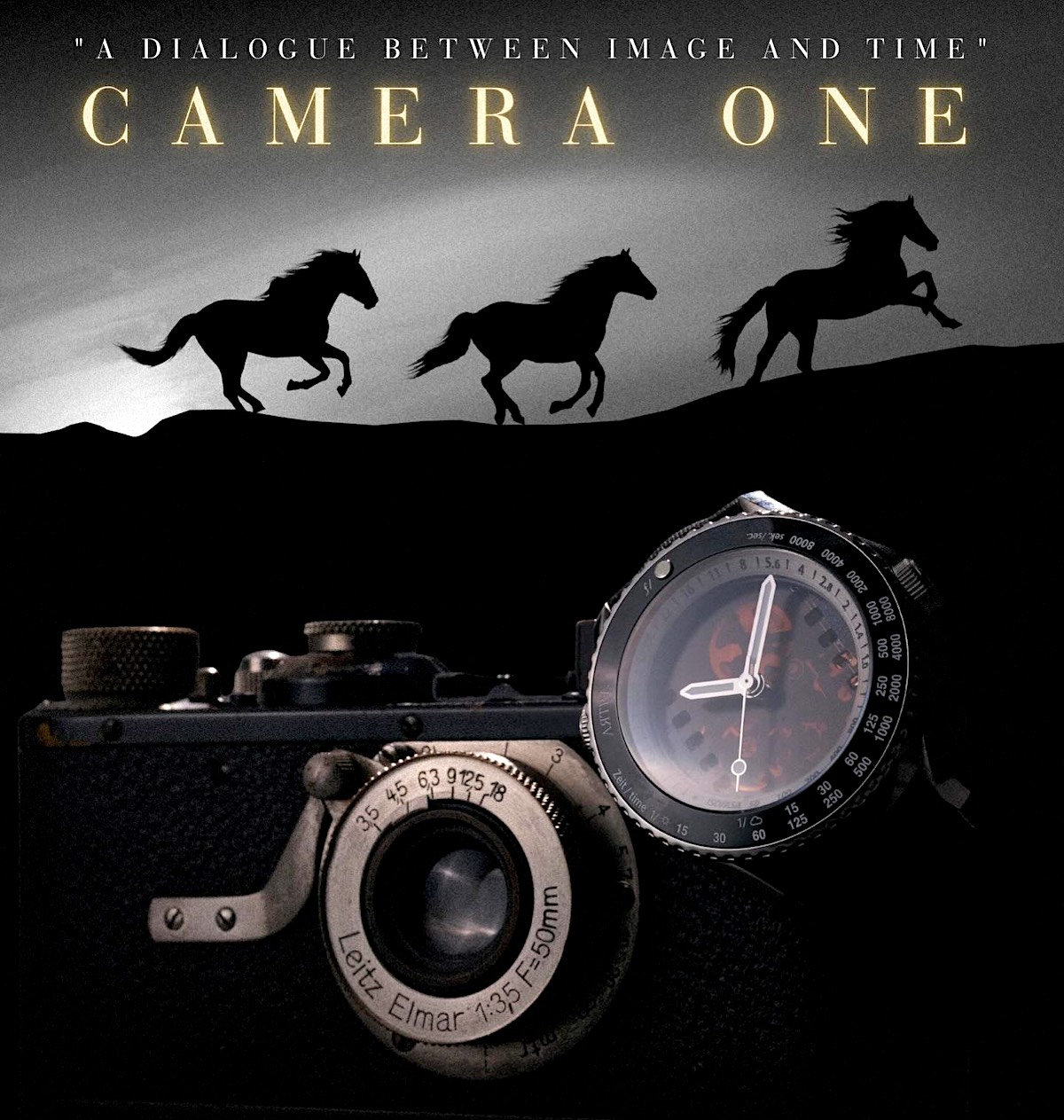
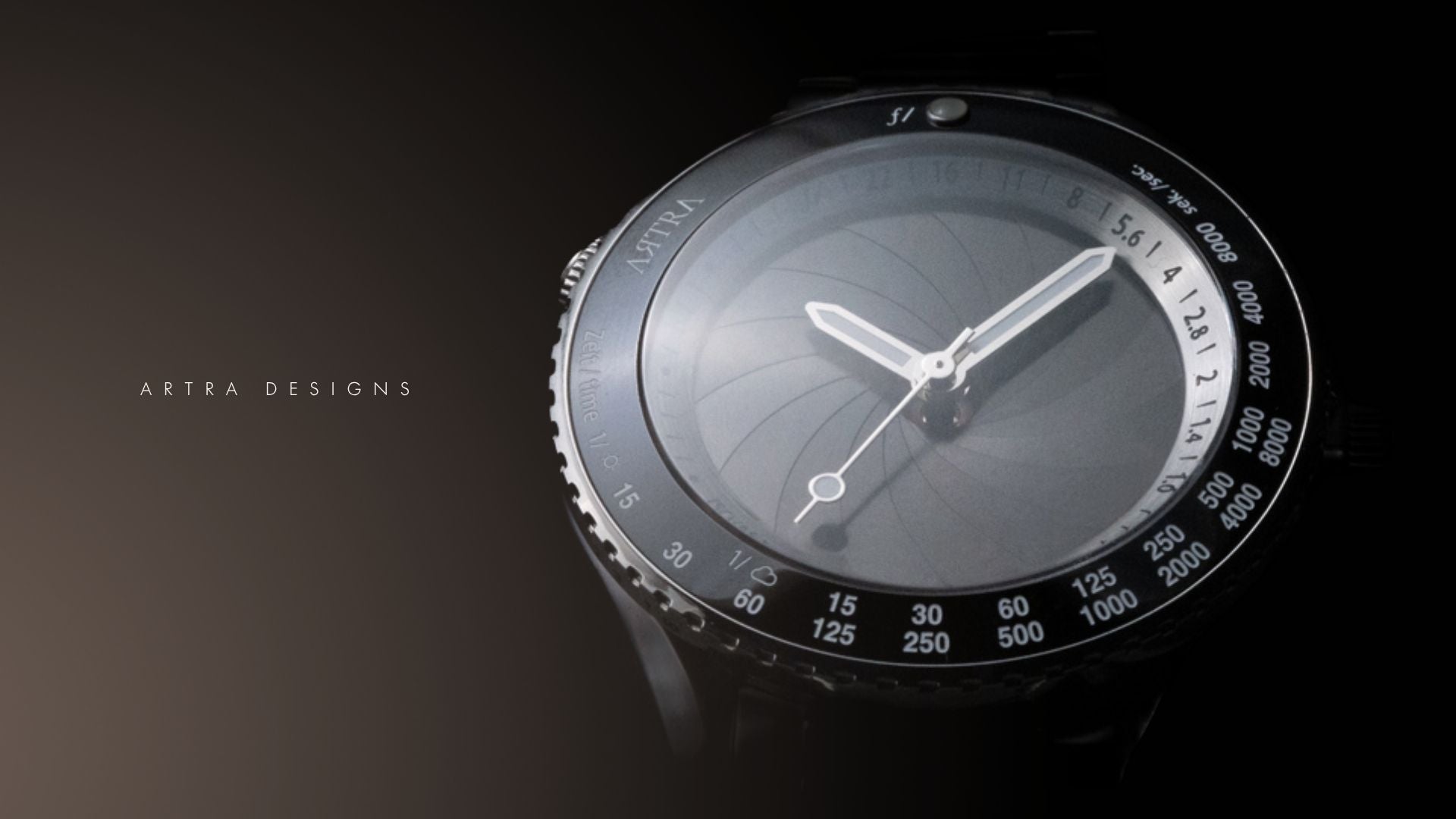
First review of the new Artra Camera One photography-inspired watch created by Artra Designs (the same company that makes the Artra lenses) has already been published on YouTube:
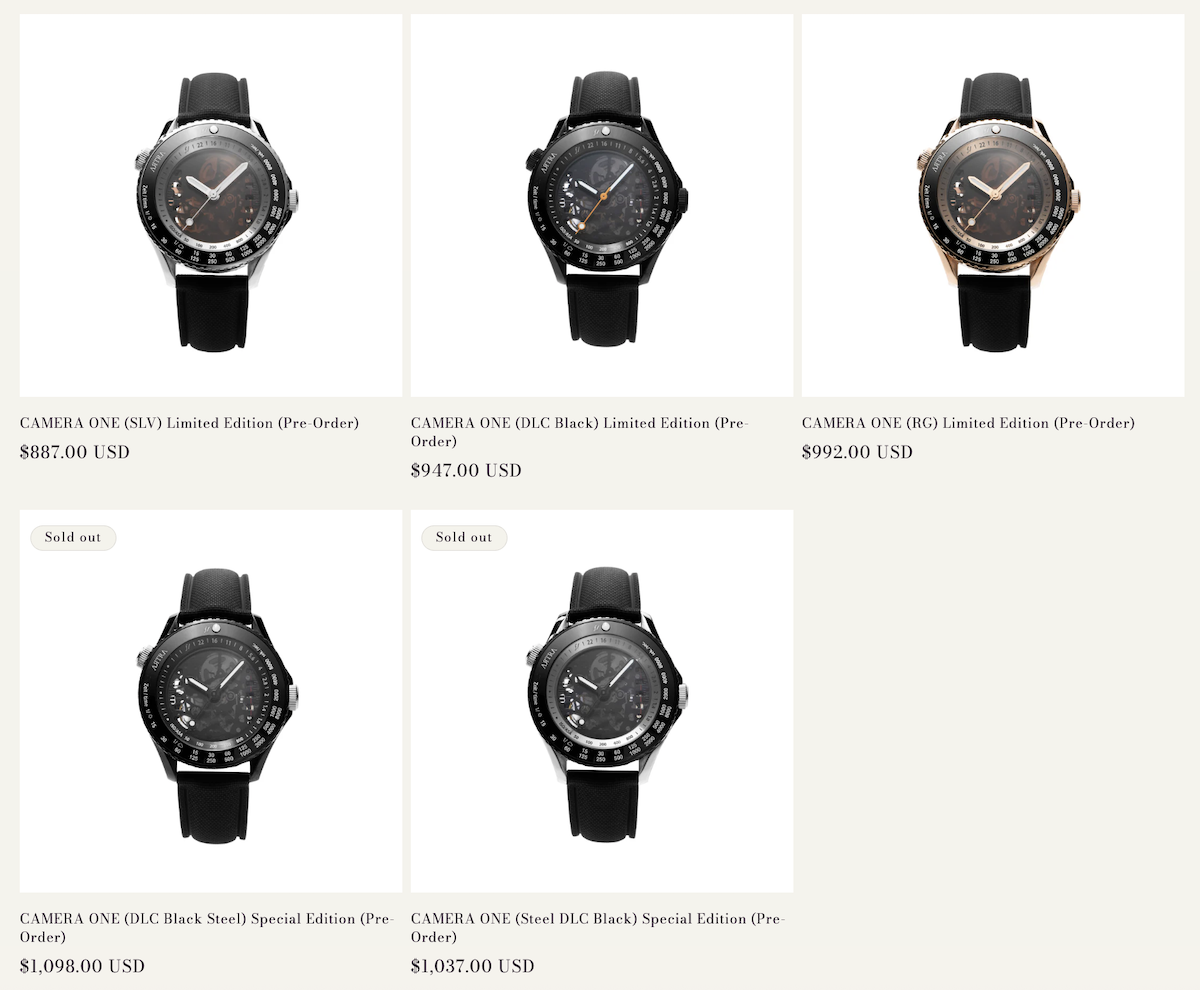
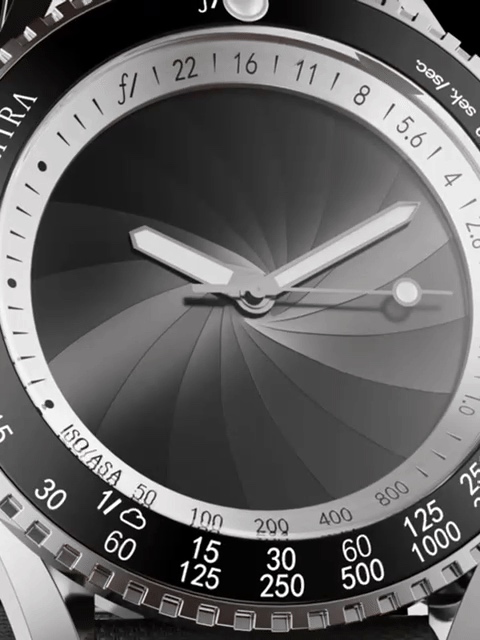
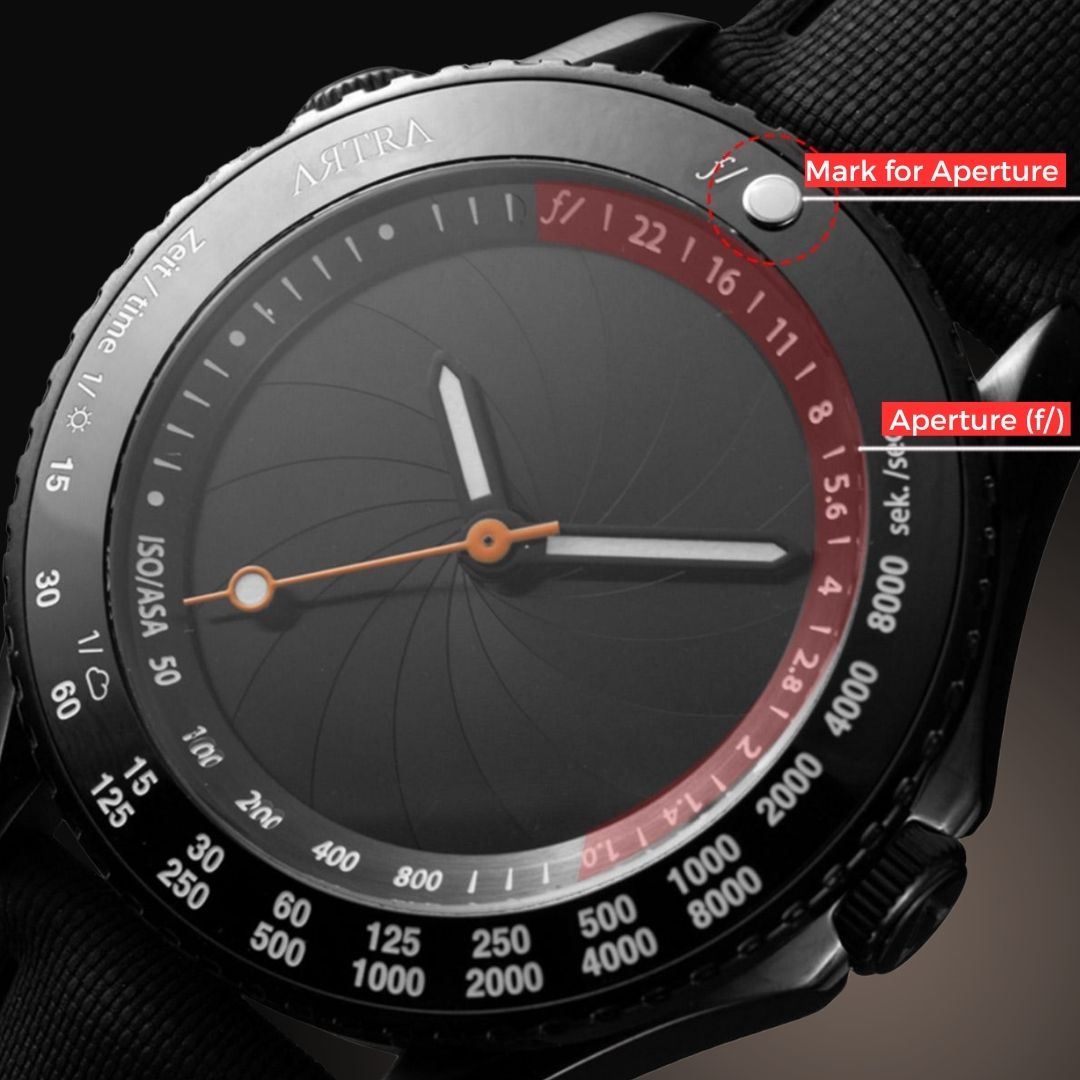
Artra Designs’ “Camera One” collection is a series of limited-edition mechanical watches rendered in premium materials with hand-finished movements visible through sapphire casebacks that pay homage to the golden age of photography, drawing inspiration from iconic cameras and lenses dating back to 1878. Each timepiece features dials and details crafted to resemble camera apertures, shutter blades, depth-of-field scales, and film advance mechanisms. The new Camera One limited edition watch comes in five different configurations (two of them are sold out already):
Inspired by the timeless art of photography, the Artra Designs Camera One shatters conventional watchmaking boundaries with two pioneering patents (ZL202530168106.1) (ZL202520671885.1), weaving the soul of film photography into every facet of its design.
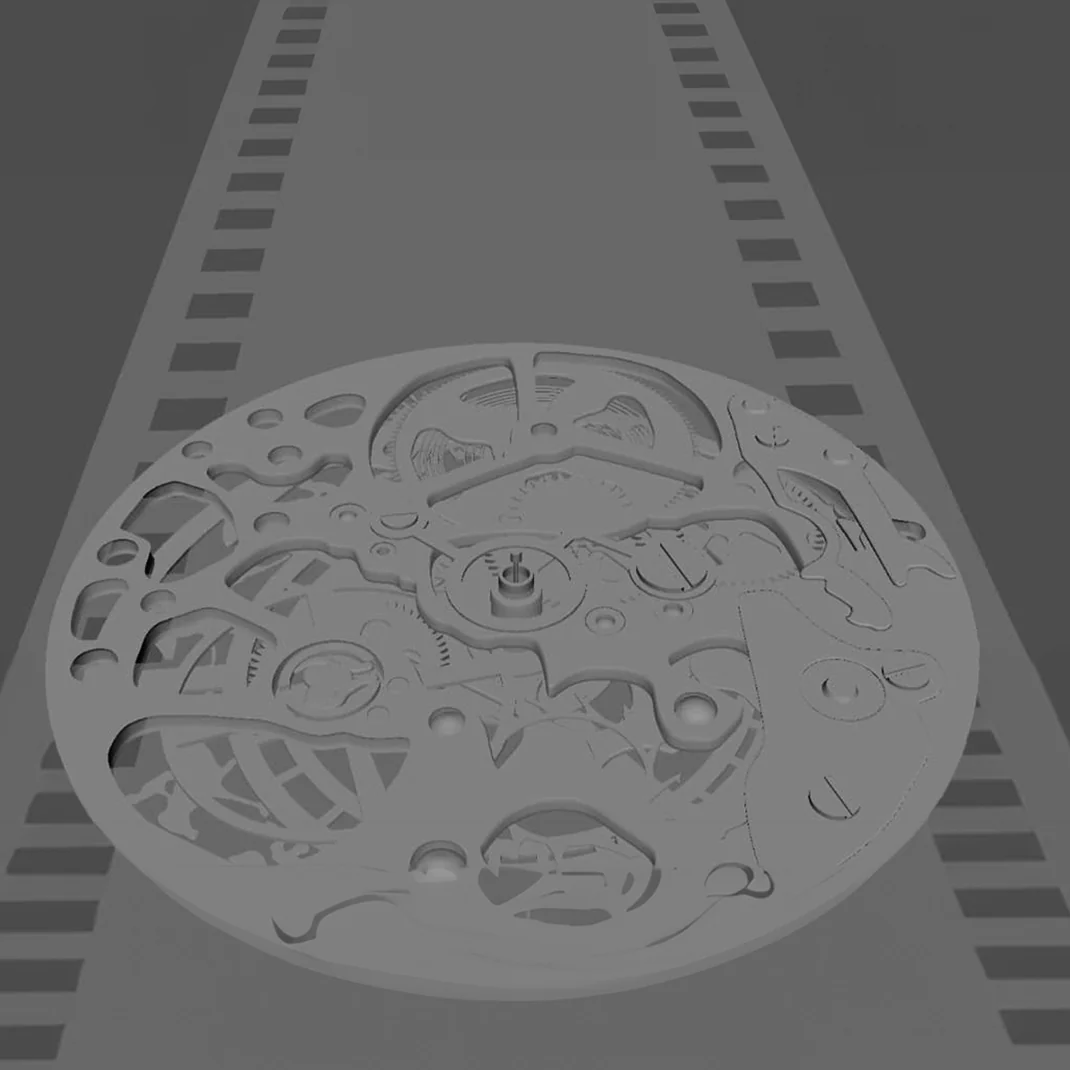
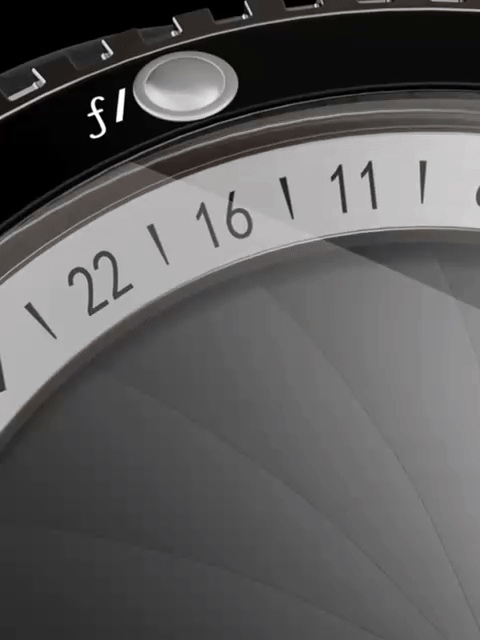
At its heart, the dial reimagines a camera’s aperture structure—turn the crown at the upper left, and the aperture blades dance open and closed, unveiling a translucent “film” beneath. As you admire this mechanical rhythm, it’s as if you’ve stepped back into the romantic golden age of film, where every frame was a deliberate, heartfelt act of creation.
The watch crystal, meanwhile, transcends its role as a mere protector, doubling as a camera lens. Through its clear transparency, it doesn’t just guard time—it captures it, freezing moments of wear into lasting memories. Even the crown rotating ring is reborn as a zoom ring; with each turn, you’re not just adjusting a watch component, but mastering the very rhythm of light and shadow, just as a photographer does when fine-tuning their lens to craft the perfect shot.
From aperture to lens to zoom, the C1 is more than a watch—it’s a wearable love letter to photography, a piece that lets you carry the romance of film in every second that ticks by.
A Tribute to the Legend of 135 Film Format
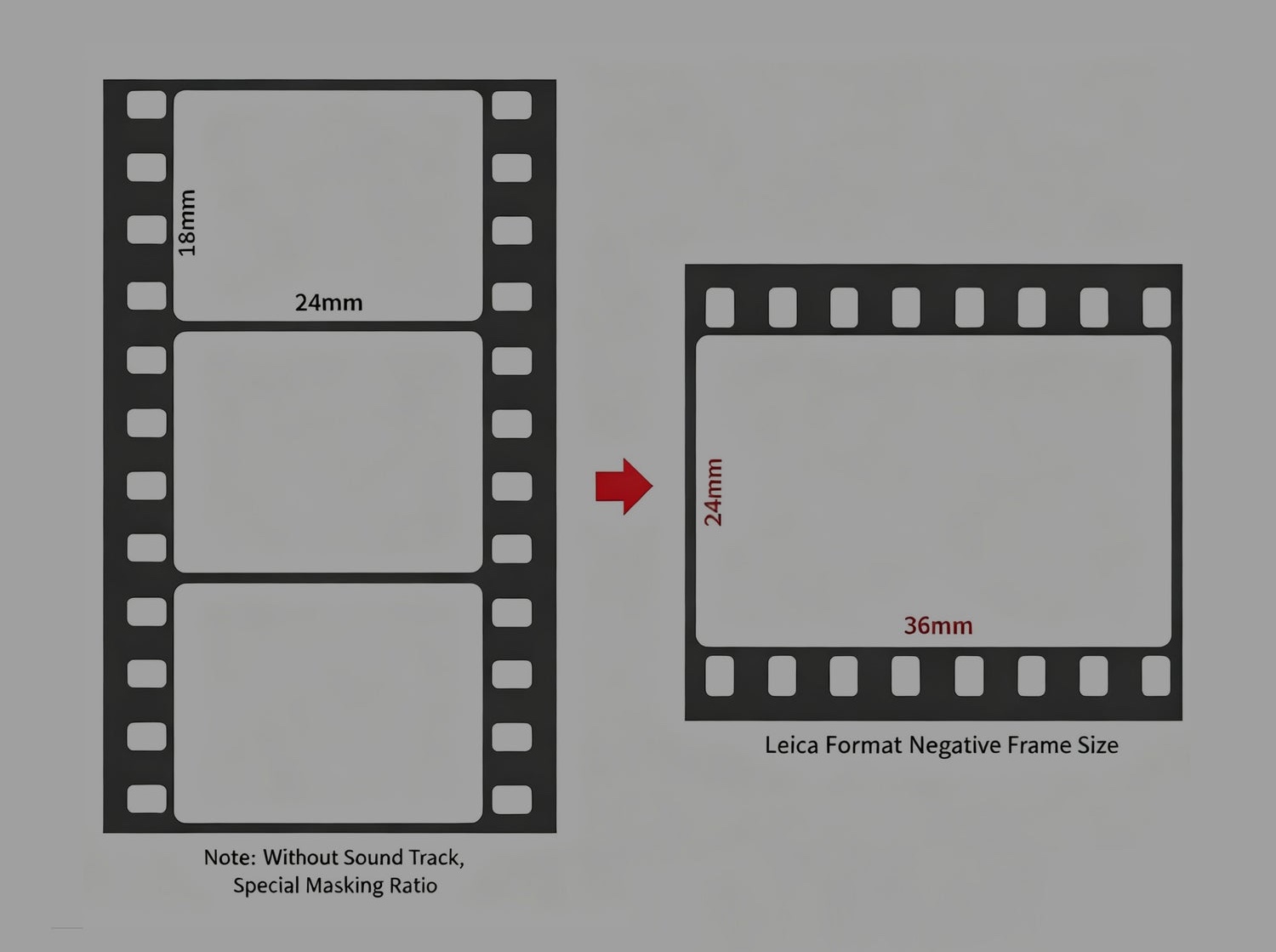
In 1925, Leica pioneered a groundbreaking idea by rotating the Super 35 film frame 90 degrees, laying the foundation for the 135 film format. Later, Kodak popularized photography among the masses by launching the Kodak Retina camera that adopted this 135 standard. A legendary chapter in imaging history was thus written. Taking time as our medium, we have integrated this legacy into watch design to create the “Light & Shadow Scale” Camera-Themed Watch, allowing the passion for imaging to flow through time.
When viewed head-on, the internal “film” of the watch is arranged vertically, replicating the classic composition of traditional film frames. Every time you raise your wrist, it is a look back at the original aspiration of imaging. When the watch is rotated 90 degrees, the depth-of-field scale on the side emerges clearly, and the outline of the watch instantly aligns with the shape of a camera, like a “mini camera” that can command time, rekindling the love for photography.
The depth of field scale on the left and the rotor on the back, featuring the iconic image of “Horse in Motion,” the first moving image ever taken by Muybridge in 1878, pay tribute to the history of photography in every detail. More than just a timekeeping tool, it embodies the art of photography on the wrist—encapsulating the inspiration and essence of photography within its compact dial. Every glance at the time feels like a touch of photographic art, embarking on a journey of photographic exploration on the wrist.
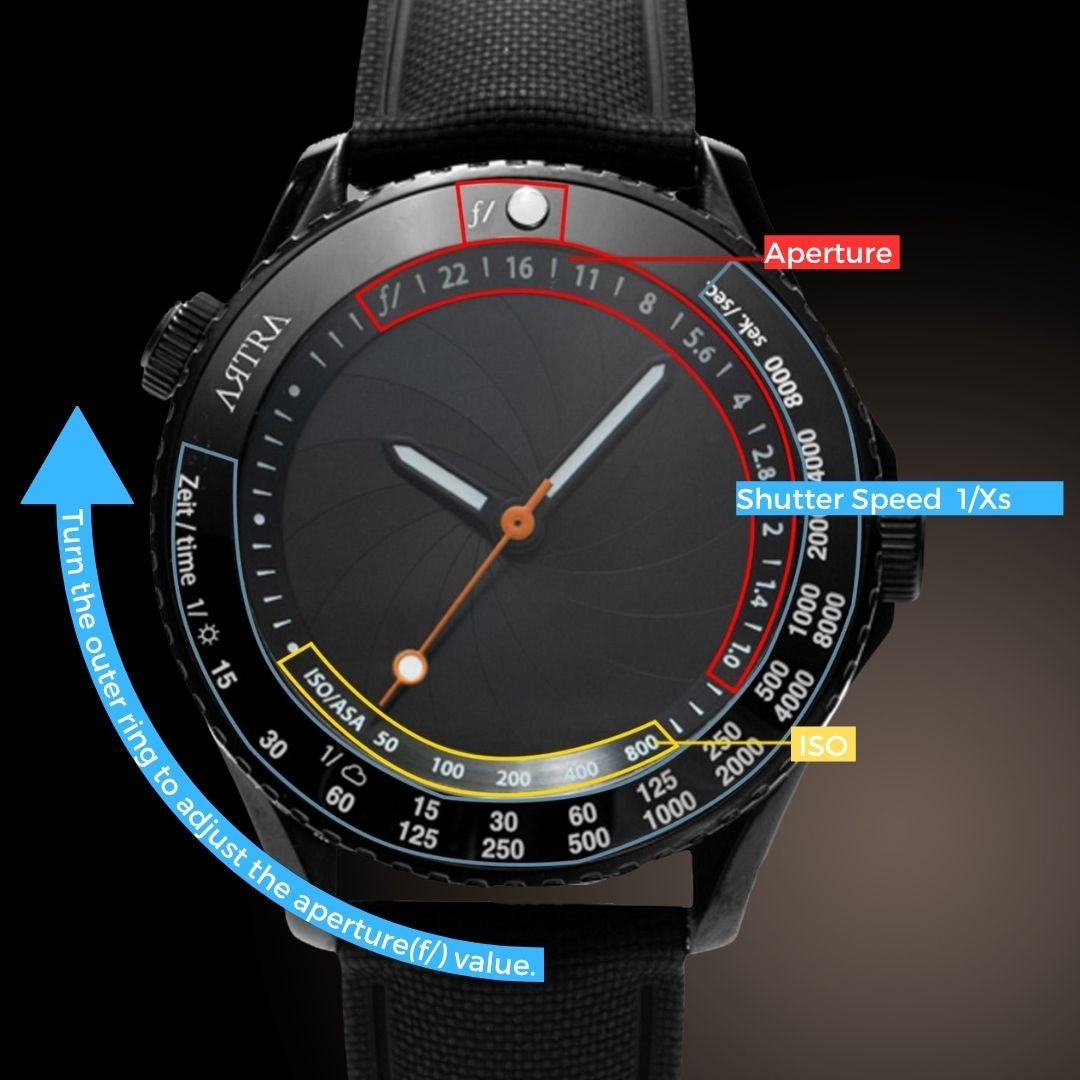
The bottom of the watch is equipped with an ISO and shutter speed display, identical to that of Leica cameras, fully replicating the core elements of a camera. Every design detail pays tribute to the legend of the 135 film format, presenting a wrist accessory that combines passion and quality for those who cherish both imaging and time.
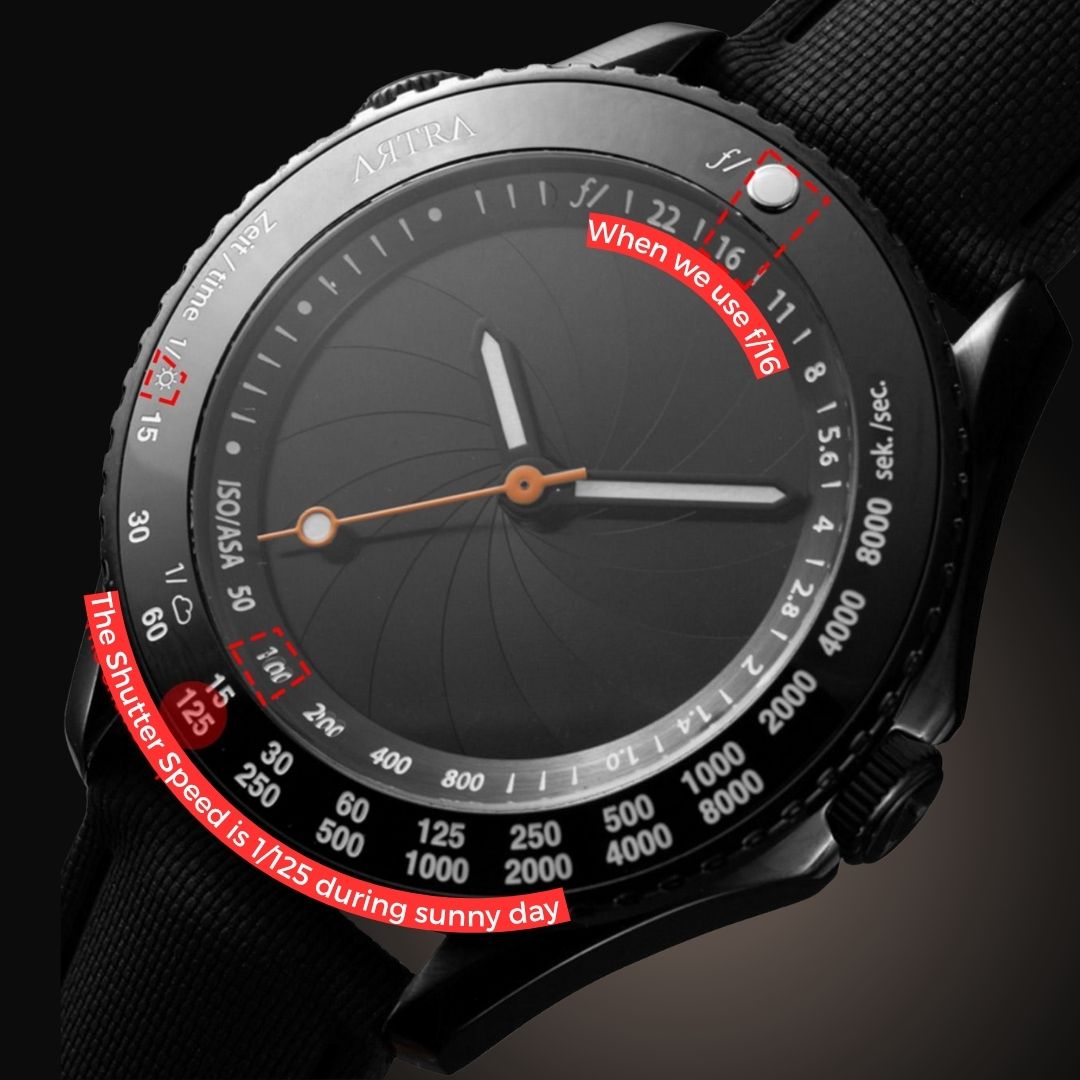
“Sunny 16” principle
The bezel is designed based on the classic “Sunny 16” principle. The luminous pearls indicating the F-number correspond to ISO and shutter speed. This universal principle in photography allows photographers using film to align the luminous pearls with the aperture value at different film speeds, and quickly match the ISO indicated below the inner bezel to the appropriate shutter speed. This allows for simple metering, integrating photographic parameters into the time-reading process and seamlessly integrating timing with the professional logic of photography.
Camera One
Here, each piece embodies craftsmanship inspired by vintage cameras dating back to 1878, holds stories that resonate with legendary figures, and carries the original vision of “freezing the beauty of flow with time.” Every model is an exclusive limited edition—from design details to craft quality, all stand up to the careful appreciation of light, shadow and the passage of time.
2025 was another exciting year for cameras. In addition to a variety of models that fit into easy-to-define categories, including high-end workhorses, enthusiast mirrorless, and entry-level bodies, we saw our share of quirky, unusual, and even unexpected cameras this year.
Our editorial team has already announced the winners of the 2025 DPReview Annual Awards. Now, it's time to find out what you think. Which of this year's new cameras do you think are worthy of recognition and one of our coveted Readers' Choice awards? Take our poll and let us know.
Polls are now open; see below.
Voting occurs in three categories (cameras, prime lenses, and zoom lenses) and runs through December 26.
Once the vote has closed, we'll run a fourth and final poll drawn from the first three winners to determine the Readers' Choice Product of the Year. Look out for that poll to open shortly before the end of the year.
Voting is easy: pick your top 3 products by dragging and dropping to rank them in order of priority. Products are listed alphabetically.
Poll widget
This widget is not optimized for RSS feed readers. Please open this article's permalink in a browser to view this content.
Please note that for the best experience, we recommend voting on our desktop site.
Poll Rules:
This poll is meant to be a bit of fun. It's not sponsored, promoted, or paid for in any way, and DPReview doesn't care how you vote. Our readers' polls are run on the basis of trust. As such, we ask that you only vote once, from a single account.
We saw some exciting lenses in 2025. Established manufacturers upped the ante with new F1.2 and F1.4 lenses, and even a couple of F2 telephotos, while up-and-coming Chinese lens manufacturers delivered numerous primes designed to deliver a lot of bang for the buck.
Our editorial team has already announced the winners of the 2025 DPReview Annual Awards. Now, it's time to find out what you think. Which of this year's new prime lenses do you think are worthy of recognition and one of our coveted Readers' Choice awards? Take our poll and let us know.
Polls are now open; see below.
Voting occurs in three categories (cameras, prime lenses, and zoom lenses) and runs through December 26.
Once the vote has closed, we'll run a fourth and final poll drawn from the first three winners to determine the Readers' Choice Product of the Year. Look out for that poll to open shortly before the end of the year.
Voting is easy: pick your top 3 products by dragging and dropping to rank them in order of priority. Products are listed alphabetically.
Poll widget
This widget is not optimized for RSS feed readers. Please open this article's permalink in a browser to view this content.
Please note that for the best experience, we recommend voting on our desktop site.
Poll Rules:
This poll is meant to be a bit of fun. It's not sponsored, promoted, or paid for in any way, and DPReview doesn't care how you vote. Our readers' polls are run on the basis of trust. As such, we ask that you only vote once, from a single account.
In addition to the usual assortment of new and updated models, we saw some head-turning zoom lenses in 2025, including fast-aperture zooms, versatile zooms for APS-C and medium format, some heavy-hitting telephotos, and at least one new kit zoom.
Our editorial team has already announced the winners of the 2025 DPReview Annual Awards. Now, it's time to find out what you think. Which of this year's new zoom lenses do you think are worthy of recognition and one of our coveted Readers' Choice awards? Take our poll and let us know.
Polls are now open; see below.
Voting occurs in three categories (cameras, prime lenses, and zoom lenses) and runs through December 26.
Once the vote has closed, we'll run a fourth and final poll drawn from the first three winners to determine the Readers' Choice Product of the Year. Look out for that poll to open shortly before the end of the year.
Voting is easy: pick your top 3 products by dragging and dropping to rank them in order of priority. Products are listed alphabetically.
Poll widget
This widget is not optimized for RSS feed readers. Please open this article's permalink in a browser to view this content.
Please note that for the best experience, we recommend voting on our desktop site.
Poll Rules:
This poll is meant to be a bit of fun. It's not sponsored, promoted, or paid for in any way, and DPReview doesn't care how you vote. Our readers' polls are run on the basis of trust. As such, we ask that you only vote once, from a single account.
The Godox AD300ProII redefines portable power for outdoor creators. Packing 300 Ws into a compact 1.2 kg body, it offers fast recycling, approximately 350 full-power flashes per charge, and full wireless TTL/manual support across major camera systems—making it a reliable, ready-to-go option for on-location shoots.
Performance Upgrade
With 300 Ws of output, a rapid 0.01–1.5 s recycle time at full power, and roughly 350 flashes per charge at maximum output, the AD300ProII delivers sustained performance for extended location shoots. That means fewer interruptions, fewer battery swaps, and more usable frames during long assignments—minimal downtime and more decisive shots.
Lightweight & Portable
Weighing just 1.2 kg with a compact footprint, the AD300ProII is easy to carry and quick to rig — It packs neatly in a camera backpack, making it ideal for on-location portraits, editorial shoots, and run-and-gun commercial work.
Visual 16 Color Groups
The group indicator light displays 16 distinct colors, letting you identify and manage flash groups at a glance—even from a distance. Visual grouping speeds multi-light setup and reduces mis-triggering during fast on-location shoots.
Clear & Intuitive Controls
A bright color screen, a smooth metal control dial and a streamlined button layout place common functions within immediate reach. The tactile dial and clear on-screen menus accelerate setup and adjustments so you can stay focused on composition.
Versatile Triggering Options
X3Pro/X3 one-tap sync links AD300ProII instantly—no group or channel setup required. This capability is enabled by the built-in Godox 2.4 GHz Wireless X system. The AD300ProII is also compatible with other X-series transmitters (XPro Series, X2T, X1) for broader control. For wired or alternate workflows, a 3.5 mm sync port is provided, and the USB-C port supports the optional FR433 433 MHz receiver.
Precise Power Control
A 10-stop range from 1/512 to 1/1 with ±0.1-stop increments gives you very fine control over output. That precision is useful when balancing several lights or setting delicate fill: feather under harsh midday sun or go full power to cut through twilight. Small micro-adjustments let you refine exposure fast, reducing test flashes and wasted light.
12 W Bi-Color Modeling Lamp
A 12 W bi-color modeling lamp provides adjustable continuous light for accurate previews and practical on-set illumination. Brightness and color temperature can be dialed to match ambient conditions, helping you preview the final look without firing test flashes.
Comprehensive Pro Modes
The AD300ProII equips photographers with a full set of pro features—Freeze Mode, Color-Stable Mode, HSS and Multi—so you can work confidently across mixed-lighting, fast-action and multi-strobe setups.
Wide Accessory Compatibility
The AD300ProII features the native Godox mount and accepts Godox’s ecosystem of modifiers. Fit the optional S3 bracket to use Bowens-mount accessories. For still broader compatibility, the optional AD-AB adapter accepts mount adapters for Broncolor, Profoto, Elinchrom—opening access to an even wider range of light-shaping tools.
I took this photo of the Abraham Lincoln statue inside the Lincoln Memorial in Washington, DC, in 2020 while writing an article about using anamorphic lenses on smartphones for wide-format photography. This image was captured using a Moment anamorphic lens on an iPhone 11 Pro and desqueezed to an aspect ratio of 2.35:1, about the same as CinemaScope, a widescreen cinema format originally developed in the 1950s.
This month, we're celebrating the art of black and white photography. Whether you're focused on the interplay between light and shadows, ethereal high-key images, or using darkness to create mood and mystery, we challenge you to show us the world in monochrome. Strip away the color and show us your best black and white images!
Photos can be submitted between Sunday, December 14, and Saturday, December 20 (GMT). The challenge is open to photos captured at any time.
Important: Images MUST include a title and a caption of at least 25 words to be eligible. We need to be able to share the story behind your photo. We will consider both photos and captions when selecting our winners, so make sure to tell us that story!
Visit the challenge page to read the full rules and to submit your photos for consideration as soon as the challenge opens.
This month, DxO Labs released 1,846 new DxO camera and lens modules for the latest releases like the DJI Mini 5 Pro, Fujifilm X-T30 III, Nikon Nikkor Z 24-70mm f/2.8 S II, OM System M.Zuiko ED 50-200mm f/2.8 IS PRO, Panasonic Lumix S 100-500mm f/5-7.1, and Zeiss Otus 85mm f/1.4.
PhotoRumors readers can use the exclusive discount coupon code RUMORS for 12% offsitewide (stackable with price-drop items, but not multi-item discounts) – the code works only for purchases made on the official SmallRig website:
A quick update to my previous post: the second lens from 7Artisans will be a new 6mm f/2 diagonal fisheye manual-focus APS-C lens with a 220° field of view. The new lens will be available for E/X/Z/MFT/R mount.
Last week, we announced the winners of DPReview's Annual Awards for 2025. As always, the process for selecting them can be a bit contentious, with some heated (but still respectful) debate among the team. This year, we thought it'd be fun to give you a peek behind the scenes, so we recorded a team discussion where we go in-depth on the winners we picked, as well as some of the runners-up.
If you want to hear more about our personal favorite things from this year, even the ones that didn't get an official award, be sure to check out our Gear of the Year columns. Not all of them are out yet, but the rest of the crew's articles will be coming soon.
When you use DPReview links to buy products, the site may earn a commission.
Partially stacked sensors are essentially conventional BSI sensors with more complex readout circuitry (seen at the top and bottom of the Z6III sensor, here). This allows boosted DR modes we're seeing from the Panasonic S1II and Sony a7 V.
Image: Nikon
Dynamic range data for the Sony a7 V makes clear that the benefit of partially stacked CMOS isn't just speed: it's the ability to deliver higher dynamic range.
Bill Claff has just published his "photographic dynamic range" figures for the Sony a7 V, making an impressive showing and revealing what's going on behind the scenes, both for the Sony and the recent Panasonic Lumix S1II.
Partially stacked sensors are essentially conventional BSI chips with more complex readout circuitry around the edge (the sensor itself isn't stacked). The Nikon Z6III showed this could bring a speed advantage over existing BSI sensors but the Panasonic S1II and Sony a7 V show that there's much more they can do.
The dynamic range data for the Sony a7 V (black) gives a hint to how it's delivering its excellent results in mechanical shutter mode (blue).
Unlike existing dual conversion gain sensors, which could use either a low gain (high capacity) setting for low ISO and a high gain (lower noise but lower capacity) mode for high ISOs, the new sensors can do both, simultaneously. So you can capture the full capacity of the low gain mode but combine the cleaner shadow data of the high gain mode.
For years, we've seen dismay that the advances in sensor tech weren't giving an IQ improvement. Well here's the step forward in IQ we've all been waiting for'
This process, which we suspect involves sample-and-hold capability in the more complex readout circuitry, takes longer than reading out just a single mode. As a result, it can only be conducted in the mechanical shutter modes, where the physical shutter stops any more light accumulating, giving you as much time as you need to read the sensor.
The publication of the e-shutter data for the Sony makes this clear: in e-shutter mode you see the now-familiar shape of a dual conversion gain sensor, but in mechanical shutter mode the low ISO DR is boosted: essentially extending the shadow benefit of the high gain mode back up into the low ISO range. Panasonic's S1II does the same thing.
Compare the results of the Panasonic S1II (orange) with that of the Nikon Z6III, which uses a similar sensor but appears to always use only either its low or high gain mode, and you see the same pattern. We strongly suspect the S1II's e-shutter data would overlap very closely with the Nikon's.
For years now, we've seen dismay expressed that the advances in sensor tech were only giving a speed benefit, rather than an IQ improvement. And those speed improvements were often mischaracterised as solely benefiting video. Well here's the step forward in IQ we've all been hoping for, in addition to the speed boost we see in the single gain readout mode.
This isn't the only way of achieving something like this: Canon has it's own 'Dual Gain Output' technology used in some of its Cinema EOS cameras and there's a similar (though, we're told, not identical) approach used in the most recent Micro Four Thirds cameras from Panasonic.
What does this mean for the a7 V?
The upshot for the Sony is that dynamic range looks excellent in mechanical shutter shooting but you have to give up that DR boost when you switch to any of the fully e-shutter modes. So, while the Sony still outputs 14-bit files in these modes, there may not be the DR advantage over the Canon EOS R6 III's 12-bit output that some commenters have been (perhaps prematurely) crowing about.
The good news is that Bill had initially marked the a7 V's data as having noise reduction in it. He's now removed this designation as the signal processing he was observing appears to be the combination of the two readout modes, rather than anything murky goings on in the shadows.
Do I need all this DR?
This is certainly a step forward for the industry, and one that doesn't come with the significant costs of a fully stacked sensor design, so it's likely to come to a wider range of cameras. We'd assume a similar approach will appear in the next generation of fully stacked sensors, though it may still require the use of a mechanical shutter.
It's worth keeping in perspective, though. DR numbers do not represent image quality as a whole, and there's nothing to suggest that there's been a big boost in IQ across the whole tonal range of the images. The improvements will primarily be in the shadows, adding editing flexibility for things like daybreak and sunset landscapes.
For a lot of photographers, DR differences were worth considering when some models produced Raw files with relatively little opportunity to exploit shadow capture, beyond what was already present in the JPEGs. But once you reach a threshold of 'good enough' for your style of shooting, any further increase is nice to have but for an increasingly small number of your images, rather than an every-shot benefit.
It's definitely a step forward, though, and if more people start to utilize the capabilities of HDR screens to make their work more striking and lifelike and more often use more of their captured DR, then that will only increase the value of this breakthrough.
Thansk to Horshack, Bill Claff and Bob Newman for their work, insight and feedback on this technology.
We all encounter situations where the environment fights against us: the lighting is too dim, the subject moves too fast, or the focal length just isn’t long enough. You end up with a composition you love, but the photo itself—plagued by high-ISO noise, slight motion blur, or low pixel count from cropping—becomes a headache to process.
Manually correcting these fundamental image quality issues in traditional photo editors often requires tedious fine-tuning to perfectly balance sharpness and natural texture.
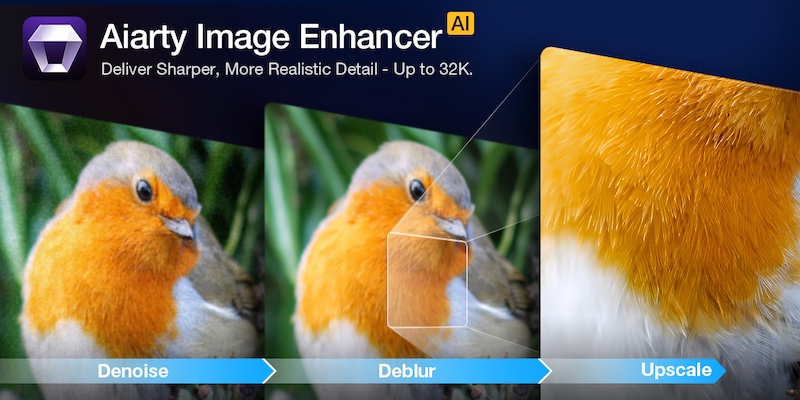
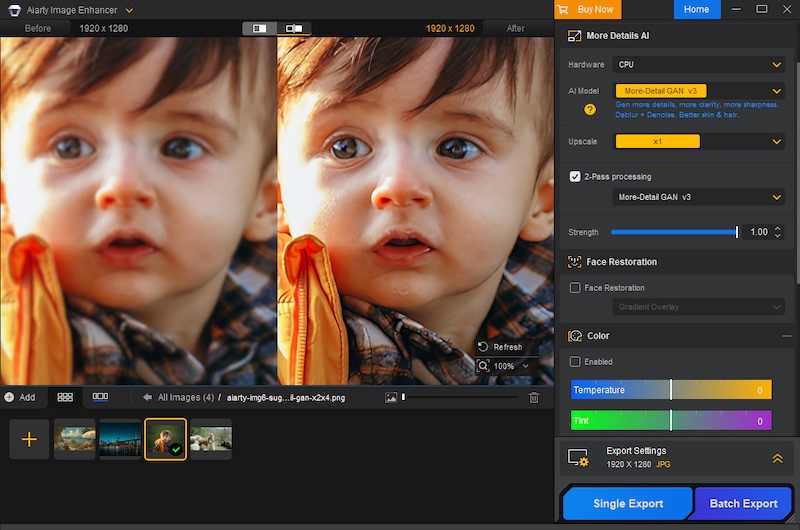
Aiarty Image Enhancer is designed to simplify this crucial post-processing step. It acts as an efficient specialist tool that quickly and automatically uses AI to denoise, deblur, sharpen, and upscale your photos. This approach hands you a clean, high-fidelity foundation, allowing you to spend less time fighting pixels and more time on the final artistic grade.
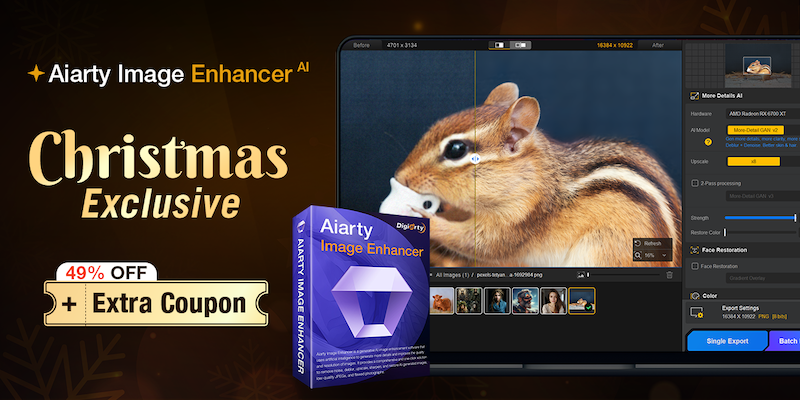
Christmas Special Offer: 49% off Lifetime License + extra $5 coupon
If you are tired of monthly subscriptions piling up, this offer is specifically for you. In celebration of Christmas, Aiarty is offering49% off Aiarty Image Enhancer Lifetime License. And that’s not all! You can also use the limited-time coupon “XMASSAVE” to save an extra $5. Originally priced at $155, now you can grab it for just $74 – the lowest-ever price!
With your purchase, you’ll enjoy:
Full access to all features and lifetime free updates
Installation on up to 3 Windows or Mac computers
30-day money back guarantee
One-time payment, no subscriptions or hidden fees
This is arguably one of the best value propositions in photo enhancement software this year. But is the software worth it? Let’s break down the performance.
Deep Dive: Why Aiarty Image Enhancer Belongs in Your Workflow
1. AI Denoise: The High-ISO Savior
Noise is the enemy of detail. Whether you are shooting indoor events, astrophotography, or wildlife at dawn, pushing your ISO is often necessary. Traditional noise reduction software works by blurring the image to hide the grain, which often results in the dreaded “waxy skin” effect or loss of fine textures like fabric or fur.
Aiarty uses advanced AI denoise technology to intelligently analyze the image. It distinguishes between luminance noise, chroma noise, and actual image detail. It allows you to remove noise from images without sacrificing the sharpness that your expensive lenses provide.
2. De-blur & Sharpening: Fixing the “Almost Perfect” Shot
Blur comes in many forms, and Aiarty tackles them all.
Camera Shake: Even with IBIS (In-Body Image Stabilization), handheld shots at slow shutter speeds can suffer from micro-jitters.
Motion Blur: Subjects don’t always stay still. A moving child, a running pet, or a swaying branch can ruin a shot.
Lens Softness: We all love vintage lenses or wide-open apertures, but they often lack sharpness at the edges.
Aiarty doesn’t just apply a “sharpening mask” which increases contrast at edges. Instead, it hallucinates (in a good way) the missing pixel data to reverse the blur. It restores edge definition and clarity without introducing the artificial white halos or “crunchy” look associated with over-sharpening.
3. The Upscaling Powerhouse: From Crop to Print
The freedom to crop is a luxury. Sometimes, your 200mm lens isn’t long enough, and you have to crop 50% or more of the frame to get the composition you want. In the past, such heavy cropping drastically reduced pixel density, rendering images unsuitable for large-format printing.
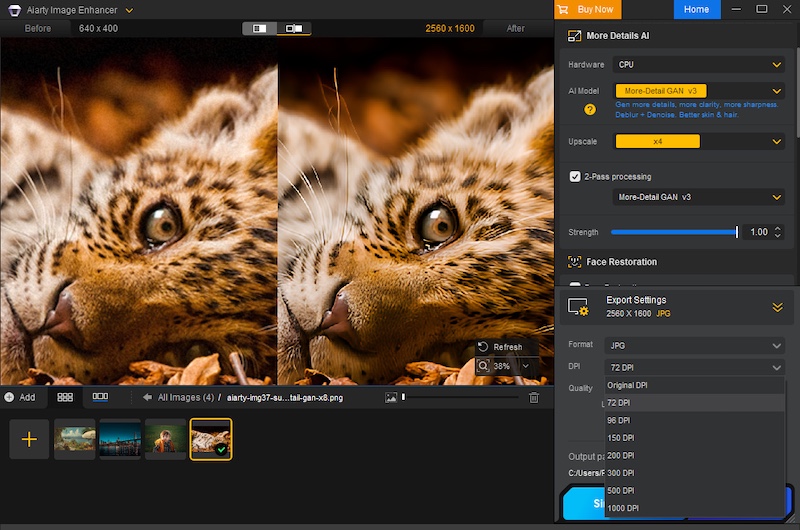
Aiarty excels in AI upscaling. Leveraging deep learning algorithms, it can enhance image resolution to 4K, 8K, 16K, and even up to 32K. Crucially, it generates new, realistic details and textures—like feathers, individual strands of hair, or intricate fabric patterns—rather than simply stretching pixels. This means you can crop without fear, transforming what would have been small, social media-only images into print-ready, large-format works with every pixel looking sharp and natural.
Furthermore, Aiarty allows for precise control over your output, enabling you to set custom DPI values directly within the software, a critical feature for professional printing workflows.
4. One-Stop Color & Tone Correction
While most professionals stick to Lightroom for grading, Aiarty includes a surprisingly robust set of adjustment tools. This is particularly useful for a “One-Stop” workflow. If you are rescuing an old, faded family photo or a poorly exposed JPEG where the RAW data isn’t available, you don’t need to open another app.
You can adjust temperature, tint, exposure, contrast, highlights, and shadows directly within the interface. It is perfect for quickly reviving the dynamic range and color vibrancy of an image immediately after denoising or upscaling.
Professional Workflow Features
Extensive Format Support (Including RAW)
It doesn’t just handle JPEGs. It supports a vast array of input formats including HEIC, TIFF, PNG, and crucially, RAW files. It works seamlessly with .CR3 (Canon), .ARW (Sony), .NEF (Nikon), .RAF (Fujifilm), .DNG, and virtually every other proprietary RAW format from Leica, Panasonic, Olympus, and Hasselblad. This means you can integrate it right at the start of your editing pipeline.
Hardware Acceleration
Processing AI models is demanding. Aiarty is optimized for GPU acceleration (NVIDIA, AMD, Intel), dramatically cutting down processing time and ensuring a much smoother workflow, particularly when dealing with large-format files or applying complex enhancements across batches.
Batch Processing
Have a folder of 500 shots from a wedding that were shot at ISO 3200? You don’t need to edit them one by one. You can batch process thousands of images.
Granular Control
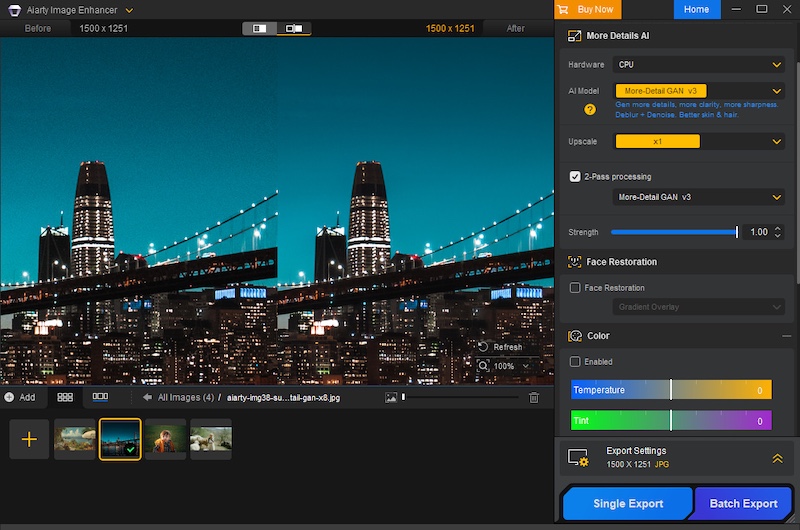
Flexible Scaling: Many AI enhancement tools restrict control to fixed ratios (e.g., only 2x upscaling). Aiarty provides flexibility. It allows users to freely select the enlargement multiplier or directly set the final target resolution.
Strength Slider: The software offers an intensity slider to manually adjust the strength of the AI enhancement and sharpening. This ensures you can achieve the optimal balance between maximum quality improvement and preserving the image’s natural, artifact-free look.
Verdict: Don’t Miss This Deal
In the world of photography, “saving” a photo used to mean spending hours cloning and masking in Photoshop. Aiarty Image Enhancer turns that into a simple, automated process. It is the perfect companion to your existing RAW editor, stepping in when you need to go beyond the limits of your sensor.
With the Christmas Lifetime Deal, you aren’t just buying software; you are buying an insurance policy for your images. No monthly fees, just permanent access to better image quality.

 Connexion