Vue normale

Breaking Leica's monopoly: Ricoh releases GR IV Mono

When you use DPReview links to buy products, the site may earn a commission.
Ricoh GR IV Monochrome front
Sample gallery
This widget is not optimized for RSS feed readers. Please open this article's permalink in a browser to view this content.

Product photos: Richard Butler

Ricoh has released a monochrome version of its GR IV enthusiast compact camera. The GR IV Monochrome features the same 26MP BSI CMOS sensor and 28mm equiv F2.8 lens as the color version, but is black-and-white only.

Key specifications

  • 26MP BSI CMOS sensor with no color filter array
  • On-sensor phase detection
  • ISO 160-409,600
  • In-lens shutter allows flash sync to 1/4000th sec
  • E-shutter allows use of F2.8 at up to 1/16,000 sec
  • Built-in red filter, giving punchier blues.
  • 53GB of internal memory
  • 250 shot-per-charge battery rating
  • UHS-I Micro SD memory card slot

The GR IV Monochrome will sell for a recommended price of $2199. This is a 46% premium over the list price of the standard GR IV, suggesting Ricoh feels that the mono version will have a smaller audience to foot the development costs. The MSRP in the UK is £1599, which is only a 33% mark-up over the standard version's original list price.


Index

What is it?

Ricoh GR IV Monochrome 3quarter view

As the name implies, the Ricoh GR IV Monochrome is a black-and-white only variant of the GR IV.

You get all the usual benefits and costs of a mono-only sensor: a higher base ISO, because less light is being lost to a color filter array (a 2/3 of a stop increase, in this instance), and much sharper detail, as there's no demosaicing taking place.

You also get better noise performance at any given ISO: again because there's no color filter sapping any light, but with that advantage disappearing if the color version can use its lower base ISO.

However, with only a single color channel, there's a lot less flexibility to the Raw files: once the image appears to be clipped, there's no way to approximate highlight data from unclipped channels.

The electronic shutter can deliver exposures down as low as 1/16,000 sec, letting you use the maximum aperture even in good light

To prevent overexposure when shooting at F2.8, the GR IV Monochrome lets you switch from its in-lens shutter to an e-shutter. The electronic shutter can deliver exposures down as low as 1/16,000 sec, letting you use the maximum aperture, even in good light, despite the camera not having an built-in ND filter. As with the regular GR IV, the mechanical shutter has an upper limit of 1/2500 sec at F2.8: you need to stop down to F5.6 to achieve the 1/4000 sec maximum.

Interestingly, Ricoh says the GR IV Monochrome's autofocus is the same as that on the GR IV, which means it has on-sensor phase detection. This would mean that, unlike the Leica Q3 Monochrom, it has to do some degree of interpolation during processing, to hide any impact of those phase-detection pixels. We've not seen any negative impact from this in our preliminary shooting, even when trying to induce flare to highlight any issues.

The company also says that the sensor is not the same one used in the K-3 III, though it wasn't specific about how the two differ.

Red Filter

Ricoh GR IV Monochrome rear controls

Other than the lack of color filter array, the other difference is that the GR IV Monochrome has a slot-in red filter, rather than the neutral density filter in the color version. This selectively lowers the impact of blue and green light on the sensor, which gives more dramatic skies and higher contrast, generally.

The filter in the GR IV Monochrome reduces the overall light to the camera by around 3 stops, for a neutral subject (it's around a 4 stop cut for blues, 3.5 for greens and closer to a single stop for reds).


Body and handling

Ricoh GR IV Monochrome controls

As you might expect, the GR IV Monochrome looks and handles exactly like the regular GR IV: it's a tiny camera for one with such a big sensor and yet it manages to put a lot of control at your fingertips without seeming too cramped.

The finish of the camera is also a little different, with a less textured matte black finish. The shutter button is also black and the GR logo on the front is a very dark grey, rather than white. The green LED ring around the power button is also white, to keep with the monochrome theme. Sadly, Ricoh has not borrowed the beautiful 'Monochrome' typography from its Pentax K-3 III Monochrome DSLR.

Ricoh GR IV Monochrome front dial

The control logic is well worked through, as you'd expect for the eighth generation of a design (prior to 2013's GR, with its APS-C sensor, were four iterations of GR Digital, which used a much smaller Type 1/1.7 sensor in a very similar body).

Despite its size, the GR IV's magnesium alloy body makes it feel very solid, without being overly weighty. And, unlike almost all modern cameras, it will sensibly fit in a pocket.

Ricoh says the GR IV's lens was specifically designed to reduce the risk of dust ingress, but that they had to make the choice between the small form factor that a retractable lens makes possible and complete weather sealing, so there are no promises around the level of sealing.

Initial impressions

Ricoh GR IV Monochrome in-hand front view

Ricoh was kind enough to lend us a pre-production GR IV Monochrome, to let us get a feel for the handling, but we were asked not to make measurements or publish images from it, as it's not necessarily representative of final production performance.

But, even in the limited time we've spent with the camera, its appeal shines through: it forces on you that same way of looking at light and shade that Leica's monochrome cameras bring. And I maintain that using a camera that can only capture black and white is a completely different experience to using a normal camera in mono mode. Knowing that you can't switch, no matter how appealing the colors are in your scene means you solely focus on light, shadow and contrast.

The inclusion of a built-in, switchable red filter is a brilliant idea, letting you add that punch to your images at the touch of a button, without having to add a filter ring adapter or carry filters round with you. I'm sure there'll be people who would have preferred a different color, but red seems like a sensible option since they had to choose one. And the option to engage electronic shutter, so that you can still shoot wide-open in bright conditions feels like a reasonable work-around.

Ricoh GR IV Monochrome rear

Even more so than the standard GR IV, the Monochrome version is going to be a niche proposition. Some people will immediately know they want one, while I suspect a great many people will be baffled at the idea that a regular GR IV in mono mode wouldn't be similar enough. And cheaper.

The price of adopting a decidedly niche camera is that there are fewer people to share the development costs with. The Ricoh is just over a quarter of the price of the other dedicated mono compact on the market – though the Leica Q3 mono has a sensor more than twice the size and a maximum aperture that's over a stop brighter, so can capture more than four times as much light – but there's still something inherently counter-intuitive about having to spend more, for less.
Is Insta360 coming up with a new mirrorless camera?

Par : PR admin
21 janvier 2026 à 18:14


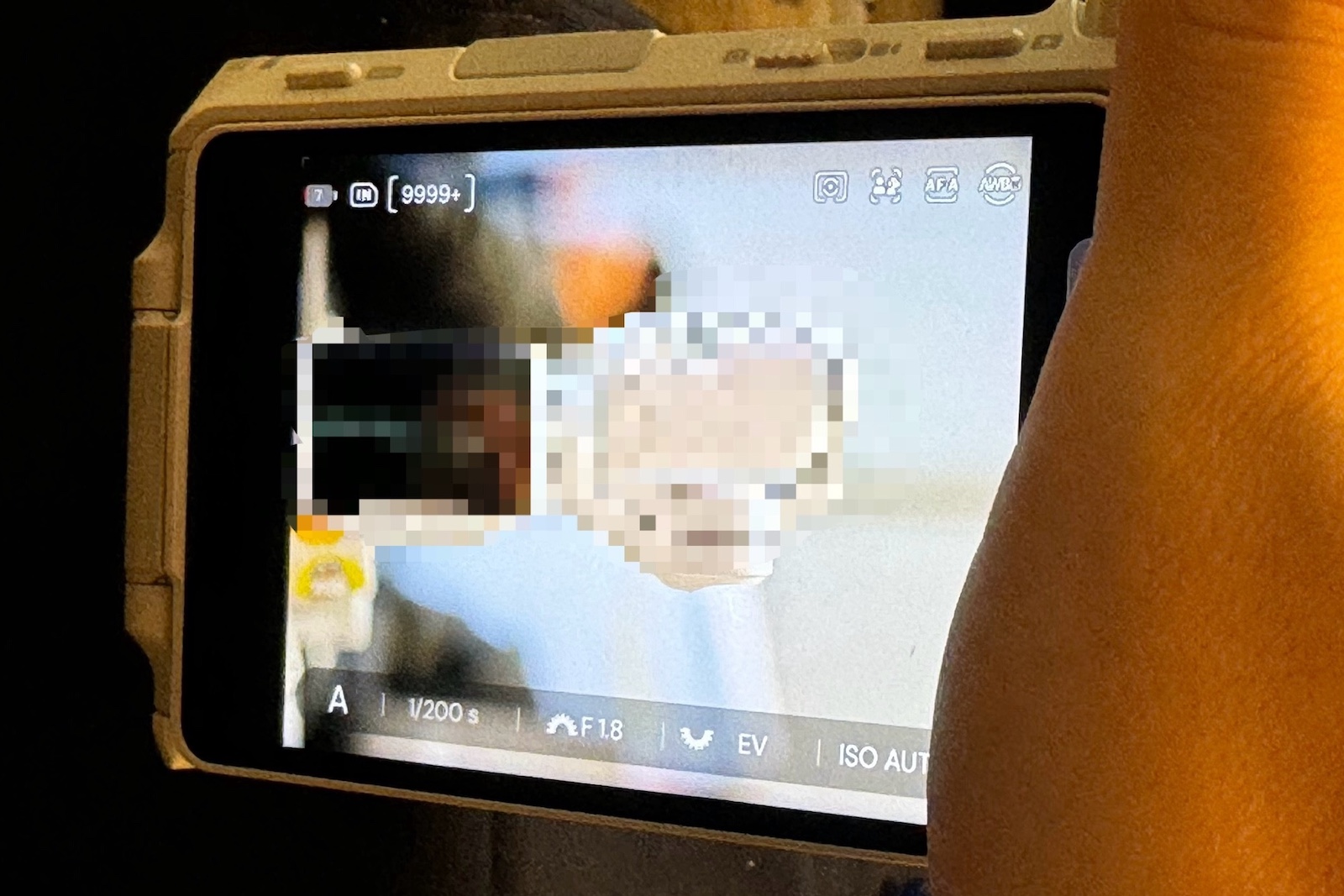
The CEO of Insta360 posted the above photo on Chinese social media, along with the words 向新的焦段进发, which translates to “Venture into new focal lengths.” The camera appears to be APS-C mirrorless (in white) based on the size relative to the hand. The mounted lens is f/1.8. Some of the buttons are:

  • Photo – Video switch (top center)
  • Play button (top left)
  • Face detection for humans and animals

Stay tuned for details.

The post Is Insta360 coming up with a new mirrorless camera? appeared first on Photo Rumors.

These are the photo projects that have kept you inspired and learning

colorful orbs light up a roman building
Photo: Community member NiVoak

For our most recent Question of the Week, we asked about a topic that's near and dear to my heart: photography projects. We wondered what projects you are taking on to spark creativity and move your photography forward. We also invited you to share ones that have made a difference for you in the past, even if you're not currently working on one.

You all had some wonderful responses (and photos), sharing about long-term projects, the constraints you put on yourself to help you see things anew and the regular challenges that keep you picking up your camera.

Constraints to drive creativity

an old bridge extends over a river with small waterfall
This image is from Maoby's project, which involves photographing the same subject at different times of year and with different cameras.
Photo: Community member Maoby

Many of you mentioned projects that may not be based on a specific period of time, but instead are more focused on applying narrow constraints on what or how you take photos. That could be taking images of the same subject or location repeatedly, or only using certain types of gear. The important thing was working on one specific thing over and over again.

Maoby: As already mentioned in your article of January 11, with a mini statuette, an approach which I have just taken up again. Another (fairly classic) example is to photograph the same subjects at different times of the year and with different cameras. Or recently, photographing with old M42 Helios lenses M42 Helios 44-2 & 44M 58mm F2.

a bird flys low agains the surface of water with its wings spread and mouth open
This image of a violet-green swallow is part of Faunagraphy's project to photograph swallows and swifts right as they splash on the water.
Photo: Community member Faunagraphy

Faunagraphy: The last major project that I assigned to myself was to photograph swallows and swifts as they splash on water...Despite (or because of) the challenges, I learned so much from this project. I experimented with different wetsuit thicknesses and designs, making the most of less-than-ideal light, how to use my gear to squeeze the most juice out of it, but above all, I learned so much about my subjects!

gary_mak: My new project for 2026 is learning – and mastering – taking wide-angle landscapes with short telephoto lenses - and then pan stitching into a single "wide angle" image. I recently attended a session by Dennis Hammon at Imaging USA 2026. After seeing his magnificent landscapes and hearing his presentation about the reasons for not using a wide-angle lens, it made a lot of sense to me, so I decided that would be a good "technical improvement" project for 2026 for me: Learn how to do landscapes with short telephoto lenses and master pan stitching.

Sirhawkeye: Another project I might also do is a prime lens project (possibly with different focal lengths, but probably will start with 50mm as this is a common focal length). While these types of projects have been done to death by the photo community, they can be a good exercise in learning how to see, and how to approach a scene, especially considering you have one focal length to work with.

Time-based projects

a small bare tree stands in snow in front of a concrete building with strong vertical beams
An image from SpiderJacek's photo-a-week project.
Photo: Community member SpiderJacek

In my post, I shared that I have completed many projects that involve taking a photo a day for a year, or a photo every week for a year. There were a handful of you who are tackling (or have in the past) something similar, focused on projects that have at least a rough endpoint.

SpiderJacek: "One week, one photo" project

JJack: I did many kinds of projects with the main purpose to either advance my skills or to overcome a creativity block, but none had such a profound effect as joining the Monthly Scavenger Hunt, which required me to shoot 20 differently-themed photos each month. (Actually, it allowed for some slack about using older photos as well – but new ones were much preferred.) Themes varied quite wildly – some simple, some bordering on impossible (at a given time and place). That caused me to keep the list of them in my pocket wherever I went (along with a camera, of course). And since photos were all rated at the end of the month, it was a bit of competition among the participants as well. Very friendly and good-natured, of course, but it provided that bit of extra oomph that kept me doing it for a few years.

It made me really look differently at the world around me. Every little thing became a potential motif – and a speculation about what future hunting themes might bring, so my shooting rate skyrocketed. And to this day, I still tend to shoot everything that's even a bit out of the ordinary, which has provided me with quite diverse themes for photo exhibitions as well during the years.

Jaberg: In December of 2023, I began what was intended to be a "one-year" (thirteen-issue) project, publishing a monthly minizine. Mostly of my vernacular photography, though some event and special project work was included. Limited to 25 copies, distributed to close friends, mostly fellow photographers and artists.

Unfortunately, my father’s health took a turn and, as his primary caregiver, I lost the thread of the project and stopped publishing after seven issues. I don’t beat myself up for this failure. In fact, I don’t look at it as such. I’ve said elsewhere here that I consider process to be more important than product. I got value and learned much from the work that I did. I will return to publishing soon, though possibly switching to a quarterly production schedule.

Long-term projects

wooden pews are lined up in an old roman church
NiVoak is working on a long-term project photographing Romanesque Architecture.
Photo: Community member NiVoak

The most common responses were projects that are long-term and still ongoing. Many of these focus on specific subjects, but have been years in the making.

Vidja: One other project is to photograph the old doors and windows in old barns and farms around the region before they are gone. This started after an accidental photo of a barn door in my hometown. I now have a collection of more than 200 barn doors and old windows within walking distance of my house.

NiVoak: My Romanesque Architecture is a huge ongoing project. I was fascinated by some Romanesque column capitals in a small country church in the mountains. I have ended up photographing this architecture all over Northern Italy. The subjects range from small county churches, through to the big cathedrals.

I have put together a series of shift lenses. I love this slow photography, and I have developed a lot of new skills. I enjoy playing with perspective effects. I use a tripod when I can and use HDR as standard. I have accumulated a small library of books on the subject, as understanding what you are photographing helps enormously. So photography has been a positive cultural advancement.

green and white plastic jugs are lined up on a dirt roadside
Cherry_F likes to photograph plastic and junk as a challenge to find interesting images, even of the mundane.
Photo: Cherry_F

Cherry_F: I have various projects that I keep going on in parallel, but my favorite themes are plastic and junk. I believe my creativity most increased when photography prompted me to take a closer look at my environment. Especially about things we find so mundane, we don't even bother about.

Challenge yourself

The common thread between all of these projects is that they are designed to challenge you in some capacity. Whether it's learning a new skill or mastering your gear, gaining a better understanding of a specific subject or forcing yourself to see things in new, fresh ways, your projects aim to push you in some way. If you're feeling stuck in your photography, maybe some of these responses can help you find ideas to source new inspiration or motivation.

Stay tuned for next week's edition of our Question of the Week series. You can also still participate in this question via the link below.

What are you working on? Click here to join the discussion!

Do photographers need the fastest external SSD? We tested three to find out

three_portable_ssds_stacked_on_top_of_each_other
We put the USB 3.2 Gen 2 Samsung T7 Shield, USB4 SanDisk Extreme Pro and Thunderbolt 5 OWC Envoy Ultra head-to-head.
Photo: Mitchell Clark

These days, there are an overwhelming number of options when it comes to buying an external SSD to expand your computer's storage (an increasingly important ability as Raw sizes and video bitrates balloon). The highest-end options use protocols like Thunderbolt 5 or USB4 to achieve blistering speeds, but this raises the question: do photographers need all that performance?

We tested several SSDs across a range of price points to see if each one had more to offer for photographers, or if the returns quickly diminished.

What we tested and how we tested them

For this article, we used a 1TB Samsung T7 Shield as our sample for USB 3.2 Gen 2, a 2TB SanDisk Extreme Pro to represent USB4 and a Thunderbolt 5 2TB OWC Envoy Ultra. The tests were carried out on a 2024 MacBook Pro with an M4 Pro processor, which supports Thunderbolt 5, and we tested each SSD one at a time, using the cable it came with.

While this isn't meant to act as a review for the specific SSDs we used for our testing, the results can't necessarily be universally applied to each product in their class. For example, the USB4 SanDisk SSD is using the faster 40Gbps version of the spec, but another USB4 SSD may only be able to reach 20Gbps speeds. We may also see faster USB 4 and Thunderbolt 5 drives as the market around those specifications matures, but, as of early 2026, the drives we've tested are some of the best in their respective classes.

How do the drives stack up?

USB 3.2 Gen 2

IMG 5980
The magic of USB-C: it can be used for almost anything. The downside of USB-C: it can run at almost any speed.

Starting with our standard-bearer for USB 3.2 Gen 2, the Samsung T7 Shield handled a number of photography-related tasks with aplomb. We didn't notice any hiccups scrolling through a Lightroom Classic library with over 3600 images, and it wasn't meaningfully slower than the competition when we were copying hundreds of Raw/JPEG pairs to it from a CFExpress or SD card. However, it did take noticeably longer to import and build previews for that Lightroom library, and copying files to the drive from the computer (and vice versa) could take several times longer than on our faster drives.

For the photographers who occasionally stumble into the land of video, we also found that the slower SSD struggled a bit more when editing footage off of it. Adobe Premiere would frequently drop frames during playback, and more complex sequences could slow it to a crawl. Final Cut fared a bit better and was surprisingly usable, though there were still occasional hitches.

USB4

rear label on an external ssd reading 2tb sandisk extreme pro with usb4

Despite the USB 3.2 Gen 2 drive's general competence, there were definitely times when the USB4 drive made it obvious that it was using a next-generation interface capable of real-world read and write speeds anywhere from 2.5 to 6.4 times faster than those of the Samsung model. Moving files back and forth between it and the computer was very quick, and most of the playback issues in our video editing suites disappeared or were substantially less noticeable. And, of course, it handled all our photo editing and organization tasks with the same ease as the lower-end model.

Thunderbolt 5

IMG 5984
The point of the Thunderbolt spec is to be an assurance of performance; USB4 may just be Thunderbolt 4 in a trenchcoat, but until you do some digging, you won't know exactly what speeds a piece of USB4 gear can deliver. That's not the case with Thunderbolt.

Unsurprisingly, the Thunderbolt 5 drive easily handled everything we threw at it, and it never felt like it was a performance bottleneck. However, there also weren't any scenarios we ran into where it was noticeably faster than the USB4 drive, outside of our synthetic benchmarks*. While there are probably some users who'd be able to push it to its limits, we suspect most photographers and video editors wouldn't see a ton of benefit over a good USB4 drive.

* - And even there, the gains weren't nearly as large a jump as the one from USB 3.2 Gen 2 to USB4; our Thunderbolt 5 drive ran around 1.2 to 1.8 times faster than our USB4 one, not quite realizing the theoretical 2x improvement that the standard would allow for.

What's in a name?

No discussion of external SSDs would be complete without a rant on just how confusing things have become when it comes to USB ratings and speeds. What was once relatively simple (USB 2 = slow, USB 3 = fast) has become incredibly complex, with the version of USB that your device supports actually telling you very little about what speeds it supports. For example, a device labeled "USB 3.2" may only run at 5Gbps, or it could rival earlier versions of Thunderbolt, supporting up to 20Gbps. USB4 has the same issue, with potential speeds ranging from 10Gbps to 120Gbps.

Screenshot 2026-01-08 at 11.51.58

Wikipedia has an excellent chart showing all the permutations of the USB specification and the speeds they provide. Which explains a bit why the standard is such a nightmare for those who care about performance.
Graphic: Wikipedia

While external SSDs usually come with maximum speed ratings that tell you what they should be capable of (even the fastest SSDs won't be capable of fully saturating USB4's top speeds), it's more of a concern when it comes to the port on your computer and the cable you use to connect the two. While the USB Implementers Forum has been leaning on people to label equipment with their speed and power delivery ratings, not everyone will, so you'll want to make sure you're familiar with which ports on your computer are the fastest, and that you're using a high-quality cable that's capable of providing the speeds your SSD needs. If you have a random USB-C to C cable laying around your house that came with some device, assume it runs at USB 2 speeds, and shouldn't be used for transferring data.

ssd with cable labeled 40gbps 240w
The cable that comes with the SanDisk is, thankfully, labeled with the speeds and power delivery that it's capable of, but this is currently far from the norm.
Photo: Mitchell Clark

Thankfully, the story is simpler with Thunderbolt, as each generation has only a single speed. If you have a Thunderbolt 4 cable, you know it should run at 40 Gbps. Of course, this is part of the reason why the price floor for Thunderbolt devices and accessories is so much higher than it is for their USB counterparts. It's also worth noting that Thunderbolt is cross-compatible with USB; if you plug a Thunderbolt drive into a 20Gbps USB-C port on your computer, it will still work, albeit at the lower speeds allowed by the connection.

Summary

IMG 5986
This isn't a review of the OWC Envoy Ultra, but it's been a very enjoyable drive to use. The attached cable may be a bit of a mixed bag in terms of repairability but means you can never accidentally leave it at home.

For most photography tasks, you can get away with a relatively standard USB 3.2 SSD with a port and cable rated for 10Gbps speeds. If you frequently move around large chunks of data, edit complex videos, or are just generally impatient, though, it may be worth upgrading to a faster USB4 one, with the greatest gains to be had by going with a model that supports a 40Gbps connection. Most photographers and videographers will be able to stop there; unless you just enjoy having the best version of a thing possible, or need a specific feature, capacity or form factor only offered by a Thunderbolt drive,

Nikon focuses on licensees as it files patent case against Viltrox

Viltrox 85mm F1p4 Pro is in a black stand against a black to white gradient

Viltrox has released a range of high-end lenses for Nikon Z-mount, including the 85mm F1.4 Pro. These appear to have been released without a license from Nikon.

Photo: Viltrox

Nikon has responded to reports of it taking legal action against the maker of Viltrox lenses by focusing on its work with licensees of its lens mount.

"Nikon has always worked with officially licensed partner companies to expand the Z-mount ecosystem." the company said in response to questions about the lawsuit: "We promote technological advancement through healthy competition and encourage the use of third-party lenses from manufacturers licensed by Nikon."

The statement notably neither acknowledges nor denies the reports of legal action being taken.

Up until now, a large number of lenses have been available for Nikon's Z-mounts made by third-party makers that aren't part of Nikon's license program; these come in addition to the specific lenses it has issued licenses for, from Tamron and Sigma.

Translations of the court docket by Nikon Rumors suggest Nikon is claiming Viltrox's lenses infringe on patented work. A hearing is scheduled for March 2nd, 2026.

"We... encourage the use of third-party lenses from manufacturers licensed by Nikon"

Like Canon, Nikon has been selective about which third-party lenses it's issued licenses for, but whereas Canon pursued both Samyang and Viltrox to prevent them from offering unlicensed products, this is the first instance we've seen of Nikon taking legal action against companies that haven't licensed the mount and its communication protocol.

If Nikon prevails in the case, we'd expect to see Z-mount Viltrox lenses withdrawn from the market. It's unclear where that would leave existing owners of Z-mount Viltrox lenses. Firmware updates for cameras have previously caused compatibility issues with unlicensed lenses, and Viltox may be blocked from updating them if the patents in question relate to the communication protocol.

Success for Nikon may also prompt other third parties to withdraw their Z-mount lenses, if they conclude their designs touch on the same patented technologies.

DxO January 2026 update: 326 new DxO Modules for the latest cameras & lenses

Par : PR admin
20 janvier 2026 à 21:31


This month, DxO Labs released 326 new DxO camera and lens modules for the latest releases, expanding support to more than 110,000 camera and lens combinations in total. It includes compatibility with some of the latest and most notable equipment from Canon, Nikon, Sony, Fujifilm, Hasselblad, Leica, and others — all precisely measured in DxO’s independent laboratories to deliver the highest possible image quality. All DxO Modules are engineered through an exclusive, laboratory-based measurement process that corrects optical flaws

Get 10% off DxO products with code RUMORS.

Here is the full list of new profiles:

Cameras

Lenses

The new DxO Modules can be found in the following DxO software:

Why DxO Modules matter

Incorporating DxO Modules into their workflow allows photographers to achieve sharper, clearer, and more accurate images — whether they’re shooting with the latest high-end gear or trusted older equipment.

Developed in DxO’s independent laboratories, each Module is a unique mathematical profile that characterizes a specific camera–lens pairing. Every profile is measured across the full range of focal lengths, focus distances, and apertures, enabling DxO software to automatically correct optical flaws and extract every ounce of detail and performance from the equipment. DxO Modules are integral to DxO PhotoLab, DxO PureRAW, DxO ViewPoint, and DxO FilmPack.

A library without equal

Over two decades, DxO’s experts have built a library of more than 110,000 camera–lens combinations, covering every major manufacturer in the industry. This unmatched body of optical research continues to set DxO apart, reinforcing its position as the leader in precision image processing and optical correction.

The post DxO January 2026 update: 326 new DxO Modules for the latest cameras & lenses appeared first on Photo Rumors.

Adobe Premiere gets a cleaner name and some new tricks

premiere pro screenshot object mask
Image: Adobe

Adobe has announced Premiere 26, the latest version of its video editing software that brings a useful feature out of beta, adds support for the R3D NE Raw files that Nikon introduced with the video-focused ZR and comes with a subtle change to the program's name.

The flagship new feature of Premiere 26 is Object Masks, which the company started publicly beta testing late last year. It updates the editor's built-in masking tools to make it much easier to select a specific subject in your video, such as a person or object, and cut it out so you can apply effects to it independently from the background (a process video editors will know as "rotoscoping"). Like Final Cut's similar "Magnetic Mask" feature, Premiere can then track the mask forwards and backwards through the footage, so it follows the subject and adapts its shape as it or the camera moves. Of course, the program allows you to tweak the mask it generates, if the AI behind it doesn't create a perfect cut out.

While it took a long time for Premiere to get support for Nikon's proprietary NRaw video codec, things have moved a little faster with the company's latest format, R3D NE. Just a few months after the camera that debuted the format launched, Adobe has added native support for it to Premiere, letting you edit and color grade R3D NE footage.

Adobe Stock

The updated Adobe Stock panel.
Image: Adobe

The update also brings updated versions of the Frame.io and Adobe Stock panels, making it easier to pull media from your own projects and elsewhere into your edit. However, perhaps the most interesting (though most superficial) is that Adobe seems to have taken a cue from The Social Network and Final Cut by dropping a word from the program's name: the app, formerly known as Premiere Pro, is now simply Premiere. During a briefing, Adobe representatives said this subtle rebranding doesn't signal a move away from it being a tool for professionals; instead, it seems to be Adobe just accepting that most editors were already just referring to it as "Premiere" anyways.

Premiere 26 is available for Creative Cloud subscribers to download starting today.

ON1 Effects 2026 now available

Par : PR admin
19 janvier 2026 à 21:26


The new 2026 ON1 Effects is now officially released and available as a standalone application or as a plugin for Lightroom Classic and Photoshop. Version 2026 introduces new 1-click subject and background masks, layer-based masking, improved mask quality, and four new creative filters, all designed to give you speed without sacrificing control. Additional information:

  • Photo RAW users can already access Effects inside that app; this release adds a standalone option
  • Subject and Background Masks: AI-powered one-click masking to instantly isolate the main subject or background in an image, enabling precise adjustments without manual brushing.
  • Depth Lighting Filter: Uses AI depth detection to add cinematic lighting effects, balancing light and shadow for dramatic, three-dimensional results in portraits or landscapes.
  • Split Field Filter: Simulates a tilt-shift lens to compress perspectives, bringing distant backgrounds closer while keeping the foreground sharp—ideal for creative landscape edits.
  • Double Exposure Filter: Easily blends two images or exposures into artistic composites without needing multiple layers or in-camera techniques, turning simple shots into surreal artwork.
  • Motion Filter: Applies realistic motion blur effects like panning, zooming, or twisting to static photos, adding a sense of movement and dynamism.
  • Effects Starting Points: Kick off edits with pre-selected favorite filters or looks applied instantly, streamlining the creative process for consistent styling across images.
  • New Add Filter Dialog: An updated interface for quicker access to commonly used filters, with search, favorites, and the ability to hide unused options for a more personalized workflow.

ON1 Photo RAW 2026.2 now available

The post ON1 Effects 2026 now available appeared first on Photo Rumors.

2026 BCN awards

Par : PR admin
19 janvier 2026 à 20:06


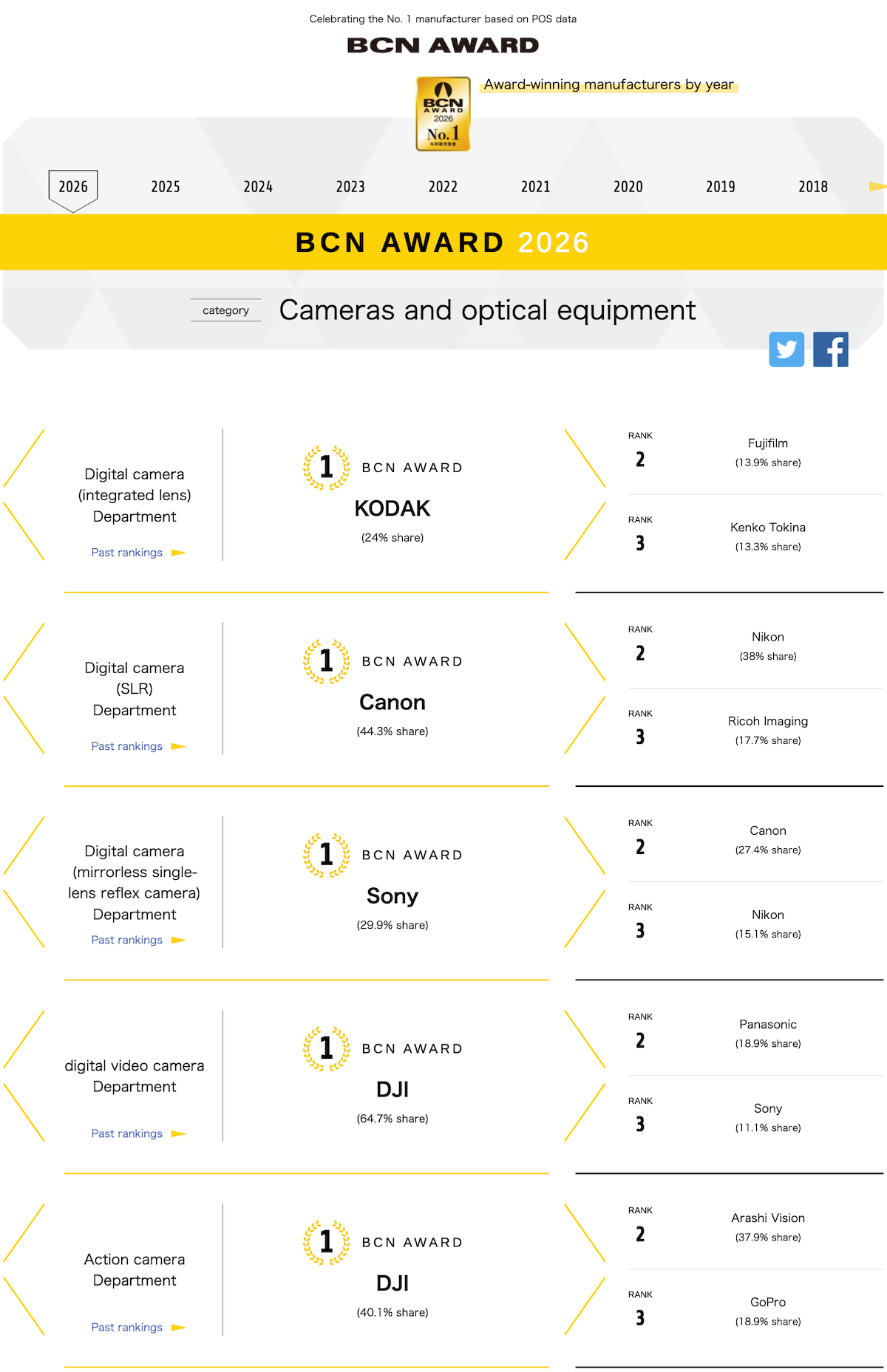
BCN Corporation, headquartered in Tokyo, announced the winners in the camera category for 2026. BCN collects POS sales data from most retail stores in Japan (January to December, 2025). Here is the latest ranking:

Mirrorless cameras:

  1. Sony: 29.9%
  2. Canon: 27.4%
  3. Nikon: 15.1%

DSLR cameras:

  1. Canon: 44.3%
  2. Nikon: 38%
  3. Ricoh/Pentax: 17.7%

Digital compact cameras with an integrated lens:

  1. Kodak: 24%
  2. Fujifilm: 13.9%
  3. Kenko Tokina: 13.3%

Action cameras:

  1. DJI: 40.1%
  2. Arashi Vision: 37.9%
  3. GoPro: 18.9%

Video cameras:

  1. DJI: 64.7%
  2. Panasonic: 18.9%
  3. Sony: 11.1%

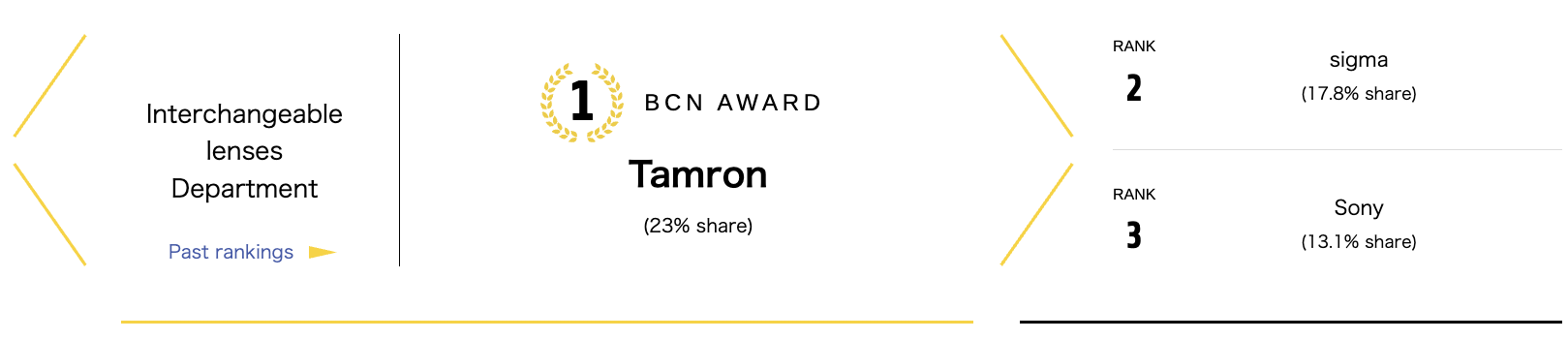
Interchangeable lenses

  1. Tamron: 23%
  2. Sigma: 17.8%
  3. Sony: 13.1%

Overall Trends and Insights

  • Mirrorless Growth vs. DSLR Decline: Mirrorless rankings show a fragmented but vibrant market, with Sony holding strong. DSLR sales are likely shrinking, as evidenced by lower overall volumes implied in historical data (e.g., Canon’s 2025 DSLR share was 69.4%, but no 2026 figure available). Nikon remains competitive in both but could benefit from more aggressive Z-system marketing.
  • Non-Traditional Brands Rising: DJI’s double win in video and action categories signals a shift to versatile, tech-integrated devices over pure camera hardware. This could pressure traditional brands like Nikon to innovate in video features.
  • Lens Market Dynamics: Third-party lenses leading points to price sensitivity in Japan. For Nikon fans, this means opportunities to pair Z-mount bodies with affordable Tamron or Sigma glass, potentially boosting system adoption.
  • Nikon-Specific Analysis: Nikon appears in three categories (DSLR 2nd, mirrorless 3rd, binoculars 3rd), a respectable showing amid intense competition. Compared to 2025 (where Nikon was 3rd in mirrorless and 2nd in DSLR), there’s consistency, but to climb higher, focusing on entry-level mirrorless or hybrid video capabilities could help. No appearance in lens top three suggests Nikon’s native optics are premium-positioned, not volume leaders.

These awards reflect Japanese retail trends, which may differ globally due to regional preferences (e.g., instant cameras are popular in Asia).

Past rankings can be found here and here:

The latest Nikon market share in Japan according to BCN: Nikon is moving up

2024 BCN awards announced (camera market share in Japanese retail stores)

The 2023 BCN awards are out

The 2022 BCN awards are out (camera market share in Japanese retail stores)

Source: BCNaward (press release) via NikonRumors

The post 2026 BCN awards appeared first on Photo Rumors.

Tamron 70-180mm F2.8 Di III VC VXD G2 sample gallery and impressions

When you use DPReview links to buy products, the site may earn a commission.
DSC 1114.acr
Nikon Z8 | Tamron 70-180mm F2.8 | 180mm | F4 | 1/200 sec | ISO 125

Photos: Mitchell Clark

Late last year, Tamron announced that it was bringing its venerable 70-180mm F2.8 Di III VC VXD G2 to Nikon's Z mount. We took the opportunity to shoot a sample gallery with it, to get an idea for how it performs, and how much it asks you to give up compared to a heavier, larger and more expensive 70-200mm F2.8.

That is a bit of a spoiler for what the experience of shooting with the lens was like. Its size makes it much more usable as an everyday walkabout lens than your typical 70-200mm F2.8, and I found myself taking it places I normally wouldn't bring this class of lens, just because it'd be too much of a hassle to do so.

tamron 70-180 extended
Even extended, the Tamron 70-180mm F2.8 Di III VC VXD G2 isn't particularly long (unlike its name).

The autofocus motors in the lens were snappy enough that I never felt like they were holding the camera back, even when I was shooting fast-moving subjects like horses. I also appreciated the lens's inclusion of optical image stabilization, which, when paired with the Z8's in-body stabilization, let me get sharp handheld shots at shutter speeds that would typically be difficult to manage with a telephoto lens.

Optically, you do give up a bit compared to the more premium options; as evidenced by several photos in our sample gallery, there's some pretty heavy vignetting at F2.8, though it's noticeably better at F4, and pretty much clears up by F5.6. There's also, of course, the 20mm difference at the long end, though in most scenarios, most photographers won't really notice the difference between a photo shot at 180mm and one shot at 200mm. The lens is also reasonably sharp throughout its range, and has relatively pleasing bokeh wide-open.

DSC 0920.acr

The vignetting will be most noticeable when shooting relatively bright, featureless surfaces like the sky, and is less distracting in other situations.

Nikon Z8 | Tamron 70-180mm | 180mm | F2.8 | 1/200 sec | ISO 80

Finally, there are the controls. The lens has a single customizable button, which is always a nice inclusion, and Nikon allows you to assign a wide variety of functions to it. I also appreciated the inclusion of a lock switch to keep the lens retracted. It's an extending zoom design (which isn't my favorite, but makes sense given its size), and having the ability to keep it from walking while I was carrying it around was much appreciated. However, it's worth noting that it's quite a strong lock; unlike with some of Sigma's lenses, you can't overpower it if you forget to deactivate it before raising the camera up to your eye.

My biggest complaint with the lens is the focus ring, which is quite sensitive, and is situated exactly where I'd typically rest my hand. This led me to frequently bump the camera into manual focus mode at inopportune times. If I spent long enough with the lens, I'm sure I'd adapt to it (and the focus ring's location will be more familiar to those who only shoot Nikon), but I ended up simply setting it to do nothing in the camera's settings.

tamron_70-180_buttons_and_controls
The buttons are nice to use, but the focus ring can be quite touchy, and doesn't leave you much room to hold the lens.

Minor complaints and personal preferences aside, I found the Tamron 70-180mm F2.8 Di III VC VXD G2 to be a capable and versatile lens, especially for the price. But be sure to check out the gallery below so you can make your own assessments.

Sample gallery
This widget is not optimized for RSS feed readers. Click here to open it in a new browser window / tab.

No evidence that a new Fujifilm X-Pro4 camera is coming soon

Par : PR admin
18 janvier 2026 à 17:26


Some random websites are reporting that a new Fujifilm X-Pro4 camera is coming soon. The Fujifilm X-Pro3 camera has been discontinued for a while without any replacement in sight:

The Fujifilm X-Pro3 camera is discontinued

Fujifilm X-Pro3 camera is being discontinued

Digging deeper with AI, the Fujifilm X-Pro4 camera rumors appear to be just clickbait:

The Fujifilm X-Pro4 remains in the realm of rumors and speculation, with no concrete evidence of an imminent launch (e.g., within the next few months). Most credible sources point to a potential release sometime in the second half of 2026 or even later, possibly tied to Fujifilm’s next-generation X-Trans VI sensor and processor updates, but this is unconfirmed. Here is a break down all references found online:

Official Fujifilm Websites

  • Searches across Fujifilm’s global and regional sites (e.g., fujifilm-x.com, fujifilm.com, fujifilm.com.cn) yield no official references to the X-Pro4. These sites focus on existing models like the X-Pro3 (released in 2019), X-T5, X-H2S, and others.
  • Fujifilm’s product pages and news sections discuss updates to current lines but make no mention of an X-Pro4.
  • In interviews (e.g., with Fujifilm executives like Yuji Igarashi), the company has acknowledged demand for an X-Pro successor but emphasized it won’t be a “boring refresh” and is still in conceptual stages, with no timeline given.
  • No product listings, teasers, or firmware mentions appear on Fujifilm China (fujifilm.com.cn) or other regional variants. If it were officially coming soon, we’d expect teasers or placeholders on these sites, but there’s nothing.

Retailer References

Major retailers show no active listings or pre-orders for the X-Pro4, indicating it’s not available for sale or even teased commercially. Searches often redirect to the X-Pro3 or unrelated accessories.

Social Media References (X/Twitter)

On X (formerly Twitter), the X-Pro4 is a hot topic among photography enthusiasts. No official Fujifilm accounts mention it. Key themes:

  • Rumors and Predictions: Many posts cite 2026 as the likely year, often linking to articles speculating on specs like a 40MP APS-C sensor, IBIS (in-body stabilization), improved hybrid viewfinder, and new film simulations.
  • User Wishes and Debates: Posts express frustration over the delay (X-Pro3 is 7 years old) and debate features, such as keeping the optical viewfinder (OVF) vs. going all-digital with an EVF. Some suggest it might be renamed (e.g., X-Pro5 or X-Pro6) to align with current numbering.
  • Broader Predictions: Some accounts bundle it with other 2026 cameras (e.g., X-T6).
  • No leaks from insiders or Fujifilm reps.

Chinese Websites

Chinese e-commerce sites like JD.com and Taobao have indirect references to the X-Pro4, but not as a sellable camera – only in accessory listings (e.g., flashes like EF-X8 or EF-60) that claim compatibility with future models, including “X-Pro4”. This seems precautionary (listing potential compatibilities) rather than evidence of a release. No actual camera pages or pre-orders exist on these platforms.

Summary and Rumored Timeline/Specs

  • Is it coming soon? Unlikely in the immediate future. Rumors suggest a 2026 release or later if Fujifilm focuses on mass-market models like the X-T6 first.
  • Rumored Specs: 40MP non-stacked APS-C sensor, faster processor, IBIS, articulating screen, new film simulations (e.g., Reala Ace), and possibly a refreshed hybrid viewfinder. Price estimates: $2,400–$2,600.
  • Why the Delay? Sources suggest Fujifilm is prioritizing broader-appeal cameras and wants a significant upgrade to justify the X-Pro line’s niche.

The post No evidence that a new Fujifilm X-Pro4 camera is coming soon appeared first on Photo Rumors.

Our "Silly Signs" photo challenge is now open for submissions

goonies-house-sign

I took this photo while touring Astoria, Oregon, solely to explore the sites featured in the 1985 movie The Goonies. The photo depicts the driveway sign leading up to the house where some of the Goonies kids lived.

Photo: Mathew Anderson

Our January Editors' photo challenge theme is "Silly Signs."

This month, we're celebrating the silly and strange world of signage that tells an interesting story. Whether you're traveling across the country or just around the corner, capture a photo of a sign with a unique story to tell. It could be a massive billboard along a highway or a quirky notice in your local pub. We can't wait to see what you discover!

Photos can be submitted between Sunday, January 18, and Saturday, January 24 (GMT). The challenge is open to photos captured at any time.

Important: Images MUST include a title and a description of at least 25 words to be eligible. We need to be able to share the story behind your photo. We will consider both photos and captions when selecting our winners, so make sure to tell us that story!

Visit the challenge page to read the full rules and to submit your photos for consideration as soon as the challenge opens.

Visit the challenge page to see the full rules

Important settings to change on any new camera

a camera with the camera menu on the display sits on a white desk
Photo: Abby Ferguson

Getting a new camera is always exciting, even if it's only new to you. So much so that it can be tempting to jump right into using it without much, if any, setup. However, despite the urge to get started right away, it's important to take a few minutes to review some important settings. Doing so can make a significant difference in what your first impressions of the camera are and how the first photos you take turn out.

It's important to note that different genres of photography and video will require their own specific tweaks. However, there are some foundational settings that stay the same no matter what you like to capture, especially when setting up a new camera. This guide focuses on core settings to help beginners navigate a new camera.

Additionally, each specific camera brand will have its own intricacies. We'll touch on some of the more prominent ones in a later article. For now, our focus is on more general settings that apply to most people, no matter their camera brand.

Settings everyone should change

There are a few settings that everyone should check and potentially change when dealing with a new camera. These are relevant to every photographer, no matter your preferred genre or camera brand.

Time and date

When you turn on a new camera for the first time, you'll be prompted to make a few changes right off the bat, including time and date. Some cameras let you skip this step, but it’s best not to. Also, if you bought a used camera, we'd advise looking up how to do a complete reset and then entering the correct information. After all, having the correct date and time will make it easier to organize your photos and videos later on, so it's useful to start here.

Firmware updates

Canon Firmware Menu screen

Canon's firmware menu screen will tell you at a glance which version of firmware you have.
Screenshot: Mitchell Clark

Your camera may be brand new, but it was likely sitting on a shelf for some time before you brought it home. As a result, there could be new firmware available, which is usually worth installing right away. Some new firmware updates are minor, simply enhancing stability or improving security, but they can also unlock new features and improve performance, so it's important to make sure your camera is up to date. New cameras from many brands will now check for you when you connect them to your phone for the first time, so it's also worth downloading the relevant app, too.

If you bought a used camera, you don't necessarily know if the previous owner kept it updated. As a result, we'd recommend checking whether new firmware is available. To check if there's new firmware, head to the manufacturer's website and see if there's an updated version for your camera's model.

Set the diopter

a black camera sits against a white background
The dial just to the right of the viewfinder is the diopter dial.
Photo: Abby Ferguson

The diopter is an often overlooked and even unknown feature on cameras. The diopter is a tiny optical lens in front of the viewfinder with a small wheel off to the side. It allows you to make small adjustments to the viewfinder so that it matches your eyesight, ensuring that text and details look sharp. It doesn't change the sharpness of your photos, only what you see in the viewfinder. However, with a mirrorless camera, having it set wrong could make you think your shots aren't sharp, so it's critical to dial this in. You can think of it like changing the prescription of your viewfinder. If you have a camera without a viewfinder, this won't be relevant; however, if your camera does have one, be sure to set it up correctly right out of the box.

Image quality and file format

Canon Quality Select screen

A screenshot of Canon's interface for choosing image type and size.
Screenshot: Mitchell Clark

Your new camera will arrive with the file format set to JPEG only. While that works well for photographers who don't need the greater control that Raw files unlock, it's not the preferred option for some. If you're the type of photographer who expects to use Raw files, make sure to change your file format settings right off the bat. Or, you can select to shoot both Raw and JPEG at once, giving you the best of both worlds. If you're unsure or on the fence, we'd suggest shooting in Raw. You can always discard the file if you don't need it, but if you get a shot you really want to edit, you can't acquire the Raw data later.

It's also worth checking the image quality settings while you're at it. Even if you shoot in JPEG only, there are multiple options to choose from that determine how large your files are. We'd recommend shooting in the largest, highest quality your camera offers. Even the largest JPEGs are pretty small, and you can always downsize or recompress a large file, but you can't regain the quality or detail you didn't originally save.

Settings to consider changing

There are settings everyone should definitely check, like the ones above, and others that many people prefer to adjust right away, while others may not. The default settings all have reasons for being there, so they make sense in certain situations and for some people, but many photographers prefer to turn them off or change them immediately.

Beeps, sounds and audio signals

Nikon Beep Off

We'd suggest turning the beeps off right away. This is what the menu looks like on a Nikon camera.
Screenshot: Mitchell Clark

Most camera manufacturers have lots of beeps turned on by default. These could be beeps for focus confirmation, for starting a recording, menu beeps and so on. For most of us, those constant noises can drive us (as well as the people around us) mad, so we'd suggest you turn them off right away. That's especially true if you're photographing in any situation where quiet is important. The only reason to leave the beeps on is if that added notification is helpful to you when using your camera, but there are also other tools you can employ in most situations that you'd use beeps.

AF-assist light

Another feature that's typically turned on by default is the AF-assist light (it can go by different names depending on the brand). It's a small light on the front of the camera that is intended to lightly illuminate a subject, helping your camera focus in dark conditions.

However, autofocus systems in cameras these days are impressive even in very low light, and that light can be annoying or even disruptive. It's not fun for a subject to have a beam of light in their eyes when you press the shutter. Plus, it's only effective for subjects that are close to the camera. Unless you know you'll need it, we'd recommend turning that off right away.

Autofocus settings

Panasonic_AF_selection_point_menu
Autofocus options on a Panasonic camera.
Screenshot: Mitchell Clark

Modern cameras have a long list of autofocus settings you can tweak, such as focus mode, focus area, subject detection and more. Most of these settings will depend on your specific type of photography or subject. Additionally, some may not be "set it and forget it" settings if you shoot a wide range of subjects. In those situations, we'd suggest getting a feel for the settings and modes you find yourself using, then checking if there's a way to configure your camera to quickly switch between your favorites.

Whether you shoot a variety of genres or stick to one, it's still worth going into the autofocus menu on your new camera. For many, you'll likely end up changing the focus mode and subject detection option to ensure that the settings align with how you most often photograph. If you don't photograph a lot of people, for example, you don't want the subject detection mode to be set to Human.

Don't forget your personal preferences

The above items are likely just a starting point for many photographers. It's also important to remember that you are the one using your camera, and choosing the settings that work best for your workflow and preferences is always the way to go. It may take time to dial in your new camera, but spending the time to figure out the best setup for your needs will help you enjoy using the camera a lot more.

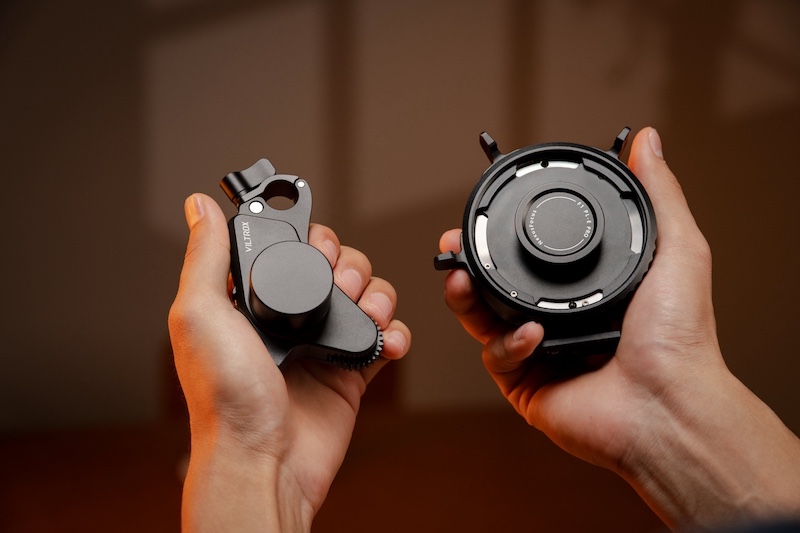
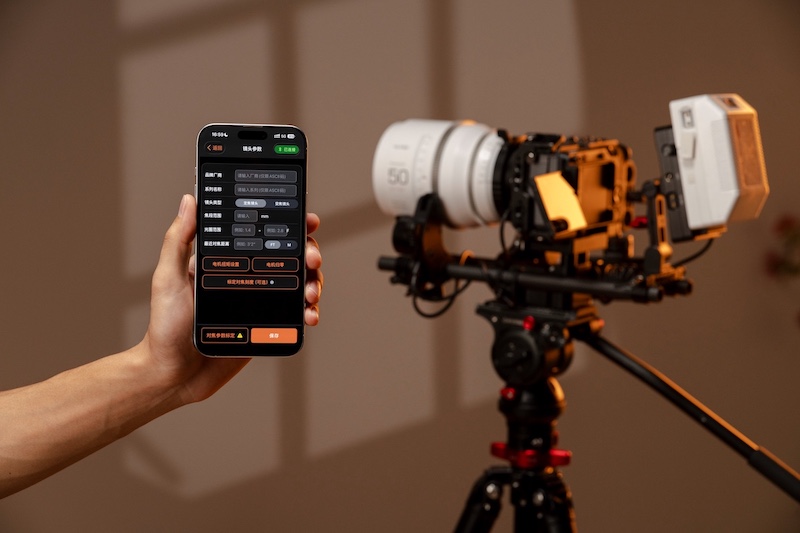
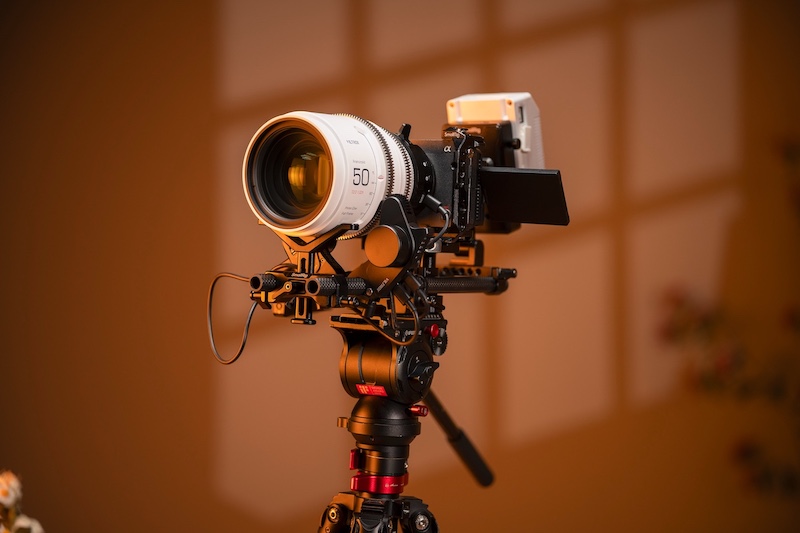
The Viltrox Nexus PL to E Pro cinema AI adapter with full AF capabilities is now available on Kickstarter

Par : PR admin
18 janvier 2026 à 02:46


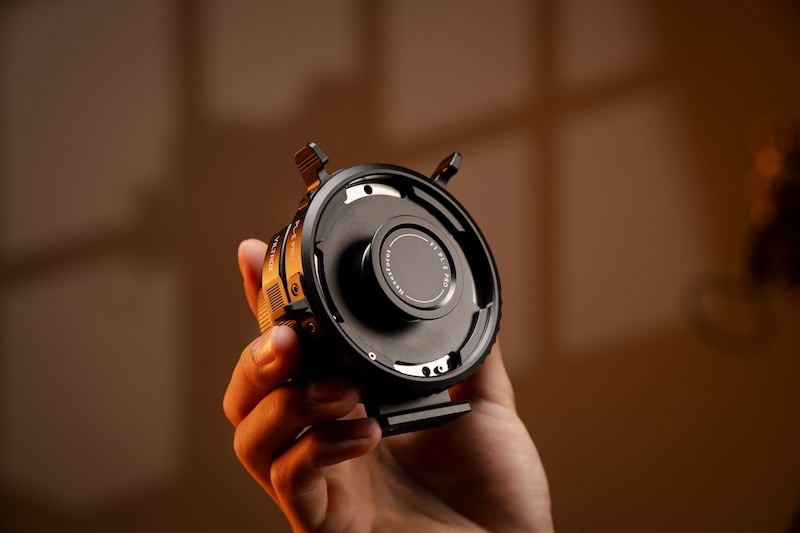
The previously reported Viltrox Nexus F1 Pro cinema with AI-assisted phase-detection autofocus adapter (PL to E) with full AF capabilities and photo/video EXIF support is now available on Kickstarter and already rasised $42k.

Additional informtion:

The Viltrox NexusFocus PL-E Adapter (also referred to as the Nexus PL to E Pro) is an innovative cinema lens adapter designed to bring full autofocus capabilities to manual PL-mount cine lenses when used on Sony E-mount cameras. Announced as a prototype at IBC 2025 in September, it essentially transforms vintage, anamorphic, or modern manual cinema primes into AI-driven autofocus lenses by leveraging the camera’s native phase-detection AF system.

Key Features

  • Autofocus Integration: It taps directly into Sony’s autofocus protocols, enabling features like eye AF, face recognition, subject tracking, and tap-to-focus on the camera’s LCD. No additional sensors (like LiDAR) or wireless follow-focus systems are needed—the adapter uses external motors to drive focus based on real-time data from the camera sensor.
  • Iris and Zoom Control: Beyond focus, it supports camera-controlled aperture (iris) adjustments, and with additional motors, it could handle zoom on compatible lenses.
  • Lens Profiles: Comes with pre-installed profiles for various PL lenses, allowing quick calibration, saving configurations, and easy swapping without recalibration.
  • Power and Design: Powered by a small battery that lasts for days of use. The prototype includes refinements planned for housing, cable management, and motor strength.

Compatibility

  • Primarily for Sony E-mount cameras with built-in AF, such as the FX3, FX6, A7 series, and NEX series.
  • Limited testing has shown partial functionality on other mounts like L-mount, Nikon Z, and Fuji GFX, with potential for expanded support in future versions.

How It Works

The adapter mounts between the PL lens and E-mount body, then connects to external motors on the lens. It receives AF commands from the camera (e.g., when you tap the screen or use subject detection) and translates them into precise motor movements for focus and iris – making manual lenses behave like native Sony AF glass.

The Viltrox Nexus PL to E Pro cinema AI adapter with full AF capabilities is coming to Kickstarter on January 15th

What’s coming next from Viltrox (updated)

The post The Viltrox Nexus PL to E Pro cinema AI adapter with full AF capabilities is now available on Kickstarter appeared first on Photo Rumors.

Do photographers need the fastest external SSD? We tested three to find out

three_portable_ssds_stacked_on_top_of_each_other
We put the USB 3.2 Gen 2 Samsung T7 Shield, USB4 SanDisk Extreme Pro and Thunderbolt 5 OWC Envoy Ultra head-to-head.
Photo: Mitchell Clark

These days, there are an overwhelming number of options when it comes to buying an external SSD to expand your computer's storage (an increasingly important ability as Raw sizes and video bitrates balloon). The highest-end options use protocols like Thunderbolt 5 or USB4 to achieve blistering speeds, but this raises the question: do photographers need all that performance?

We tested several SSDs across a range of price points to see if each one had more to offer for photographers, or if the returns quickly diminished.

What we tested and how we tested them

For this article, we used a 1TB Samsung T7 Shield as our sample for USB 3.2 Gen 2, a 2TB SanDisk Extreme Pro to represent USB4 and a Thunderbolt 5 2TB OWC Envoy Ultra. The tests were carried out on a 2024 MacBook Pro with an M4 Pro processor, which supports Thunderbolt 5, and we tested each SSD one at a time, using the cable it came with.

While this isn't meant to act as a review for the specific SSDs we used for our testing, the results can't necessarily be universally applied to each product in their class. For example, the USB4 SanDisk SSD is using the faster 40Gbps version of the spec, but another USB4 SSD may only be able to reach 20Gbps speeds. We may also see faster USB 4 and Thunderbolt 5 drives as the market around those specifications matures, but, as of early 2026, the drives we've tested are some of the best in their respective classes.

How do the drives stack up?

USB 3.2 Gen 2

IMG 5980
The magic of USB-C: it can be used for almost anything. The downside of USB-C: it can run at almost any speed.

Starting with our standard-bearer for USB 3.2 Gen 2, the Samsung T7 Shield handled a number of photography-related tasks with aplomb. We didn't notice any hiccups scrolling through a Lightroom Classic library with over 3600 images, and it wasn't meaningfully slower than the competition when we were copying hundreds of Raw/JPEG pairs to it from a CFExpress or SD card. However, it did take noticeably longer to import and build previews for that Lightroom library, and copying files to the drive from the computer (and vice versa) could take several times longer than on our faster drives.

For the photographers who occasionally stumble into the land of video, we also found that the slower SSD struggled a bit more when editing footage off of it. Adobe Premiere would frequently drop frames during playback, and more complex sequences could slow it to a crawl. Final Cut fared a bit better and was surprisingly usable, though there were still occasional hitches.

USB4

rear label on an external ssd reading 2tb sandisk extreme pro with usb4

Despite the USB 3.2 Gen 2 drive's general competence, there were definitely times when the USB4 drive made it obvious that it was using a next-generation interface capable of real-world read and write speeds anywhere from 2.5 to 6.4 times faster than those of the Samsung model. Moving files back and forth between it and the computer was very quick, and most of the playback issues in our video editing suites disappeared or were substantially less noticeable. And, of course, it handled all our photo editing and organization tasks with the same ease as the lower-end model.

Thunderbolt 5

IMG 5984
The point of the Thunderbolt spec is to be an assurance of performance; USB4 may just be Thunderbolt 4 in a trenchcoat, but until you do some digging, you won't know exactly what speeds a piece of USB4 gear can deliver. That's not the case with Thunderbolt.

Unsurprisingly, the Thunderbolt 5 drive easily handled everything we threw at it, and it never felt like it was a performance bottleneck. However, there also weren't any scenarios we ran into where it was noticeably faster than the USB4 drive, outside of our synthetic benchmarks*. While there are probably some users who'd be able to push it to its limits, we suspect most photographers and video editors wouldn't see a ton of benefit over a good USB4 drive.

* - And even there, the gains weren't nearly as large a jump as the one from USB 3.2 Gen 2 to USB4; our Thunderbolt 5 drive ran around 1.2 to 1.8 times faster than our USB4 one, not quite realizing the theoretical 2x improvement that the standard would allow for.

What's in a name?

No discussion of external SSDs would be complete without a rant on just how confusing things have become when it comes to USB ratings and speeds. What was once relatively simple (USB 2 = slow, USB 3 = fast) has become incredibly complex, with the version of USB that your device supports actually telling you very little about what speeds it supports. For example, a device labeled "USB 3.2" may only run at 5Gbps, or it could rival earlier versions of Thunderbolt, supporting up to 20Gbps. USB4 has the same issue, with potential speeds ranging from 10Gbps to 120Gbps.

Screenshot 2026-01-08 at 11.51.58

Wikipedia has an excellent chart showing all the permutations of the USB specification and the speeds they provide. Which explains a bit why the standard is such a nightmare for those who care about performance.
Graphic: Wikipedia

While external SSDs usually come with maximum speed ratings that tell you what they should be capable of (even the fastest SSDs won't be capable of fully saturating USB4's top speeds), it's more of a concern when it comes to the port on your computer and the cable you use to connect the two. While the USB Implementers Forum has been leaning on people to label equipment with their speed and power delivery ratings, not everyone will, so you'll want to make sure you're familiar with which ports on your computer are the fastest, and that you're using a high-quality cable that's capable of providing the speeds your SSD needs. If you have a random USB-C to C cable laying around your house that came with some device, assume it runs at USB 2 speeds, and shouldn't be used for transferring data.

ssd with cable labeled 40gbps 240w
The cable that comes with the SanDisk is, thankfully, labeled with the speeds and power delivery that it's capable of, but this is currently far from the norm.
Photo: Mitchell Clark

Thankfully, the story is simpler with Thunderbolt, as each generation has only a single speed. If you have a Thunderbolt 4 cable, you know it should run at 40 Gbps. Of course, this is part of the reason why the price floor for Thunderbolt devices and accessories is so much higher than it is for their USB counterparts. It's also worth noting that Thunderbolt is cross-compatible with USB; if you plug a Thunderbolt drive into a 20Gbps USB-C port on your computer, it will still work, albeit at the lower speeds allowed by the connection.

Summary

IMG 5986
This isn't a review of the OWC Envoy Ultra, but it's been a very enjoyable drive to use. The attached cable may be a bit of a mixed bag in terms of repairability but means you can never accidentally leave it at home.

For most photography tasks, you can get away with a relatively standard USB 3.2 SSD with a port and cable rated for 10Gbps speeds. If you frequently move around large chunks of data, edit complex videos, or are just generally impatient, though, it may be worth upgrading to a faster USB4 one, with the greatest gains to be had by going with a model that supports a 40Gbps connection. Most photographers and videographers will be able to stop there; unless you just enjoy having the best version of a thing possible, or need a specific feature, capacity or form factor only offered by a Thunderbolt drive,

❌