Vue normale

Aftershoot: “The Workflow is Now Complete” and “AI that works for you, not against you”

Par : PR admin
7 juin 2026 à 01:40

“The Workflow is Now Complete”


Aftershoot’s biggest recent news is the completion of its end-to-end post-processing workflow, announced on May 28: “The Workflow is Now Complete.”

The company has evolved from an AI culling-focused tool into a full all-in-one platform for culling (Select), AI + manual editing (Edit), retouching (Retouch), and client delivery via Aftershoot Galleries. This shift eliminates the need to switch between multiple apps (e.g., Lightroom for editing/delivery).

Use coupon code RUMORS for a 15% discount at Aftershoot.


Here are the details:

Key Elements of the May 2026 Update

  • Built-in RAW Editing: New dedicated RAW editor with manual tonal adjustments, batch processing, sliders, and fine-tuning of AI edits. You can now edit RAW files directly in Aftershoot and export JPEGs or TIFFs without leaving the app. This includes self-improving AI profiles that learn from your adjustments, plus pipeline tools such as advanced masking, denoising, object removal, HSL/color grading, and more precise cropping/straightening (including aggressive, subject-focused crops).
  • Aftershoot Galleries (new, highlighted with “New” on the homepage): Integrated client delivery platform with 100 GB free storage. Features include built-in proofing, face detection/filtering by person, favorites, branded galleries, and direct export from Aftershoot (no re-uploads or downloads needed). It integrates print sales via labs like WHCC, Bay Photo, and Atkins Pro Labs. The goal is a better client experience than basic shares or Google Drive links.
  • Culling (Select) Enhancements: Smarter duplicate/variation detection (distinguishes intentional variations from true duplicates, ~20% tighter culls), improved blur/closed-eye detection, key subjects prioritization, binary selection states, and “cull to target” (specify how many keepers you want). UI now clearly distinguishes AI Automated Cull vs. AI Assisted Cull.
  • Editing & Retouching Improvements: More consistent white balance/exposure across albums, better before/after previews, enhanced acne/blemish/hair/glare detection with texture preservation, Background Replacement (beta with custom uploads), Cloth Dewrinkle, object removal, and subtle body reshaping. Retouching works on RAW files.

The update positions Aftershoot as a privacy-focused (local processing), non-destructive workflow tool that learns your style via training on your edits/presets or imported Lightroom profiles. It includes 30+ pro styles in the marketplace.

2026 Roadmap

Aftershoot also published its 2026 Roadmap (full AI Retouching rollout with one-click skin/hair/glare tools, advanced culling, smarter editing, and expanded creator styles/marketplace):

  • Further AI refinements in culling (smarter technical detection, key subjects, cull-to-target).
  • Enhanced editing (better profile accuracy, advanced masking/cropping, more marketplace styles with previews).
  • Expanded RAW Editing (histogram, tone curves, deeper masking, etc.).
  • More AI Retouching tools (one-click object removal, body reshaping, background removal, natural skin work).
  • Aftershoot Gallery delivery enhancements (already live).
  • Tethered shooting (sneak peek): Planned rock-solid tethering with fast/stable connections, broad camera support, auto-import/organization, on-set proofing, and instant gallery pushes. Not yet released.

The company claims users save significant time (e.g., 60+ days per year in repetitive work across their user base) while maintaining creative control and style consistency.

Pricing Updates

Aftershoot introduced more flexible modular pricing aligned with the complete workflow:

  • Select (Culling): ~$10/mo (annual) or $15/mo.
  • Edit: ~$30/mo (annual) or $35/mo.
  • Retouch: ~$20/mo (annual) or $25/mo.
  • Aftershoot Complete (Select + Edit + Retouch): ~$45/mo (annual, discounted) or $55/mo.
  • Galleries: Currently free with 100 GB storage (future pricing TBD).

“AI that works for you, not against you”

Aftershoot recently issued a reassuring manifesto titled “AI That Works For You, Not Against You.” It directly addresses photographers’ fears that AI will replace them, emphasizing that the camera will always need a human behind it for intuition, light reading, and client connection. Aftershoot positions its AI as a supportive tool built by photographers for photographers – designed only to handle tedious tasks like culling and editing so you can spend more time shooting.

Aftershoot outlines three firm commitments: they will never create tools to replace you, they will always ask explicit permission before using your images (with easy opt-out or deletion), and they will build the product together with their Founders Community of photographers who help shape the roadmap. A personal note from founder Harshit explains how the company started in 2019 with a simple request to reduce culling time and has stayed true to its mission of returning time to creators ever since.

The post Aftershoot: “The Workflow is Now Complete” and “AI that works for you, not against you” appeared first on Photo Rumors.
Skylum Luminar Neo Summer Sale: up to 70% off

Par : PR admin
6 juin 2026 à 17:28


Skylum has launched a new Luminar Summer Sale with discounts of up to 70%. The campaign runs June 5-28, 2026. Here are the details:

For new users:

  • Desktop Perpetual – $119 / €99 + free Neo video course
  • Cross-device Perpetual – $149 / €129 + free Neo video course
  • MAX Perpetual – $164.99 / €134.99 + free Neo video course + free gift

For existing users:

  • Cross-device Perpetual – $99.99 / €89.99 + free Neo video course
  • MAX Perpetual – $109.99 / €99.99 + free Neo video course + free gift

Luminar Neo is an AI-powered photo editor that makes it easy to achieve professional results with simple and fast edits (available on both desktop and mobile). All plans are perpetual (one-time purchase) licenses with no subscriptions required. The Max plan unlocks the complete experience: desktop + mobile apps, plus access to the creative assets library (skies, overlays, LUTs, presets, and more to fuel your creativity). Here are the main benefits:

  • AI-powered editing made simple
  • Professional results with minimal effort
  • Works across desktop + mobile
  • Strong value with lifetime licenses

The post Skylum Luminar Neo Summer Sale: up to 70% off appeared first on Photo Rumors.
Aiarty Image Enhancer: Restore Old Photos and Recover Blurry Faces with AI (49% Lifetime License)

Par : PR admin
23 mai 2026 à 18:27

Aiarty Image Enhancer: Restore Old Photos and Recover Blurry Faces with AI (49% Lifetime License)

Restoring old photos is rarely as simple as increasing sharpness or removing visible damage. Many photographers and families are now digitizing decades-old prints, film negatives, and family albums to preserve them before physical deterioration becomes irreversible. However, scanned family photos and aging film prints often suffer from multiple issues simultaneously, including faded colors, scratches, dust, low-resolution scans, compression artifacts, and facial detail loss accumulated through years of storage, rescanning, and digital compression.

For photographers and archive enthusiasts, the challenge is restoring clarity without destroying the original texture and character of the image. Film grain is often mistaken for digital noise, facial details become overprocessed, and low-quality scans leave limited data for accurate restoration or upscaling.

Traditional workflows still rely heavily on manual Photoshop adjustments such as denoising, retouching, sharpening, scratch removal, and color correction, especially when processing larger photo archives or film scan collections.

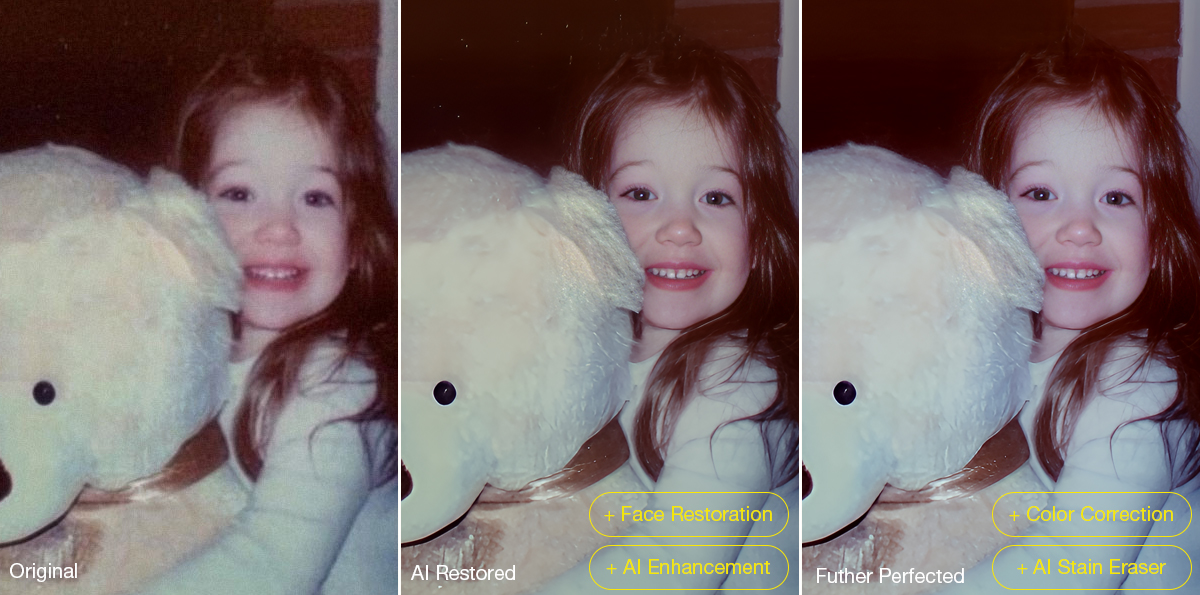
AI-assisted restoration tools are increasingly being used to simplify repetitive cleanup tasks within a broader editing workflow. Designed around a restoration-oriented approach rather than one-click filters, Aiarty Image Enhancer combines denoising, deblurring, face recovery, scratch cleanup, upscaling, and color correction into a single workflow pipeline while maintaining more natural-looking results.

To celebrate its anniversary, the software is currently available at 49% OFF lifetime pricing, with the coupon code ANNIVERSARY providing an extra $5 off single products and $10 off bundles. The special offer runs through June 8.

The lifetime plan includes:

  • Use on up to 3 Windows or Mac computers
  • Unlimited access to all features
  • Free lifetime upgrades and priority technical support
  • 30-day money-back guarantee

How Aiarty Image Enhancer Fits Into Modern Photo Restoration Workflows

Rather than functioning as a one-click AI filter, Aiarty Image Enhancer is designed around a workflow-oriented approach for restoring old photos, film scans, and archived images while maintaining natural-looking detail.

A video demonstration showing real restoration results can be viewed below:

Its AI denoise and deblur tools help recover clarity from noisy or slightly soft scans without aggressively removing texture. A built-in Strength slider allows more controlled adjustments, which is particularly useful when working with film grain or older portraits where overprocessing can quickly create artificial-looking results.

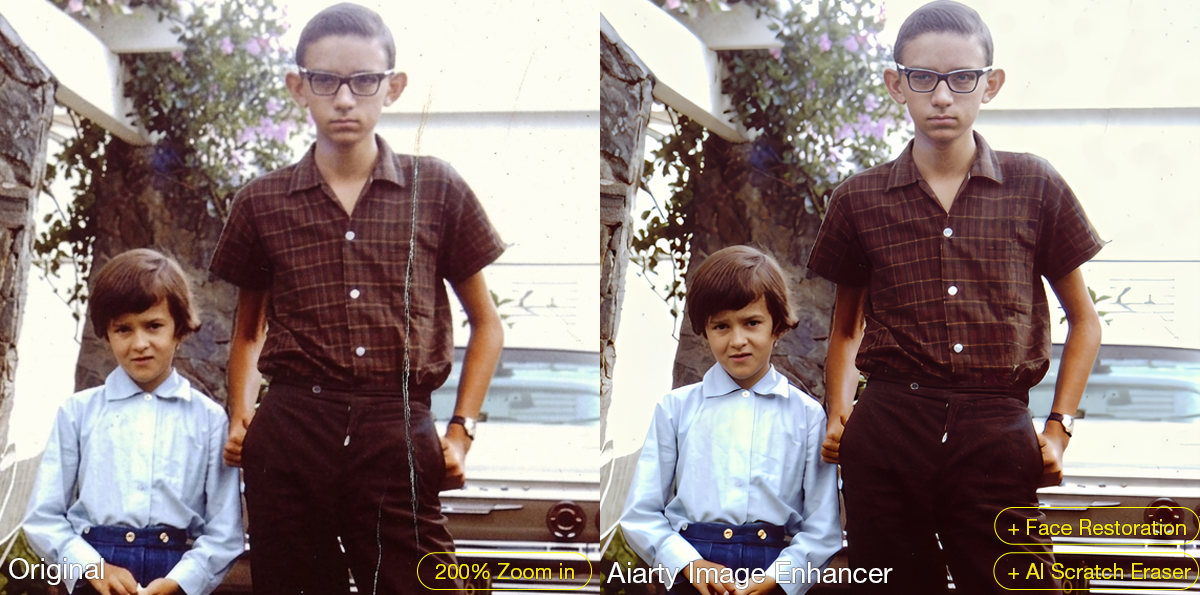
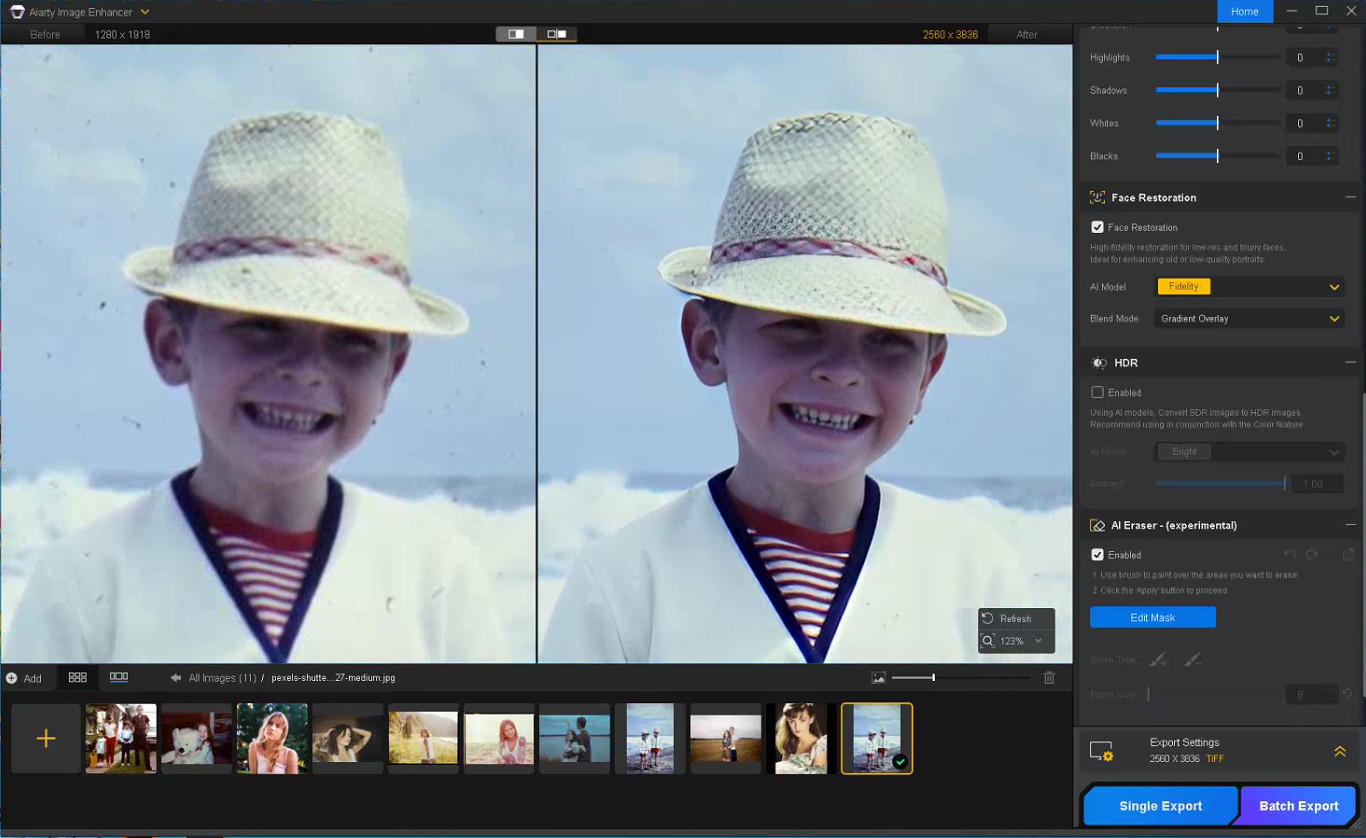
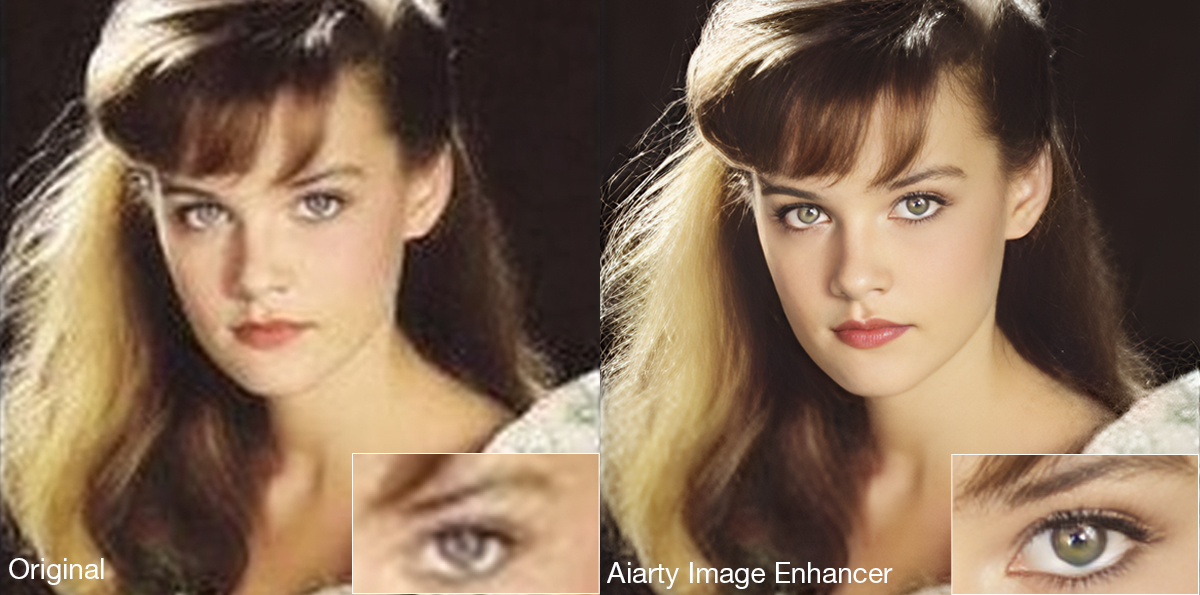
The latest Face Restoration improvements focus on rebuilding blurred facial areas while preserving realistic skin texture and facial structure. For damaged prints, the integrated AI Eraser can remove dust spots, scratches, stains, fold marks, and other small distractions commonly found in archived photographs.

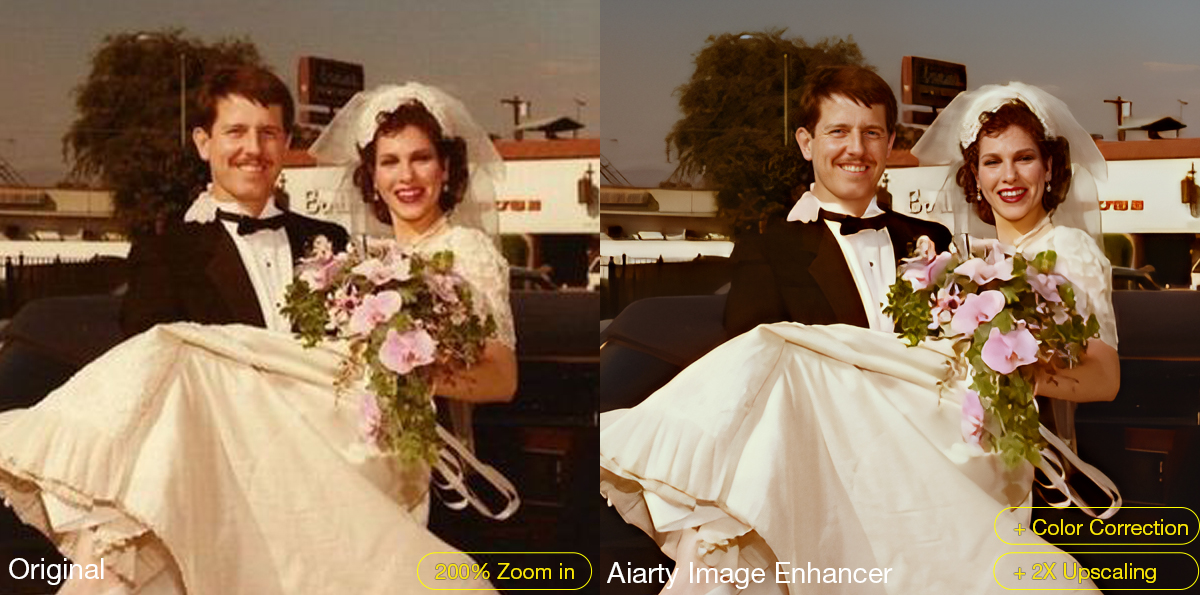
The software also supports AI upscaling for printing, digital archiving, and recovering low-resolution scans. Upgraded color controls help correct faded tones and yellow aging, while TIFF/DNG export support improves compatibility with Lightroom, Photoshop, and non-destructive editing workflows. Batch processing can further simplify repetitive cleanup work across multiple images or film scans.

A Practical Workflow for Restoring Old Photos

Step 1: Scan the Original Photo Properly

The quality of the restoration process still depends heavily on the original scan. For best results, scan photos at least 300dpi or higher, use TIFF when possible, avoid repeated JPEG compression, and clean the scanner surface before digitizing older prints.

Step 2: Reduce Noise and Upscale the Photo

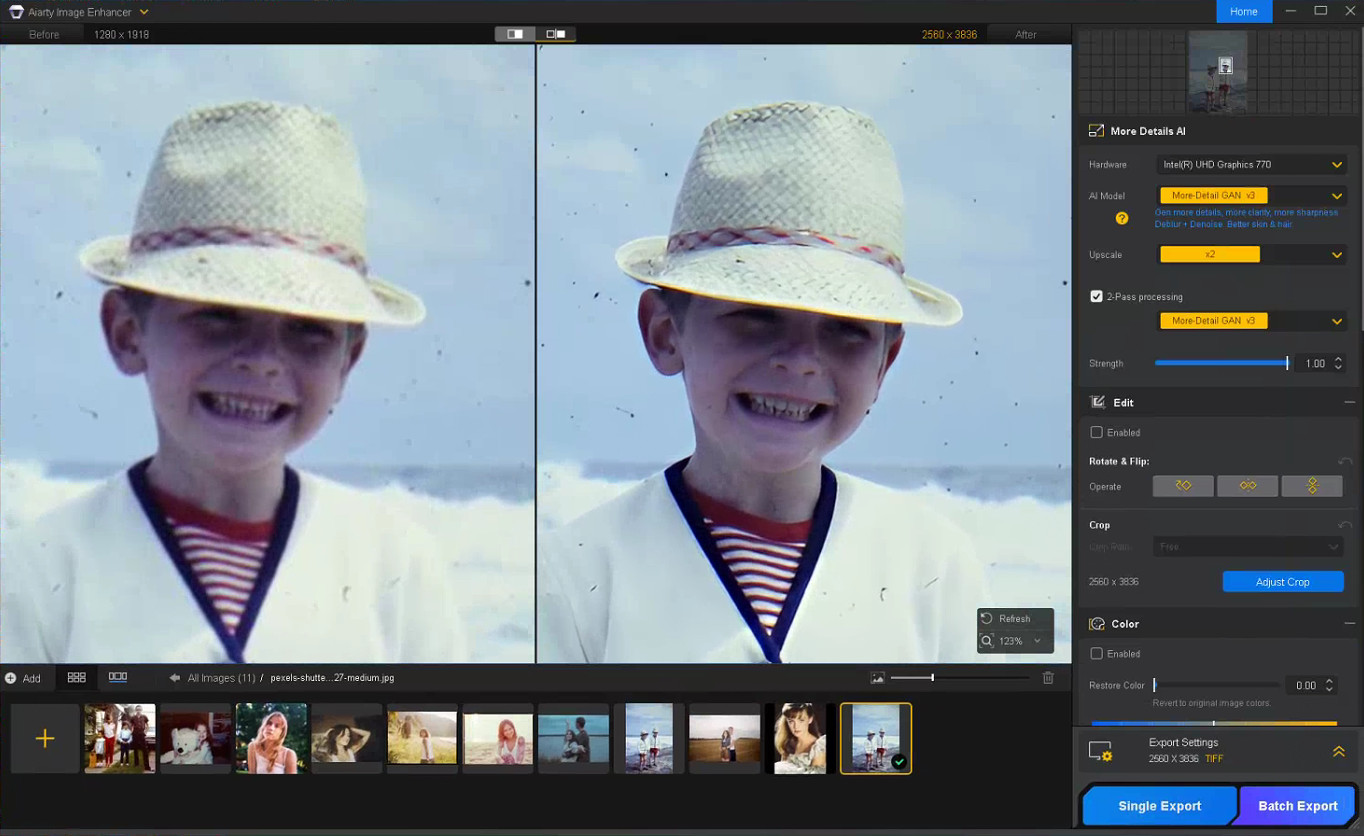
The first stage of restoring old photos usually focuses on improving image clarity while preserving the original texture of the photo. In Aiarty Image Enhancer, denoising, detail enhancement, and AI upscaling are processed together within the same AI pipeline.

Choose a suitable AI model and upscale factor depending on your old/damaged photo restoration goal. Using x1 applies denoising and enhancement only, while higher upscale settings can help AI upscale photos from low-resolution scans and prepare restored photos for printing or digital archiving without heavily over-smoothing fine details.

Step 3: Restore Facial Details Carefully

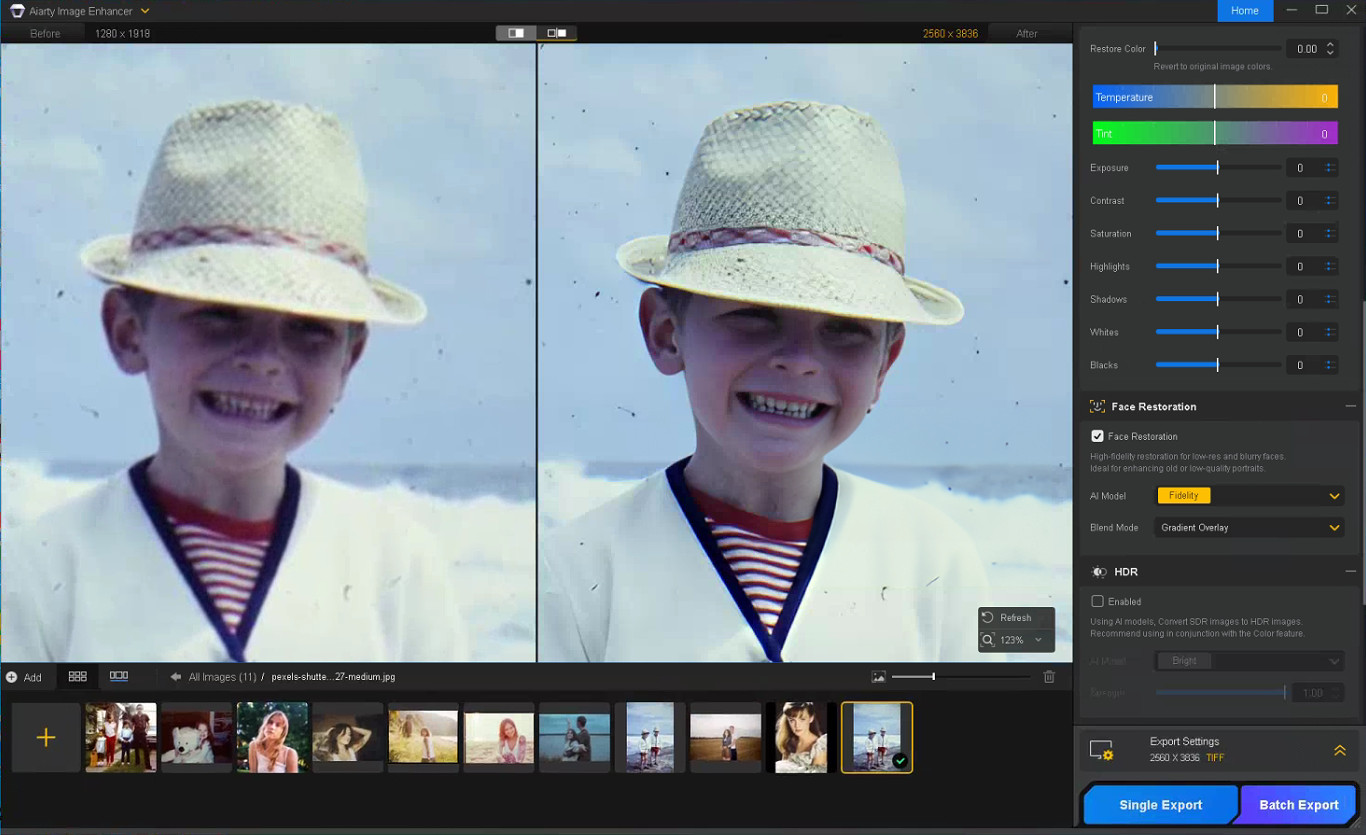
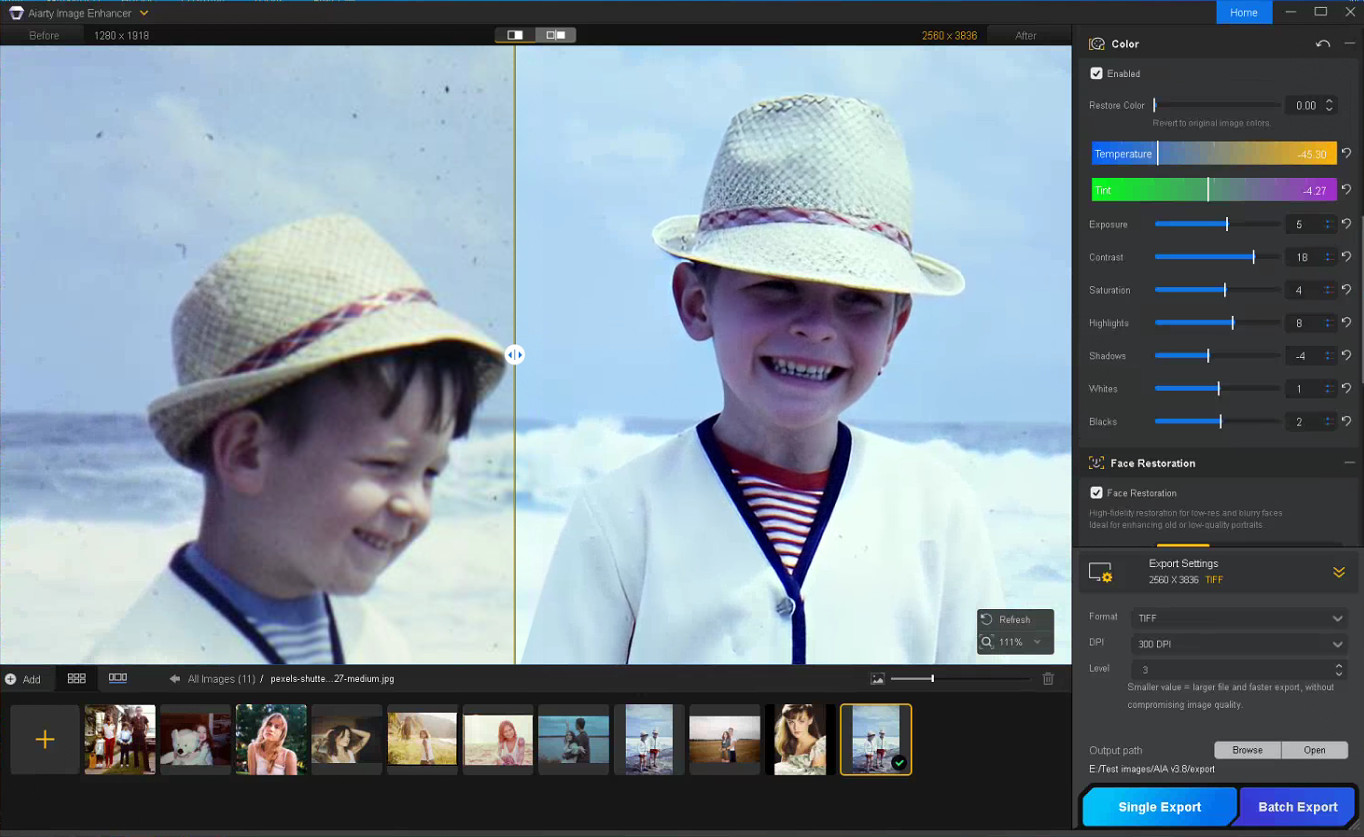
Enable Face Restoration and choose the Fidelity mode to better preserve the original facial structure and maintain more realistic-looking results. Rather than aggressively sharpening every facial feature, Aiarty’s Face Restoration focuses on recovering eye clarity, hair detail, facial edges, and natural skin texture while avoiding an over-smoothed or artificial appearance.

Step 4: Remove Scratches, Dust, and Small Damage

Enable the AI Eraser and mask scratches, stains, fold marks, or other distracting elements. Working in smaller sections with a properly adjusted brush size generally produces more natural-looking results than masking large areas at once.

Step 5: Correct Faded Colors and Improve Contrast

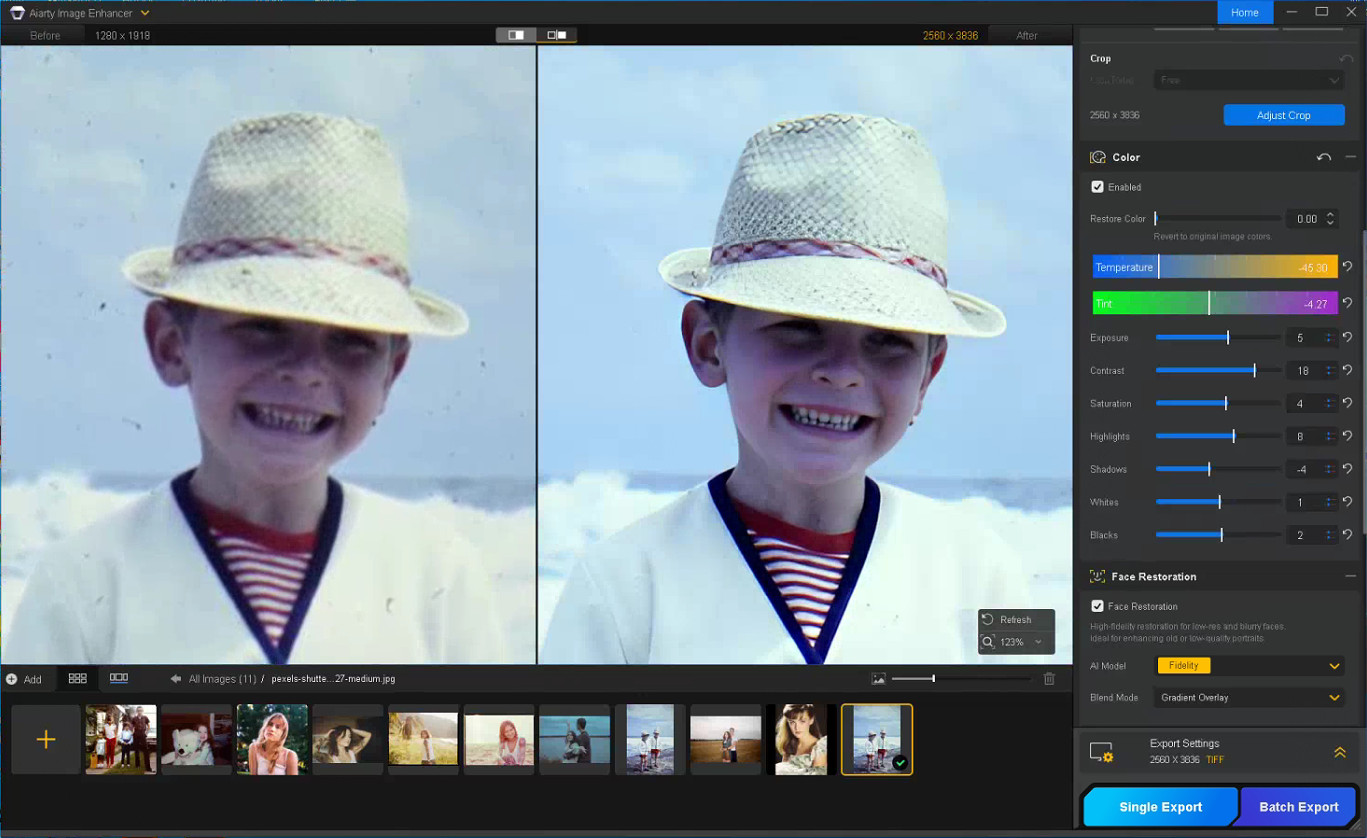
With the Color option enabled, you can fine-tune temperature, tint, contrast, exposure, shadows, and other parameters to correct yellow tint, faded contrast, washed-out shadows, and uneven color fading commonly found in older photos, helping restore depth and readability without making the image look overly processed.

Step 6: Export the Restored Photo

Once restoration is complete, choose the output format, DPI, and quality settings before exporting the final image. TIFF and DNG formats are recommended for preserving image quality and maintaining compatibility with Lightroom and Photoshop workflows.

Notes for Getting Better Restoration Results

Old photo restoration results can vary depending on the condition of the original image, so small workflow adjustments often produce better outcomes.

Trying Different AI Models

Each AI model in Aiarty Image Enhancer is optimized for different enhancement scenarios.

  • More-Detail GAN v3: Enhances detail and sharpness while reducing blur and noise
  • AIGCsmooth v3: Optimized for AI-generated images and smoother surfaces
  • Real-Photo v3: Designed for high-quality photos with more natural detail recovery

Experimenting with different AI models can help identify which one produces the most natural-looking old photo restoration for a specific image.

Adjusting the Strength Setting

If the restored image looks slightly waxy or overprocessed, lowering the Strength value can help preserve more natural texture and finer details.

Restoring Before Upscaling

For printing or digital archiving, it is generally recommended to complete denoising and face correction before applying upscaling, as cleaner base images usually produce more stable results.

In some cases, sequential upscaling (such as 2x + 2x) may also preserve detail better than applying a direct 4x upscale in a single pass.

Using Face Restoration Selectively

Face Restoration works best on photos where facial details are still partially visible but have become soft or faded over time. Fidelity mode keeps results closer to the original image, while Rebuild focuses more on reconstructing missing facial details.

Final Thoughts

The photo restoration workflow used in Aiarty Image Enhancer helps streamline the process while preserving more natural-looking detail compared to isolated manual adjustments. By combining cleanup and enhancement into a structured sequence, it reduces repetitive Photoshop work and improves consistency across different image types.

Beyond old photo recovery, the same workflow can also improve compressed social media uploads, AI-generated images, low-quality web photos, and images prepared for posters or large-format printing.

With the anniversary promotion, users can get the Aiarty Image Enhancer Lifetime License for only $74 (up to 52% OFF) with the code “ANNIVERSARY”, including lifetime access, lifetime free updates, and a 30-day money-back guarantee with no hidden fees.

The post Aiarty Image Enhancer: Restore Old Photos and Recover Blurry Faces with AI (49% Lifetime License) appeared first on Photo Rumors.
❌