❌

Vue normale

Insta360 is making its Antigravity A1 drone way cheaper – with a catch

The Follow Me bundle promises to make it easier than ever to record 360 video of yourself from the air, but comes with a battery that puts it over the weight limit.

A cyclist rides along a coastal road with a small white drone flying alongside.

When you use DPReview links to buy products, the site may earn a commission.

Last year, Insta360 announced that it was entering the drone market with its Antigravity brand and A1 drone, which comes equipped with a 360 camera. Now, the company is launching a new “Follow Me” bundle, which pairs the drone with a few new accessories aimed to make it even easier to film yourself. It also provides a substantially less expensive way to buy the drone, though there’s a big catch to anyone looking for a drone to use casually.

Like many other drones, including models from DJI, the A1 is able to track a recognized subject, following them without needing to be manually controlled. With the Follow Me bundle, Antigravity is introducing a watch you can wear to make tracking more reliable, even if the drone loses sight of you behind an obstacle, such as a row of trees.

Insta360 GO 3 camera mounted in a wrist accessory, displaying a live view of cycling on its screen.Antigravity

The watch has a 1.7″ display, which you can use to watch a live view from the drone’s camera and to control things like recording, video mode and which subject the drone is tracking (though it’ll be best equipped to follow the person wearing the watch). According to the spec sheet, the drone has a maximum tracking speed of 10 meters per second (22.4mph).

The bundle also includes a new ring accessory, which the company says enables a “Drag-to-Fly” mode where you can “grab” the drone by pointing at it and pressing a button on the ring. You can then move your arm to control its position. Swing your arm over your head, and it’ll go from following you from behind to filming you from the front, or move your arm left to right to have the drone execute a pan. You can also do a twisting motion to have the drone fly away from you, showing more of the surroundings.

This is somewhat similar to how the drone works already worked in its “FreeMotion” mode when paired with the motion-sensitive remote that came in the standard bundle, but the ring will theoretically be a bit harder to notice in the actual footage. The A1 offers 8K 360 capture at up to 30p, recorded from two cameras with Type 1/1.28 (76mm²) sensors and F2.2 lenses.

White drone with four propeller guards hovering above a wrist wearing a smartwatch displaying a live video feed, with a small remote control ring worn on the index finger.Antigravity

Both the ring and the watch are IP67 rated, so you should be able to wear them even during sweaty or water-based activities.

The bundle also includes a new set of propeller guards that Insta360 says will fully enclose the blades for added safety, along with four extra propellers, a crossbody bag, a USB-C cable for charging the drone (though no charging brick) and the brand’s high-capacity battery. That latter inclusion is a critical one, for reasons we’ll cover in just a moment.

What the bundle doesn’t have are the “Vision Goggles” that came with the standard A1 bundle. Nor does it come with the motion controller. These let you fly the A1 from a first-person view, and look around your scene while doing so, thanks to the drone’s 360-degree camera. Of course, the standard bundle will still be available alongside the Follow Me one.

a woman stands in a desert with goggles on her face and a drone flying in front
The A1’s headset and controller were a large part of its original identity, but aren’t included in this bundle.
Antigravity

Not including the headset apparently means Antigravity can sell the drone for substantially less than it has previously. The “Standard bundle,” which until now has been the entry point for the A1, costs $1599 but the Follow Me bundle, which is available starting today, comes in at just $799. If you already own an A1 and want the watch and ring, the company is also making those available for $340 at retail, though it says it’s offering a 20% discount for “existing A1 users” (which, to me, seems to encompass everyone who would be interested in buying them).

You’ll have to take some extra steps to fly it legally in the US and EU

The Antigravity press release says that the new bundle makes the drone a good option “for family outings and sporting activities, giving people an easy way to capture memories while staying in the moment.” While the price makes it seem like a reasonable pick for those scenarios, especially in the US where DJI’s models are harder to come by, the use of the high-capacity battery rather than Antigravity’s standard one means that the drone included in this bundle has a takeoff weight of 351g. Consequently, you’ll have to take some extra steps to fly it legally in the US and EU, which isn’t the case for the Standard bundle version of the A1, as it comes in right at the 249g limit with its non-extended battery.

The spec sheet for the Follow Me version of the A1 has some other differences compared to the one in the standard bundle, too, with substantially shorter flight time and max flight distance than even the version with the smaller battery, lower top speed, and less wind resistance. However, Antigravity says this is this is only the case with the full-coverage propeller guards installed; without them, it will perform the same.

All of this makes it hard to know what to make of this bundle

All of this makes it hard to know what to make of this bundle. Had it included the standard battery, it’d be a much more straightforward story: a cheaper version of the drone that’s a bit better equipped to follow someone for vlogging style content and more casual shooting. But, at least to me, the people in that audience are the least likely to want to have to get a license to fly a drone, especially when the higher-end version doesn’t require that (at least, until you get into the even more expensive bundles that come with the high-capacity battery).

Still, the A1 is an interesting drone, and this offers a less expensive way to buy it for those who are interested and willing to go through some hurdles to fly it, be they registering the drone or buying one of the standard batteries to try and get it under that 249g weight limit.

About the Author: Mitchell started taking pictures at 10 and hasn’t stopped since. It’s been a wide-ranging adventure, spanning a wide variety of genres and locales, and occasionally dipping into fascinations with video and filmmaking. They honed their technical knowledge doing documentation, programing and QA, writing for The Verge, and just generally messing around on the computer to see what breaks.

Want to stay up to date on the latest product news and releases? Add DPReview as a preferred source to ensure our independent journalism makes it to the top of your Google search results.

DxO ViewPoint 6 adds direct Raw support and more precise local corrections

Once limited to processed files, ViewPoint 6 can now handle Raw images directly, with smarter subject selection and a more granular mesh for local distortion correction.

The Eiffel Tower viewed from a riverbank, overlaid with a digital grid and a series of orange and red markers.DxO

DxO has announced ViewPoint 6, the latest version of its software for correcting perspective, lens distortion and stretched subjects in photographs. The update adds direct Raw support to the standalone application, along with AI-assisted subject selection and a more flexible correction mesh for precise, local adjustments.

Raw support

ViewPoint 5 only worked with JPEG and TIFF files, meaning that photographers had to process Raw files in a separate program before bringing them into ViewPoint to adjust perspective and distortion. ViewPoint 6, however, can open Raw files directly, rendering them with DxO’s camera profile in its Wide Gamut working space.

While ViewPoint 6 is far from a full Raw editor, the added support allows photographers to make basic tonal and color adjustments before tackling geometry. That includes exposure compensation settings from -4 to +4 EV. It also offers white balance controls with temperature and tint sliders as well as a neutral-point eyedropper.

DxO says that all corrections are written to sidecar files that save as photographers work. That means the original is untouched, but users can reopen the file and come back to those adjustments. Photographers can export finished images as JPEG files or 8- or 16-bit TIFF files.

AI masking and refined local adjustments

Two figures running through a harvested field with a kite flying above, overlaid with a blue grid and node pattern.
ViewPoint 6 adds AI-assisted masking to ReShape Fusion: draw a box, and the software identifies the subject and traces its edges.
DxO

The other major update is AI-assisted masking in ReShape Fusion, the tool DxO introduced in ViewPoint 5 for moving, scaling, rotating and correcting individual parts of a photograph. In version 6, photographers can draw a rectangle around a subject, and the software identifies the element inside and creates a mask following its outline.

ViewPoint then builds a correction mesh around that outline, concentrating control points where finer adjustments are needed rather than relying on a uniform grid. Users can subdivide or merge mesh regions and enable or disable individual control points.

DxO says that AI handles the selection, while the photographer still makes the geometric adjustments. It also emphasizes that the AI is non-generative: it selects existing subjects rather than inventing content or filling image borders.

Before and after comparison of the Shanghai skyline, featuring the Oriental Pearl Tower corrected from a tilted angle to a vertical orientation using DXO software.
DxO says ViewPoint 6’s improved ReShape Fusion tool is useful for correcting a single leaning building without distorting the rest of the scene.
DxO

The more precise local adjustments could make the tool more useful for correcting a leaning building without transforming the entire scene or adjusting a stretched face near the edge of a group photograph. DxO says users can also control how adjustments extend into neighboring areas, an important consideration when reshaping one subject that could then distort what surrounds it.

Price and availability

DxO ViewPoint 6 is available for macOS and Windows for $130, with upgrades from ViewPoint 5 priced at $85. A 30-day free trial is also available. The software runs as a standalone application, supports plugin workflows with Lightroom Classic, Photoshop and Capture One, and integrates with PhotoLab 10.

About the Author: Abby Ferguson holds an MFA in photography and blends a fine-art background with extensive editorial and commercial experience. She built and led an in-house imaging program for a large vacation rental company and has served as an associate editor at Popular Photography. She also teaches at a local community college and serves on its Photographic Technology Program Advisory Board, sharing her knowledge and enthusiasm for the medium.

Want to stay up to date on the latest product news and releases? Add DPReview as a preferred source to ensure our independent journalism makes it to the top of your Google search results.

Adobe adds easy AI eye generation to Lightroom Mobile

The feature will detect if someone has their eyes closed in a photo and create a new pair for them.

Split-screen comparison showing eyes closed on the left and eyes open on the right, labeled with an Open Eyes button icon.Adobe

If you’ve spent any time taking pictures of people, you’ll probably know the pain of photographing someone with an almost-perfect expression… only to realize that their eyes are closed. Adobe is looking to solve that problem, with a new feature for Lightroom for mobile that it calls “Open Eyes.” And, of course, it uses generative AI.

The way it works is relatively simple: if you open a photo that has someone with their eyes closed in it, there’ll be an option called “Open Eyes” in the Quick Actions menu. Tap it, and the app will use generative AI to composite in a new set of eyes for them that are, well, open. The company says that if you have other pictures of the person in your Lightroom library, it’ll use data from those to match their eye shape, color and size for an “even more accurate” result. The feature works on shots of individuals, as well as groups, and the company says it only targets “the area that needs adjustment,” without messing with the rest of the person’s face, letting you “save an otherwise great photo without losing what made the moment special.”

A before / after example created using the “Open Eyes” feature, provided by Adobe.

Of course, it’s not like this kind of thing was impossible to do before. Even well before the age of generative AI, Adobe Photoshop Elements had a similar feature, which worked by pulling an image of the person’s eyes from another picture you took. If you didn’t have one, or if the lighting didn’t match, or if the result looked odd because they were making a facial expression that would usually force someone’s eyes closed, you were out of luck.

You could also do this relatively easily in modern versions of Photoshop using the Generative Fill tool, though obviously that requires having a subscription to Photoshop and being willing to go through the few extra steps required. Adobe gives people using the free version of Lightroom mobile two uses of the Open Eyes feature before asking them to subscribe to an AI or Creative Cloud plan. Interestingly, when I tested the feature out, the UI implied it was using a third-party image generation model – Google’s Nano Banana – rather than Adobe’s own FireFly one.

I suspect many of our regular readers won’t be in love with the idea of this feature, as it’s the latest in a not-so-slow march of tech that makes us ask “so what really counts as a photo?” And indeed, it’s hard to imagine myself ever using this kind of feature; I’m not particularly interested in sharing moments that didn’t happen, and I think there’s something special about a laugh or a smile so intense you couldn’t possibly keep your eyes open during it. However, I suspect there will be many out there who will find this kind of feature useful, because they just need one more shot to round out a social post, or couldn’t get all the kids smiling with their eyes open at once. Phone makers have been playing around with similar features for a while, most of which typically rely more on combining multiple pictures than wholesale generation, but that step is starting to feel inevitable.

Adobe’s “Open Eyes” feature is now available in the Lightroom mobile app. Like the rest of the Quick Actions system, it doesn’t currently appear to be available on the desktop version of Lightroom.

About the Author: Mitchell started taking pictures at 10 and hasn’t stopped since. It’s been a wide-ranging adventure, spanning a wide variety of genres and locales, and occasionally dipping into fascinations with video and filmmaking. They honed their technical knowledge doing documentation, programing and QA, writing for The Verge, and just generally messing around on the computer to see what breaks.

Want to stay up to date on the latest product news and releases? Add DPReview as a preferred source to ensure our independent journalism makes it to the top of your Google search results.

Flashback’s One75 is a more premium toy camera emulating the film experience

With brass controls, aluminum plates and film-camera rituals, the $179 One75 puts a more premium spin on the nostalgic digicam.

Brown cowboy hat and red bandana worn while looking through a vintage-style 35mm film camera.Flashback

Flashback, the company behind the disposable-inspired One35 digital camera, has announced its next offering, the One75. The new digicam takes on the half-frame format and brings a more premium aesthetic.

Flashback says the One75 is inspired by classic half-frame film cameras, and, like those, it produces vertical photos. The company says it takes 13MP photos, though it doesn’t specify a sensor size or sensor resolution. It also didn’t specify the lens’s focal length, though the sample photos suggest a fairly wide-angle view. Unlike its vertical frame competitor, the Fujifilm X half, the One75 can capture Raw photos (in DNG format), though you’ll have to plug it into a computer to access them, rather than using the Flashback app, which can access the JPEGs.

Flashback digital camera in silver and black with an orange lens mount and gold-tone top dials.Flashback

There are other film-inspired features, too. The camera supports up to 27 photos at a time (like a small roll of film), with a frame counter on the OLED display and a mechanical winder for advancing the “roll.” Users then need to transfer images to the app or a computer using Bluetooth, Wi-Fi or USB-C. That transfer triggers a reset on the camera, like putting in a new roll.

Photographers can choose to wait 24 hours to view the photos (using Film Camera Mode) or use Digicam Mode to see photos instantly in the Flashback app. The camera also offers a double exposure mode and eight built-in film types for different looks, which can be changed on-camera.

Top view of a digital camera featuring a brass dial and a small screen displaying a menu with options for flash, film type, and double exposure.Flashback

The One75 isn’t technically screen-free, as it features an OLED display on the top of the camera for adjusting settings. However, it lacks a display for viewing photos. Users will need to use the free companion app or transfer the files to a computer to see them. There is a portrait-oriented optical viewfinder for composing images.

Instead of a full plastic build like the One35 and many other film-inspired digicams, the One75 features aluminum top and bottom plates and brass controls. It also offers a tripod mount and self-timer, giving photographers more flexibility with how they use the camera. In addition, the lens features a 25mm threaded mount, making it compatible with filters and add-on lenses. It also includes a xenon flash.

Top-down view of two black and silver digital cameras, each featuring a prominent gold knurled dial, a central circular button, and a small LCD screen displaying camera settings.Flashback

The Flashback One75 is available for pre-order now for $179 (no, that’s not a typo, it doesn’t cost $175), with the company stating that pre-orders will arrive before Christmas. It comes in Brushed Aluminum (silver and black) or Noir (all black).

About the Author: Abby Ferguson holds an MFA in photography and blends a fine-art background with extensive editorial and commercial experience. She built and led an in-house imaging program for a large vacation rental company and has served as an associate editor at Popular Photography. She also teaches at a local community college and serves on its Photographic Technology Program Advisory Board, sharing her knowledge and enthusiasm for the medium.

Want to stay up to date on the latest product news and releases? Add DPReview as a preferred source to ensure our independent journalism makes it to the top of your Google search results.

Micro Four Thirds issues an interesting warning about unlicensed companies

It doesn’t guarantee compatibility between devices made by non-member companies.

Micro Four Thirds logo consisting of a white stylized waveform icon positioned above the text MICRO FOURTHIRDS against a dark red background.

The Micro Four Thirds standards group recently posted a warning on its site saying that it can’t guarantee that products made by companies not in the group will work as expected. The message, a link to which is prominently displayed in the site’s top navigation bar, doesn’t name any specific brands or products, but comes at an interesting time for the Micro Four Thirds system.

The official statement says that “the Four Thirds Office does NOT guarantee that products manufactured or sold by non-member companies comply with the Micro Four Thirds System standard or are compatible with individual devices.” It also tells users to check specific compatibility information with the manufacturer or seller of whatever gear you’re trying to buy.

Screenshot of the Micro Four Thirds website, showing a link to the "Products from Non-member companies" warning in the navigation menu
You won’t miss the notice on the Micro Four Thirds site; it’s right up in the menu bar (on both the English, and Japanese versions).
Micro Four Thirds

When we first saw the warning at DPReview, we thought it might be related to the recent GoPro Mission 1 Pro ILS. That camera has a Micro Four Thirds mount, but without any electrical contacts, so most of the lenses for the system from OM System and Panasonic won’t work, since they require those contacts to control aperture and focus.

That’s something potential buyers of the camera should be aware of, and it’s probably the most prominent instance of a product that uses the mount but that’s incompatible with many other products in the system. However, it also seems unlikely that the warning is referring to the ILS: while GoPro wasn’t a member of the group when that camera launched, it has since joined, and the warning explicitly calls out products from non-member companies.

It’s worth reading a variety of reviews before spending your money on a product

So why was it issued? Honestly, there’s no clear answer. We’re not aware of any major scandals in the Micro Four Thirds world recently, though there have been rumors swirling around Insta360 using the mount for the cameras it’s currently working on. As of the time of writing, it isn’t listed among the supporting companies on the Micro Four Thirds website.

There’s also, as was pointed out several times in a Reddit thread, the case of SG-image, a budget lens company which is also not part of the Micro Four Thirds group. It has released one lens for the system that, according to several reports, doesn’t work at all with older cameras, and has some limitations on several newer models too. However, that lens has been out for a few months, so it would be a bit odd for the group to issue a warning about it only now.

Of course, it’s also possible that it’s just a general message, issued as a standard bit of housekeeping as an increasing number of companies release gear with Micro Four Thirds-shaped mounts without official support. As always, it’s worth reading a variety of reviews before spending your money on a product, especially if you’re going a bit off the beaten path.

About the Author: Mitchell started taking pictures at 10 and hasn’t stopped since. It’s been a wide-ranging adventure, spanning a wide variety of genres and locales, and occasionally dipping into fascinations with video and filmmaking. They honed their technical knowledge doing documentation, programing and QA, writing for The Verge, and just generally messing around on the computer to see what breaks.

Want to stay up to date on the latest product news and releases? Add DPReview as a preferred source to ensure our independent journalism makes it to the top of your Google search results.

A 24-panel mosaic timed just before moonrise won this year’s top astrophoto prize

From a unanimously perfect-scoring nebula shot to a backyard capture that stunned the panel, this year’s entries pushed the boundaries of what astrophotographers can achieve.

Collage of space and night sky photographs, featuring the aurora borealis over a lake, deep space nebulas, and a coastal landscape beneath the Milky Way.Evan McKay, Jason Perry, Marzena Rogozińska and Alpha Zhang

The Astrophotography Prize has announced the winners of its 2026 edition of the competition. Astrophotographer Evan McKay took home the Photographer of the Year prize, while Alpha Zhang earned a unanimous Gold rating from all five judges in the Remote Imaging category.

The contest, which is independent and astrophotographer-run, is still in its early years, with this year marking the fourth edition. It drew approximately 500 entries from 22 countries. The competition offers four categories: Aurora, Deep Space, Astro Landscape and Remote Imaging.

The Astrophotography Prize hosts public, live judging for each category. The judging panel provides constructive feedback on entries, allowing the public to hear the rationale behind the decisions and gain insight into the technical and artistic qualities of exceptional astrophotography. The judging panel also made written feedback available to entrants to help them continue to improve their work.

Below you’ll find a selection of the 2026 winners, along with captions provided by entrants and statements from the judging panel. You can see all of the winning images and learn more about the Astrophotography Prize at the competition website. You can also rewatch the judging panels on the competition’s YouTube channel.

Photographer of the Year

Moonlit beach with a tall sea stack, driftwood, and a vivid star-filled sky over calm water.Evan McKay

Photographer: Evan McKay

Awards: 2026 Photographer of the Year, Astro Landscape Category Winner

Entrant statement: This is a multilayer 24-panel mosaic taken from Cathedral Cove before and during a moonrise. I timed it in such a way that I was able to finish capturing the sky just before the moon started to rise.

Exposure: Full color sky: F2, 15 sec, ISO 1600 | Duoband: F2, 120 sec, ISO 1600

Total integration time: 15 hours

Equipment: Nikon Z6a, Sigma 40mm F1.4 DG HSM , Optolong L-Para

Location: Cathedral Cove, New Zealand

Judges’ statement: McKay’s winning image was praised for its exceptional detail and depth, drawing viewers into the scene. Judges highlighted its balanced composition and strong sense of atmosphere and place, describing it as beautifully executed and deserving of the award.

Astro Landscape Category Top 5 Finalist

Snow-capped volcanic mountain beneath a star-filled sky with red nebula clouds.Evan McKay

Photographer: Evan McKay

Award: Astro Landscape Category Top 5 Finalist

Entrant statement: This is a multilayer 2-panel mosaic in full color and duoband data of the Comet C/2025 R3 PANSTARRS with Orion above Mount Taranaki. All was shot with a 135mm lens on location.

Exposure: Full colour sky: F1.8, 30 sec, ISO 1600 | Duoband data: F1.8, 60 sec, ISO 1600

Total integration time: 1.5 hours

Equipment: Nikon Z6a, Sigma 135mm F1.8 DG HSM IF ART, Optolong L-Para

Location: Mount Taranaki, New Zealand

Astro Landscape Category Top 5 Finalist

Starry night sky over rippled desert dunes, with a person holding a light on a dune ridge.Matteo Strassera

Photographer: Matteo Strassera

Award: Astro Landscape Category Top 5 Finalist

Entrant statement: Panorama of the Milky Way captured in Rub’ al-Khali desert, in the UAE. A solitary figure is framed between two elements, the cosmos and the dunes, both immutable but in constant evolution.

Exposure: Land: 6 x 120 sec + manual bracketing for light; Sky: 8 frames x 360 sec + bracketing for light pollution

Total integration time: 360 seconds each frame, total around 42 minutes

Equipment: Canon R5, Sigma 14mm F1.4 DG HSM Art

Location: Rub’ al-Khali, United Arab Emirates

Gateway Award

Dark nebula and glowing dust cloud against a dense star field in deep space.Brian Puhl

Photographer: Brian Puhl

Awards: Gateway Award, Deep Space Category Finalist

Entrant statement: LDN 1251, the Rotten Fish Nebula. A dark nebula of rich brown dust in Cepheus. A little over 19 hours of LRGB from my North Carolina back yard.

Exposure:  232 x 300 seconds

Total integration time: 19 hours, 20 minutes

Equipment: Esprit 150, QHY-268M, Antlia LRGB

Location: North Carolina

Judges’ statement: The 2026 Gateway Award was presented to Brian Puhl of the United States for his image of LDN 1251, commonly known as the Rotten Fish Nebula.

Sponsored by Nebula Nest, the award provides a year of free hosting at its remote observatory in rural Victoria, Australia, under Bortle 1 skies. The award is valued at $2150 and is selected from the ten highest-scoring Deep Space images.

Deep Space Category Winner

Wispy brown and blue nebula clouds scattered across a star-filled deep space background.Marzena Rogozińska

Photographer: Marzena Rogozińska

Award: Deep Space Category Winner

Entrant statement: The Chameleon Dark Clouds in the constellation Chamaeleon, captured from Namibia. The image reveals intricate streams of interstellar dust illuminated by delicate blue reflection nebulae.

Exposure: 300 x 180 seconds

Total integration time: About 15 hours

Equipment: ZWO Asi 2600MC Pro, Takahashi Epsilon 130d, UV/IR Cut filter

Location: Hakos, Namibia (during the expedition in may 2025)

Judges’ statement: Rogozińska’s image stood out for its dynamic treatment of interstellar dust. Judges described the structures as appearing almost alive and turbulent, like a tornado, and praised the image’s detail, processing and composition. The panel found the result both beautiful and exciting, and considered it thoroughly deserving of recognition.

Deep Space Category Top 5 Finalist

A composite image displaying the progression of a comet with a long blue ion tail traveling across a star-filled night sky.Dan Bartlett

Photographer: Dan Bartlett

Award: Deep Space Category Top 5 Finalist

Entrant statement: Fifteen Consecutive Nights, Star-aligned sequence of Comet 13P/Olbers Surrounding Perihelion, June 26 – July 10, 2024. The first comet to show the extreme variability of its blue ion tail by solar winds.

Exposure: 440 x 60 seconds, 46 x 45 seconds

Total integration time: 7 hours 54 minutes 30 seconds

Equipment: asi6200mcPro, RASA11

Location: June Lake, California USA

Aurora Category Winner

Bright green aurora borealis over dark mountain peaks reflected in a still lake at night.Jason Perry

Photographer: Jason Perry

Award: Aurora Category Winner

Entrant statement: The Aurora Borealis dances above the mountains of Å in Norway’s Lofoten Islands, its vibrant green light reflected across the calm waters below.

Exposure: A single exposure at 6 seconds

Total integration time: 6 seconds

Equipment: Nikon Z7 II, Nikkor Z 14-24mm F2.8 S

Location: Å, Lofoten Islands, Norway

Judges’ statement: Perry’s image impressed the judges with its technical quality and depth. The foreground detail was particularly notable, with the image remaining pin-sharp from front to back, an impressive achievement for a single-exposure photograph. The judges considered it a beautifully executed image.

Aurora Category Top 5 Finalist

Lighthouse on a grassy hill beneath a vibrant green and purple aurora borealis in the night sky.Kavan Chay

Photographer: Kavan Chay

Award: Aurora Category Top 5

Entrant statement: This Aurora Australis display was so expansive, it needed a 12 frame panorama to capture the full display, with another 6 to capture the lighthouse in the foreground.

Exposure: 12 at 5 seconds + 6 at 30 seconds(sky/foreground)

Total integration time: 0.016 hours

Equipment: Nikon Z7a, Nikkor Z 14-24mm F2.8 S

Location: Waipapa Point, New Zealand

Remote Imaging Category Winner

Deep-space nebula with wispy gray dust clouds and red glowing gas against a star-filled black sky.Alpha Zhang

Photographer: Alpha Zhang

Award: Remote Imaging Category Winner

Entrant statement: Galileo’s Finger Through a Faint Hα Veil. A near-threshold Hα veil rather than a bright red sea: dust sets the direction, Ha builds the depth, and distant galaxies still thread through the field.

Exposure: 74 exposures

Total integration time: 14 hours

Equipment: ToupTek SkyEye 62AM, SkyRover 180APO Pro, Sky-Watcher EQ8-Rh

Location: SiChuan China

Judges’ statement: Zhang’s image received a unanimous Gold rating from all five judges, a rare result in the competition. Judges praised its natural presentation, framing and sense of movement, describing it as exceptionally
well presented and close to flawless.

Remote Imaging Category Top 5 Finalist

Colorful red and blue nebula with scattered stars in deep space.Kevin Morefield

Photographer: Kevin Morefield

Award: Remote Imaging Category Top 5 Finalist

Entrant statement: As this complex is in the distant LMC, it is really a collection of many objects. I wanted to highlight the similarity with the Rosette. Massive young stars carving out the central cavity.

Exposure: Red: 32 x 300 sec | Green: 33 x 300 sec | Blue: 33 x 300 sec | Hydrogen-alpha: 50 x 900 sec | Sulfur II: 50 x 900 sec | Oxygen III: 49 x 900 sec

Total integration time: 45 Hours 25 minutes

Equipment: QHY600M, Planewave DR350, Chroma SHORGB

Location: El Sauce Observatory

About the Author: Abby Ferguson holds an MFA in photography and blends a fine-art background with extensive editorial and commercial experience. She built and led an in-house imaging program for a large vacation rental company and has served as an associate editor at Popular Photography. She also teaches at a local community college and serves on its Photographic Technology Program Advisory Board, sharing her knowledge and enthusiasm for the medium.

Want to stay up to date on the latest product news and releases? Add DPReview as a preferred source to ensure our independent journalism makes it to the top of your Google search results.

The best cameras under $1000 in 2026

Around $1000 is increasingly becoming the entry point for modern interchangeable lens cameras. We look at what you can get for your money, and which we think is best.

A large Nikon digital camera on the left, a Canon camera positioned in the upper right, and a Sony camera in the lower right, each with visible brand logos, displayed against a blue textured background

Updated October 19, 2026

$1000 might sound like a lot of money for a camera, but it’s probably the least we’d recommend spending if you want to go beyond phone photography, especially as photography equipment is steadily getting more expensive. The picks on this list will give you more control than a phone and offer a more satisfying photographic experience.

At this price point, your options for a new camera will be entry-level interchangeable lens cameras or larger-sensor compact cameras with built-in lenses. Compacts offer more control than a phone and a greater zoom range, but likely won’t offer a huge jump in image quality compared to the latest flagship phones (despite their typically larger sensors).

Meanwhile, an interchangeable lens camera won’t be as easy to carry around and comes with the added expense of lenses. However, they can make you feel even more involved in the photographic process, and the flexibility of swappable lenses will let you learn and grow into different types of photography as you develop your passion. They also feature much larger sensors than phones and the majority of compacts.

It’s worth noting that camera makers sometimes assume that beginners will stick with the basic ‘kit’ zoom that comes with the camera, so it’s worth checking whether a good selection of lenses is available (at a price you’re willing to spend) before deciding which brand’s system to buy into.


Best camera under $1000: Nikon Z50II

20.9MP APS-C sensor Subject recognition AF Full-width 4K video up to 30p
Nikon-z50ii
Photo courtesy Nikon

Pros

  • Twin command dials
  • Simple tracking AF w/ subject recognition
  • Strong video specs

Cons

  • Weak battery life
  • Limited zoom lens selection
  • Non-stabilized sensor limits video
The Nikon Z50II is an entry-level APS-C mirrorless camera, built around a 21MP CMOS sensor. It features Nikon’s ‘3D tracking’ autofocus system, and can recognize nine subject types.

It earns its place at the top of this list by offering most of what you’ll need for stills and videography, and having a relatively easy-to-use and reliable AF system with automatic subject detection. Nikon has made a few fast APS-C zooms for Z-mount, and allowed a select few third-party options, so you won’t be stuck with a mediocre kit zoom, though other systems do offer a bit more choice.

It has a solid grip, twin top-plate control dials, and a wide variety of customizable buttons, including one that, by default, controls color mode. Focusing is handled using the touchscreen or four-way controller.
The Z50II delivers on the basics without breaking the bank.
Autofocus is very good with subject detection being especially good. However, human detection doesn’t seem as sticky and 3D Tracking isn’t as dependable as on Nikon’s higher-end models. Otherwise, the camera is snappy and can even do 30fps pre-capture, though it’s JPEG only.
The Z50II can shoot Log or HLG video and has a waveform monitor to help set correct exposure. A headphone socket helps maintain audio quality but the lack of in-body stabilization counts against its use for video.
The Z50II is a solid hybrid camera, with several features from Nikon’s higher-end cameras. The lack of a stabilized sensor is the one mark against what are otherwise very good video specs, and you may find the lens selection limited if you want a camera to grow with you.

Loading gallery…


The other options

Canon’s EOS R10 is a close competitor to the Z50II, offering much the same functionality. We also appreciate its inclusion of an AF joystick, but its biggest advantage over the Nikon is the wider selection of compelling APS-C zooms available for RF mount (even if they come from Sigma and Tamron, rather than Canon itself). However, its AF is ever so slightly less reliable than the Z50II’s, and it costs $100 more, so we feel the Nikon still deserves the top spot.

If you genuinely only have $1000 to spend on a camera and lens, and aren’t willing to buy used, your best bet is the Sony a6100. It’s quite elderly at this point (though it was relatively advanced when it released, compared to its peers), and the kit zoom that comes with it is quite poor. But if every last penny counts, it’s one of the few option that gets you a camera you can actually shoot with for under $1000.


The best value for money: OM System PEN

20MP BSI Four Thirds sensor In body stabilization Built-in 2.36M dot EVF
3qtr view of OM System PEN
The OM System PEN’s autofocus system isn’t as sophisticated as what you’ll find on our top pick, but it offers features you can’t get elsewhere for this price.
Richard Butler

Pros

  • Good balance of size and controls
  • Interesting color modes
  • Decent battery life

Cons

  • Slightly quirky autofocus
  • UI gets complex/inconsistent in places
  • Video modes
The OM System PEN is a compact, retro-rangerfinder-styled ILC based around a stabilized 20MP Four Thirds sensor.

It offers a list of features that you won’t find on the other cameras in this buying guide: in-body image stabilization, multi-shot computational modes and rated weather sealing (even if its IPX1 rating is relatively modest), all wrapped in an attractive rangefinder-styled body. You’d have to pay substantially more to get these features in a camera with a larger sensor, but the PEN offers it at a reasonable price point, and in a system with plenty of good lenses to choose from. Its autofocus isn’t as easy to use as our top pick, and it’s substantially less capable at video, but it’s unmatched when it comes to features (and maybe even fun) per dollar.

The kind of travel companion that won’t always do exactly what you want to do. But also the kind that you’re glad you took with you.
The PEN is less suited to fast scenes, with modest burst rates and AF that struggles with unpredictable movement. Its subject recognition modes overrule your chosen AF point and are prone to false-positives, so you’ll need to engage and disengage those modes as needed. Focus is generally very accurate when it focuses on the right thing: you just may need to put in a bit more work.
Video is perhaps the PEN’s biggest weak spot. It can shoot attractive clips and can apply its various color modes and effects to its footage. However, all the footage is 8-bit, which limits the option for post-shoot grading and only its 24fps DCI 4K mode is particularly sharp.
The PEN is an attractive camera at an attractive price. It has a few quirks and foibles but, paired with some of the compact Micro Four Thirds lenses, can deliver on its promise of an everyday and travel camera that’s fun and pleasant company.

Loading gallery…


Best compact camera under $1000: Canon G7X III

20MP Type 1 Stacked CMOS sensor 24-100mm equiv. F1.8-2.8 lens 4K/30p video capture
Canon G7Xiii red background
The PowerShot G7X III can deliver excellent image quality, backed up by good (though not great) autofocus

Pros

  • Nice grip and well-placed controls
  • 4K/30p recording with live streaming to YouTube
  • Fast burst shooting

Cons

  • Lens is soft at wide-angle
  • Limited battery life
  • Contrast-detect only autofocus

The Canon PowerShot G7X III is the last in what used to be a popular style: the pocketable enthusiast photographers’ compact, with a relatively large Type 1 20MP sensor and bright zoom lens. Canon has added features to make it more vlogging-friendly, but the clicking control wheel gives a satisfying, hands-on shooting experience.

A note on availability: the PowerShot G7X III has been difficult to get for a while, despite Canon’s continued promises about ramping up production. Getting your hands on one for anything near its original MSRP may require some patience.

The G7 X III can’t focus continuously as fast as the best models in its class, and it can’t track subjects around the frame while shooting bursts. If you follow your subject yourself, you get a not-too-shabby 8.3 fps with a single autofocus area. There’s a 30 fps Raw burst mode, though focus is locked. In general use, the G7 X III is very responsive, though battery life is on the short side.
“If you’re after a pocketable high-quality compact, the Canon G7 X Mark III is well worth a look”
It has two top-plate control dials and a focus control joystick, but no four-way controller. It also features the company’s film simulation dial for controlling the color profile.
Overall, we’re impressed by the upgrades on this model. The Mark III brings improved video and continuous shooting performance while maintaining excellent controls and a competitive price point. If you do a lot of wide-angle shooting, there are options with better lenses, but if you’re after a pocketable high-quality compact, the Canon G7 X Mark III is well worth a look.

Loading gallery…


Best camera for content creation: Fujifilm X-M5

26MP APS-C BSI CMOS sensor Fully articulated 3“ LCD 6.2K 3:2 video up to 30p
fujifilm-xm5

Pros

  • Great JPEG colors with dedicated dial
  • Solid selection of vlogging features and UI
  • Good level of direct control

Cons

  • No viewfinder
  • AF tracking performance isn't the strongest
  • Unstabilized sensor
The Fujifilm X-M5 is based around an APS-C 26MP X-Trans sensor, and equipped with AI-powered subject detection autofocus.

It’s aimed at creators taking pictures and video for the web, with a suite of vlogging features that let you shoot video that’s ready to upload as soon as you transfer it to your phone. It also has a dial for easily switching between ‘Film Simulations,’ Fujifilm’s much-loved color modes, and the full suite of stills features from larger, more expensive models – minus a viewfinder. Its support for X-mount lenses also gives you access to the most complete range of APS-C lenses, no matter what journey you’re on.

Fujifilm’s autofocus can recognize and accurately track several subject types, but overall its autofocus isn’t as swift or reliable as its rivals and its general subject tracking isn’t as dependable.
The X-M5’s stills mode is among the most competent in vlogging-focused cameras
It has two top-plate control dials and a focus control joystick, but no four-way controller. It also features the company’s film simulation dial for controlling the color profile.
The X-M5 can shoot up to 6.2K open-gate footage, which can be cropped for sharing on multiple platforms. Many of its video modes, such as 4K 60p, lighter-weight 4K LP mode, and electronic stabilization modes, come with a substantial crop.
If you’re looking for a camera to take pictures and videos for social media, the X-M5 is worth your consideration. It has an attractive design, great image quality in stills and video, and engaging controls, though its autofocus doesn’t match the best of its peers.

Loading gallery…


What if I only vlog?

If you plan to shoot more videos than photos, it’s worth considering the Canon PowerShot V1. It’s a compact camera built for vlogging with its integrated 16-50mm equiv. F2.8-4.5 lens, large (for a compact) Type 1.4 (18.4 x 12.3mm) sensor, complete with optical image stabilization and an ND filter. While we don’t think it offers an especially enjoyable photography experience , features like a built-in fan for cooling, headphone and microphone ports, very usable stabilization and the ability to shoot 4K60p with a 1.4x crop make it a quite powerful video camera for its size.

If you only care about vlogging, and want an even more pocketable option, the DJI Osmo Pocket 3 comes in under $1000 and can’t be beat when it comes to stabilization thanks to its built-in gimbal. That, and the ability to sync with DJI’s wireless microphones, earn it the top spot in our dedicated vlogging buying guide.


Why you should trust us

This buying guide is based on cameras used and tested by DPReview’s editorial team. We don’t select a camera until we’ve used it enough to be confident in recommending it, usually after our extensive review process. The selections are purely a reflection of which cameras we believe to be best: there are no financial incentives for us to select one model or brand over another.

Want to stay up to date on the latest product news and releases? Add DPReview as a preferred source to ensure our independent journalism makes it to the top of your Google search results.

Panasonic and Sigma rumored to announce new L-mount cameras in the coming weeks

Par : PR admin
19 octobre 2026 à 14:55


Both Panasonic and Sigma are rumored to announce new L-mount cameras in the coming weeks:

Sigma fp II (L-mount cine compact)

  • 24MP full-frame sensor
  • L-mount
  • Open gate recording
  • Internal RAW
  • Cine-focused
  • Optional EVF
  • Body slightly larger than the fp L
  • Price around $2,500
  • Successor to the fp / fp L series
  • Possible announcement by November, with October 23-24 floated as a candidate (Sigma has product events around then, including a Sigma China special event on October 23):

Sigma has a new product launch event scheduled for October 24th

Sigma is also rumored to announce a new 65mm ultra-fast autofocus lens (faster than f/1.2):

Sigma is rumored to release a new 65mm ultra-fast (faster than f/1.2) autofocus lens in September

Rumored Panasonic Lumix camera

  • Will be announced for Lumix’s 25th anniversary.
  • A new L-mount cine camera is the strongest possibility – either a more traditional S1H-style successor or a boxier, FX5-style cinema body. Another option is something like an S9II or a new Micro Four Thirds camera (GH8 or a more compact GM/GF-style body).
  • Panasonic announced “Lumix Collective” anniversary events starting mid-November (Manchester on the 17th, then other cities), which could give hints about the potential announcement timeline.

New Panasonic Lumix teaser

The post Panasonic and Sigma rumored to announce new L-mount cameras in the coming weeks appeared first on Photo Rumors.

Nikon, GoPro and Instax cameras made Time’s list of best inventions for 2026. Here’s who each is really for

The Nikon ZR, GoPro Mission 1 Pro ILS and Instax Mini Evo Cinema all earned a spot, but our reviews and hands-on time tell a slightly different story than Time’s.

Three cameras shown side by side: GoPro on blue, Fujifilm Instax Mini Evo on green, and Nikon on yellow.

When you use DPReview links to buy products, the site may earn a commission.

This week, Time published its list of the Best Inventions of 2026, and three cameras were among the 300 honorees: the Nikon ZR, the GoPro Mission 1 Pro ILS and the Fujifilm Instax Mini Evo Cinema. According to Time, it gathers nominations from its editors and correspondents as well as through an online application process – meaning companies can nominate their own products – then evaluates each nominee based on “originality, efficacy, ambition, and impact.” But its write-ups on each product are very brief.

We’ve covered all three of these cameras since they were announced, so here’s what our experience with them adds to the picture – including where we might disagree with Time’s editors.

Nikon ZR

Black Nikon Z mirrorless camera with a 35mm lens attached, positioned against a solid yellow background.
The Nikon ZR earned a Gold award from DPReview as a standout vlogging camera, though we don’t recommend it for photographers.
Nikon

The Nikon ZR is Nikon’s inaugural take on a video-first body, and the company’s first camera to carry both Nikon and Red branding. Under the hood, it’s essentially a Z6III without the viewfinder or mechanical shutter, but with a boxy body that sports a 4″, 1000-nit screen, internal 32-bit float audio and Red’s R3D (NE) Raw codec at up to 6K/60p. And at $2,199, its launch price landed $500 below the Z6III’s.

Time pitches the ZR (or, as it calls it, the “Nikon RED ZR”) as a tool for emerging cinematographers, but our take is slightly different. Despite the Red branding, the ZR has more in common with creator-focused cameras like the Sony ZV-E1 and Panasonic S9 than with cinema cameras like the Sony FX3. That’s not a criticism: our review found it to be one of the best vlogging cameras we’ve tested, earning it a Gold award. That said, we’d steer photographers away from it entirely, no matter how much they fall in love with the camera’s looks.

GoPro Mission 1 Pro ILS

GoPro action camera featuring a large, circular lens mount attachment centered on the front, with a rear display screen showing a recording of someone on horseback.
At $700, the Mission 1 Pro ILS is GoPro’s first interchangeable-lens camera, swapping the fixed wide-angle lens for a Micro Four Thirds mount with no electronic contacts.
GoPro

The Mission 1 Pro ILS is GoPro’s first interchangeable-lens camera. It’s essentially a Mission 1 Pro, with the same 50MP Type 1 sensor and 8K/60p capture, but with a Micro Four Thirds mount where the fixed wide-angle lens would be. And at $700, it’s an inexpensive entry point to 8K open gate and 4K/240p slow-motion video.

Time’s article cites a GoPro product manager who imagines the same camera “careening down a mountain” and capturing valley flowers après-ski, but our experience with the camera points to a more specialized audience. The lens mount has no electronic contacts, meaning there’s no autofocus, and it can’t drive the focus-by-wire or electronic apertures found in most Micro Four Thirds lenses. Pulling focus by hand on a 2.59″ screen is no easy feat – especially while careening down a mountain.

As we noted in our earlier coverage, this is a cinema tool built for rigs and crews, not a take-everywhere pocket camera, and GoPro’s recent beta firmware, which adds anamorphic support, reinforces that.

Fujifilm Instax Mini Evo Cinema

Fujifilm Instax mini Evo hybrid instant camera in charcoal gray, positioned against a green background.
The Instax Mini Evo Cinema is Fujifilm’s first Instax camera to shoot video.
Fujifilm

The Instax Mini Evo Cinema is Fujifilm’s first Instax camera to shoot video. With a design reminiscent of Fujifilm’s 1960s Fujica Single-8 cine camera, it captures stills and 15-second clips, prints on Instax Mini film, and can print a frame from a video clip with a QR code that plays the video back on a phone. The camera’s “Gen Dial” applies effects inspired by ten different eras, ranging from the grainy 1930s to the modern look of the 2020s.

Time says the camera offers “oodles of analog charm in a digital friendly package.” On paper, though, it’s a tougher sell, which is why we called it divisive when it launched. It’s built around a tiny 5MP Type 1/5 sensor – smaller than those in even budget smartphones. Most of its video modes top out at 800×600 pixels, and the video “memory” in each print isn’t permanent; Fujifilm only stores clips for 24 months, so you’ll want to download them. And then there’s the price: at $410 before you even buy film, it feels like an indulgence.

When our team went hands-on with the camera, the takeaway was that it’s a fun device, built around nostalgic looks, and that one of its core appeals was transforming digital clips into keepsakes using QR-coded prints. It’s a camera you buy for the experience, not the image quality.

All three are innovative takes on what a camera can be, and it’s nice to see companies experimenting with different camera formats. However, if one of these catches your eye, just make sure it’s built for the way you actually shoot.

Fujifilm Instax mini Evo hybrid instant camera in dark gray, featuring a front-facing lens, a setting dial, and a manual print lever.Fujifilm

Instax Mini Evo Cinema

The instax mini Evo Cinema is a 3-in-1 hybrid instant camera — the first instax device to shoot short video clips and still images while also printing from a smartphone. A Gen Dial cycles through 10 decade-inspired visual and audio effects, and a Degree Control Dial fine-tunes each effect across 10 intensity levels, giving 100 creative combinations in total. Printed instax mini photos can include a QR code that links viewers to the recorded video, which is editable and shareable via the instax mini Evo app.
About the Author: Dale Baskin is a professional photographer, writer, and filmmaker based in the Pacific Northwest. He is the Managing Editor of DPReview.com.

Want to stay up to date on the latest product news and releases? Add DPReview as a preferred source to ensure our independent journalism makes it to the top of your Google search results.

What I learned from printing a photo for the first time

Abby was kind enough to guide me on my inaugural darkroom journey

Two people silhouetted under yellow light in a darkroom.Mitchell Clark

I have something to admit: I’ve never really printed my photos. Sure, I have some drugstore 4 x 6″ prints of pictures taken with both digital and film cameras, as well as a few photo books and pieces of wall art, but I’ve never done anything that would be considered a large print, nor have I ever actually been involved in the process.

When I told my coworker Abby this, she was horrified. Making prints is an important part of her process, especially for work that ends up in a gallery. So, long ago (March 5th of this year, according to my Slack records), we decided that the next time we were in the same town, we should make a video where she teaches me how to print.

That opportunity didn’t come quickly – we live on basically opposite sides of the US, after all – but the stars eventually aligned, and we were able to make the video, which you can watch below.

Ever since our first conversation, I knew what image I wanted to print: a film photo I had taken of a baseball player signing autographs. It’s one of my favorite shots, and having the negative meant we could make the video using the photochemical darkroom process. I’ve developed almost all my own film, but that was done almost exclusively in my bathroom using a daylight tank. I figured the fully immersive experience would be far more interesting, and I was right, even if it did present some filming challenges*.

While we didn’t go through the full end-to-end process – I’d already scanned the roll, so I knew exactly what picture to print, obviating the need to make a contact sheet – I feel like the few prints we did gave a lot of appreciation for printing as an art form. I’ve seen my images blown up on a pretty big TV, and spent time laboring over some of them in Photoshop, but the physical printing process forced me to spend time with them in a way that I rarely do. I suspect I’d have a very different relationship to photography if I were in an era where printing was an integral part of the process, rather than a novelty.

Baseball player in a Flowers jersey signs autographs for a crowd of children in a stadium corridor.
A scan of the negative from which we printed.
Mitchell Clark

Despite having looked at the image on my monitor many times, I still noticed new things about it after printing it. It also helped me see past some of the flaws. Perhaps this is a bad habit, but when I’m looking at photos on a computer, I often zoom in to 1:1. Doing that with my film photos is a recipe for disappointment; I can see that not everything is sharp, and that I may have used a shutter speed that was a touch slower than optimal.

All of that melts away when looking at the print, though, and I can focus on the photo itself. At the size we used, those “issues” aren’t as obvious, and it can just be a picture that I can experience and enjoy. Looking at it from the other side, though, I can also see how printing could be a very educational process, since spending so much time with the image forces you to consider what you’d do differently if you were shooting it again.

Despite having looked at the image on my monitor many times, I still noticed new things about it after printing it

Abby was also kind enough to do a digital print with me too, though the process doesn’t make for as good TV. (We have posted the lightly edited video of it, though, if you’re interested.) I personally enjoyed the darkroom experience a lot more, but almost all of my photography is digital these days, and I think I could still learn a lot by printing digitally.

Unfortunately, that doesn’t necessarily mean that I will. I don’t really have room for a large photo printer, and I think I’d struggle to spend the money on the ink for one even if I had a place to put it. And even if I were taking film photos worth printing, I don’t think there’s anywhere I could do it in my local area.

Still, I’m glad I had the opportunity to do a print, and feel like I learned a lot from the experience. I’m interested to hear from our community, though. As Abby says in the video, we did a survey in our newsletter about printing habits and there were several responses from people who said they never printed. If that was you, why haven’t you printed, or why don’t you anymore? Lack of interest? Access? Let me know in the comments below.

* – Yes, I probably should’ve manually focused the camera… but then how would I have tested its autofocus in an extreme situation?

About the Author: Mitchell started taking pictures at 10 and hasn’t stopped since. It’s been a wide-ranging adventure, spanning a wide variety of genres and locales, and occasionally dipping into fascinations with video and filmmaking. They honed their technical knowledge doing documentation, programing and QA, writing for The Verge, and just generally messing around on the computer to see what breaks.

Want to stay up to date on the latest product news and releases? Add DPReview as a preferred source to ensure our independent journalism makes it to the top of your Google search results.

High camera prices aren’t proof that camera makers are greedy

Camera companies’ appetite for profit hasn’t changed, but their costs have, and that’s what you’re seeing on the price tag.

Camera bodies and lenses on a blue background with three money bag icons.

Almost every time a camera maker announces a new model, I spot a few comments that follow a familiar script: someone sees the price, winces, and declares the company “greedy.”

It’s not just cameras. The same charge gets thrown at smartphone makers, appliance manufacturers, and even app developers who choose to charge a subscription. I see it far more often today than I did ten years ago, and in most cases, I think it’s misguided.

Don’t get me wrong. I understand sticker shock, and I feel it too. My colleague Richard Butler has done a great job explaining why your sense of camera prices might be out of date and why launch prices always seem high. Even with that perspective, though, we still feel the sting of higher prices. But a price that makes us cringe isn’t evidence of greed.

panasonic l10 in hand top plate
Camera prices have risen dramatically in the past few years. But a price that makes us cringe isn’t evidence of greed.
Mitchell Clark

Few people start a business to give something away, and camera companies aren’t charities. Like most companies, their goal is to make money, ideally as much as they can. That’s not wrong – it’s business.

Consider what that means. Camera makers want the highest price they can get today. But they wanted the same thing five years ago, and ten years before that. Their appetite for profit didn’t suddenly appear when prices went up, and that appetite always has to be tempered by what people are willing or able to pay. What has changed is what it costs to design and build a camera, and what we’re comparing new prices against.

In fact, it can be in our interest for camera companies to be profitable.

In fact, it can be in our interest for camera companies to be profitable. Profit keeps them in business and pays for R&D. And let’s be honest – making cameras isn’t exactly a gold mine. Olympus sold off its camera business, and Samsung walked away from the market entirely, just as it was emerging as a more serious player.

Additionally, we always want more. I’ve never seen a camera launch where everyone said, “That’s it. This camera is perfect. It’s all we’ll ever need.” There’s always a “but.” But if it only had this one feature… The catch is that nobody agrees on what that feature is, so manufacturers have to keep developing. That requires money.

Am I suggesting that manufacturers never overreach? Of course not. We’ve all seen a company swing for the fences on price, sometimes to the point of being laughable. As Richard pointed out, launch prices in particular are essentially an opening bid, the most a company will ever get for a product, and they’re often optimistic.

However, consumers have power too: we can choose not to buy. If a camera sits on shelves, its price will come down. It almost always does. And if it sells out at full price, that tells us something too, even if we don’t like what it says.

Three-quarter view of the Sony RX10 V
The Sony RX10 V may look much more expensive than its predecessor, but its price has risen roughly in line with US consumer prices over the nine years between them.
Richard Butler

Is the system perfect? No. A handful of brands dominate the camera market, and once you’re invested in a system, switching is neither easy nor inexpensive. Companies do have real leverage over pricing, and it tends to show up where you’re locked in: proprietary batteries, pricey accessories, or even mounts that restrict the use of third-party lenses. Those are fair targets for criticism. But it’s a much more specific complaint than “this camera costs more than I want to pay, so the manufacturer must be greedy.” And when it comes to the cameras themselves, you have alternatives.

The next time a new camera’s price makes you cringe, try asking a different question. Instead of “why are they so greedy?”, ask “is this worth it to me?” If the answer is no, don’t buy it. It’s the most effective message a camera buyer can send.

That message has its limits, though. Holding off on buying might bring an optimistic launch price down, but it can’t make a camera cheaper to manufacture. If enough people decide the answer is yes, that price may simply be the new normal. If enough decide it’s no, we’re more likely to get a cheaper camera than the same camera for less.

About the Author: Dale Baskin is a professional photographer, writer, and filmmaker based in the Pacific Northwest. He is the Managing Editor of DPReview.com.

Want to stay up to date on the latest product news and releases? Add DPReview as a preferred source to ensure our independent journalism makes it to the top of your Google search results.

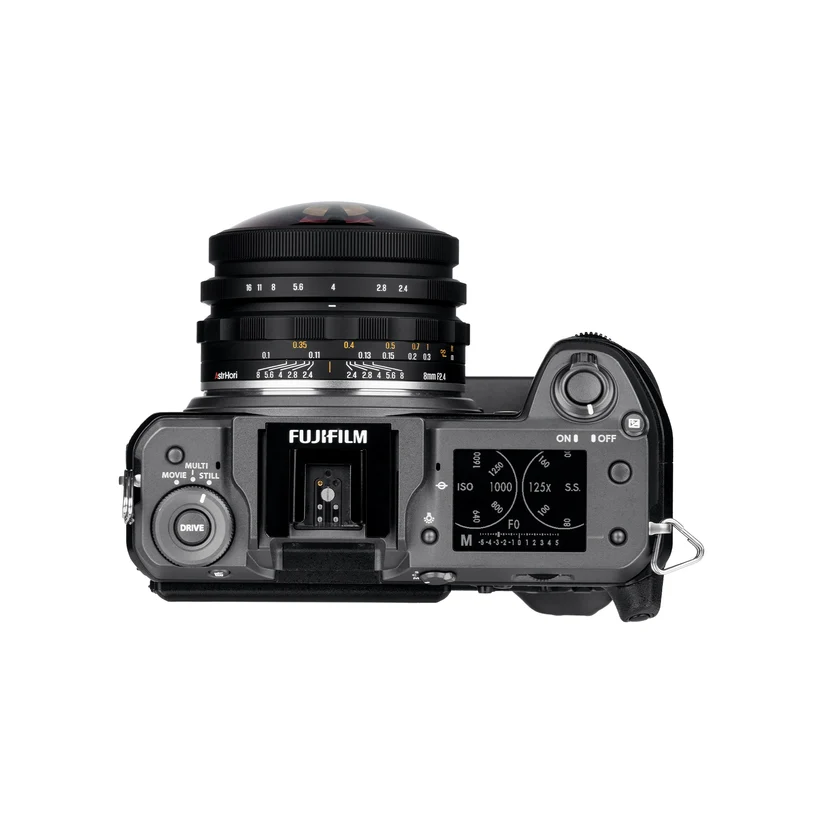
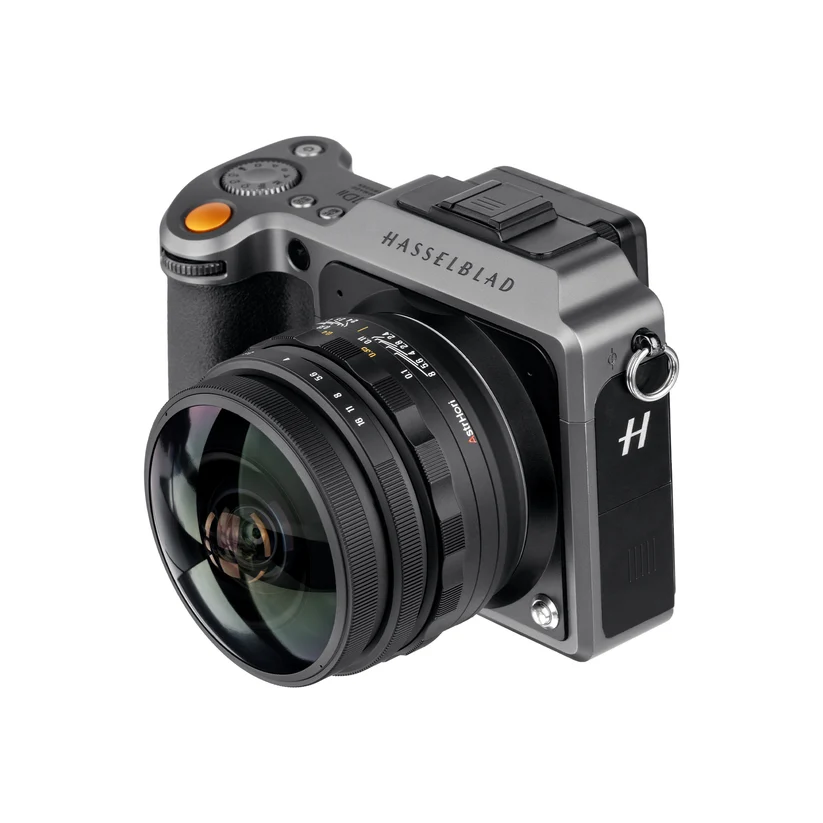
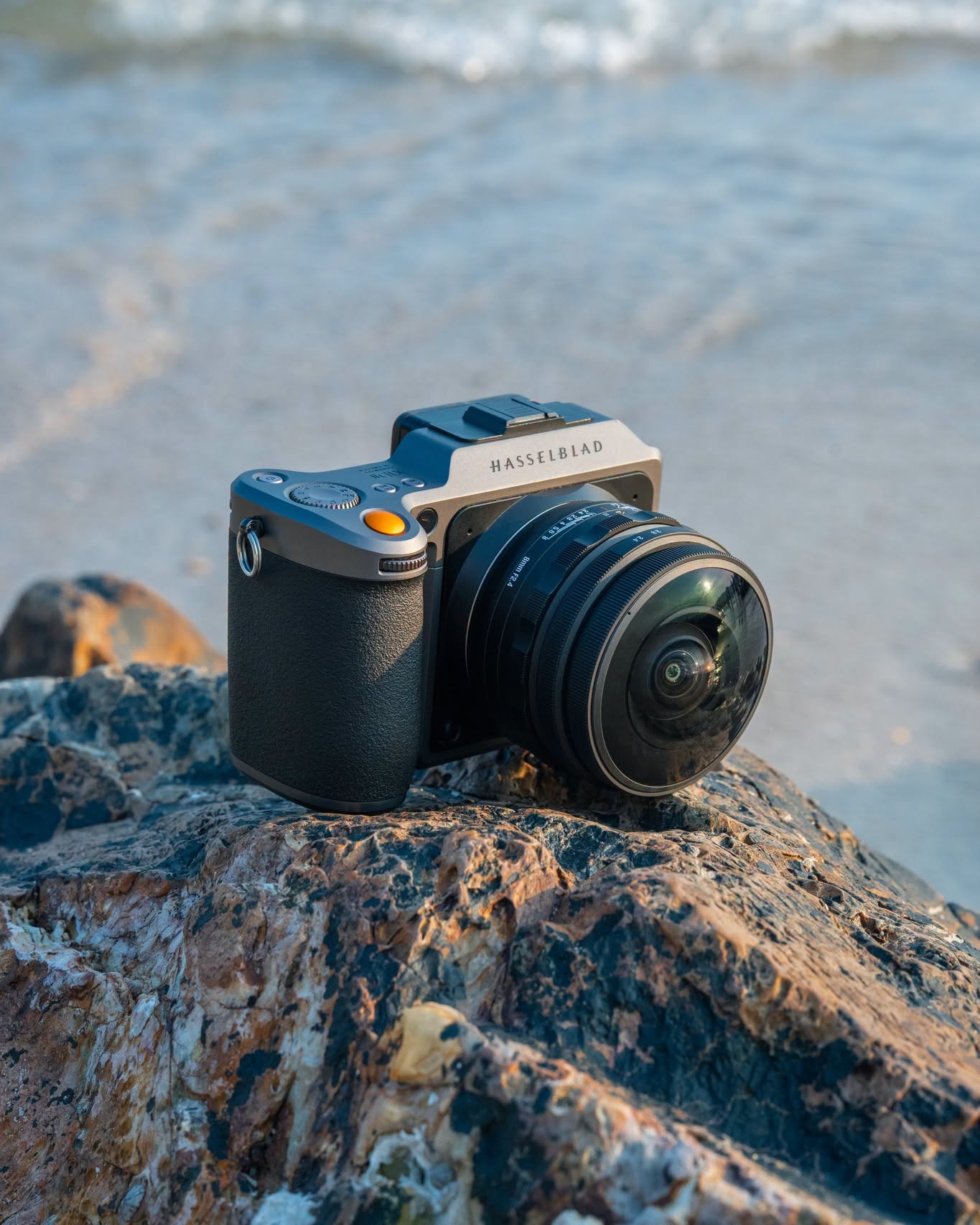
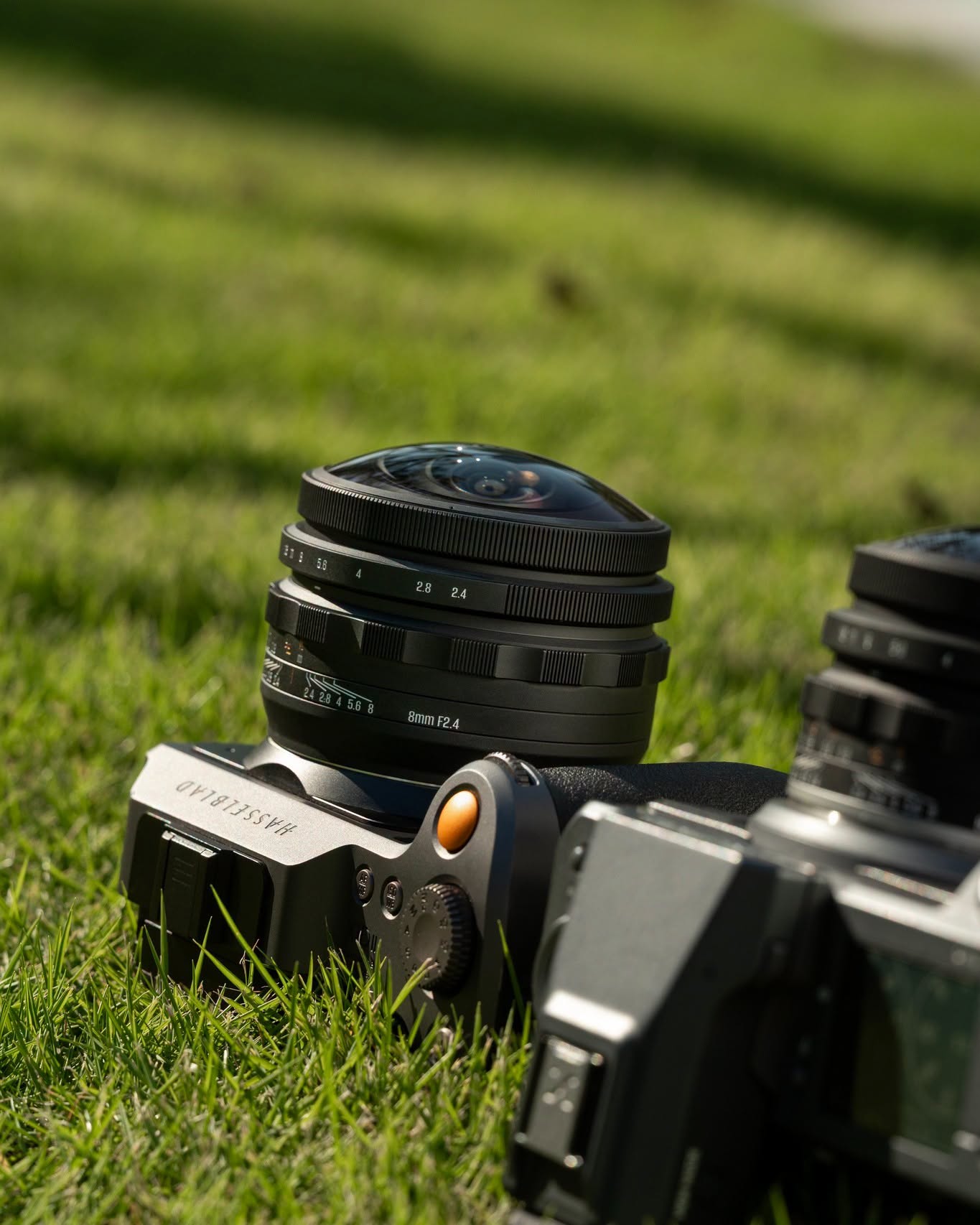
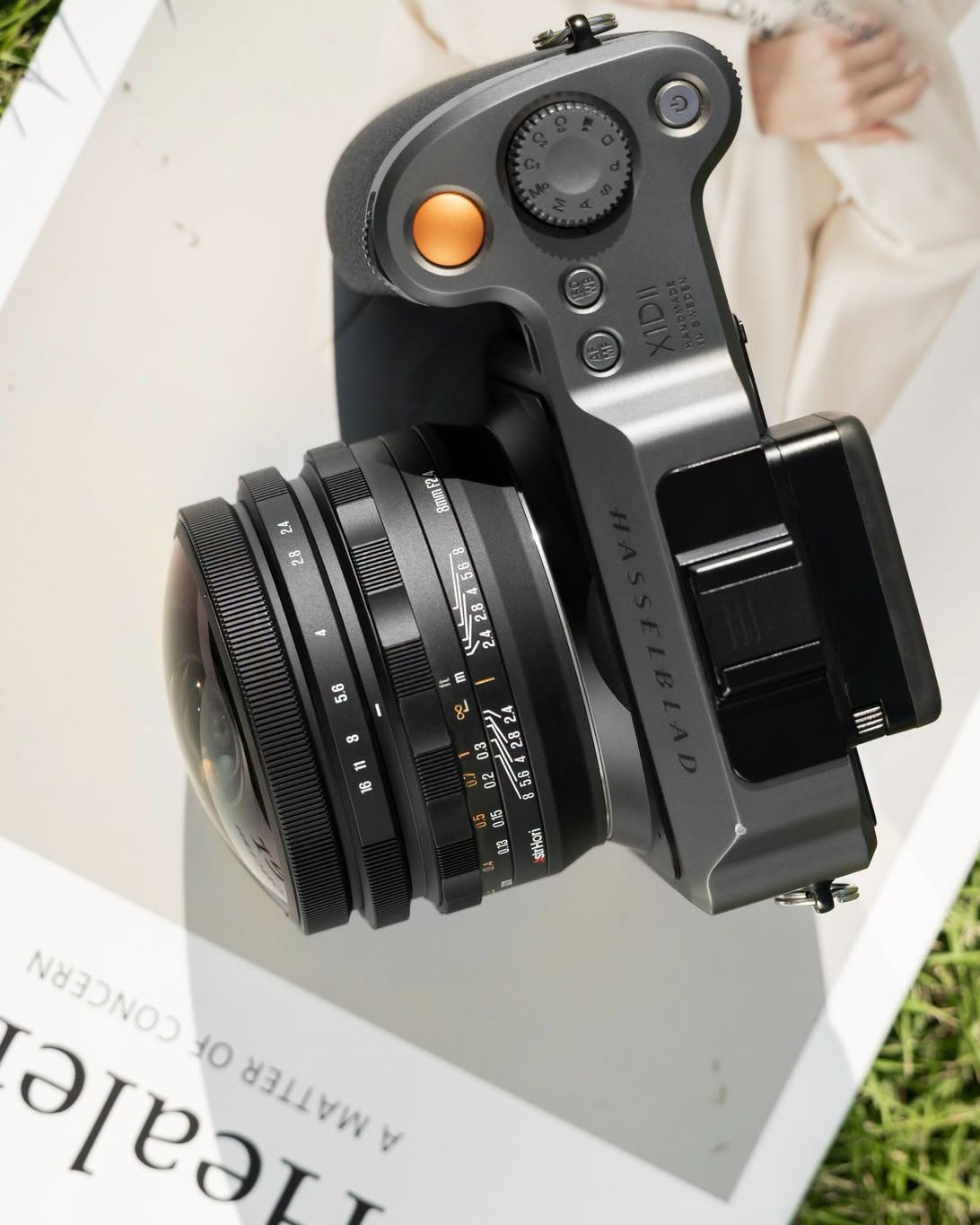
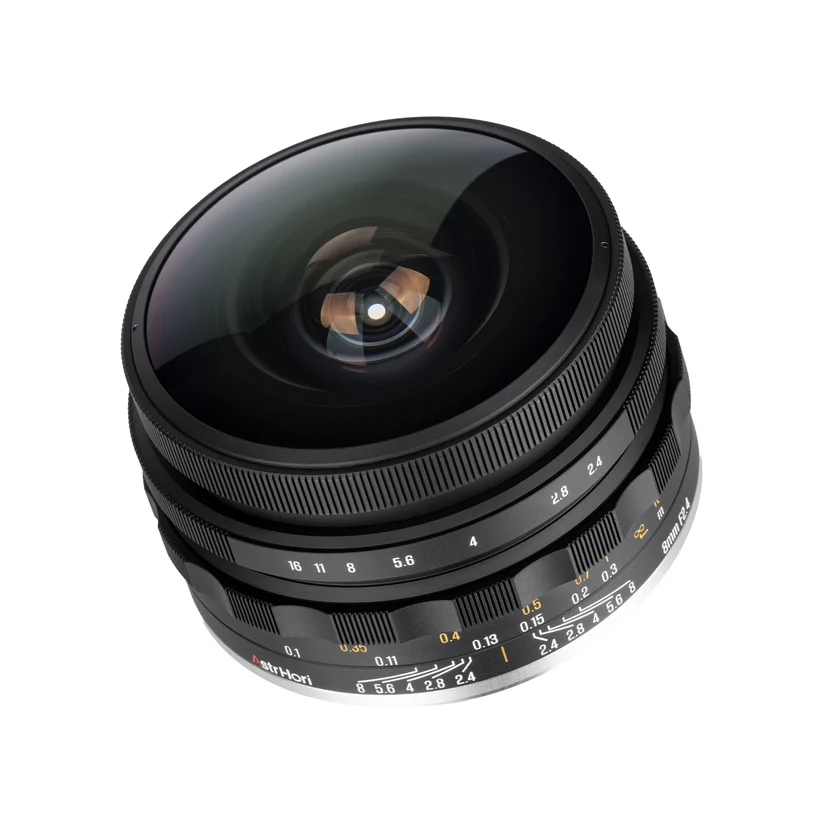
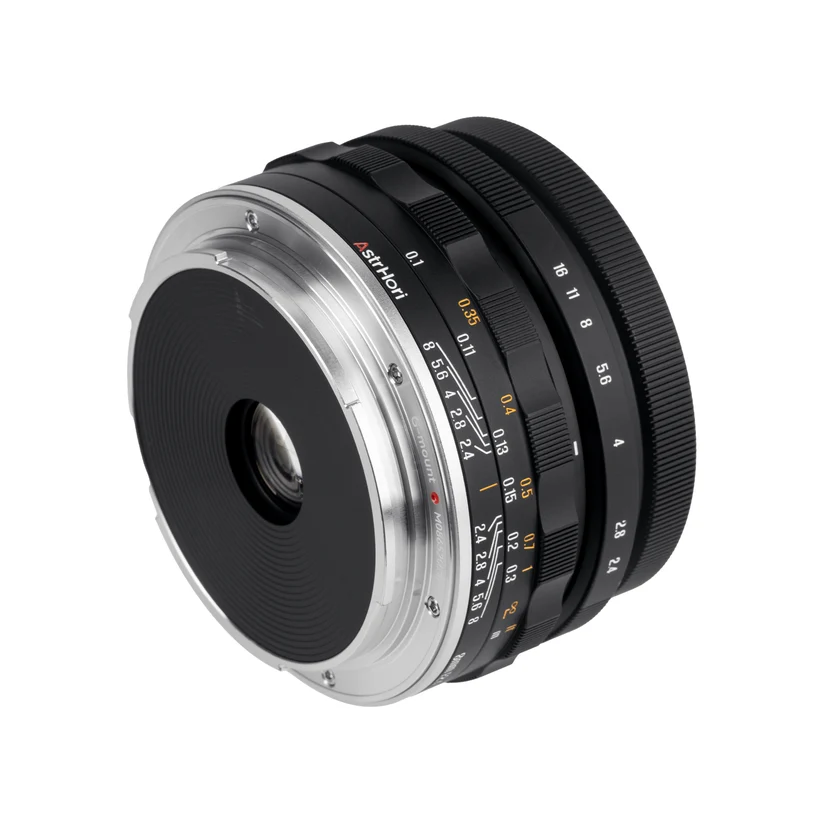
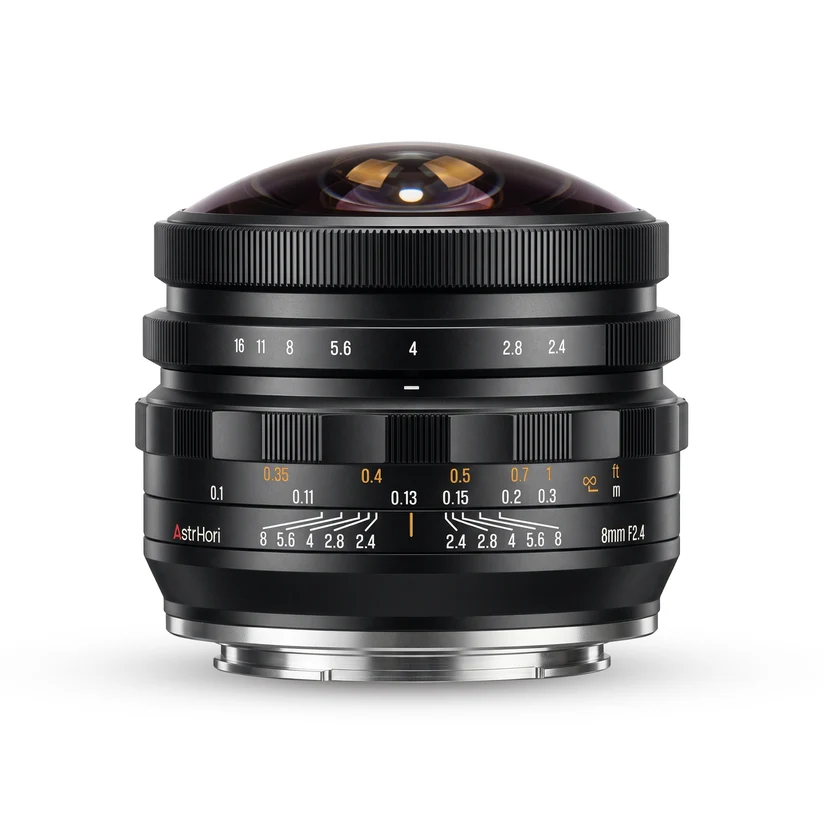
New AstrHori 8mm f/2.4 medium-format circular fisheye lens for GFX/XCD mount announced

Par : PR admin
16 octobre 2026 à 12:56


The previously reported AstrHori 8mm f/2.4 medium-format circular fisheye lens for GFX/XCD mount is now officially announced:

  • Pre-orders: AstrHori store | Pergear | B&H Photo (coming soon)
  • 220° ultra-wide field of view for GFX / XCD systems
  • Weight: 517g
  • Medium Format
  • 8mm Focal Length
  • F2.4–F16 Aperture Range
  • 0.1m–∞ Focus Range
  • Regular price is $398, the intro price is $359 until October 20, 2026
  • Additional information:

Design & Specifications

The MF 8mm F2.4 is a fully manual-focus circular fisheye engineered for medium-format sensors. Its 8mm focal length (roughly 6mm full-frame equivalent) combines with a 220° angle of view to wrap the entire surroundings into a single circular image – a look that ordinary wide-angle lenses cannot reproduce.

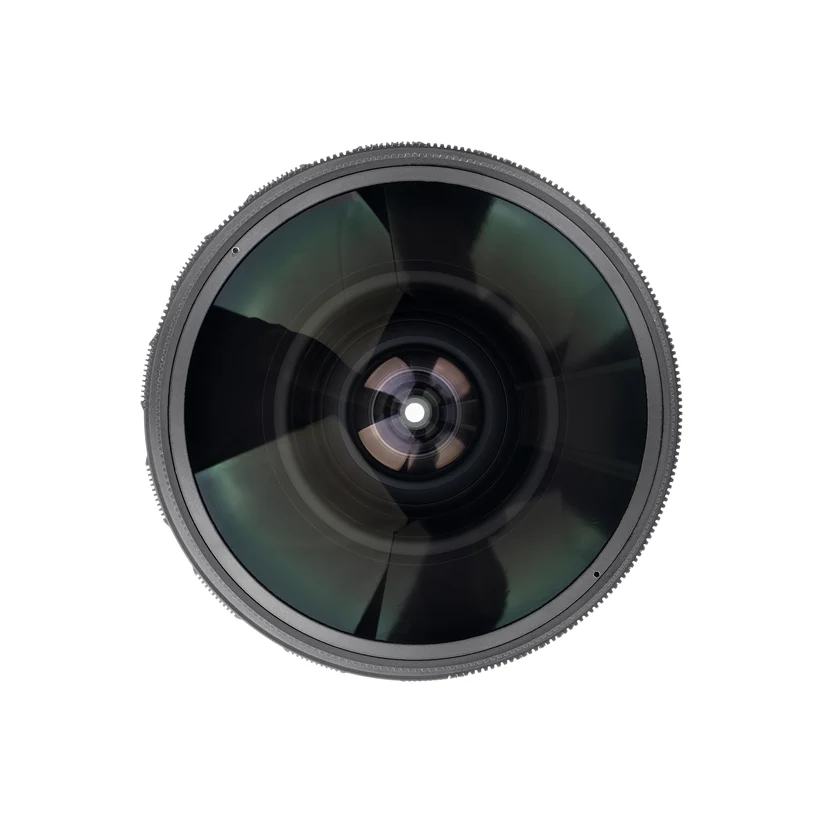
The optical design consists of 10 elements in 8 groups, including 2 high-refractive-index and 2 ED elements to control chromatic aberration across the huge image circle. The aperture range is F2.4 to F16 with a 10-blade diaphragm, and the minimum focusing distance is just 0.1m for bold, close-in compositions.

The all-metal body measures about Φ80 × 62mm (GFX) and Φ80 × 65mm (XCD), weighing approximately 511g and 536g respectively. As is typical of fisheye optics, a front filter thread is not supported.

A Perspective Beyond 180°

Unlike a standard 180° fisheye, the extra reach to 220° pulls in the space behind and around the camera, giving landscapes, architecture, interiors and night skies a distinctive spherical character. Combined with the 0.1m minimum focus, creatives can exaggerate foreground subjects while still capturing the full scene around them.

The post New AstrHori 8mm f/2.4 medium-format circular fisheye lens for GFX/XCD mount announced appeared first on Photo Rumors.

Yashica’s 1950s throwback micro-camera will cost $119

The company has fully announced the Y16 with specs, price and a release date

Two small Yashica Y16 digital cameras held in a hand, one with an orange front and one with a yellow front.Yashica

Last month, Yashica announced it was working on the Y16, a tiny pocket camera that mimics the design of the Y16 released in 1959 by the original Yashica company. While details on the camera were slim, the company has now fully revealed it, giving us its specifications, price and release date.

The Y16 has a 12MP ~18mm² sensor paired with a 27mm F12 equiv. lens. Like many of the other cameras the company makes, this means its image quality will be far lower than that of a typical smartphone, though for some, that’s part of the charm. Alongside the announcement, Yashica has shared some sample images from the camera, which you can see in the gallery below.

What phones don’t have is a proper xenon flash built-in, which will help in low-light situations. The company says it should work at up to 2m (6’6″) away from your subject. The camera also features an optical viewfinder, and a 1.45″ display.

A small digital camera in a hand displays its screen with a selfie of two people, while a blurred airplane and runway appear in the background.Yashica

Physically, it’s minuscule, weighing only 93g (3.3oz). It measures 91 x 45 x 29mm (3.6 x 1.8 x 1.1″), so it should fit in most pockets and pretty much any purse or bag.

The Y16 has a microSD card slot for storage, and actually comes with an 8GB card. While that’s not huge, it should hold quite a few of the relatively small JPEGs the camera produces. Plus, given the price, it’s hard to complain about included storage: the Y16 will retail for $119. The company says it’s currently still in production, but it’s available for pre-order now and is expected to ship in late November.

The Yashica of the 1950s isn’t the same as the one today, as in the 1980s it was sold to Kyocera, which has since licensed the name to other companies. The current crop of Yashica cameras appears to be sold by the Hong Kong-based 100 Enterprises.

Manufacturer samples

Loading gallery…

About the Author: Mitchell started taking pictures at 10 and hasn’t stopped since. It’s been a wide-ranging adventure, spanning a wide variety of genres and locales, and occasionally dipping into fascinations with video and filmmaking. They honed their technical knowledge doing documentation, programing and QA, writing for The Verge, and just generally messing around on the computer to see what breaks.

Want to stay up to date on the latest product news and releases? Add DPReview as a preferred source to ensure our independent journalism makes it to the top of your Google search results.

The Godox A2 is a real flash for your phone

The company is bringing its flash expertise to a whole new kind of camera.

Orange smartphone held in a hand, featuring a circular LED ring light attached to the back, positioned against a clear blue sky.Godox

Godox has announced the A2, a flash that’s designed to attach to the back of your phone. While almost every smartphone has a flash built-in, they’re almost always LEDs, which aren’t particularly powerful, and don’t really produce the look most people associate with flash photography. The A2, meanwhile, has a xenon flash tube, like you’d find on a traditional compact or flash gun.

It magnetically connects to the back of your phone, providing the classic front-on flash look that is nostalgically associated with photos from compact cameras. However, since it’s wireless, you’re also free to detach it from your phone and use it as a bounce or fill light. The company says its bluetooth connection should work at up to 15m (49′) away.

A hand holds up a sparkling blue drink on a beach at dusk, with a white floral sundress and a large straw hat visible.Godox

Unlike most cameras, phones don’t really expect you to be using them with an external flash, which means you can’t use the A2 with your phone’s built-in camera app. Instead, Godox is providing its own app, which lets you either shoot in auto mode, which decides how bright the flash should be and your exposure settings for you, or in a fully manual mode that gives you control over all those settings.

Three smartphone screens displaying the Godox Camera app interface in manual mode, showing adjustable shutter speed settings of 1/2000, 1/4000, and 1/8000.
The reliance on an app means that, unfortunately, the A2 is iPhone-only to start.
Godox

Godox says that, at launch, the app will work with the iPhone 15 or newer running at least iOS 18. The company promises that versions for Android and Huawei’s HarmonyOS are in the works.

The flash is small enough to fit in most pockets once detached from your phone, so it’s not surprising that it’s not the most powerful light out there, with a guide number of 15. The company says that, for best results, you should have the flash within 2m (6’6″) of your subject. But while it’s not particularly powerful in the world of standalone flashes, it’s still much brighter than the flash included on your phone.

The A2 also has a 3W bi-color modeling light built-in, which you can use to make focusing and composing easier in dark environments, or as a video light with adjustable color temperature. The company says you should be able to leave it running at full power for up to an hour off of the 500mAh internal battery, which is also good for up to 400 full-power flashes.

Alongside it, Godox is releasing several optional accessories that you can use to shape the light and change its look, and that give you more options for positioning it. The magnetic ring that lets you attach the flash to your phone also means you can theoretically mount it to any magnetic surface.

The A2 seems like a very interesting product for anyone who’s serious about phone photography, and we’ve enjoyed Godox’s flashes in the past. It will, however, be interesting to see how well its camera app works, and whether it comes with a hit to image quality. So much of mobile photography comes down to multi-shot exposures and computation, and it’s unclear whether Godox’s app will have any of that (and, if it does, how well it’ll play with flash).

Four round Godox LED lights in silver, black, light blue, and maroon hovering over a wavy white surface.Godox

Thankfully, Godox isn’t demanding too high a price for the A2: it retails for $85, and comes with a diffuser dome and carrying case. It’s also available in four colors which, perhaps unsurprisingly, match this year’s crop of pro iPhones: silver, black, light blue and dark red.

About the Author: Mitchell started taking pictures at 10 and hasn’t stopped since. It’s been a wide-ranging adventure, spanning a wide variety of genres and locales, and occasionally dipping into fascinations with video and filmmaking. They honed their technical knowledge doing documentation, programing and QA, writing for The Verge, and just generally messing around on the computer to see what breaks.

Want to stay up to date on the latest product news and releases? Add DPReview as a preferred source to ensure our independent journalism makes it to the top of your Google search results.

❌